

Adding an About dialog as a property to a custom component: what changed
Revision 2 to 3. Removed lines have a minus sign; added lines have a plus sign.
| Old | New | Line | |
|---|---|---|---|
| 1 | 1 | ## Summary | |
| 2 | 2 | ||
| 3 | 3 | This article is for writers of Lazarus visual components (descended from TComponent or descendants) | |
| 4 | 4 | ||
| 5 | 5 | - With the addition of a few lines of code to your component, it can display an 'About' property with an ellipsis button in the IDE Object Inspector | |
| 6 | 6 | - When the application programmer using your component clicks the button in the Object Inspector, a customised modal 'About' dialog is displayed with your info on it. | |
| 7 | 7 | - As well as an 'OK' button, the dialog can also display a 'License' button | |
| 8 | 8 | - When clicked, this displays one of the standard licenses (GPL, LGPL etc) in a modal window | |
| 9 | 9 | ||
| 10 | 10 | This is what the application programmer would see when he drops your component onto a form: | |
| 11 | 11 | ||
| 12 | 12 | #### Object Inspector example screenshot | |
| 13 | 13 | ||
| 14 | 14 | 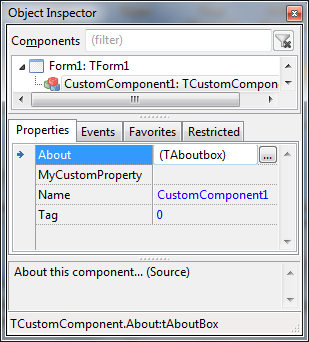 | |
| 15 | 15 | ||
| 16 | 16 | #### About dialog example screenshot | |
| 17 | 17 | ||
| 18 | 18 | - Clicking the ellipse button shows this: | |
| 19 | 19 | ||
| 20 | 20 | 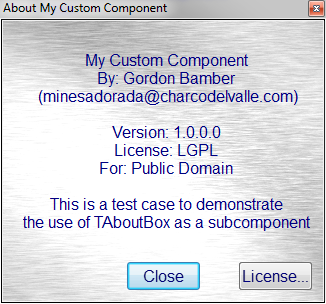 | |
| 21 | 21 | ||
| 22 | 22 | #### License screen example screenshot | |
| 23 | 23 | ||
| 24 | 24 | - Clicking the License button shows this: | |
| 25 | 25 | ||
| 26 | 26 | 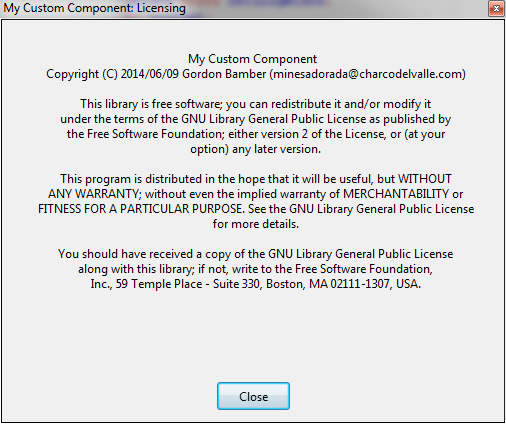 | |
| 27 | 27 | ||
| 28 | 28 | ## Download example code | |
| 29 | 29 | ||
| 30 | 30 | You can download the full source as described in this article from the lazarus CCR [here](https://sourceforge.net/p/lazarus-ccr/svn/HEAD/tree/components/) | |
| 31 | 31 | ||
| 32 | 32 | ## Adding an About property to your new or existing component | |
| 33 | 33 | ||
| 34 | 34 | - Add the files aboutcomponentunit.pas and license.lrs to your component directory | |
| 35 | 35 | ||
| 36 | 36 | 1. Rename aboutcomponentunit.pas to about\<yourcomponentname\>unit.pas | |
| 37 | 37 | 2. In the pas file rename the Unit to match (1) | |
| 38 | 38 | 3. Open the renamed pas file and do Search/Replace to change all instances of "TAboutComponent" to TAbout\<yourcomponentname\> | |
| 39 | 39 | 4. In the line TAboutComponent = Class(TComponent), change the ancestor to your component's ancestor (if it's not TComponent) | |
| 40 | 40 | 5. Add the edited pas file to your component's package | |
| 41 | 41 | 6. In your component's class declaration, change it's ancestor to TAbout\<yourcomponentname\> (from step 3) | |
| 42 | 42 | 7. Compile, install and see the new clickable 'About' property in your component! | |
| 43 | 43 | ||
| 44 | 44 | ### Configuring the About property dialog | |
| 45 | 45 | ||
| 46 | 46 | - In your component's Constructor Create() set some, all or none of the following properties: | |
| 47 | 47 | - AboutBoxComponentName (string) | |
| 48 | 48 | - AboutBoxWidth (integer) | |
| 49 | 49 | - AboutBoxHeight (integer) | |
| 50 | 50 | - AboutBoxDescription (string - can contain LineEndings) | |
| 51 | 51 | - AboutBoxBackgroundColor (TColor, like clWhite) | |
| 52 | 52 | - AboutBoxFontName (string) | |
| 53 | 53 | - AboutBoxFontSize (integer) | |
| 54 | 54 | - AboutBoxVersion (string) | |
| 55 | 55 | - AboutBoxAuthorname (string) | |
| 56 | 56 | - AboutBoxOrganisation (string) | |
| 57 | 57 | - AboutBoxAuthorEmail (string) | |
| 58 | 58 | - AboutBoxLicenseType (string e.g. 'GPL', ModifiedGPL' etc) | |
| 59 | 59 | - You will have to recompile and reinstall your component to see the results. | |
| 60 | 60 | ||
| 61 | 61 | ## Example | |
| 62 | 62 | ||
| 63 | 63 | - Using the component [[ScrollText]] (available [here](http://www.charcodelvalle.com/scrollingtext/scrollingtext_component.zip)) | |
| 64 | 64 | - I have already renamed the AboutComponentunit to AboutScrolltextunit, and changed the class name from TAboutComponent to TAboutScrollText | |
| 65 | 65 | - TScrolltext is dereived from TGraphicControl so in the AboutScrollText unit I alter: | |
| 66 | 66 | ||
| 67 | - | ||
| 67 | + | ``` | |
| 68 | + | TAboutScrollText = class(TComponent) | |
| 69 | + | ``` | |
| 68 | 70 | ||
| 69 | 71 | to | |
| 70 | 72 | ||
| 71 | - | ||
| 73 | + | ``` | |
| 74 | + | TAboutScrollText = class(TGraphicControl) | |
| 75 | + | ``` | |
| 72 | 76 | ||
| 73 | 77 | - Then in my scrolltext unit, I change | |
| 74 | 78 | ||
| 75 | - | ||
| 79 | + | ``` | |
| 80 | + | TScrollingText = class(TGraphicControl) | |
| 81 | + | ``` | |
| 76 | 82 | ||
| 77 | 83 | to | |
| 78 | 84 | ||
| 79 | - | ||
| 85 | + | ``` | |
| 86 | + | TScrollingText = class(TAboutScrollText) | |
| 87 | + | ``` | |
| 80 | 88 | ||
| 81 | 89 | - Now the Scrolltext component has an 'About' property, but with default values. | |
| 82 | 90 | - So in my TScrollingText constructor, I now set my own values: | |
| 83 | 91 | ||
| 84 | - | ||
| 85 | - | ||
| 86 | - | ||
| 87 | - | ||
| 88 | - | ||
| 89 | - | ||
| 90 | - | ||
| 91 | - | ||
| 92 | - | ||
| 93 | - | ||
| 94 | - | ||
| 95 | - | ||
| 96 | - | ||
| 97 | - | ||
| 98 | - | ||
| 99 | - | ||
| 100 | - | ||
| 101 | - | ||
| 102 | - | ||
| 103 | - | ||
| 92 | + | ``` pascal | |
| 93 | + | constructor TScrollingText.Create(AOwner: TComponent); | |
| 94 | + | begin | |
| 95 | + | inherited Create(AOwner); | |
| 96 | + | ..other constructor code.. | |
| 97 | + | // About dialog | |
| 98 | + | AboutBoxComponentName:='ScrollingText component'; | |
| 99 | + | AboutBoxWidth:=400; | |
| 100 | + | // AboutBoxHeight (integer) | |
| 101 | + | AboutBoxDescription:='Component that shows a scrolling window.' + LineEnding + | |
| 102 | + | 'Use Lines property to set text and Active=True' + LineEnding + | |
| 103 | + | 'to use the component'; | |
| 104 | + | AboutBoxBackgroundColor:=clWindow; | |
| 105 | + | AboutBoxFontName:='Arial'; | |
| 106 | + | AboutBoxFontSize:=10; | |
| 107 | + | AboutBoxVersion:=C_VERSION; | |
| 108 | + | AboutBoxAuthorname:='Gordon Bamber'; | |
| 109 | + | AboutBoxOrganisation:='Public Domain'; | |
| 110 | + | AboutBoxAuthorEmail:='minesadorada@charcodelvalle.com'; | |
| 111 | + | AboutBoxLicenseType:='LGPL'; | |
| 112 | + | end; | |
| 113 | + | ``` | |
| 104 | 114 | ||
| 105 | 115 | - I then compile and install the scroller component to the IDE palette, and the 'About' property is part of the component. | |
| 106 | 116 | ||
| 107 | 117 | ## See Also | |
| 108 | 118 | ||
| 109 | 119 | - [[Lazarus Nongraphical Visual Component Example Code]] | |
| 110 | 120 | - [[ScrollText]] | |
| 111 | 121 | ||
| 112 | 122 | --- | |
| 113 | 123 | *From the Free Pascal wiki, page "Adding an About dialog as a property to a custom component", as it stood on 2016-07-15 after a change by Arent, out of the wiki's dump of 2024-05-26. Copyright stays with the author who wrote it, according to the old wiki's [[Licensing]] page. If you have concerns about this material, [message the admin](/wiki-contact).* | |
| 114 | 124 | Category: Component Creation | |
| 115 | 125 | Category: Lazarus-CCR |