

Add an Apple Help Book to your macOS app: what changed
Revision 1 to 2. Removed lines have a minus sign; added lines have a plus sign.
| Old | New | Line | |
|---|---|---|---|
| 1 | 1 | *(macOS only)* | |
| 2 | 2 | ||
| 3 | 3 | No professional macOS application should be without a functioning Apple Help Book. Unfortunately Apple make it harder than it should be for developers to create an Apple Help Book because the official documentation is significantly out of date (2013 anyone?) and the Apple Help Viewer has undergone significant change in recent versions of the operating system. For the full details on how to add an Apple Help Book to your application, along with sample code, read on. | |
| 4 | 4 | ||
| 5 | 5 | ## Application Bundle Layout | |
| 6 | 6 | ||
| 7 | 7 | A typical [[Application Bundle|application bundle]] with an Apple Help Book bundle should resemble this layout: | |
| 8 | 8 | ||
| 9 | 9 | `+-- MyApp.app/ [application bundle]`\ | |
| 10 | 10 | ` |`\ | |
| 11 | 11 | ` +-- Contents/`\ | |
| 12 | 12 | ` |`\ | |
| 13 | 13 | ` +-- MacOS/`\ | |
| 14 | 14 | ` | |`\ | |
| 15 | 15 | ` | +-- MyApp [application executable]`\ | |
| 16 | 16 | ` +-- Resources/`\ | |
| 17 | 17 | ` | |`\ | |
| 18 | 18 | ` | +-- MyApp.icns`\ | |
| 19 | 19 | ` | |`\ | |
| 20 | 20 | ` | +-- MyApp.help/ [Help Book bundle]`\ | |
| 21 | 21 | ` | |`\ | |
| 22 | 22 | ` | +-- Contents/`\ | |
| 23 | 23 | ` | |`\ | |
| 24 | 24 | ` | +-- Resources/`\ | |
| 25 | 25 | ` | | | `\ | |
| 26 | 26 | ` | | +-- en.lproj/ [for English]`\ | |
| 27 | 27 | ` | | | |`\ | |
| 28 | 28 | ` | | | +-- help.helpindex [generated by the macOS help indexer hiutil]`\ | |
| 29 | 29 | ` | | | |`\ | |
| 30 | 30 | ` | | | +-- index.html [table of contents - do not index]`\ | |
| 31 | 31 | ` | | | |`\ | |
| 32 | 32 | ` | | | +-- page1.html`\ | |
| 33 | 33 | ` | | | |`\ | |
| 34 | 34 | ` | | | +-- ...`\ | |
| 35 | 35 | ` | | | |`\ | |
| 36 | 36 | ` | | | +-- pageN.html`\ | |
| 37 | 37 | ` | | | |`\ | |
| 38 | 38 | ` | | | +-- InfoPlist.strings [see `[[macOS property list files|Localizing an Info.plist]]`]`\ | |
| 39 | 39 | ` | | |`\ | |
| 40 | 40 | ` | | +-- fr.lproj/ [for French] `\ | |
| 41 | 41 | ` | | | |`\ | |
| 42 | 42 | ` | | | +-- help.helpindex [generated by the macOS help indexer hiutil]`\ | |
| 43 | 43 | ` | | | |`\ | |
| 44 | 44 | ` | | | +-- index.html [table of contents - do not index]`\ | |
| 45 | 45 | ` | | | |`\ | |
| 46 | 46 | ` | | | +-- page1.html`\ | |
| 47 | 47 | ` | | | |`\ | |
| 48 | 48 | ` | | | +-- ...`\ | |
| 49 | 49 | ` | | | |`\ | |
| 50 | 50 | ` | | | +-- pageN.html`\ | |
| 51 | 51 | ` | | | |`\ | |
| 52 | 52 | ` | | | +-- InfoPlist.strings `\ | |
| 53 | 53 | ` | | |`\ | |
| 54 | 54 | ` | | +-- images/ `\ | |
| 55 | 55 | ` | | | |`\ | |
| 56 | 56 | ` | | | +-- chip3_32x32.ico [icon used in help pages]`\ | |
| 57 | 57 | ` | | `\ | |
| 58 | 58 | ` | +-- Info.plist [Help Book plist]`\ | |
| 59 | 59 | ` |`\ | |
| 60 | 60 | ` +-- Info.plist [application plist]` | |
| 61 | 61 | ||
| 62 | 62 | ## Main Menu | |
| 63 | 63 | ||
| 64 | 64 | If you have not already done so, you need to add a TMainMenu component to your application form, and create a TMenuItem with a caption name of "Help". macOS will then automatically add a Search menu option to your Help menu when you run your application. | |
| 65 | 65 | ||
| 66 | 66 | You also need to add a menu item to your Help menu to open your application help file at its table of contents. Once you have added the My App Help menu item, create an OnClick event handler containing the following code: | |
| 67 | 67 | ||
| 68 | 68 | ``` pascal | |
| 69 | 69 | ... | |
| 70 | 70 | Uses | |
| 71 | 71 | LCLIntf, MacOSAll; | |
| 72 | 72 | ... | |
| 73 | 73 | function GetResourcesPath(): string; | |
| 74 | 74 | var | |
| 75 | 75 | pathRef: CFURLRef; | |
| 76 | 76 | pathCFStr: CFStringRef; | |
| 77 | 77 | pathStr: shortstring; | |
| 78 | 78 | begin | |
| 79 | 79 | pathRef := CFBundleCopyBundleURL(CFBundleGetMainBundle()); | |
| 80 | 80 | pathCFStr := CFURLCopyFileSystemPath(pathRef, kCFURLPOSIXPathStyle); | |
| 81 | 81 | CFStringGetPascalString(pathCFStr, @pathStr, 255, CFStringGetSystemEncoding()); | |
| 82 | 82 | ||
| 83 | 83 | Result := pathStr + '/Contents/Resources/'; | |
| 84 | 84 | end; | |
| 85 | 85 | ||
| 86 | 86 | procedure TForm1.MenuItem_MyAppHelpClick(Sender: TObject); | |
| 87 | 87 | var | |
| 88 | 88 | helpPath: String; | |
| 89 | 89 | begin | |
| 90 | 90 | helpPath := GetResourcesPath + 'MyApp.help'; | |
| 91 | 91 | OpenDocument(helpPath); | |
| 92 | 92 | end; | |
| 93 | 93 | ``` | |
| 94 | 94 | ||
| 95 | 95 | > **Tip:** If you wish to **NOT** have macOS automatically add a Search option to your Help menu then, when you create the Help menu item, add a trailing space after Help in the menu item's caption property and the Search option will not show up in your application's Help menu. | |
| 96 | 96 | ||
| 97 | 97 | ## Application Info.plist | |
| 98 | 98 | ||
| 99 | 99 | One of the most important files is the application [[macOS property list files|Info.plist]]. Two keys need to be added or Spotlight will not index your help file. If your help file is not indexed, then even trying to open it will result in a perplexing "Not available" error page in the Apple Help Viewer. If you are using Xcode, then add these keys. | |
| 100 | 100 | ||
| 101 | 101 | ` Help Book directory name`\ | |
| 102 | 102 | ` Help Book identifier` | |
| 103 | 103 | ||
| 104 | 104 | The Help Book directory name should refer to the Help Book bundle name (eg MyApp.help). This directory should be located in the application bundle Contents/Resources directory. The Help Book identifier is simply the name of your help (eg My App Help). | |
| 105 | 105 | ||
| 106 | 106 | If you are editing the `Info.plist` file in a text editor, then add these keys and their value strings: | |
| 107 | 107 | ||
| 108 | 108 | ``` xml | |
| 109 | 109 | <key>CFBundleHelpBookFolder</key> | |
| 110 | 110 | <string>myapp.help</string> | |
| 111 | 111 | <key>CFBundleHelpBookName</key> | |
| 112 | 112 | <string>My App Help</string> | |
| 113 | 113 | ``` | |
| 114 | 114 | ||
| 115 | 115 | ## Help Book Info.plist | |
| 116 | 116 | ||
| 117 | 117 | Below is a basic Help Book Info.plist for an application called "My App". | |
| 118 | 118 | ||
| 119 | 119 | ``` pascal | |
| 120 | 120 | <?xml version="1.0" encoding="UTF-8"?> | |
| 121 | 121 | <!DOCTYPE plist PUBLIC "-//Apple//DTD PLIST 1.0//EN" "http://www.apple.com/DTDs/PropertyList-1.0.dtd"> | |
| 122 | 122 | <plist version="1.0"> | |
| 123 | 123 | <dict> | |
| 124 | 124 | <key>CFBundleDevelopmentRegion</key> | |
| 125 | 125 | <string>en</string> | |
| 126 | 126 | <key>CFBundleIdentifier</key> | |
| 127 | 127 | <string>org.sentry.myapp.help</string> | |
| 128 | 128 | <key>CFBundleInfoDictionaryVersion</key> | |
| 129 | 129 | <string>6.0</string> | |
| 130 | 130 | <key>CFBundlePackageType</key> | |
| 131 | 131 | <string>BNDL</string> | |
| 132 | 132 | <key>CFBundleShortVersionString</key> | |
| 133 | 133 | <string>22</string> | |
| 134 | 134 | <key>CFBundleSignature</key> | |
| 135 | 135 | <string>hbwr</string> | |
| 136 | 136 | <key>CFBundleVersion</key> | |
| 137 | 137 | <string>22</string> | |
| 138 | 138 | <key>HPDBookAccessPath</key> | |
| 139 | 139 | <string>index.html</string> | |
| 140 | 140 | <key>HPDBookIconPath</key> | |
| 141 | 141 | <string>images/chip3_32x32.ico</string> | |
| 142 | 142 | <key>HPDBookIndexPath</key> | |
| 143 | 143 | <string>help.helpindex</string> | |
| 144 | 144 | <key>HPDBookTitle</key> | |
| 145 | 145 | <string>My App Help</string> | |
| 146 | 146 | <key>HPDBookType</key> | |
| 147 | 147 | <string>3</string> | |
| 148 | 148 | <key>HPDBookUsesExternalViewer</key> | |
| 149 | 149 | <false/> | |
| 150 | 150 | </dict> | |
| 151 | 151 | </plist> | |
| 152 | 152 | ``` | |
| 153 | 153 | ||
| 154 | 154 | ## Creating Help Book pages | |
| 155 | 155 | ||
| 156 | 156 | Apple Help Book pages are simply HTML files. You need to create an `index.html` page which is the table of contents for your application Help Book. You also need to ensure that this file is not indexed or it will show up in the Apple Help Viewer as a blank entry. There is also usually little point indexing pages which just contain links to other pages. You do this by adding the noindex meta tag to the file. Here is an example `index.html` page for "My App". | |
| 157 | 157 | ||
| 158 | 158 | ``` html | |
| 159 | 159 | <?xml version="1.0" encoding="UTF-8"?> | |
| 160 | 160 | <!DOCTYPE html PUBLIC "-//W3C//DTD XHTML 1.0 Strict//EN"> | |
| 161 | 161 | ||
| 162 | 162 | <html xmlns="http://www.w3.org/1999/xhtml" xml:lang="en" lang="en"> | |
| 163 | 163 | <head> | |
| 164 | 164 | <title>My App Table of Contents</title> | |
| 165 | 165 | <meta name="robots" content="noindex"> | |
| 166 | 166 | </head> | |
| 167 | 167 | ||
| 168 | 168 | <body class="Normal"> | |
| 169 | 169 | ||
| 170 | 170 | <H1><img style="margin: 0.0px 12.0px 0.0px 0.0px;" height="32.0" src="../images/chip3_32x32.ico" width="32.0" />Table of Contents</H1> | |
| 171 | 171 | ||
| 172 | 172 | <ul> | |
| 173 | 173 | <li id="Page1"><a href="Page1.html">Introduction</a></li> | |
| 174 | 174 | <li id="Page2"><a href="Page2.html">Combo Boxes</a></li> | |
| 175 | 175 | </ul> | |
| 176 | 176 | ||
| 177 | 177 | </body> | |
| 178 | 178 | </html> | |
| 179 | 179 | ``` | |
| 180 | 180 | ||
| 181 | 181 | A sample page 1 for "My App" is set out below. Note: | |
| 182 | 182 | ||
| 183 | 183 | ``` html | |
| 184 | 184 | <?xml version="1.0" encoding="UTF-8"?> | |
| 185 | 185 | <!DOCTYPE html PUBLIC "-//W3C//DTD XHTML 1.0 Strict//EN"> | |
| 186 | 186 | ||
| 187 | 187 | <html xmlns="http://www.w3.org/1999/xhtml" xml:lang="en" lang="en"> | |
| 188 | 188 | <head> | |
| 189 | 189 | <title>Introduction</title> | |
| 190 | 190 | <meta name="robots" content="index, anchors" /> | |
| 191 | 191 | <meta name="description" content="My App Introduction" /> | |
| 192 | 192 | <meta name="keywords" content="introduction, operating system" /> | |
| 193 | 193 | </head> | |
| 194 | 194 | <body> | |
| 195 | 195 | <a name="Introduction"></a> | |
| 196 | 196 | <H1><img style="margin: 0.0px 12.0px 0.0px 0.0px;" height="32.0" src="../images/chip3_32x32.ico" width="32.0" />Introduction</H1> | |
| 197 | 197 | <p>My App is a very useful application for all users of all ages!</p> | |
| 198 | 198 | <p>The macOS version of My App has been tested on macOS Sierra 10.12.6 , macOS High Sierra 10.13.6 and macOS Mojave 10.14.5.</p> | |
| 199 | 199 | <p>The Windows version of My App has been tested on Windows XP, Windows 7 and Windows 10.</p> | |
| 200 | 200 | ||
| 201 | 201 | <p>The latest version of the My App application is available from the web site at <a href="https://www.sentry.org/">www.sentry.org</a>.</p> | |
| 202 | 202 | </body> | |
| 203 | 203 | </html> | |
| 204 | 204 | ``` | |
| 205 | 205 | ||
| 206 | 206 | Once you have created the HTML pages for your Help Book, you need to index them. You do this from a Terminal using the macOS command line utility called `hiutil`. The man page (`man hiutil` in an Applications \> Utilities \> Terminal) details all the information you may ever need to know. A simple example to create an index file and include anchors: | |
| 207 | 207 | ||
| 208 | 208 | ```text | |
| 209 | 209 | hiutil -Caf help.helpindex . | |
| 210 | 210 | ``` | |
| 211 | 211 | ||
| 212 | 212 | This will index all the HTML files in the current directory and create the index file named helpindex.help in the same directory (do not omit the trailing full stop which signifies the current directory). It will also index any help anchors should you use them for context-sensitive help; note that macOS applications rarely, if ever, implement context-sensitive help. | |
| 213 | 213 | ||
| 214 | 214 | An example of a help anchor is included in the sample page 1 HTML file above; specifically the: `<a name="Introduction"></a>` line. | |
| 215 | 215 | ||
| 216 | 216 | Also note the | |
| 217 | 217 | ||
| 218 | 218 | line which ensures that the anchors are indexed along with the file content. | |
| 219 | 219 | ||
| 220 | 220 | ## Updating cached Help Books | |
| 221 | 221 | ||
| 222 | 222 | macOS caches an Apple Help Book after first use which can be perplexing when you are developing a Help Book and do not see your changes. The way to overcome this is to run the following shell script from a Terminal after a change: | |
| 223 | 223 | ||
| 224 | 224 | ``` bash | |
| 225 | 225 | #!/bin/sh | |
| 226 | 226 | killall helpd | |
| 227 | 227 | rm -rf ~/Library/Caches/com.apple.help* | |
| 228 | 228 | rm -rf ~/Library/Preferences/com.apple.help* | |
| 229 | 229 | ``` | |
| 230 | 230 | ||
| 231 | 231 | Note: those are tildes (~) and not dashes (-) before /Library; this only affects the current user's Apple Help cache and Apple Help preferences, not the system-wide ones. | |
| 232 | 232 | ||
| 233 | 233 | ## Sample MyApp with Help Book | |
| 234 | 234 | ||
| 235 | 235 | The Apple Help Book facility can be frustrating the first time you set out to create an Apple Help Book. In an effort to make it a little easier, you can download a minimal "My App" example (blank form with Main Menu and Help Menu) on which the above examples have been based. Note: the first time you run MyApp.app and choose the Help Menu, no entries will show in the Search if you start typing "my app" apart from the menu items. Give it a few seconds and delete the "my app" in the search box and the two sample entries should show up in a few seconds after you again type "my". | |
| 236 | 236 | ||
| 237 | - | ||
| 237 | + | 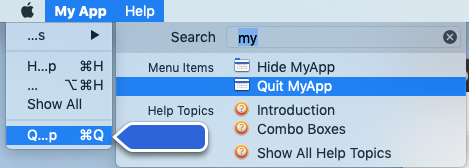 | |
| 238 | 238 | ||
| 239 | 239 | Compiled MyApp: [Download](https://www.sentry.org/lazarus/MyApp.zip) (2.2MB). | |
| 240 | 240 | ||
| 241 | 241 | Full project source code is available from [SourceForge](https://sourceforge.net/p/lazarus-wiki-projects/code/ci/master/tree/laz_helpbook/). | |
| 242 | 242 | ||
| 243 | 243 | ## See also | |
| 244 | 244 | ||
| 245 | 245 | - [[Application Bundle|macOS Application Bundle]] | |
| 246 | 246 | - [[macOS property list files]] | |
| 247 | 247 | ||
| 248 | 248 | --- | |
| 249 | 249 | *From the Free Pascal wiki, page "Add an Apple Help Book to your macOS app", as it stood on 2021-12-28 after a change by Trev, out of the wiki's dump of 2024-05-26. Copyright stays with the author who wrote it, according to the old wiki's [[Licensing]] page. If you have concerns about this material, [message the admin](/wiki-contact).* | |
| 250 | 250 | Category: Code Snippets | |
| 251 | 251 | Category: Help and Docs | |
| 252 | 252 | Category: Platform-sensitive development | |
| 253 | 253 | Category: Tutorials | |
| 254 | 254 | Category: macOS |