

Add Help to Your Application: what changed
Revision 2 to 3. Removed lines have a minus sign; added lines have a plus sign.
| Old | New | Line | |
|---|---|---|---|
| 1 | 1 | The LCL comes with a help system, and allows you to **create help for your own applications**. | |
| 2 | 2 | ||
| 3 | 3 | ## Quick Start | |
| 4 | 4 | ||
| 5 | 5 | Open the example in examples/helphtml/. | |
| 6 | 6 | ||
| 7 | 7 | This project demonstrates how to use the HTML help components. Just drop them on a form of your project. Setup the paths and create some HTML pages. Then give each control of your application a HelpKeyword. | |
| 8 | 8 | ||
| 9 | 9 | See the CHM help section if you want to use CHM help files instead of HTML help files. | |
| 10 | 10 | ||
| 11 | 11 | There is a very nice simple demo (chmdemo.zip) here: <http://forum.lazarus.freepascal.org/index.php/topic,38487.msg261731.html#msg261731> | |
| 12 | 12 | ||
| 13 | 13 | ## Help Basics | |
| 14 | 14 | ||
| 15 | 15 | The LCL help mainly consists of two parts: Help databases and help viewers. A Help Database contains the mapping from the keywords (ID, node, message, pascal, ...) to the help page (or help web site or...). The Help Viewer is invoked by the Help Database to show the help to the user. | |
| 16 | 16 | ||
| 17 | 17 | - A [[THelpDatabase]] manages content. It can be a collection of HTML pages or fpdoc XML files or a CHM file or a database or whatever. | |
| 18 | 18 | - A [[THelpViewer]] is a component that shows help content. For example a viewer for the mime type text/html can start a web browser. | |
| 19 | 19 | ||
| 20 | 20 | When help is requested, the LCL queries each registered [[THelpDatabase]] and each database can return a list of entries. If several entries are returned, the LCL asks the user to choose an entry. Then the LCL asks the database to show the help for the entry. The database extracts the help content and asks the LCL for a viewer that supports the mime type of the content. Finally, the viewer shows the help content. | |
| 21 | 21 | ||
| 22 | 22 | ## CHM | |
| 23 | 23 | ||
| 24 | 24 | Context-sensitive CHM application help can be used from Lazarus 1.0 and later. | |
| 25 | 25 | ||
| 26 | 26 | A demonstration program is included that shows how to include context-sensitive help using CHM and the [[lhelp]] CHM viewer (the same one that is used for IDE help by default). Please see \${lazarusdir}/components/chmhelp/democontrol/. | |
| 27 | 27 | ||
| 28 | 28 | You can write your own CHM files, e.g. with the now ancient Microsoft HTML Workshop or with the new Lazarus chmmaker tools in \$(lazarusdir)/tools/chmmaker You can use a [[TCHMHelpDatabase]] control like the [[THTMLHelpDatabase]] control described below. | |
| 29 | 29 | ||
| 30 | 30 | The advantages of using the CHM system are a smaller, self contained help file instead of multiple files. On the other hand, not every system has a CHM viewer installed by default, so you might want to include lhelp, a CHM viewer written in Pascal and included with the Lazarus sources (components/chmhelp/lhelp/lhelp.lpi). | |
| 31 | 31 | ||
| 32 | 32 | ### Using LHelp | |
| 33 | 33 | ||
| 34 | 34 | - Drop a **`TCHMHelpDatabase`** on your form. | |
| 35 | 35 | - Set its **`FileName`** property to the path to the chm file, and set **`AutoRegister`** to `true`. | |
| 36 | 36 | - In **`KeywordPrefix`** specify the path to the html files contained in the chm file as seen from the chm root. Example: If the html help files during chm creation are in the subfolder *html* the `KeywordPrefix` is `html` (without trailing path delimiter!). | |
| 37 | 37 | - Put a **`TLHelpConnector`** on your form. | |
| 38 | 38 | - Set **`LHelpPath`** to the name and location of the LHelp executable (this can be absolute, or relative to the application directory) | |
| 39 | 39 | - Set **`AutoRegister`** to `true`. | |
| 40 | 40 | ||
| 41 | 41 | ``` pascal | |
| 42 | 42 | // Example with both chm file and LHelp.exe in Application folder. | |
| 43 | 43 | procedure TForm1.FormCreate(Sender: TObject); | |
| 44 | 44 | begin | |
| 45 | 45 | if FileExists(ChangeFileExt(Application.ExeName, '.chm')) then | |
| 46 | 46 | begin | |
| 47 | 47 | CHMHelpDatabase1.Filename := ChangeFileExt(Application.ExeName, '.chm'); | |
| 48 | 48 | CHMHelpDatabase1.KeywordPrefix := 'html'; | |
| 49 | 49 | CHMHelpDatabase1.AutoRegister:=True; | |
| 50 | 50 | ||
| 51 | 51 | LHelpConnector1.LHelpPath := IncludeTrailingBackSlash(ExtractFileDir(Application.ExeName)) + 'lhelp.exe'; | |
| 52 | 52 | LHelpConnector1.AutoRegister:=True; | |
| 53 | 53 | end | |
| 54 | 54 | else | |
| 55 | 55 | mnuHelpMain.Enabled := False; | |
| 56 | 56 | end; | |
| 57 | 57 | ||
| 58 | 58 | procedure TForm1.Button1Click(Sender: TObject); | |
| 59 | 59 | begin | |
| 60 | 60 | if mnuHelpMain.Enabled then | |
| 61 | 61 | ShowHelpOrErrorForKeyword('', 'html/main.html'); | |
| 62 | 62 | //ShowTableOfContents; (Not implemented for TCHMHelpDatabase) | |
| 63 | 63 | end; | |
| 64 | 64 | ``` | |
| 65 | 65 | ||
| 66 | 66 | When LHelp is invoked during execution of your project it is started by *Inter-Process Communication* (IPC) in a separate process which normally does not terminate when you application is closed. If you want to close LHelp with your application you should write an `OnDestroy` event handler to send an `mrClose` command to LHelp via IPC: | |
| 67 | 67 | ||
| 68 | 68 | ``` Pascal | |
| 69 | 69 | uses | |
| 70 | 70 | LHelpControl; // for "mrClose" | |
| 71 | 71 | ||
| 72 | 72 | procedure TForm1.FormDestroy(Sender: TObject); | |
| 73 | 73 | begin | |
| 74 | 74 | if (LHelpConnector1.Connection <> nil) and LHelpConnector1.Connection.ServerRunning then | |
| 75 | 75 | LHelpConnector1.Connection.RunMiscCommand(LHelpControl.mrClose); | |
| 76 | 76 | end; | |
| 77 | 77 | ``` | |
| 78 | 78 | ||
| 79 | 79 | ## HTML | |
| 80 | 80 | ||
| 81 | 81 | The LCL provides two components to use HTML files for help: [[THTMLHelpDatabase]] and [[THTMLBrowserHelpViewer]]. To see the HTML help, see the lazarus example examples/helphtml/htmlhelp1.lpi. | |
| 82 | 82 | ||
| 83 | 83 | ### Setup HTML help for your application | |
| 84 | 84 | ||
| 85 | - | ||
| 85 | + | 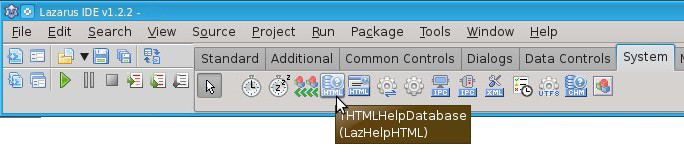 Adding HTML help to your application is easy: | |
| 86 | 86 | ||
| 87 | 87 | - Put a **THTMLHelpDatabase** on a form. | |
| 88 | 88 | - Set **AutoRegister** to true. | |
| 89 | 89 | - Set **KeywordPrefix** to **html/**. It means all keywords must start with the string *html/*. | |
| 90 | 90 | - Set **BaseURL** to **<file://yourhelp/>**. This will search for HTML files in the sub folder 'yourhelp' relative to the application directory. You can specify an absolute path to the directory where HTML files are stored. For UNIX-like platforms, use an URL like *<file:///usr/lib/yourhelp/>* for local access or an URL like *<http://www.yoursite.com/>* for web access. For the Windows platform, use an URL like *<file://c:/temp/html/>* or *[file://c:\temp\html](file://c:\temp\html)*. | |
| 91 | 91 | - Put a **THTMLBrowserHelpViewer** on the form. This component can start the user's default browser. | |
| 92 | 92 | - Set **AutoRegister** to true. | |
| 93 | 93 | ||
| 94 | 94 | ### Creating a help entry | |
| 95 | 95 | ||
| 96 | 96 | - Now create the subfolder *yourhelp* and create an HTML page *yourhelp/edit1.html*. In case of a website, the help page should be accessible as *<http://www.yoursite.com/edit1.html>* | |
| 97 | 97 | - Put a TEdit on a form | |
| 98 | 98 | - Set **HelpType** to *htKeyword* | |
| 99 | 99 | - Set **HelpKeyword** to *html/edit1.html* | |
| 100 | 100 | ||
| 101 | 101 | When running the program you can focus the edit control and press `F1` to invoke the help. Under macOS the help key sequence is `Cmd-?` (or `Cmd+Shift+?` depending on your keyboard layout). | |
| 102 | 102 | ||
| 103 | 103 | Note: Some window managers, widget set combinations do not pass `F1` to the LCL. | |
| 104 | 104 | ||
| 105 | 105 | ## INF (using fpGUI's DocView help viewer) | |
| 106 | 106 | ||
| 107 | 107 | See the message and example project included in the Lazarus Forums. [1](http://forum.lazarus.freepascal.org/index.php/topic,27864.msg173887.html#msg173887) | |
| 108 | 108 | ||
| 109 | 109 | It shows a fully working example of an LCL application using [[fpGUI]]'s [DocView help viewer](http://fpgui.sourceforge.net/screenshots_apps.shtml). It shows context sensitive help and general help. | |
| 110 | 110 | ||
| 111 | 111 | For example: | |
| 112 | 112 | ||
| 113 | 113 | - Set focus to a specific control and press `F1`. It will show the help topic for that specific control. | |
| 114 | 114 | - Click the Help button and it will show the help topic for the dialog/form. | |
| 115 | 115 | - Select the "Help -\> Show Help" menu item and it will show the general application help and display the first topic in the help file. | |
| 116 | 116 | ||
| 117 | 117 | ## See also | |
| 118 | 118 | ||
| 119 | 119 | - [[Add an Apple Help Book to your macOS app]] | |
| 120 | 120 | ||
| 121 | 121 | --- | |
| 122 | 122 | *From the Free Pascal wiki, page "Add Help to Your Application", as it stood on 2024-03-10 after a change by Dsiders, out of the wiki's dump of 2024-05-26. Copyright stays with the author who wrote it, according to the old wiki's [[Licensing]] page. If you have concerns about this material, [message the admin](/wiki-contact).* | |
| 123 | 123 | Category: CHM | |
| 124 | 124 | Category: Help and Docs | |
| 125 | 125 | Category: Tutorials |