

Add Help to Your Application/zh CN: what changed
Revision 4 to 5. Removed lines have a minus sign; added lines have a plus sign.
| Old | New | Line | |
|---|---|---|---|
| 1 | 1 | LCL带来一个帮助系统,允许你 **为你自己的应用程序来创建帮助**。 | |
| 2 | 2 | ||
| 3 | 3 | ## 快速开始 | |
| 4 | 4 | ||
| 5 | - | ||
| 5 | + | ```text | |
| 6 | 6 | 在 examples/helphtml/中打开示例。 | |
| 7 | 7 | ``` | |
| 8 | 8 | ||
| 9 | 9 | 演示如何使用HTML帮助控件。只需要拖拽它们到你的项目中。并设置并创建HTML文件。就可以给程序提供HelpKeyword。 | |
| 10 | 10 | ||
| 11 | 11 | 如果要使用CHM帮助,请参照CHM帮助部分。 | |
| 12 | 12 | ||
| 13 | 13 | 这里是一个非常好的演示 (chmdemo.zip): <http://forum.lazarus.freepascal.org/index.php/topic,38487.msg261731.html#msg261731> | |
| 14 | 14 | ||
| 15 | 15 | ## 帮助基础 | |
| 16 | 16 | ||
| 17 | 17 | LCL帮助包含两部分: 帮助数据库和查看器. 帮助数据库包含关键字(ID, node, message, pascal, ...)到帮助页面(或者帮助网页网站,或者...)。 帮助查看器援引帮助数据库来向用户显示帮助信息。 | |
| 18 | 18 | ||
| 19 | 19 | - [[THelpDatabase]]管理内容。它可以是HTML页面、或fpdoc XML文、或一个CHM文件、或一个数据库、或任何东西的一个集合。 | |
| 20 | 20 | - [[THelpViewer]]是一个显示帮助内容的组件。例如,一个mime类型的text/html查看器可以启动一个网页浏览器。 | |
| 21 | 21 | ||
| 22 | 22 | 当请求帮助时,LCL询问每个注册的[[THelpDatabase]],并且每个数据库都会返回一个条目列表。 如果返回数个条目,LCL会要求用户来选择一个条目。 接下来LCL或要求数据库来显示条目的帮助。数据库提取帮助内容,并向LCL请求支持mime类型内容的查看器。 最后,查看器显示帮助内容。 | |
| 23 | 23 | ||
| 24 | 24 | ## CHM | |
| 25 | 25 | ||
| 26 | 26 | 上下文相关的CHM应用程序帮助自lazarus1.0和更高版本开始能够使用。 | |
| 27 | 27 | ||
| 28 | 28 | 一个演示程序,包含演示如何使用CHM和[[lhelp|lhelpCHM]]查看器(默认情况下与IDE帮助使用同一个查看器)来包含上下文相关的帮助。 请查看\${lazarusdir}/components/chmhelp/democontrol/. | |
| 29 | 29 | ||
| 30 | 30 | 你可以写你自己的CHM文件,例如,使用古老的Microsoft HTML Workshop,或者使用新的Lazarus chmmaker 工具(位于\$(lazarusdir)/tools/chmmaker)。 你可以使用一个[[TCHMHelpDatabase]]控件,像下面描述的[[THTMLHelpDatabase]]控件。 | |
| 31 | 31 | ||
| 32 | 32 | 使用CHM系统的优点是一个较小的、独立的帮助文件,而不是多个文件。另一方面,并不是每个系统都默认安装了CHM查看器,因此您可能希望包含lhelp,一个用Pascal编写的CHM查看器,包含在Lazarus源代码(components/chmhelp/lhelp/lhelp.lpi)中。 | |
| 33 | 33 | ||
| 34 | 34 | ### 使用LHelp | |
| 35 | 35 | ||
| 36 | 36 | - 在你的窗体上放置一个**TLHelpConnector**。 | |
| 37 | 37 | - 使用LHelp可执行文件的名称和位置来设置**LHelpPath**。(路径可以是绝对的,也可以是相对于应用程序的目录) | |
| 38 | 38 | - 设置**AutoRegister**为true | |
| 39 | 39 | ||
| 40 | 40 | ``` pascal | |
| 41 | 41 | // Example with both chm file and LHelp.exe in Application folder. | |
| 42 | 42 | Procedure TForm1.FormCreate(Sender: TObject); | |
| 43 | 43 | Begin | |
| 44 | 44 | If FileExists(ChangeFileExt(Application.ExeName, '.chm')) Then | |
| 45 | 45 | Begin | |
| 46 | 46 | CHMHelpDatabase1.Filename := ChangeFileExt(Application.ExeName, '.chm'); | |
| 47 | 47 | CHMHelpDatabase1.Keyword := 'test'; | |
| 48 | 48 | CHMHelpDatabase1.AutoRegister:=True; | |
| 49 | 49 | ||
| 50 | 50 | LHelpConnector1.LHelpPath := IncludeTrailingBackSlash(ExtractFileDir(Application.ExeName)) + 'lhelp.exe'; | |
| 51 | 51 | LHelpConnector1.AutoRegister:=True; | |
| 52 | 52 | end | |
| 53 | 53 | Else | |
| 54 | 54 | mnuHelpMain.Enabled := False; | |
| 55 | 55 | End; | |
| 56 | 56 | ||
| 57 | 57 | Procedure TForm1.Button1Click(Sender: TObject); | |
| 58 | 58 | Begin | |
| 59 | 59 | If mnuHelpMain.Enabled Then | |
| 60 | 60 | ShowHelpOrErrorForKeyword('','test/Main.html'); | |
| 61 | 61 | //ShowTableOfContents; (Not implemented for TCHMHelpDatabase) | |
| 62 | 62 | End; | |
| 63 | 63 | ``` | |
| 64 | 64 | ||
| 65 | 65 | ## HTML | |
| 66 | 66 | ||
| 67 | 67 | LCL提供两个组件来使用HTML文件获取帮助:[[THTMLHelpDatabase]]和[[THTMLBrowserHelpViewer]]。 为查看HTML帮助,查看lazarus示例:examples/helphtml/htmlhelp1.lpi。 | |
| 68 | 68 | ||
| 69 | 69 | ### 为你的应用程序设置HTML帮助 | |
| 70 | 70 | ||
| 71 | 71 | 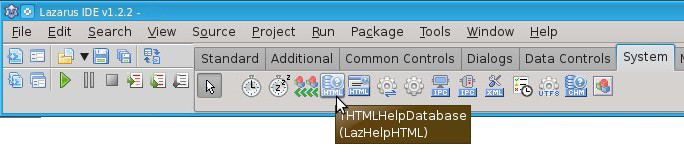 添加HTML帮助到你的应用程序是很容易的: | |
| 72 | 72 | ||
| 73 | 73 | - 在一个窗体上放置一个**THTMLHelpDatabase**。 | |
| 74 | 74 | - 设置**AutoRegister**为 true 。 | |
| 75 | 75 | - 设置**KeywordPrefix**为**html/** 。它意味着所有关键字都必须以字符串*html/*为开头。 | |
| 76 | 76 | - 设置**BaseURL**为**<file://yourhelp/>**。这将在子文件夹*yourhelp*中搜索HTML文件。你可以具体指定完整的路径(像:*<file:///usr/lib/yourhelp/>*)或者一个URL(像:*<http://www.yoursite.com/>*)。 | |
| 77 | 77 | ||
| 78 | 78 | - 在窗体上放置一个**THTMLBrowserHelpViewer**。这个组件可以启动用户的默认浏览器。 | |
| 79 | 79 | - 设置**AutoRegister**为 true 。 | |
| 80 | 80 | ||
| 81 | 81 | ### 创建一个帮助条目 | |
| 82 | 82 | ||
| 83 | 83 | - 现在创建子文件夹*yourhelp*,并创建一个html页面 *yourhelp/edit1.html*。如果是网站,帮助页应该是可使用的:*<http://www.yoursite.com/edit1.html>*。 | |
| 84 | 84 | - 在一个窗体上放置一个TEdit。 | |
| 85 | 85 | - 设置**HelpType**为*htKeyword* | |
| 86 | 86 | - 设置**HelpKeyword**为*html/edit1.html* | |
| 87 | 87 | ||
| 88 | 88 | 当运行程序时,你可以聚焦于编辑并按`F1`键援引助。在macOS下帮助按键顺序是`Cmd-?` (或 `Cmd+Shift+?`,取决于你的键盘布局)。 注意: 一些窗口管理器、小部件集组合不会将F1传递给LCL。 | |
| 89 | 89 | ||
| 90 | 90 | ## INF (使用fpGUI的DocView帮助查看器) | |
| 91 | 91 | ||
| 92 | 92 | 查看Lazarus论坛中包含的消息和示例项目。[1](http://forum.lazarus.freepascal.org/index.php/topic,27864.msg173887.html#msg173887) | |
| 93 | 93 | ||
| 94 | 94 | It shows a fully working example of an LCL application using [[fpGUI]]'s [DocView help viewer](http://fpgui.sourceforge.net/screenshots_apps.shtml). It shows context sensitive help and general help. | |
| 95 | 95 | ||
| 96 | 96 | 例如: | |
| 97 | 97 | ||
| 98 | 98 | - Set focus to a specific control and press `F1`. It will show the help topic for that specific control. | |
| 99 | 99 | - Click the Help button and it will show the help topic for the dialog/form. | |
| 100 | 100 | - Select the "Help -\> Show Help" menu item and it will show the general application help and display the first topic in the help file. | |
| 101 | 101 | ||
| 102 | 102 | ## 请参阅 | |
| 103 | 103 | ||
| 104 | 104 | - [[Add an Apple Help Book to your macOS app|添加一个苹果系统帮助书到你的macOS应用程序]] | |
| 105 | 105 | ||
| 106 | 106 | ## 贡献者和更改 | |
| 107 | 107 | ||
| 108 | 108 | - 简体中文版本由 robsean 于 2020-03-09 创建。 | |
| 109 | 109 | ||
| 110 | 110 | --- | |
| 111 | 111 | *From the Free Pascal wiki, page "Add Help to Your Application/zh CN", as it stood on 2021-02-04 after a change by Robsean, out of the wiki's dump of 2024-05-26. Copyright stays with the author who wrote it, according to the old wiki's [[Licensing]] page. If you have concerns about this material, [message the admin](/wiki-contact).* | |
| 112 | 112 | Category: CHM | |
| 113 | 113 | Category: Help and Docs | |
| 114 | 114 | Category: Tutorials |