

ATSynEdit: what changed
Revision 4 to 5. Removed lines have a minus sign; added lines have a plus sign.
| Old | New | Line | |
|---|---|---|---|
| 1 | 1 | # About | |
| 2 | 2 | ||
| 3 | - | ||
| 3 | + | **ATSynEdit** is the multi-line editor control. | |
| 4 | 4 | ||
| 5 | - | ||
| 6 | - | ||
| 5 | + | * Homepage: <https://github.com/Alexey-T/ATSynEdit> | |
| 6 | + | * Support for EControl adapter: <https://github.com/Alexey-T/EControl> | |
| 7 | 7 | ||
| 8 | - | ||
| 8 | + | Author: Alexey Torgashin | |
| 9 | 9 | ||
| 10 | - | ||
| 10 | + | [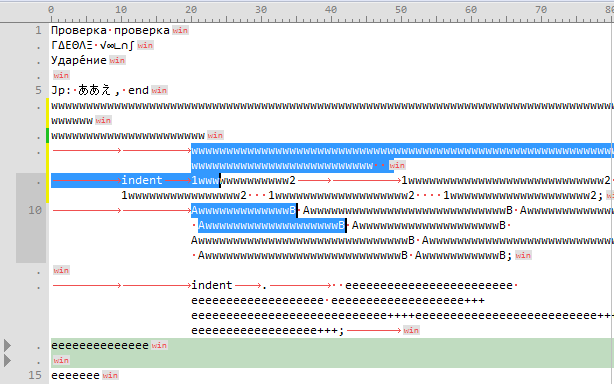](</File:atsynedit.png>) | |
| 11 | 11 | ||
| 12 | 12 | # License | |
| 13 | 13 | ||
| 14 | - | ||
| 14 | + | ATSynEdit files licensed under MPL 2.0. You can optionally use them under LGPL if your project needs it. | |
| 15 | 15 | ||
| 16 | - | ||
| 16 | + | EControl files licensed under special license (readme.txt), usage allowed only in open-source projects. | |
| 17 | 17 | ||
| 18 | 18 | # Keyboard shortcuts | |
| 19 | 19 | ||
| 20 | - | ||
| 20 | + | Run demo_editor and call menu item "Help - Commands'. You'll see all shortcuts in a dialog like this: | |
| 21 | 21 | ||
| 22 | - | ||
| 22 | + | [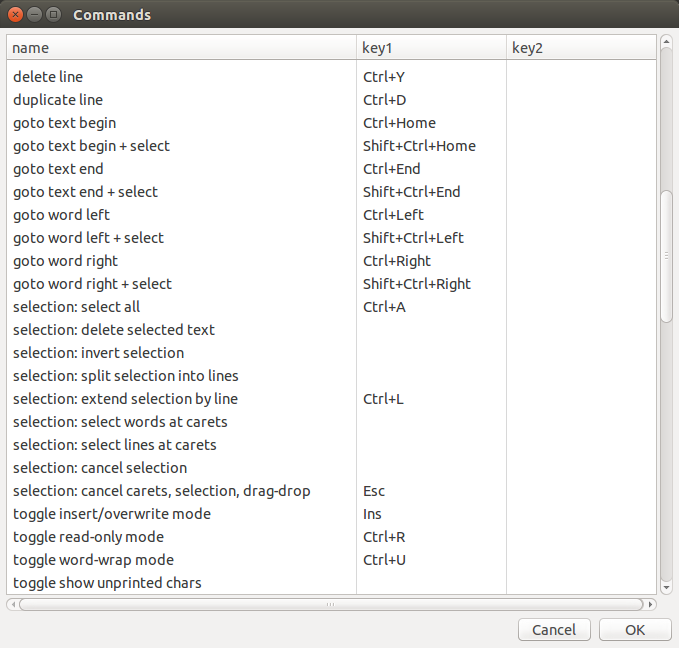](</File:atsynedit_keymap.png>) | |
| 23 | 23 | ||
| 24 | 24 | # Mouse shortcuts | |
| 25 | 25 | ||
| 26 | - | ||
| 26 | + | Multi-carets: | |
| 27 | 27 | ||
| 28 | - | ||
| 29 | - | ||
| 30 | - | ||
| 28 | + | * Ctrl+click - add/delete caret | |
| 29 | + | * Ctrl+drag - add caret with selection | |
| 30 | + | * Ctrl+Shift+click - add carets column in several lines (from previous caret to clicked line) | |
| 31 | 31 | ||
| 32 | - | ||
| 32 | + | Select: | |
| 33 | 33 | ||
| 34 | - | ||
| 35 | - | ||
| 36 | - | ||
| 34 | + | * Alt+drag - select column of text (Note: it may look weird if word-wrap on, because wrap is not considered here at all. Simple rectangle of coordinates [x1,y1]-[x2,y2] is always selected, even if this gives bad looking screen) | |
| 35 | + | * drag on gutter's line numbers - select by entire lines | |
| 36 | + | * double-click and immediately drag - select text by words | |
| 37 | 37 | ||
| 38 | - | ||
| 38 | + | Clicks: | |
| 39 | 39 | ||
| 40 | - | ||
| 41 | - | ||
| 42 | - | ||
| 40 | + | * double-click - select clicked word | |
| 41 | + | * triple-click - select entire line (limited by end-of-lines) | |
| 42 | + | * middle-button click - start "Browser Scroll" mode: circle mark appears and mouse moving around this mark auto-scrolls text in 4 directions; speed of scrolling depends on distance of cursor from circle mark (any click to turn off) | |
| 43 | 43 | ||
| 44 | 44 | # Multi-carets | |
| 45 | 45 | ||
| 46 | - | ||
| 46 | + | Multi-carets are several carets at once. All carets work together for many editing commands: caret moving, text typing, deleting, selection with keyboard. See "Mouse shortcuts", how to add/remove carets. | |
| 47 | 47 | ||
| 48 | - | ||
| 48 | + | Animation: | |
| 49 | 49 | ||
| 50 | - | ||
| 50 | + | [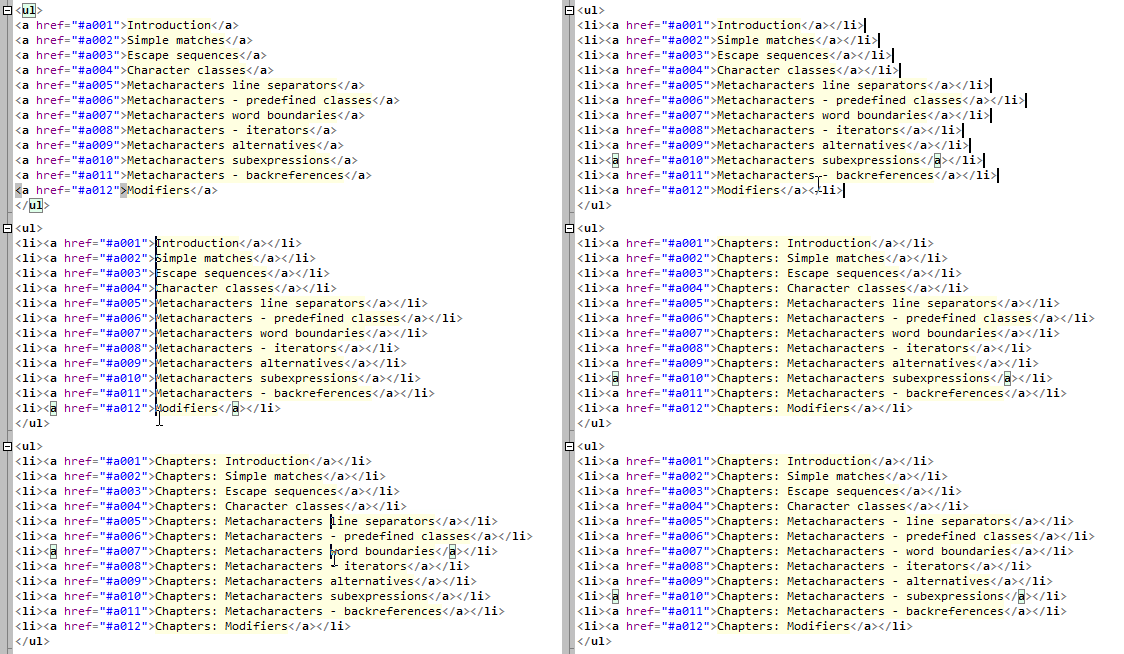](</File:atsynedit-carets.gif>) | |
| 51 | 51 | ||
| 52 | 52 | ## Multi-selections | |
| 53 | 53 | ||
| 54 | - | ||
| 54 | + | If you add caret with Ctrl+click, caret has no selection. If you add caret with Ctrl+drag, caret will have selection. You can add selections to carets later, by Shift+arrows, Shift+Home, Shift+End etc. | |
| 55 | 55 | ||
| 56 | - | ||
| 56 | + | Multi-selections are handled specially on copy/paste. If you copy selections, then move carets, then paste, paste will insert clipboard lines into carets: line-1 at caret-1, line-2 at caret-2 etc (only if carets count equals to lines count in clipboard, otherwise result is different). | |
| 57 | 57 | ||
| 58 | - | ||
| 58 | + | Animation shows this: | |
| 59 | 59 | ||
| 60 | - | ||
| 60 | + | [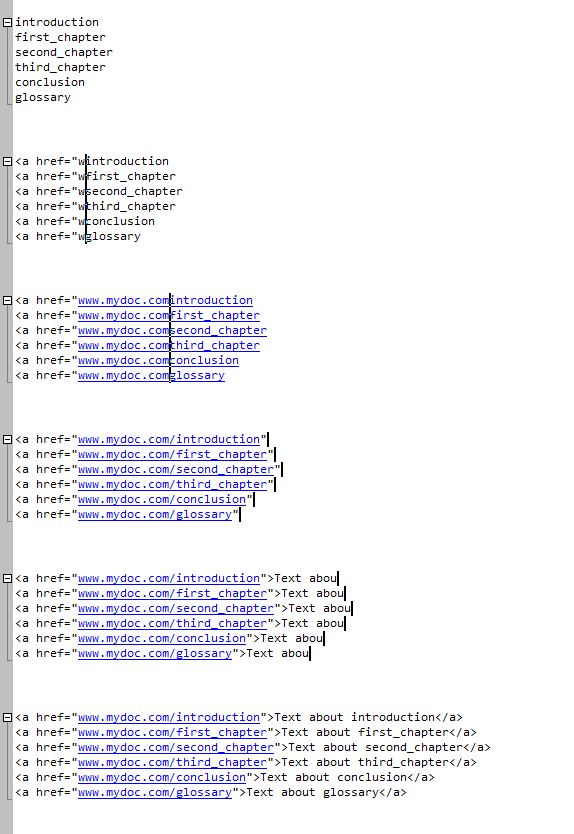](</File:atsynedit-sel.gif>) | |
| 61 | 61 | ||
| 62 | 62 | ## Clipboard commands with selections | |
| 63 | 63 | ||
| 64 | - | ||
| 65 | - | ||
| 66 | - | ||
| 67 | - | ||
| 68 | - | ||
| 69 | - | ||
| 70 | - | ||
| 71 | - | ||
| 72 | - | ||
| 73 | - | ||
| 74 | - | ||
| 75 | - | ||
| 76 | - | ||
| 77 | - | ||
| 78 | - | ||
| 79 | - | ||
| 80 | - | ||
| 81 | - | ||
| 82 | - | ||
| 83 | - | ||
| 84 | - | ||
| 85 | - | ||
| 86 | - | ||
| 87 | - | ||
| 88 | - | ||
| 89 | - | ||
| 90 | - | ||
| 91 | - | ||
| 92 | - | ||
| 93 | - | ||
| 94 | - | ||
| 95 | - | ||
| 96 | - | ||
| 64 | + | Clipboard-related commands work with carets, both with selections and without them. Some details about this: | |
| 97 | 65 | ||
| 66 | + | Command | Behaviour, when there're no selections | Behaviour, when at last one selection present | |
| 67 | + | ---|---|--- | |
| 68 | + | Copy to clipboard | Copies entire lines, containing carets. (Ignores multiple carets on same line.) | Copies only selections text. (Ignores carets without selections.) | |
| 69 | + | Cut to clipboard | Similarly to "Copy" w/o selections. | Similarly to "Copy" with selections. | |
| 70 | + | Paste from clipboard | First, selections are cleared (deleted). Then, command pastes text into each caret position. Special case is when clipboard lines count equals to carets count - in this case, first line is inserted at first caret, second line is inserted at 2nd caret, etc. | |
| 71 | + | Delete char | Deletes one char at each caret position. | Deletes only selections text. (Ignores carets without selections.) | |
| 72 | + | ||
| 98 | 73 | # Help topics | |
| 99 | 74 | ||
| 100 | 75 | ## Compilation errors | |
| 101 | 76 | ||
| 102 | 77 | **IME error on GTK2.** | |
| 103 | 78 | ||
| 104 | - | ||
| 105 | - | ||
| 106 | - | ||
| 79 | + | You may get this error: | |
| 80 | + | ``` | |
| 107 | 81 | atsynedit_adapter_gtk2ime.pas(131,5) Error: Identifier not found "IM_Context_Set_Cursor_Pos" | |
| 108 | 82 | ``` | |
| 109 | 83 | ||
| 110 | - | ||
| 111 | - | ||
| 112 | - | ||
| 113 | - | ||
| 114 | - | ||
| 115 | - | ||
| 116 | - | ||
| 117 | - | ||
| 118 | - | ||
| 84 | + | To fix it, edit the file "atsynedit/atsynedit_package.lpk" and remove this block there: | |
| 119 | 85 | ``` | |
| 86 | + | <Other> | |
| 87 | + | <CustomOptions Value="-dGTK2_IME_CODE"/> | |
| 88 | + | <OtherDefines Count="1"> | |
| 89 | + | <Define0 Value="GTK2_IME_CODE"/> | |
| 90 | + | </OtherDefines> | |
| 91 | + | </Other> | |
| 92 | + | ``` | |
| 120 | 93 | ||
| 121 | - | ||
| 94 | + | Alternative solution when symbol "IM_Context_Set_Cursor_Pos" cannot be found: you need to open IDE dialog "Tools / Configure 'Build Lazarus'", and there enable the define: WITH_GTK2_IM; then recompile the IDE. | |
| 122 | 95 | ||
| 123 | 96 | ## What limitations it has? | |
| 124 | 97 | ||
| 125 | - | ||
| 126 | - | ||
| 127 | - | ||
| 98 | + | * All lines have the same height | |
| 99 | + | * Cannot set different fonts for different parts | |
| 100 | + | * No support for right-to-left mode, only limited support for Arabic text | |
| 128 | 101 | ||
| 129 | 102 | ## What features it has? | |
| 130 | 103 | ||
| 131 | - | ||
| 132 | - | ||
| 133 | - | ||
| 134 | - | ||
| 135 | - | ||
| 136 | - | ||
| 137 | - | ||
| 138 | - | ||
| 139 | - | ||
| 140 | - | ||
| 141 | - | ||
| 142 | - | ||
| 143 | - | ||
| 144 | - | ||
| 145 | - | ||
| 146 | - | ||
| 147 | - | ||
| 148 | - | ||
| 149 | - | ||
| 150 | - | ||
| 151 | - | ||
| 152 | - | ||
| 104 | + | * Fast editing of big texts (tested 10M log) | |
| 105 | + | * Syntax highliting using 'adapters' | |
| 106 | + | * Multi-carets from birth. All code carets aware. | |
| 107 | + | * Strings object is holder of text. 2+ editors can have 1 strings obj. (Split editor.) | |
| 108 | + | * Unicode (used UnicodeString in Strings obj) | |
| 109 | + | * Word-wrap (wrap at control edge, wrap at column) | |
| 110 | + | * Inter-line gaps (see #Gaps_object) | |
| 111 | + | * Undo/redo | |
| 112 | + | * Column blocks | |
| 113 | + | * Gutter (line numbers, folding, colored line states) | |
| 114 | + | * Bookmarks (with icons) | |
| 115 | + | * Supports Win/Unix/Mac line ends | |
| 116 | + | * Minimap like Sublime Text | |
| 117 | + | * Micromap (owner drawn) | |
| 118 | + | * Ruler (at top edge) | |
| 119 | + | * Renders wrapped indent (line contains some indent, wrapped parts contain the same indent) | |
| 120 | + | * Renders CJK chars with big width | |
| 121 | + | * Renders some Unicode chars as "AABB" hex code | |
| 122 | + | * Renders unprintable chars (space, tab, line end) | |
| 123 | + | * Can highlight/activate URLs | |
| 124 | + | * Can set color attributes for ranges (to highlight pair brackets or same words) | |
| 125 | + | * Supports proportional fonts | |
| 153 | 126 | ||
| 154 | 127 | ## Difference from other components | |
| 155 | 128 | ||
| 156 | - | ||
| 157 | - | ||
| 158 | - | ||
| 159 | - | ||
| 160 | - | ||
| 129 | + | * Adapters to support syntax highlighting. In theory, using adapters it's possible to support syntax files from any app: Sublime Text, Atom, EmEditor etc. | |
| 130 | + | * Muti-carets, multi-selections | |
| 131 | + | * Inter-line gaps, can insert pictures in it | |
| 132 | + | * Minimap, Micromap (rare in others editors) | |
| 133 | + | * Smooth per-pixel scrolling (option) | |
| 161 | 134 | ||
| 162 | 135 | ## Does it need to be installed? | |
| 163 | 136 | ||
| 164 | - | ||
| 137 | + | It may be installed or not. | |
| 165 | 138 | ||
| 166 | - | ||
| 167 | - | ||
| 139 | + | * Use not installed: see below "Basic example how to use". | |
| 140 | + | * Use installed: in Lazarus IDE, open package file "atsynedit\atsynedit_package". Install it in Package dialog. You 'll have components installed in "Misc" page of component pallette: TATSynEdit, TATEdit (single line edit), etc. | |
| 168 | 141 | ||
| 169 | 142 | ## What parts does it have? | |
| 170 | 143 | ||
| 171 | 144 | ### Strings object | |
| 172 | 145 | ||
| 173 | - | ||
| 146 | + | type TATStrings in unit atstrings. Storage of text lines. It includes managing of Undo/Redo too. | |
| 174 | 147 | ||
| 175 | - | ||
| 148 | + | Methods: | |
| 176 | 149 | ||
| 177 | - | ||
| 178 | - | ||
| 179 | - | ||
| 180 | - | ||
| 150 | + | * To add/delete lines: LineAdd, LineInsert, LineDelete. They automatically create/update Undo/Redo data. Methods with "Raw" word in name: ignore Undo/Redo data, usually don't use them. | |
| 151 | + | * To insert/delete blocks of lines: LineBlockInsert, LineBlockDelete. | |
| 152 | + | * Methods starting with "Text" support basic text operations: TextReplace, TextAppend, TextInsert etc. They operate on one caret position and get parameters AShift (shift of caret after text operation, by x/y) and APosAfter (position of caret after the operation). | |
| 153 | + | * To load entire content into Strings object: LoadFromFile, LoadFromStream, LoadFromString (multi-line string). | |
| 181 | 154 | ||
| 182 | - | ||
| 155 | + | To get/set lines, use properties: | |
| 183 | 156 | ||
| 184 | - | ||
| 185 | - | ||
| 186 | - | ||
| 187 | - | ||
| 188 | - | ||
| 189 | - | ||
| 190 | - | ||
| 191 | - | ||
| 157 | + | * Lines[i]: text, of type UnicodeString | |
| 158 | + | * LinesUTF8[i]: text, of type string (faster than Lines[]) | |
| 159 | + | * LinesLen[i]: integer: same as Length(Lines[i]), but faster | |
| 160 | + | * LinesEnds[i]: enum: kind of end-of-line chars | |
| 161 | + | * LinesHidden[i]: bool: true if line is fully hidden (inside folded block) | |
| 162 | + | * LinesFoldFrom[i]: byte: 0 if line is not folded, >0 if line is folded from this char-pos | |
| 163 | + | * LinesState[i]: enum: line state, normal/changed/saved, it's shown by color on gutter | |
| 164 | + | * LinesSeparator[i]: enum: kind of horizontal separator line to paint near text (rarely needed for apps). | |
| 192 | 165 | ||
| 193 | - | ||
| 166 | + | Auto-adjustments of other objects when lines are added/deleted: | |
| 194 | 167 | ||
| 195 | - | ||
| 196 | - | ||
| 197 | - | ||
| 198 | - | ||
| 168 | + | * Strings object updates Strings.Bookmarks, Strings.Bookmarks2 objects. | |
| 169 | + | * Strings object updates Gaps (actually Strings.Gaps) object. | |
| 170 | + | * If Strings.GutterDecor1 / .GutterDecor2 properties are set, Strings object updates GutterDecor object(s). Properties are not set in ATSynEdit, application must set them. | |
| 171 | + | * Objects Attribs / Markers / HotSpots are updated not inside Strings object, but in main ATSynEdit code. | |
| 199 | 172 | ||
| 200 | 173 | ### Strings.Bookmarks object | |
| 201 | 174 | ||
| 202 | - | ||
| 175 | + | type TATBookmarks in unit atsynedit_bookmarks. Holds list of bookmarks of type TATBookmarkItem. Each item has props: | |
| 203 | 176 | ||
| 204 | - | ||
| 205 | - | ||
| 206 | - | ||
| 207 | - | ||
| 208 | - | ||
| 209 | - | ||
| 177 | + | * Data.LineNum: line index (in Strings object) | |
| 178 | + | * Data.Kind: int kind value | |
| 179 | + | * Data.Hint: tooltip string, which is shown on mouse-over for bookmark gutter icon | |
| 180 | + | * Data.Tag: int value, for custom application needs | |
| 181 | + | * Data.DeleteOnDelLine: bool, enables to auto delete item, when its line is deleted | |
| 182 | + | * Data.ShowInBookmarkList: bool, for custom application needs | |
| 210 | 183 | ||
| 211 | - | ||
| 184 | + | Kind specifies background color and gutter icon for bookmarks of this kind. Kind value 0 must not be used (previously value 0 meaned "no bookmark"), value 1 should be used for "usual" bookmarks, value>1 should be used for custom application bookmarks. ATSynEdit has 2 events: to paint bookmark icon (from its kind), and to get color of bookmark (from its kind). | |
| 212 | 185 | ||
| 213 | - | ||
| 186 | + | Bookmarks object is always sorted by line index. Duplicate bookmarks (for the same line index) are auto removed. To change bookmarks, use methods Add, Delete, DeleteForLine, Clear. Also use method Find. | |
| 214 | 187 | ||
| 215 | 188 | ### Strings.Bookmarks2 object | |
| 216 | 189 | ||
| 217 | - | ||
| 190 | + | Same type as Strings.Bookmarks object. This list holds "background bookmarks", which have lower paint priority than usual bookmarks. So if a line has usual bookmark - it is painted, and if not - background bookmark is searched for this line and painted. Bookmarks2 allows to colorize entire lines, but not to interfere with usual bookmarks - it is "passive coloring". Additionally, marks in Bookmarks2 don't have gutter icon, and mouse-over tooltip. Marks in Bookmarks/Bookmarks2 use the same Kind values space. | |
| 218 | 191 | ||
| 219 | 192 | ### Carets object | |
| 220 | 193 | ||
| 221 | - | ||
| 194 | + | type TATCarets in unit atsynedit_carets. Holds list of items of type TATCaretItem. Each caret item has properties: | |
| 222 | 195 | ||
| 223 | - | ||
| 224 | - | ||
| 225 | - | ||
| 226 | - | ||
| 196 | + | * PosY: index of line in Strings object, 0-based | |
| 197 | + | * PosX: offset of caret from line start, 0-based | |
| 198 | + | * EndY, EndX: position for selection edge for this caret, or -1/-1 if no selection for this caret | |
| 199 | + | * CoordY, CoordX: screen coordinates (usually you don't need these) | |
| 227 | 200 | ||
| 228 | - | ||
| 201 | + | For forward sel, pair (PosY, PosX) is after pair (EndY, EndX); for backward sel the order is reversed. So if you want to get pos of selection start (e.g. to delete this selection), get minimal pair. | |
| 229 | 202 | ||
| 230 | - | ||
| 203 | + | Carets object is sorted by text position, method Sort does this. Duplicate carets (they appear during work with multi-carets) are auto removed. If you try to add overlapping caret selections, they will be auto merged to one caret. To add/delete carets, use methods Add, Clear. Also ATSynEdit has methods DoCaretNNNNN, eg DoCaretSingle makes single caret. | |
| 231 | 204 | ||
| 232 | 205 | ### CaretsSel object | |
| 233 | 206 | ||
| 234 | - | ||
| 207 | + | type TATCaretSelections in unit atsynedit_carets. It is helping object, internally it holds array of carets coordinates, sorted by text position, but only for carets with selection (carets w/o selection are not included). It is read-only, ie it's needed only to find some info about selections, not to store it. Finding some info about selections is much faster with CaretsSel object, though you can use Carets object too (slower). It uses binary search. | |
| 235 | 208 | ||
| 236 | - | ||
| 209 | + | Note: object is updated (from contents of Carets) in Paint method, not immediately after you add/change something in Carets. | |
| 237 | 210 | ||
| 238 | 211 | ### Keymap object | |
| 239 | 212 | ||
| 240 | - | ||
| 241 | - | ||
| 242 | - | ||
| 213 | + | type TATKeymap in unit atsynedit_keymap. | |
| 243 | 214 | ||
| 244 | - | ||
| 215 | + | Holds list of keyboard actions of type TATKeymapItem. It's inited at start. And to init items at start, two "filling" procedures exist in code: one for TATSynEdit, and simpler one for TATEdit (single line version, less commands). And you can add more keymap items or change hotkeys for any keymap item. | |
| 245 | 216 | ||
| 246 | - | ||
| 217 | + | Each keymap item has 2 (yet) hotkeys, second is needed for e.g.: Copy-to-clipboard (Ctrl+C and Ctrl+Ins), Paste-from-clipbd (Ctrl+V and Shift+Ins) etc. | |
| 247 | 218 | ||
| 248 | - | ||
| 249 | - | ||
| 250 | - | ||
| 251 | - | ||
| 252 | - | ||
| 253 | - | ||
| 254 | - | ||
| 255 | - | ||
| 256 | - | ||
| 219 | + | When adding keymap item, you can set simple hotkeys (e.g. "Alt+Shift+F") or key combos (several simple hotkeys which must be pressed in order). Example adds commands with simple hotkey and combo: | |
| 257 | 220 | ``` | |
| 221 | + | var | |
| 222 | + | M: TATKeymap; | |
| 223 | + | const | |
| 224 | + | cmd_My1 = 3000; | |
| 225 | + | cmd_My2 = 3001; | |
| 226 | + | begin | |
| 227 | + | M.Add(cmd_My1, 'cmd with simple hotkey', ['Ctrl+Shift+F'], []); | |
| 228 | + | M.Add(cmd_My2, 'cmd with 3 keys combo', ['Ctrl+B', 'Ctrl+B', 'Ctrl+M'], []); | |
| 229 | + | ``` | |
| 258 | 230 | ||
| 259 | - | ||
| 231 | + | After you added new keymap items, add reaction for them: use OnCommand event as usual. | |
| 260 | 232 | ||
| 261 | 233 | ### WrapInfo object | |
| 262 | 234 | ||
| 263 | - | ||
| 235 | + | type TATWrapInfo in unit atsynedit_wrapinfo. Holds list of wrap items, each is info about wrapped part of line or about entire line: | |
| 264 | 236 | ||
| 265 | - | ||
| 266 | - | ||
| 267 | - | ||
| 268 | - | ||
| 269 | - | ||
| 237 | + | * its original line index in Strings object (0-base) | |
| 238 | + | * its char offset in original line (0-base) | |
| 239 | + | * its length | |
| 240 | + | * its indent size (if feature "wrapped indent" is on) | |
| 241 | + | * its final-state: is it first/middle part of wrapped line, or final part | |
| 270 | 242 | ||
| 271 | - | ||
| 243 | + | One wrap item renders on control as one short line. It is part of wrapped line or entire line. Also used for wrap-mode off, this is simple case - one wrap item per one line. Wrap items exist only for lines not hidden by folding feature (with Strings.LinesHidden[i]=true). | |
| 272 | 244 | ||
| 273 | - | ||
| 245 | + | ||
| 246 | + | WrapInfo has weird property VirtualMode. This prop is set if a) no fold ranges created (ie no lexer is active, or lexer didn't create fold ranges), b) word wrapping is off. VirtualMode means that WrapInfo don't store any data in internal TList, it is empty and fast, it only reads props of Strings and returns them. Indeed, when no fold ranges, and word wrapping off, all items of WrapInfo must be simple "mirror" of Strings items props (and count is the same). | |
| 274 | 247 | ||
| 275 | - | ||
| 248 | + | VirtualMode makes loading of huge logs (100-500Mb) ~1.5 times faster. | |
| 276 | 249 | ||
| 277 | 250 | ### Undo object | |
| 278 | 251 | ||
| 279 | - | ||
| 252 | + | Holds list of actions for Undo/Redo. You must not touch it. Filled auto by changing-adding-deleting of lines in Strings object (by any API). Also holds end-of-lines markers (changed ends-of-lines can undo too). | |
| 280 | 253 | ||
| 281 | - | ||
| 254 | + | Items in Undo object have 'group marker'. This means that some editor commands set this marker, and items after marked item will undo as a group (if option "Group undo" on). You can set group marker (for next editor action) by method SetGroupMark of Strings object. | |
| 282 | 255 | ||
| 283 | 256 | ### Gutter object | |
| 284 | 257 | ||
| 285 | - | ||
| 286 | - | ||
| 287 | - | ||
| 288 | - | ||
| 289 | - | ||
| 258 | + | type TATGutter in unit atsynedit_gutter. Holds list of gutter items. Each gutter item has properties: | |
| 290 | 259 | ||
| 291 | - | ||
| 260 | + | * Visible: gutter band is shown on gutter | |
| 261 | + | * Size: width of gutter band | |
| 262 | + | * Left/Right: calculated auto from Visible and Size, coordinates of band on control | |
| 292 | 263 | ||
| 293 | - | ||
| 294 | - | ||
| 295 | - | ||
| 296 | - | ||
| 264 | + | To know which band of gutter does what, use properties of ATSynEdit: GutterBandNum (index of band for line numbers), GutterBandFold (index of band for folding) etc. Example shows/hides gutter column: | |
| 297 | 265 | ``` | |
| 266 | + | ed.Gutter[ed.GutterBandNum].Visible:= checkGutterNum.Checked; | |
| 267 | + | ed.Gutter.Update; | |
| 268 | + | ed.Update; | |
| 269 | + | ``` | |
| 298 | 270 | ||
| 299 | 271 | ### GutterDecor object | |
| 300 | 272 | ||
| 301 | - | ||
| 273 | + | type TATGutterDecor in unit atsynedit_gutter_decor. Holds list of items, which are painted over gutter, for decoration purpose. Items can hold short text strings (e.g. normal/square/curly brackets to show pair brackets in text), or icon from TImageList. If item has not empty Text, then text is shown, otherwise icon is shown. Each item has props: | |
| 302 | 274 | ||
| 303 | - | ||
| 304 | - | ||
| 305 | - | ||
| 306 | - | ||
| 307 | - | ||
| 308 | - | ||
| 309 | - | ||
| 310 | - | ||
| 275 | + | * Data.LineNum: line index (in Strings object) | |
| 276 | + | * Data.Tag: int value, for custom app needs | |
| 277 | + | * Data.ImageIndex: icon index in TATSynEdit.ImagesGutterDecor image list | |
| 278 | + | * Data.Text: short string | |
| 279 | + | * Data.TextBold: bool, text font is bold | |
| 280 | + | * Data.TextItalic: bool, text font is italic | |
| 281 | + | * Data.TextColor: color of text | |
| 282 | + | * Data.DeleteOnDelLine: bool, enables to auto delete item, when its line is deleted | |
| 311 | 283 | ||
| 312 | - | ||
| 284 | + | Items in this object are auto adjusted when text is edited. But note: for this to work, you must assign GutterDecor object to Strings object prop GutterDecor1 or GutterDecor2. | |
| 313 | 285 | ||
| 314 | - | ||
| 286 | + | Duplicate items (for the same line index) are auto removed. TATSynEdit.GutterBandDecor sets index of gutter band for decorations. If -1, then gutter band for bookmarks is used. | |
| 315 | 287 | ||
| 316 | 288 | ### Fold object | |
| 317 | 289 | ||
| 318 | - | ||
| 319 | - | ||
| 320 | - | ||
| 321 | - | ||
| 322 | - | ||
| 323 | - | ||
| 324 | - | ||
| 325 | - | ||
| 290 | + | type TATSynRanges in unit atsynedit_ranges. Holds list of ranges which can be folded and show plus/minus on gutter. Each range is of type TATSynRange, it has properties: | |
| 326 | 291 | ||
| 327 | - | ||
| 292 | + | * Y: starting line of range (0-based) | |
| 293 | + | * Y2: ending line of range (if same as Y, plus/minus not shown on gutter) | |
| 294 | + | * X: char-offset in starting line (must be >0, 1 means fold from 1st char) | |
| 295 | + | * Folded: boolean, state: folded/unfolded | |
| 296 | + | * Staple: boolean, true if range has staple shown (vertical line on text area) | |
| 297 | + | * Hint: string, shown in rectangle when range is folded | |
| 328 | 298 | ||
| 329 | - | ||
| 330 | - | ||
| 331 | - | ||
| 332 | - | ||
| 333 | - | ||
| 299 | + | Example adds few ranges to text: | |
| 334 | 300 | ``` | |
| 301 | + | Edit1.Fold.Clear; | |
| 302 | + | Edit1.Fold.Add(1, 4, 15, false, ''); //line 4 to 15, range1 | |
| 303 | + | Edit1.Fold.Add(1, 5, 9, false, ''); //line 5 to 9, nested into range1 | |
| 304 | + | Edit1.Fold.Add(1, 7, 8, false, ''); //line 7 to 8, nested into range2 | |
| 305 | + | ``` | |
| 335 | 306 | ||
| 336 | - | ||
| 337 | - | ||
| 338 | - | ||
| 339 | - | ||
| 307 | + | * To fold/unfold a range, don't change Folded field, use methods of ATSynEdit: DoRangeFold, DoRangeUnfold. | |
| 308 | + | * To fold/unfold all, use commands via DoCommand method: cCommand_FoldAll, cCommand_UnfoldAll. | |
| 309 | + | * In Fold object, items are not sorted, but usually syntax-adapters add these ranges as sorted (by Y). | |
| 310 | + | * Fold object has methods, which find ranges, e.g. all ranges which contain any line from N1 to N2, etc. | |
| 340 | 311 | ||
| 341 | 312 | ### Markers object | |
| 342 | 313 | ||
| 343 | - | ||
| 344 | - | ||
| 345 | - | ||
| 346 | - | ||
| 347 | - | ||
| 348 | - | ||
| 349 | - | ||
| 350 | - | ||
| 351 | - | ||
| 352 | - | ||
| 353 | - | ||
| 354 | - | ||
| 355 | - | ||
| 314 | + | type TATMarkers in unit atsynedit_markers. Holds list of marker items. Each marker item has properties: | |
| 356 | 315 | ||
| 357 | - | ||
| 316 | + | * PosX, PosY: position of marker (like caret position). | |
| 317 | + | * LineLen: if not 0, render horizontal line to the left (LineLen<0) or right (LineLen>0). | |
| 318 | + | * CoordX, CoordY: screen coordinates. | |
| 319 | + | * CoordX2, CoordY2: screen coordinates of LineLen end. | |
| 320 | + | * SelX, SelY: used in CudaText: when "collect marker" gets this marker, caret will be with selection. | |
| 321 | + | * if SelY=0 - SelX is length of selection (single line selection) | |
| 322 | + | * if SelY>0 - SelY is Y-delta of selection end, SelX is absolute X of selection-end | |
| 323 | + | * Tag (Int64): some integer value, useful for apps: e.g. CudaText holds here tabstop-index (several markers with the same index >0 give multi-carets, when user jumps to one of markers). | |
| 324 | + | * Value (Int64): some integer value, attached to marker. | |
| 325 | + | * Ptr (TObject): some application-specific object. Object is freed automatically when marker item is freed. | |
| 326 | + | * MicromapOnly (enum): where to render the marker: on text area, on micromap, on both text/micromap. | |
| 358 | 327 | ||
| 359 | - | ||
| 328 | + | Markers are painted as red triangles below their positions (PosX, PosY). They are needed e.g. for making snippets, where user needs to jump over snippet's insert points and wants to see these points. Also it's good for IDE to have commands like "drop marker here", "remove last marker", "swap caret and last marker" etc (like CodeRush). | |
| 360 | 329 | ||
| 361 | - | ||
| 330 | + | Example code from CudaText: | |
| 331 | + | ``` | |
| 362 | 332 | procedure EditorMarkerGotoLast(Ed: TATSynEdit; AndDelete: boolean); | |
| 363 | - | ||
| 364 | - | ||
| 365 | - | ||
| 366 | - | ||
| 367 | - | ||
| 368 | - | ||
| 369 | - | ||
| 370 | - | ||
| 371 | - | ||
| 372 | - | ||
| 373 | - | ||
| 374 | - | ||
| 375 | - | ||
| 376 | - | ||
| 377 | - | ||
| 333 | + | var | |
| 334 | + | Caret: TATCaretItem; | |
| 335 | + | Mark: TATMarkerItem; | |
| 336 | + | begin | |
| 337 | + | if Ed.Carets.Count<>1 then exit; | |
| 338 | + | if Ed.Markers.Count=0 then exit; | |
| 339 | + | Caret:= Ed.Carets[0]; | |
| 340 | + | Mark:= Ed.Markers[Ed.Markers.Count-1]; | |
| 341 | + | Caret.PosX:= Mark.PosX; | |
| 342 | + | Caret.PosY:= Mark.PosY; | |
| 343 | + | if AndDelete then | |
| 344 | + | Ed.Markers.Delete(Ed.Markers.Count-1); | |
| 345 | + | Ed.DoGotoCaret(cEdgeTop); | |
| 346 | + | Ed.Update; | |
| 347 | + | end; | |
| 378 | 348 | ``` | |
| 379 | 349 | ||
| 380 | 350 | ### Attribs object | |
| 381 | 351 | ||
| 382 | - | ||
| 383 | - | ||
| 384 | - | ||
| 385 | - | ||
| 386 | - | ||
| 387 | - | ||
| 388 | - | ||
| 352 | + | type TATMarkers (same as for Markers). Holds list of additional color/font attribute items, these items are added to syntax hiliting and selection hiliting. Each item has properties: | |
| 389 | 353 | ||
| 390 | - | ||
| 354 | + | * PosX, PosY: see Markers object. | |
| 355 | + | * SelX, SelY: see Markers object. | |
| 356 | + | * Ptr (TObject): object of type TATLinePartClass, which has Data field. This Data is record, it contains all color/font/borders properties of this attr. | |
| 391 | 357 | ||
| 392 | - | ||
| 358 | + | Attribs object is used in CudaText: app adds attr items to hilite brackets, to hilite misspelled words, etc. | |
| 393 | 359 | ||
| 394 | - | ||
| 360 | + | If you add attrib item, create new object of type TATLinePartClass, fill its Data, and pass object to TATMarkers.Add. This object is freed automatically if attrib item deleted or all attribs cleared. | |
| 395 | 361 | ||
| 396 | 362 | ### Gaps object | |
| 397 | 363 | ||
| 398 | - | ||
| 399 | - | ||
| 400 | - | ||
| 401 | - | ||
| 402 | - | ||
| 403 | - | ||
| 404 | - | ||
| 364 | + | type TATGaps in unit atsynedit_gaps. Holds list of items TATGapItem. Each item has properties: | |
| 405 | 365 | ||
| 406 | - | ||
| 366 | + | * LineIndex: index in Strings object; and special value -1 is allowed: gap before the first line | |
| 367 | + | * Size: height in pixels | |
| 368 | + | * Tag: int value, to difference gaps from several plugins | |
| 369 | + | * Bitmap: TBitmap which is painted on gap, when it's visible | |
| 370 | + | * DeleteOnDelLine: bool, enables to auto delete item, when its line is deleted | |
| 407 | 371 | ||
| 408 | - | ||
| 372 | + | Gap item paints as rectangle (it is owner-drawn), just between lines N and N+1, not overlapping text. When user adds/deletes lines, gaps auto-shift with their lines; gap is deleted if its line is deleted. | |
| 409 | 373 | ||
| 410 | - | ||
| 411 | - | ||
| 374 | + | Use cases: | |
| 412 | 375 | ||
| 413 | - | ||
| 376 | + | * App wants to show picture preview, when picture is linked in HTML. It creates small preview picture e.g. 100x50, and adds gap: gap size=52, picture height and 2 pixels of border. | |
| 377 | + | * App runs linter on JS code, for JS errors it places bookmarks, and adds gaps with size=15 for error lines: in gaps it writes errors, maybe icons. | |
| 414 | 378 | ||
| 415 | - | ||
| 416 | - | ||
| 417 | - | ||
| 418 | - | ||
| 419 | - | ||
| 420 | - | ||
| 421 | - | ||
| 379 | + | To add/remove gaps: | |
| 422 | 380 | ``` | |
| 381 | + | //to add | |
| 382 | + | ed.Gaps.Add(NLine, NGapHeight, FSomeBitmap, NGapTag); | |
| 383 | + | ed.Update; | |
| 384 | + | //to delete this gap | |
| 385 | + | ed.Gaps.DeleteForLineRange(NLine, NLine); | |
| 386 | + | ed.Update; | |
| 387 | + | ``` | |
| 423 | 388 | ||
| 424 | - | ||
| 389 | + | Event OnDrawGap is used to paint gaps, it gets canvas, and rectangle on canvas. Note: if you add gap to the last line, you must turn on option OptLastLineOnTop, better don't turn it off later (to not scroll, when gap added/removed). | |
| 425 | 390 | ||
| 426 | 391 | ### DimRanges object | |
| 427 | 392 | ||
| 428 | - | ||
| 429 | - | ||
| 430 | - | ||
| 431 | - | ||
| 432 | - | ||
| 393 | + | type TATDimRanges in unit atsynedit_dimranges. Holds list of ranges which shade/dim/fade text font color, ie blend font color with background color. Each range is of type TATDimRange, it has properties: | |
| 433 | 394 | ||
| 434 | - | ||
| 395 | + | * LineFrom: range starts from this line (0-based) | |
| 396 | + | * LineTo: range ends on this line (can use MaxInt) | |
| 397 | + | * DimValue: dim value from 0 to 255. 0 means "no effect", 255 means "transparent text". | |
| 435 | 398 | ||
| 436 | - | ||
| 399 | + | To dim all text except current paragraph, you must add 2 ranges: before/after paragraph, then correct line indexes in them. | |
| 437 | 400 | ||
| 438 | - | ||
| 401 | + | There is no checking for line indexes, ranges can have any indexes, but overlapping indexes not good (first found range will give dim value). | |
| 439 | 402 | ||
| 440 | - | ||
| 441 | - | ||
| 442 | - | ||
| 443 | - | ||
| 444 | - | ||
| 445 | - | ||
| 446 | - | ||
| 447 | - | ||
| 403 | + | Example adds 2 ranges and changes them later: | |
| 448 | 404 | ``` | |
| 405 | + | R1:= Ed.DimRanges.Add(0, 6, 100{dim value}); | |
| 406 | + | R2:= Ed.DimRanges.Add(20, MaxInt, 100{dim value}); | |
| 407 | + | Ed.Update; | |
| 408 | + | //change ranges | |
| 409 | + | R1.LineTo:= 10; | |
| 410 | + | R2.LineFrom:= 30; | |
| 411 | + | Ed.Update; | |
| 412 | + | ``` | |
| 449 | 413 | ||
| 450 | 414 | ### Hotspots object | |
| 451 | 415 | ||
| 452 | - | ||
| 416 | + | type TATHotspots in unit atsynedit_hotspots. Holds list of ranges, which need special tooltip on mouse-over. Each range is of type TATHotspotItem, it has props: | |
| 453 | 417 | ||
| 454 | - | ||
| 455 | - | ||
| 456 | - | ||
| 457 | - | ||
| 418 | + | * PosX, PosY: start of range (text position) | |
| 419 | + | * EndX, EndY: end of range | |
| 420 | + | * Tag: some custom int value | |
| 421 | + | * TagString: some custom string value | |
| 458 | 422 | ||
| 459 | - | ||
| 423 | + | You can add hotspots via Add method, and find them later by Tag, by TagString, by text position - methods FindByPos, FindByTag, FindByTagString. To support mouse-over for these ranges, two events exist: OnHotspotEnter, OnHotspotExit. | |
| 460 | 424 | ||
| 461 | - | ||
| 425 | + | Example of usage: in HTML file, app can find all HTML color tokens #rrggbb, add hotspots for them, and store color value to Tag. Then on mouse-over app can show colored tooltip. | |
| 462 | 426 | ||
| 463 | 427 | ### Micromap object | |
| 464 | 428 | ||
| 465 | - | ||
| 429 | + | type TATMicromap in unit atsynedit_micromap. Holds list of micromap's columns (by default only one column is added, and CudaText adds 2nd column to paint marks from plugins). The micromap is shown by ATSynEdit property OptMicromapVisible and must be painted by the app via OnDrawMicromap event. Micromap object has Columns property, "array of TATMicromapColumn". | |
| 466 | 430 | ||
| 467 | - | ||
| 431 | + | Type TATMicromapColumn is record with the fields: | |
| 468 | 432 | ||
| 469 | - | ||
| 470 | - | ||
| 471 | - | ||
| 472 | - | ||
| 433 | + | * NTag: Int64 tag value, so app can find this column by tag - app can change this | |
| 434 | + | * NWidthPercents: Width of column in percents of average char width - app can change this | |
| 435 | + | * NWidthPixels: Width of column in pixels - auto calculated, app must not change this | |
| 436 | + | * NLeft, NRight: Control-related coordinates of column left and right edge - auto calculated, app must not change this | |
| 473 | 437 | ||
| 474 | - | ||
| 438 | + | Micromap object holds Columns prop, and several methods to add/delete columns: ColumnAdd, ColumnDelete, and method ColumnFromTag to find columns by int tag. Application can paint anything on micromap, but it's recommented to paint small marks per editor lines. To get coordinates of such marks, use ATSynEdit method RectMicromapMark, it does calculations to get coords for all editor lines, to fill the entire micromap. | |
| 475 | 439 | ||
| 476 | 440 | ## What are the basic methods/properties? | |
| 477 | 441 | ||
| 478 | - | ||
| 442 | + | Objects | |
| 479 | 443 | ||
| 480 | - | ||
| 481 | - | ||
| 482 | - | ||
| 483 | - | ||
| 484 | - | ||
| 485 | - | ||
| 486 | - | ||
| 487 | - | ||
| 488 | - | ||
| 489 | - | ||
| 490 | - | ||
| 491 | - | ||
| 492 | - | ||
| 493 | - | ||
| 494 | - | ||
| 495 | - | ||
| 444 | + | * property Strings | |
| 445 | + | * property Strings.Bookmarks | |
| 446 | + | * property Strings.Bookmarks2 | |
| 447 | + | * property Carets | |
| 448 | + | * property Gutter | |
| 449 | + | * property GutterDecor | |
| 450 | + | * property Keymap | |
| 451 | + | * property Fold | |
| 452 | + | * property Markers | |
| 453 | + | * property Attribs | |
| 454 | + | * property Colors | |
| 455 | + | * property WrapInfo | |
| 456 | + | * property Gaps | |
| 457 | + | * property DimRanges | |
| 458 | + | * property Hotspots | |
| 459 | + | * property Micromap | |
| 496 | 460 | ||
| 497 | - | ||
| 461 | + | Files | |
| 498 | 462 | ||
| 499 | - | ||
| 500 | - | ||
| 463 | + | * procedure LoadFromFile(const AFilename: string): load text from file (filename uses utf-8) | |
| 464 | + | * procedure SaveToFile(const AFilename: string): save text to file | |
| 501 | 465 | ||
| 502 | - | ||
| 466 | + | States | |
| 503 | 467 | ||
| 504 | - | ||
| 505 | - | ||
| 506 | - | ||
| 468 | + | * property Modified: modified state (cleared on file loading) | |
| 469 | + | * property ModeOverwrite: mode insert/overwrite state (Ins key toggles it) | |
| 470 | + | * property ModeReadOnly: mode read-only state | |
| 507 | 471 | ||
| 508 | - | ||
| 472 | + | More | |
| 509 | 473 | ||
| 510 | - | ||
| 511 | - | ||
| 512 | - | ||
| 474 | + | * procedure Update(AUpdateWrapInfo: boolean = false; AUpdateCaretsCoords: boolean = true): to repaint+invalidate; 1st param must be True to recalculate WrapInfo object (usually it's auto updated, but if text change detection don't work, e.g. Strings object changed directly, pass True here) | |
| 475 | + | * procedure DoCommand(ACmd: integer; const AText: UnicodeString = ""): command runner, pass command code to run it (see file atsynedit_commands) | |
| 476 | + | * property Text: unicodestring which gives entire editor text with LF separator | |
| 513 | 477 | ||
| 514 | - | ||
| 478 | + | Caret | |
| 515 | 479 | ||
| 516 | - | ||
| 517 | - | ||
| 518 | - | ||
| 519 | - | ||
| 480 | + | * procedure DoCaretSingle(AX, AY: integer): make single caret | |
| 481 | + | * function CaretPosToClientPos(P: TPoint): TPoint: convert caret coords to screen coords | |
| 482 | + | * function ClientPosToCaretPos(P: TPoint; out AEndOfLinePos: boolean): TPoint: convert screen coords to caret coords | |
| 483 | + | * function IsLineWithCaret(ALine: integer): boolean: is line index contains any caret | |
| 520 | 484 | ||
| 521 | - | ||
| 485 | + | ||
| 486 | + | Selection | |
| 522 | 487 | ||
| 523 | - | ||
| 488 | + | (P.Y is line index, P.X is char offset in line, 0-based) | |
| 524 | 489 | ||
| 525 | - | ||
| 526 | - | ||
| 527 | - | ||
| 528 | - | ||
| 529 | - | ||
| 530 | - | ||
| 490 | + | * property SelRect: for column selection, rectangle of column block | |
| 491 | + | * function IsSelRectEmpty: is column selection exists | |
| 492 | + | * procedure DoSelect_All: select all text (makes single caret) | |
| 493 | + | * procedure DoSelect_Line(P: TPoint): select single line | |
| 494 | + | * procedure DoSelect_Word(P: TPoint): select single word | |
| 495 | + | * procedure DoSelect_LineRange(ALineFrom: integer; P: TPoint): select several lines from line index to given point | |
| 531 | 496 | ||
| 532 | - | ||
| 497 | + | View | |
| 533 | 498 | ||
| 534 | - | ||
| 535 | - | ||
| 536 | - | ||
| 537 | - | ||
| 538 | - | ||
| 539 | - | ||
| 540 | - | ||
| 499 | + | * property LineTop: index of line visible at the top of control (almost vertical scroll, though exact scroll pos is different, it considers WrapInfo object) | |
| 500 | + | * property LineBottom: index of line visible at the bottom of control (because of folding you cannot simply calculate it) | |
| 501 | + | * property ColumnLeft: index of left visible column (ie, horizontal scroll) | |
| 502 | + | * procedure DoRangeFold(ARange: TATSynRange): fold range, which exists in the Fold object | |
| 503 | + | * procedure DoRangeUnfold(ARange: TATSynRange): unfold range | |
| 504 | + | * procedure DoScrollByDelta(Dx, Dy: integer): scroll editor area by Dx chars right and Dy lines down | |
| 505 | + | * procedure DoGotoPos(APnt: TPoint; AIndentHorz, AIndentVert: integer): scroll editor to given caret pos | |
| 541 | 506 | ||
| 542 | - | ||
| 507 | + | Options | |
| 543 | 508 | ||
| 544 | - | ||
| 509 | + | I cannot post here options. See ATSynEdit properties beginning with "Opt", these are props which can change in design time in IDE. You can place on form ATSynEdit and see in IDE its "Opt" properties and see their values. | |
| 545 | 510 | ||
| 546 | - | ||
| 511 | + | Encodings | |
| 547 | 512 | ||
| 548 | - | ||
| 549 | - | ||
| 550 | - | ||
| 551 | - | ||
| 513 | + | * Strings.EncodingDetect: boolean | |
| 514 | + | * Strings.Encoding: enum (cEncAnsi, cEncUTF8, cEncWideLE, cEncWideBE) | |
| 515 | + | * Strings.EncodingCodepage: string (used for Encoding=cEncAnsi) | |
| 516 | + | * Strings.SaveSignUtf8: boolean | |
| 552 | 517 | ||
| 553 | 518 | ## Basic example how to use? | |
| 554 | 519 | ||
| 555 | - | ||
| 556 | - | ||
| 557 | - | ||
| 558 | - | ||
| 520 | + | * Add "uses ATSynEdit". | |
| 521 | + | * Add variable "ed". | |
| 522 | + | * Add OnCreate event to new form. | |
| 523 | + | * How to load file "unit1.pas": | |
| 559 | 524 | ||
| 560 | - | ||
| 561 | - | ||
| 562 | - | ||
| 563 | - | ||
| 564 | - | ||
| 565 | - | ||
| 566 | - | ||
| 567 | - | ||
| 568 | - | ||
| 569 | - | ||
| 570 | - | ||
| 571 | 525 | ``` | |
| 526 | + | procedure TForm1.FormCreate(Sender: TObject); | |
| 527 | + | begin | |
| 528 | + | ed:= TATSynEdit.Create(Self); | |
| 529 | + | ed.Parent:= Self; | |
| 530 | + | ed.Align:= alClient; | |
| 531 | + | ed.Font.Name:= 'Courier New'; | |
| 532 | + | ed.OptUnprintedVisible:= false; | |
| 533 | + | ed.OptRulerVisible:= false; | |
| 534 | + | ed.LoadFromFile(ExtractFilePath(Application.ExeName)+'unit1.pas'); | |
| 535 | + | end; | |
| 536 | + | ``` | |
| 572 | 537 | ||
| 573 | - | ||
| 538 | + | * How to save file: call "ed.SaveToFile()". | |
| 574 | 539 | ||
| 575 | 540 | ## How does it manage the coordinates? | |
| 576 | 541 | ||
| 577 | - | ||
| 542 | + | Carets object contains list of caret items. Each caret item, e.g. Carets[0], has properties: | |
| 578 | 543 | ||
| 579 | - | ||
| 580 | - | ||
| 581 | - | ||
| 582 | - | ||
| 544 | + | * PosY: line index in Strings object | |
| 545 | + | * PosX: char offset from line start | |
| 546 | + | * EndY, EndX: selection end for caret, both -1 if no selection | |
| 547 | + | * CoordX, CoordY: control-relative coordinates of caret | |
| 583 | 548 | ||
| 584 | - | ||
| 549 | + | Strings object holds UnicodeString's, where each WideChar gives offset=1, and even Tab char gives offset=1. Component auto-calculates properties CoordX/CoordY for all carets, screen coordinates. Don't touch CoordX/CoordY, change only PosX/PosY and EndX/EndY. | |
| 585 | 550 | ||
| 586 | 551 | ### Text position to/from screen coordinates | |
| 587 | 552 | ||
| 588 | - | ||
| 589 | - | ||
| 590 | - | ||
| 591 | - | ||
| 592 | - | ||
| 593 | - | ||
| 594 | - | ||
| 553 | + | Methods allow to convert text position to/from control-relative coordinates (in pixels). Layout of gutter, ruler and other UI elements are already considered by methods. | |
| 595 | 554 | ``` | |
| 555 | + | function CaretPosToClientPos(P: TPoint): TPoint; | |
| 556 | + | function ClientPosToCaretPos(P: TPoint; | |
| 557 | + | out ADetails: TATPosDetails; | |
| 558 | + | AGapCoordAction: TATGapCoordAction=cGapCoordToLineEnd): TPoint; | |
| 559 | + | ``` | |
| 596 | 560 | ||
| 597 | - | ||
| 598 | - | ||
| 561 | + | * Param ADetails: returned True if text pos is after real end-of-line, False if text pos is inside line. | |
| 562 | + | * Param AGapCoordAction: you must specify here what to do if coordinates are over inter-line gap (see Gaps object). | |
| 599 | 563 | ||
| 600 | - | ||
| 564 | + | Functions give Result.Y<0 if cannot calculate pos. For example, if line index is too big or line with this index is fully folded. | |
| 601 | 565 | ||
| 602 | - | ||
| 566 | + | Property OptCaretVirtual exists. If it's True, caret is allowed after end-of-line. Methods consider it. | |
| 603 | 567 | ||
| 604 | 568 | ### Text posistion to/from column index | |
| 605 | 569 | ||
| 606 | - | ||
| 607 | - | ||
| 608 | - | ||
| 609 | - | ||
| 610 | - | ||
| 611 | - | ||
| 612 | - | ||
| 613 | - | ||
| 614 | - | ||
| 615 | - | ||
| 616 | - | ||
| 617 | - | ||
| 618 | - | ||
| 619 | - | ||
| 570 | + | To convert text coordinate X to/from column index (considering Tab chars), ATSynEdit has TabHelper object and methods of Strings object. Here is example, code which converts X of first caret to its column index: | |
| 620 | 571 | ``` | |
| 572 | + | var | |
| 573 | + | ed: TATSynEdit; | |
| 574 | + | caret: TATCaretItem; | |
| 575 | + | //... | |
| 576 | + | ||
| 577 | + | caret:= ed.Carets[0]; | |
| 578 | + | if ed.Strings.IsIndexValid(caret.PosY) then | |
| 579 | + | begin | |
| 580 | + | //optimized for huge lines | |
| 581 | + | ColumnIndex:= ed.Strings.CharPosToColumnPos(caret.PosY, caret.PosX, ed.TabHelper)+1; | |
| 582 | + | end; | |
| 583 | + | ``` | |
| 621 | 584 | ||
| 622 | 585 | ## How to manage the caret, the selection? | |
| 623 | 586 | ||
| 624 | - | ||
| 625 | - | ||
| 626 | - | ||
| 587 | + | See topic "Carets object". To change position of carets, get Carets property of editor, get each item Carets[N], and change caret items' properties PosX/PosY and/or EndX/EndY, then call editor's method Update. To change selection for any caret (each caret has own selection): get caret item, and change its propeties EndX/EndY (set both to -1 to remove selection), then call editor's method Update. | |
| 627 | 588 | ||
| 628 | - | ||
| 589 | + | Better don't do overlapping selections (when e.g. selection of caret-2 overlaps selection of caret-3), but even here you can call Carets.Sort, which should sort carets by PosX/PosY and fix them. | |
| 629 | 590 | ||
| 630 | - | ||
| 631 | - | ||
| 632 | - | ||
| 633 | - | ||
| 634 | - | ||
| 635 | - | ||
| 636 | - | ||
| 637 | - | ||
| 638 | - | ||
| 639 | - | ||
| 640 | - | ||
| 641 | - | ||
| 642 | - | ||
| 643 | - | ||
| 591 | + | You can delete and add caret items. | |
| 644 | 592 | ``` | |
| 593 | + | var | |
| 594 | + | Caret: TATCaretItem; | |
| 595 | + | i: integer; | |
| 596 | + | begin | |
| 597 | + | for i:= 0 to edit.Carets.Count-1 do | |
| 598 | + | begin | |
| 599 | + | Caret:= edit.Carets[i]; | |
| 600 | + | { | |
| 601 | + | change here Caret.PosX and Caret.PosY | |
| 602 | + | } | |
| 603 | + | end; | |
| 604 | + | edit.Update; | |
| 605 | + | end; | |
| 606 | + | ``` | |
| 645 | 607 | ||
| 646 | 608 | ## How to modify text? | |
| 647 | 609 | ||
| 648 | - | ||
| 649 | - | ||
| 650 | - | ||
| 610 | + | See topic above about "Strings object". To change text, get Strings property of editor. "Strings.Count" is number of lines in object. Then access methods of Strings: LineAdd, LineInsert, LineDelete. To get/set lines by index, use properties of Strings: Strings.Lines[i], etc, listed above. | |
| 651 | 611 | ||
| 652 | - | ||
| 653 | - | ||
| 654 | - | ||
| 655 | - | ||
| 656 | - | ||
| 657 | - | ||
| 658 | - | ||
| 659 | - | ||
| 660 | - | ||
| 661 | - | ||
| 662 | - | ||
| 663 | - | ||
| 664 | - | ||
| 665 | - | ||
| 666 | - | ||
| 667 | - | ||
| 668 | - | ||
| 669 | - | ||
| 612 | + | To do advanced changes, use TATStrings.Text* methods: | |
| 670 | 613 | ``` | |
| 614 | + | procedure TextInsert(AX, AY: integer; const AText: atString; AOverwrite: boolean; | |
| 615 | + | out AShift, APosAfter: TPoint); | |
| 616 | + | procedure TextAppend(const AText: atString; out AShift, APosAfter: TPoint); | |
| 617 | + | procedure TextInsertColumnBlock(AX, AY: integer; ABlock: TATStrings; | |
| 618 | + | AOverwrite: boolean); | |
| 619 | + | procedure TextDeleteLeft(AX, AY: integer; ALen: integer; out AShift, APosAfter: TPoint); | |
| 620 | + | procedure TextDeleteRight(AX, AY: integer; ALen: integer; out AShift, | |
| 621 | + | APosAfter: TPoint; ACanDelEol: boolean=true); | |
| 622 | + | function TextDeleteRange(AFromX, AFromY, AToX, AToY: integer; out AShift, APosAfter: TPoint): boolean; | |
| 623 | + | procedure TextInsertEol(AX, AY: integer; AKeepCaret: boolean; | |
| 624 | + | const AStrIndent: atString; out AShift, APosAfter: TPoint); | |
| 625 | + | procedure TextDeleteLine(AX, AY: integer; out AShift, APosAfter: TPoint); | |
| 626 | + | procedure TextReplaceInOneLine(AY, AX1, AX2: integer; const AText: atString); | |
| 627 | + | procedure TextReplaceRange(AFromX, AFromY, AToX, AToY: integer; | |
| 628 | + | const AText: atString; out AShift, APosAfter: TPoint); | |
| 629 | + | function TextReplaceLines_UTF8(ALineFrom, ALineTo: integer; ANewLines: TStringList): boolean; | |
| 630 | + | function TextSubstring(AX1, AY1, AX2, AY2: integer; const AEolString: string = #10): atString; | |
| 631 | + | ``` | |
| 671 | 632 | ||
| 672 | - | ||
| 633 | + | Strings.Lines[i] do not contain end-of-line chars. Usually not needed to change end-of-line chars. You can change them using Strings.LinesEnds[i]. | |
| 673 | 634 | ||
| 674 | - | ||
| 675 | - | ||
| 635 | + | * After changes in Strings object, always call editor.Update(true). Update(false) only repaints editor, Update(true) invalidates WrapInfo object first (must be called after changes to Strings, or after window resize). | |
| 636 | + | * You can read Strings from one editor1 and set it to Strings of editor2. This will make editor2 having same strings object (needed for split-tab). | |
| 676 | 637 | ||
| 677 | 638 | ## How to highlight syntax? | |
| 678 | 639 | ||
| 679 | - | ||
| 680 | - | ||
| 681 | - | ||
| 682 | - | ||
| 640 | + | There're 2 ways: | |
| 683 | 641 | ||
| 684 | - | ||
| 642 | + | * OnCalcHilite event (better, if your code is small, e.g. colorize few tokens) | |
| 643 | + | * Adapter (better, if your code is big, e.g. support for EControl lexers) | |
| 685 | 644 | ||
| 686 | - | ||
| 687 | - | ||
| 688 | - | ||
| 645 | + | You can set handler of OnCalcHilite event. Adapter is different way to do the same. Instead of using event, you write code in the new class which is child of TATAdapterHilite. Then you link adapter to editor: | |
| 689 | 646 | ``` | |
| 690 | - | ||
| 691 | - | ||
| 692 | - | ||
| 693 | - | ||
| 694 | - | ||
| 647 | + | Adapter.AddEditor(editor1); | |
| 648 | + | Adapter.AddEditor(editor2); //if 2 editors share the same text buffer | |
| 695 | 649 | ``` | |
| 696 | 650 | ||
| 697 | - | ||
| 651 | + | To unlink adapter from all editors, call: | |
| 652 | + | ``` | |
| 653 | + | Adapter.AddEditor(nil); | |
| 654 | + | ``` | |
| 698 | 655 | ||
| 699 | - | ||
| 656 | + | If adapter assigned, editor will call adapter's methods (first called adapter, next OnCalcHilite). | |
| 700 | 657 | ||
| 701 | - | ||
| 702 | - | ||
| 703 | - | ||
| 704 | - | ||
| 705 | - | ||
| 658 | + | See file "atsynedit_adapters.pas". It has base class for such adapters. Main method in adapter, which is called by ATSynEdit is: | |
| 706 | 659 | ``` | |
| 660 | + | procedure OnEditorCalcHilite(Sender: TObject; | |
| 661 | + | var AParts: TATLineParts; | |
| 662 | + | ALineIndex, ACharIndex, ALineLen: integer; | |
| 663 | + | var AColorAfterEol: TColor); | |
| 664 | + | ``` | |
| 707 | 665 | ||
| 708 | - | ||
| 666 | + | Parameters here: | |
| 709 | 667 | ||
| 710 | - | ||
| 711 | - | ||
| 712 | - | ||
| 713 | - | ||
| 714 | - | ||
| 715 | - | ||
| 668 | + | * Sender: editor object. | |
| 669 | + | * AParts: array of "parts": each part has Offset, Len, colors, font style. Adapter must create parts for entire string (1st part takes 1st chars of string, last part takes last chars of string). See code about TATLineParts. | |
| 670 | + | * ALineIndex: index of passed line (0-based). | |
| 671 | + | * ACharIndex: index of 1st char in line (it's not 0 if wrapped part of line is shown, 0-based). | |
| 672 | + | * ALineLen: length of substring to hilite. | |
| 673 | + | * AColorAfterEol: return here color for background of line after end-of-line. Return clNone if no color needed. | |
| 716 | 674 | ||
| 717 | - | ||
| 675 | + | Real string which you must hilite: see example project how to get it. | |
| 718 | 676 | ||
| 719 | 677 | ## How to set same text-source to several editors? | |
| 720 | 678 | ||
| 721 | - | ||
| 722 | - | ||
| 723 | - | ||
| 724 | - | ||
| 679 | + | Several editors can have same text source, text source is ATStrings object which holds | |
| 725 | 680 | ||
| 726 | - | ||
| 681 | + | * same text for all editors | |
| 682 | + | * separate folding states for each editor | |
| 727 | 683 | ||
| 728 | - | ||
| 684 | + | Each editor holds its own WrapInfo object so wrapped states are separate. Each editor holds its own Carets object, so carets/selections are separate. | |
| 729 | 685 | ||
| 730 | - | ||
| 731 | - | ||
| 732 | - | ||
| 733 | - | ||
| 734 | - | ||
| 735 | - | ||
| 686 | + | Tech details: items in ATStrings object have fields: | |
| 736 | 687 | ``` | |
| 688 | + | ItemHidden: packed array[0..cMaxStringsClients-1] of ByteBool; | |
| 689 | + | // this line is fully hidden | |
| 690 | + | ItemFoldFrom: packed array[0..cMaxStringsClients-1] of byte; | |
| 691 | + | // 0: line not folded | |
| 692 | + | // >0: line folded from this char-pos | |
| 693 | + | ``` | |
| 737 | 694 | ||
| 738 | - | ||
| 695 | + | (constant can be changed in source). These fields allow to hold separate fold-info for each "editor client" of ATStrings. Each client must have it's own EditorIndex (0 to cMaxStringsClients-1). Example, make 4 editors ed0..ed3. | |
| 739 | 696 | ||
| 740 | - | ||
| 741 | - | ||
| 742 | - | ||
| 743 | - | ||
| 744 | - | ||
| 745 | - | ||
| 746 | - | ||
| 747 | - | ||
| 697 | + | * change cMaxStringsClients to 4 | |
| 698 | + | * set ed0.EditorIndex:=0 | |
| 699 | + | * set ed1.EditorIndex:=1 | |
| 700 | + | * set ed2.EditorIndex:=2 | |
| 701 | + | * set ed3.EditorIndex:=3 | |
| 702 | + | * set ed1.Strings:=ed0.Strings | |
| 703 | + | * set ed2.Strings:=ed0.Strings | |
| 704 | + | * set ed3.Strings:=ed0.Strings | |
| 748 | 705 | ||
| 749 | - | ||
| 706 | + | If user changes text in ed3, ed3 will update but others will not: you need to force it: | |
| 750 | 707 | ||
| 751 | - | ||
| 752 | - | ||
| 753 | - | ||
| 708 | + | * ed0.Update(true) | |
| 709 | + | * ed1.Update(true) | |
| 710 | + | * ed2.Update(true) | |
| 754 | 711 | ||
| 755 | 712 | ## How to add/change commands? | |
| 756 | 713 | ||
| 757 | - | ||
| 758 | - | ||
| 759 | - | ||
| 714 | + | To change action of internal commands (file atsynedit_commands.pas) you need to use event OnCommand which can do any action for any command (and return AHandled=True to disable default code). Better use OnCommand handler for all commands, even new ones. So you can call DoCommand() and have one handler to do anything. | |
| 760 | 715 | ||
| 761 | - | ||
| 716 | + | Example func which adds new commands to Keymap object: | |
| 717 | + | ``` | |
| 762 | 718 | const | |
| 763 | - | ||
| 764 | - | ||
| 765 | - | ||
| 766 | - | ||
| 767 | - | ||
| 768 | - | ||
| 769 | - | ||
| 770 | - | ||
| 771 | - | ||
| 772 | - | ||
| 719 | + | cmd_FileNew = 2500; | |
| 720 | + | ... | |
| 721 | + | ||
| 722 | + | procedure InitKeymapApp(M: TATKeymap); | |
| 723 | + | begin | |
| 724 | + | M.Add(cmd_FileNew, 'file: new file', ['Ctrl+N'], []); | |
| 725 | + | M.Add(cmd_FileOpen, 'file: open file', ['Ctrl+O'], []); | |
| 726 | + | M.Add(cmd_FileSave, 'file: save file', ['Ctrl+S'], []); | |
| 727 | + | ... | |
| 728 | + | end; | |
| 773 | 729 | ``` | |
| 774 | 730 | ||
| 775 | - | ||
| 776 | - | ||
| 777 | - | ||
| 731 | + | Example handler for new commands: some close editor tabs (special case: cannot close tabs just inside OnCommand) and some commands copy something to clipboard: | |
| 732 | + | ``` | |
| 778 | 733 | procedure TfmMain.EditorOnCommand(Sender: TObject; Cmd: integer; var Handled: boolean); | |
| 779 | - | ||
| 780 | - | ||
| 781 | - | ||
| 782 | - | ||
| 783 | - | ||
| 784 | - | ||
| 785 | - | ||
| 786 | - | ||
| 787 | - | ||
| 788 | - | ||
| 789 | - | ||
| 790 | - | ||
| 791 | - | ||
| 734 | + | begin | |
| 735 | + | Handled:= true; //by default command marked as handled | |
| 736 | + | case Cmd of | |
| 737 | + | cmd_FileNew, | |
| 738 | + | cmd_FileOpen, | |
| 739 | + | cmd_FileClose, | |
| 740 | + | cmd_FileCloseAll, | |
| 741 | + | cmd_FileReopen: | |
| 742 | + | begin | |
| 743 | + | //these commands close tabs so cannot handle here. | |
| 744 | + | //we start timer which will handle them. | |
| 745 | + | TimerCmd.Tag:= Cmd; | |
| 746 | + | TimerCmd.Enabled:= true; | |
| 747 | + | end; | |
| 748 | + | ||
| 749 | + | cmd_CopyLine: DoCopyLine; | |
| 750 | + | cmd_CopyFilenameFull: DoCopyFilenameFull; | |
| 751 | + | cmd_CopyFilenameDir: DoCopyFilenameDir; | |
| 752 | + | cmd_CopyFilenameName: DoCopyFilenameName; | |
| 753 | + | ||
| 754 | + | else | |
| 755 | + | Handled:= false; //unknown command: don't mark handled | |
| 792 | 756 | end; | |
| 793 | - | ||
| 794 | - | ||
| 795 | - | ||
| 796 | - | ||
| 797 | - | ||
| 798 | - | ||
| 799 | - | ||
| 800 | - | ||
| 801 | - | ||
| 802 | - | ||
| 757 | + | end; | |
| 803 | 758 | ``` | |
| 804 | 759 | ||
| 805 | 760 | ## How to emulate Edit, Combobox? | |
| 806 | 761 | ||
| 807 | - | ||
| 808 | - | ||
| 809 | - | ||
| 762 | + | Special child of ATSynEdit exists: ATEdit. It's single line control in which all multiline text editing is disabled. And paste can give only single line. And scrollbars are disabled. And many commands (like "Move lines up/down") are removed from Keymap object. | |
| 810 | 763 | ||
| 811 | - | ||
| 764 | + | Special child of ATEdit exists: ATComboEdit. It has micromap area which paints dropdown arrow to look like combobox. Click on this arrow gives popup-menu with entered variants. | |
| 812 | 765 | ||
| 813 | - | ||
| 766 | + | [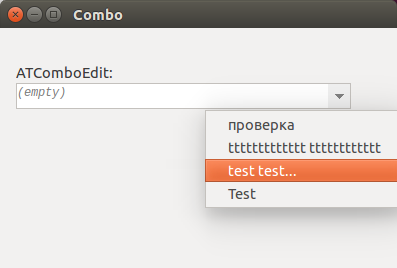](</File:atsynedit_combo.png>) | |
| 814 | 767 | ||
| 815 | - | ||
| 768 | + | Variants must be added to history by user code, using OnCommand handler: react to command "cCommand_KeyEnter". Example of handler: | |
| 769 | + | ``` | |
| 816 | 770 | procedure TfmCombo.ComboCommand(Sender: TObject; ACmd: integer; | |
| 817 | - | ||
| 818 | - | ||
| 819 | - | ||
| 820 | - | ||
| 821 | - | ||
| 822 | - | ||
| 823 | - | ||
| 824 | - | ||
| 771 | + | var AHandled: boolean); | |
| 772 | + | var | |
| 773 | + | s: string; | |
| 774 | + | n: integer; | |
| 825 | 775 | begin | |
| 826 | - | ||
| 827 | - | ||
| 828 | - | ||
| 829 | - | ||
| 830 | - | ||
| 831 | - | ||
| 832 | - | ||
| 833 | - | ||
| 776 | + | if ACmd=cCommand_KeyEnter then | |
| 777 | + | begin | |
| 778 | + | with ed do | |
| 779 | + | begin | |
| 780 | + | s:= UTF8Encode(Trim(Text)); | |
| 781 | + | ||
| 782 | + | Text:= ''; | |
| 783 | + | DoCaretSingle(0, 0); | |
| 784 | + | ||
| 785 | + | n:= Items.IndexOf(s); | |
| 786 | + | if n>=0 then Items.Delete(n); | |
| 787 | + | Items.Insert(0, s); | |
| 788 | + | end; | |
| 789 | + | AHandled:= true; | |
| 790 | + | end; | |
| 834 | 791 | end; | |
| 835 | - | ||
| 836 | - | ||
| 837 | - | ||
| 838 | 792 | ``` | |
| 839 | 793 | ||
| 840 | 794 | ## What props are useful for statusbar? | |
| 841 | 795 | ||
| 842 | - | ||
| 843 | - | ||
| 844 | - | ||
| 845 | - | ||
| 846 | - | ||
| 847 | - | ||
| 848 | - | ||
| 849 | - | ||
| 850 | - | ||
| 851 | - | ||
| 852 | - | ||
| 853 | - | ||
| 854 | - | ||
| 855 | - | ||
| 856 | - | ||
| 857 | - | ||
| 858 | - | ||
| 796 | + | * number of carets: Carets.Count | |
| 797 | + | * positions of carets: Carets.Items[i].PosX (column), PosY (line) | |
| 798 | + | * text encoding: Strings.Encoding | |
| 799 | + | * cEncAnsi: then codepage is given by Strings.EncodingCodepage | |
| 800 | + | * cEncUTF8: then presence of utf8 bom is given by Strings.SaveSignUtf8 | |
| 801 | + | * cEncWideLE, cEncWideBE: then presense of Unicode bom is given by Strings.SaveSignWide | |
| 802 | + | * text line endings (win/unix/mac): Strings.Endings | |
| 803 | + | * tab-char width: OptTabSize | |
| 804 | + | * tab-char entered by spaces: OptTabSpaces | |
| 805 | + | * index of top visible line: LineTop | |
| 806 | + | * index of left visible column: ColumnLeft | |
| 807 | + | * modified state: Modified | |
| 808 | + | * read-only mode: ModeReadOnly | |
| 809 | + | * insert/overwrite mode: ModeOverwrite | |
| 810 | + | * word-wrap mode: OptWrapMode | |
| 811 | + | * unprinted chars shown: OptUnprintedVisible | |
| 812 | + | * selection: get Carets.Items[i].PosX/PosY/EndX/EndY, for state of column selection get IsSelRectEmpty, SelRect | |
| 859 | 813 | ||
| 860 | 814 | ## How to customize popup menu? | |
| 861 | 815 | ||
| 862 | - | ||
| 816 | + | These properties allow to change all menus in control (you cannot modify default menu): | |
| 863 | 817 | ||
| 864 | - | ||
| 865 | - | ||
| 866 | - | ||
| 867 | - | ||
| 868 | - | ||
| 869 | - | ||
| 870 | - | ||
| 818 | + | * PopupText: for text area | |
| 819 | + | * PopupRuler | |
| 820 | + | * PopupMinimap | |
| 821 | + | * PopupMicromap | |
| 822 | + | * PopupGutterBm: for bookmarks column | |
| 823 | + | * PopupGutterFold: for folding column | |
| 824 | + | * PopupGutterNum: for line numbers column | |
| 871 | 825 | ||
| 872 | - | ||
| 826 | + | Prop OptMouse* exists, which allows to show menus on mouse-down or on mouse-up. | |
| 873 | 827 | ||
| 874 | 828 | ## How to know indexes of changed lines in OnChange? | |
| 875 | 829 | ||
| 876 | - | ||
| 830 | + | You have event Strings.OnLog. It gives parameters: | |
| 877 | 831 | ||
| 878 | - | ||
| 879 | - | ||
| 832 | + | * ALine: index of line at which change occurs | |
| 833 | + | * ALen: len of text which is added (ALen>0) or deleted (ALen<0) at line start | |
| 880 | 834 | ||
| 881 | - | ||
| 835 | + | Get the log, save it, and then parse it during OnChange. | |
| 882 | 836 | ||
| 883 | 837 | ## How to export text to HTML? | |
| 884 | 838 | ||
| 885 | - | ||
| 839 | + | Unit atsynedit_export_html has the function which does HTML report. It has several parameters to customize output. See example of usual parameters in the demo_editor. | |
| 886 | 840 | ||
| 887 | - | ||
| 841 | + | ATSynEdit has API which allows to make report to any format. It's function DoCalcLineHiliteEx. It returns syntax highlight info for any line. Info is stored in TATLineParts struct, see HTML exporter code how to use it. | |
| 888 | 842 | ||
| 889 | 843 | ## Short description of events? | |
| 890 | 844 | ||
| 891 | - | ||
| 892 | - | ||
| 893 | - | ||
| 894 | - | ||
| 895 | - | ||
| 896 | - | ||
| 897 | - | ||
| 898 | - | ||
| 899 | - | ||
| 900 | - | ||
| 901 | - | ||
| 902 | - | ||
| 903 | - | ||
| 904 | - | ||
| 905 | - | ||
| 906 | - | ||
| 907 | - | ||
| 908 | - | ||
| 909 | - | ||
| 910 | - | ||
| 911 | - | ||
| 912 | - | ||
| 913 | - | ||
| 914 | - | ||
| 915 | - | ||
| 845 | + | * OnBeforeCalcHilite: Called before OnCalcHilite for first visible line. | |
| 846 | + | * OnCalcBookmarkColor: Called to determine color of bookmark (background color of line with bookmark). | |
| 847 | + | * OnCalcHilite: Called to calculate syntax highlight for a line (or wrapped part of line). You need to fill TATLineParts struct for this line. | |
| 848 | + | * OnCalcStaple: Called to determine color of block staple (vertical line which is painted near fold-ranges). | |
| 849 | + | * OnChange: Called after any command which changes text. | |
| 850 | + | * OnChangeCaretPos: Called after any command which changes caret(s) position(s). | |
| 851 | + | * OnChangeState: Called after any command which changes editor state, such as read-only, insert/overwrite, word-wrap etc. | |
| 852 | + | * OnClickDouble: Called on double-click on text area. | |
| 853 | + | * OnClickGutter: Called on click on gutter area. | |
| 854 | + | * OnClickMicromap: Called on click on micromap area. | |
| 855 | + | * OnClickMiddle: Called on middle button click on text area. | |
| 856 | + | * OnClickTriple: Called on triple-click on text area. | |
| 857 | + | * OnClickMoveCaret: Called just before changing caret pos via mouse click (you get prev caret pos, new caret pos). | |
| 858 | + | * OnClickEndSelect: Called just after mouse-up, if single selection made (you get selection start pos, end pos). | |
| 859 | + | * OnCommand: Called before running any command. You can disable any command processing, or perform custom processing before/instead of command. | |
| 860 | + | * OnCommandAfter: Called after running command. | |
| 861 | + | * OnDrawBookmarkIcon: Called on painting gutter mark for line with bookmark. | |
| 862 | + | * OnDrawEditor: Called after painting entire text area. | |
| 863 | + | * OnDrawLine: Called after painting line (or wrapped part of line) on canvas. You can paint some "image" over this line. | |
| 864 | + | * OnDrawMicromap: Called on painting micromap area. | |
| 865 | + | * OnDrawRuler: Called after painting ruler area. | |
| 866 | + | * OnScroll: Called after any command which scrolls text. | |
| 867 | + | * OnPaste: Called just before pasting text. App can disable/override default pasting. | |
| 868 | + | * OnHotspotEnter: Called when mouse moving enters one of the ranges in Hotspots object. | |
| 869 | + | * OnHotspotExit: Called when mouse moving exits hotspot. | |
| 916 | 870 | ||
| 917 | 871 | ## What is logic of grouped-undo? | |
| 918 | 872 | ||
| 919 | - | ||
| 873 | + | There're kinds of group-marks in undo-items: hard-marks, soft-marks. | |
| 920 | 874 | ||
| 921 | - | ||
| 922 | - | ||
| 875 | + | * Hard-marks are placed on undo-items if you call Strings.BeginUndoGroup, editing, Strings.EndUndoGroup. All items marked with hard-marks are undone as group, even of OptUndoGrouped=false. | |
| 876 | + | * Soft-marks used only if OptUndoGrouped=true. Soft-marks are placed on one next undo-item, when user does mouse click (or some similar action); or in code by call Strings.SetGroupMark. All items beginning with last soft-marked item are undone as group. | |
| 923 | 877 | ||
| 924 | - | ||
| 878 | + | Example 1. OptUndoGrouped=true, such undo-items exist: | |
| 925 | 879 | ||
| 926 | - | ||
| 927 | - | ||
| 928 | - | ||
| 929 | - | ||
| 930 | - | ||
| 931 | - | ||
| 932 | - | ||
| 933 | - | ||
| 934 | - | ||
| 935 | - | ||
| 880 | + | * item1 | |
| 881 | + | * item2 | |
| 882 | + | * item3, soft-mark | |
| 883 | + | * item4 | |
| 884 | + | * item5, hard-mark | |
| 885 | + | * item6, hard-mark | |
| 886 | + | * item7 | |
| 887 | + | * item8, soft-mark | |
| 888 | + | * item9 | |
| 889 | + | * item10 | |
| 936 | 890 | ||
| 937 | - | ||
| 891 | + | Undo: | |
| 938 | 892 | ||
| 939 | - | ||
| 940 | - | ||
| 941 | - | ||
| 893 | + | * undone: item10..8; until soft-mark. | |
| 894 | + | * undone: item7..3; until soft-mark. | |
| 895 | + | * undone: item2..1. | |
| 942 | 896 | ||
| 943 | - | ||
| 897 | + | Example 2. OptUndoGrouped=false, undo-items: | |
| 944 | 898 | ||
| 945 | - | ||
| 946 | - | ||
| 947 | - | ||
| 948 | - | ||
| 949 | - | ||
| 950 | - | ||
| 951 | - | ||
| 899 | + | * item1 | |
| 900 | + | * item2 | |
| 901 | + | * item3, hard-mark | |
| 902 | + | * item4, hard-mark | |
| 903 | + | * item5, hard-mark | |
| 904 | + | * item6 | |
| 905 | + | * item7 | |
| 952 | 906 | ||
| 953 | - | ||
| 907 | + | Undo: | |
| 954 | 908 | ||
| 955 | - | ||
| 956 | - | ||
| 957 | - | ||
| 958 | - | ||
| 959 | - | ||
| 909 | + | * Undone: item7 | |
| 910 | + | * Undone: item6 | |
| 911 | + | * Undone: item5..3 | |
| 912 | + | * Undone: item2 | |
| 913 | + | * Undone: item1 | |
| 960 | 914 | ||
| 961 | - | ||
| 915 | + | Soft-marks also used together with hard-marks. Soft-mark is placed with first hard-mark after call Strings.BeginUndoGroup. This allows to undo N groups of edits, if many items hard-marked (w/out gaps). | |
| 962 | 916 | ||
| 963 | - | ||
| 917 | + | Example 3. Undo-items: | |
| 964 | 918 | ||
| 965 | - | ||
| 966 | - | ||
| 967 | - | ||
| 968 | - | ||
| 969 | - | ||
| 970 | - | ||
| 919 | + | * item1, hard-mark | |
| 920 | + | * item2, hard-mark, soft-mark | |
| 921 | + | * item3, hard-mark | |
| 922 | + | * item4, hard-mark, soft-mark | |
| 923 | + | * item5, hard-mark | |
| 924 | + | * item6, hard-mark | |
| 971 | 925 | ||
| 972 | - | ||
| 926 | + | Undo: | |
| 973 | 927 | ||
| 974 | - | ||
| 975 | - | ||
| 976 | - | ||
| 928 | + | * undone: item6..4 | |
| 929 | + | * undone: item3..2 | |
| 930 | + | * undone: item1 | |
| 977 | 931 | ||
| 978 | 932 | ## How to record/playback macros? | |
| 979 | 933 | ||
| 980 | - | ||
| 934 | + | Macro support must be done on app level, component does support by event OnCommand. Handle OnCommand and you get all command codes which run. Real app adds more commands in Keymap object and it must decide which of them it wants to record (e.g. don't record commands to show dialogs, and record commands which comment/uncomment lines). | |
| 981 | 935 | ||
| 982 | - | ||
| 936 | + | To playback macro, call DoCommand for all codes in macro. | |
| 983 | 937 | ||
| 984 | - | ||
| 938 | + | Hint. CudaText also adds 3 commands to help with macros: | |
| 985 | 939 | ||
| 986 | - | ||
| 987 | - | ||
| 988 | - | ||
| 940 | + | * "mouse click" (command recorded in OnClick event of editor) | |
| 941 | + | * "goto pos" (command recorded by GoTo dialog) | |
| 942 | + | * "finder action" (command recorded when doing find/replace actions) | |
| 989 | 943 | ||
| 990 | 944 | ## How to configure modifier-keys with click? | |
| 991 | 945 | ||
| 992 | - | ||
| 993 | - | ||
| 994 | - | ||
| 946 | + | You can configure some of mouse clicks with modifier keys: simple click, Ctrl+click, Shift+click, Ctrl+Shift+click, middle click, etc. Property MouseMap configures it, it's array, type TATMouseActions. Default code configures it in InitMouseActions like this: | |
| 947 | + | ``` | |
| 995 | 948 | procedure InitMouseActions(var M: TATMouseActions); | |
| 996 | - | ||
| 997 | - | ||
| 998 | - | ||
| 999 | - | ||
| 1000 | - | ||
| 1001 | - | ||
| 1002 | - | ||
| 1003 | - | ||
| 1004 | - | ||
| 1005 | - | ||
| 949 | + | //... | |
| 950 | + | begin | |
| 951 | + | SetLength(M, 0); | |
| 952 | + | Add(cMouseActionClickSimple, [ssLeft]); | |
| 953 | + | Add(cMouseActionClickRight, [ssRight]); | |
| 954 | + | Add(cMouseActionClickAndSelBlock, [ssLeft, ssShift]); | |
| 955 | + | Add(cMouseActionMakeCaret, [ssLeft, ssXControl]); | |
| 956 | + | Add(cMouseActionMakeCaretsColumn, [ssLeft, ssXControl, ssShift]); | |
| 957 | + | Add(cMouseActionNiceScrolling, [ssMiddle]); | |
| 958 | + | //... | |
| 1006 | 959 | ``` | |
| 1007 | 960 | ||
| 1008 | 961 | ## Does it use PrimarySelection on gtk? | |
| 1009 | 962 | ||
| 1010 | - | ||
| 1011 | - | ||
| 1012 | - | ||
| 1013 | - | ||
| 1014 | - | ||
| 1015 | - | ||
| 1016 | - | ||
| 1017 | - | ||
| 1018 | - | ||
| 1019 | - | ||
| 1020 | - | ||
| 1021 | - | ||
| 1022 | - | ||
| 1023 | - | ||
| 1024 | - | ||
| 963 | + | It can use it, all methods which work with clipboard, get AClipboardObject:TClipboard, here you can pass Clipboard, PrimarySelection, SecondarySelection. | |
| 1025 | 964 | ||
| 1026 | - | ||
| 1027 | - | ||
| 1028 | - | ||
| 1029 | - | ||
| 1030 | - | ||
| 1031 | - | ||
| 965 | + | Command codes for Paste: exist for Clipboard, and for PrimarySelection. This is part which reacts to command codes: | |
| 1032 | 966 | ``` | |
| 1033 | - | ||
| 1034 | - | ||
| 967 | + | cCommand_ClipboardCopy: Res:= DoCommand_ClipboardCopy(false, Clipboard); | |
| 968 | + | cCommand_ClipboardCopyAdd: Res:= DoCommand_ClipboardCopy(true, Clipboard); | |
| 969 | + | cCommand_ClipboardCut: Res:= DoCommand_ClipboardCut(Clipboard); | |
| 970 | + | ||
| 971 | + | //use Clipboard:TClipboard | |
| 972 | + | cCommand_ClipboardPaste: Res:= DoCommand_ClipboardPaste(false, false, Clipboard); | |
| 973 | + | cCommand_ClipboardPaste_Select: Res:= DoCommand_ClipboardPaste(false, true, Clipboard); | |
| 974 | + | cCommand_ClipboardPaste_KeepCaret: Res:= DoCommand_ClipboardPaste(true, false, Clipboard); | |
| 975 | + | cCommand_ClipboardPaste_Column: Res:= DoCommand_ClipboardPasteColumnBlock(false, Clipboard); | |
| 976 | + | cCommand_ClipboardPaste_ColumnKeepCaret: Res:= DoCommand_ClipboardPasteColumnBlock(true, Clipboard); | |
| 977 | + | ||
| 978 | + | //same, but use PrimarySelection:TClipboard | |
| 979 | + | cCommand_ClipboardAltPaste: Res:= DoCommand_ClipboardPaste(false, false, PrimarySelection); | |
| 980 | + | cCommand_ClipboardAltPaste_Select: Res:= DoCommand_ClipboardPaste(false, true, PrimarySelection); | |
| 981 | + | cCommand_ClipboardAltPaste_KeepCaret: Res:= DoCommand_ClipboardPaste(true, false, PrimarySelection); | |
| 982 | + | cCommand_ClipboardAltPaste_Column: Res:= DoCommand_ClipboardPasteColumnBlock(false, PrimarySelection); | |
| 983 | + | cCommand_ClipboardAltPaste_ColumnKeepCaret: Res:= DoCommand_ClipboardPasteColumnBlock(true, PrimarySelection); | |
| 984 | + | ``` | |
| 1035 | 985 | ||
| 1036 | - | ||
| 986 | + | Default code uses PrimarySelection in one place: on copy, it copies to Clipboard, then (under Linux/Mac) copies the same to PrimarySelection. | |
| 1037 | 987 | ||
| 1038 | - | ||
| 988 | + | To make middle-button-click paste from PrimarySelection, you need to handle OnClickMiddle, here's example from CudaText: | |
| 989 | + | ``` | |
| 1039 | 990 | procedure TEditorFrame.EditorOnClickMiddle(Sender: TObject; var AHandled: boolean); | |
| 1040 | - | ||
| 1041 | - | ||
| 1042 | - | ||
| 1043 | - | ||
| 1044 | - | ||
| 1045 | - | ||
| 1046 | - | ||
| 1047 | - | ||
| 1048 | - | ||
| 1049 | - | ||
| 991 | + | begin | |
| 992 | + | AHandled:= false; | |
| 993 | + | if EditorOps.OpMouseMiddleClickPaste then | |
| 994 | + | begin | |
| 995 | + | AHandled:= true; | |
| 996 | + | (Sender as TATSynEdit).DoCommand(cmd_MouseClickAtCursor); | |
| 997 | + | (Sender as TATSynEdit).DoCommand(cCommand_ClipboardAltPaste); //uses PrimarySelection:TClipboard | |
| 998 | + | exit; | |
| 999 | + | end; | |
| 1000 | + | end; | |
| 1050 | 1001 | ``` | |
| 1051 | 1002 | ||
| 1052 | 1003 | ## How to handle OnCalcLineHilite event | |
| 1053 | 1004 | ||
| 1054 | - | ||
| 1055 | - | ||
| 1056 | - | ||
| 1005 | + | This event has type: | |
| 1006 | + | ``` | |
| 1057 | 1007 | type | |
| 1058 | - | ||
| 1059 | - | ||
| 1008 | + | TATSynEditCalcHiliteEvent = procedure(Sender: TObject; var AParts: TATLineParts; | |
| 1009 | + | ALineIndex, ACharIndex, ALineLen: integer; var AColorAfterEol: TColor) of object; | |
| 1060 | 1010 | ``` | |
| 1061 | 1011 | ||
| 1062 | - | ||
| 1012 | + | Handler gets: | |
| 1063 | 1013 | ||
| 1064 | - | ||
| 1065 | - | ||
| 1066 | - | ||
| 1014 | + | * ALineIndex: index of line (in Strings object) | |
| 1015 | + | * ACharIndex: offset of fragment in line (not trivial only if line is wrapped) | |
| 1016 | + | * ALineLen: length of fragment in line (in WideChars) | |
| 1067 | 1017 | ||
| 1068 | - | ||
| 1018 | + | Handler must fill: | |
| 1069 | 1019 | ||
| 1070 | - | ||
| 1071 | - | ||
| 1020 | + | * AParts: array of highlighted parts, one part per one "syntax token" (e.g. one symbol, one keyword, one string const, one comment, etc). Fill all other parts with zeros. | |
| 1021 | + | * AColorAfterEol: color of background after line end (for empty area). | |
| 1072 | 1022 | ||
| 1073 | - | ||
| 1023 | + | Handler must handle the situation of line-wrapping inside long comments (or long string constants, etc), when one fragment gives part for ALineIndex=N, and next fragment gives part for ALineIndex=N+1. | |
| 1074 | 1024 | ||
| 1075 | - | ||
| 1025 | + | Example. Handler gets string with Pascal syntax like "procedure AB(name: word)". It must create such "parts" for this string: | |
| 1076 | 1026 | ||
| 1077 | - | ||
| 1078 | - | ||
| 1079 | - | ||
| 1080 | - | ||
| 1081 | - | ||
| 1082 | - | ||
| 1083 | - | ||
| 1084 | - | ||
| 1027 | + | * part[0]: for "procedure": TATLinePart properties: offset=0, len=9, etc | |
| 1028 | + | * part[1]: for "AB": offset=10, len=2 | |
| 1029 | + | * part[2]: for "(": offset=12, len=1 | |
| 1030 | + | * part[3]: for "name": offset=13, len=1 | |
| 1031 | + | * part[4]: for ":": offset=17, len=1 | |
| 1032 | + | * part[5]: for "word": offset=19, len=4 | |
| 1033 | + | * part[6]: for ")": offset=23, len=1 | |
| 1034 | + | * other parts must have offset=0, len=0 | |
| 1085 | 1035 | ||
| 1086 | 1036 | ## Details about highlighting rendering | |
| 1087 | 1037 | ||
| 1088 | - | ||
| 1038 | + | Central procedure is DoCalcLineHilite. For items of WrapInfo object, it calculates "line parts" (array TATLineParts of record TATLinePart). Each "part" here is one colored/styled fragment of string. After line parts are calculated, they pass to ATSynEdit_CanvasProc.CanvasTextOut to render. | |
| 1089 | 1039 | ||
| 1090 | - | ||
| 1040 | + | DoCalcLineHilite works like this: | |
| 1091 | 1041 | ||
| 1092 | - | ||
| 1093 | - | ||
| 1094 | - | ||
| 1095 | - | ||
| 1096 | - | ||
| 1042 | + | * Updates adapter's "dynamic hilites enabled" flag (to on/off) and calls adapter's OnCalcLineHilite. This makes initial version of line parts. | |
| 1043 | + | * Calculated line parts are added to cache (same calculation of same WrapInfo item will not happen, only cache item is used). | |
| 1044 | + | * Updates line parts via OnCalcHilite event (it's additional method to hilite, first is adapter, usually only adapter is used). | |
| 1045 | + | * Calls DoPartCalc_ApplyAttribsOver to apply Attribs object to line parts. E.g. add parts for spell-checker bad words. E.g. add parts for underlined URLs. | |
| 1046 | + | * Calls DoPartCalc_ApplySelectionOver to apply selection (for all multi-carets, or one column selection) to parts. | |
| 1097 | 1047 | ||
| 1098 | - | ||
| 1048 | + | DoPartCalc_ApplySelectionOver is complex function. It updates TATLineParts. How it works: | |
| 1099 | 1049 | ||
| 1100 | - | ||
| 1101 | - | ||
| 1102 | - | ||
| 1103 | - | ||
| 1050 | + | * It tests entire TATLineParts - is it all selected (optimization for selected-all), or all unselected (optimization for selected-none), or partly selected. | |
| 1051 | + | * If all selected, it just marks all parts (already calc'ed) with selection color. If partly selected, it finds parts, which are all/partly selected. | |
| 1052 | + | * For parts, which are all selected, it marks them with selection color. | |
| 1053 | + | * For parts, which are partly selected, it makes slow loop over offsets in parts. This slow loop finds chars which are selected and inserts new parts (with selection color) for them. | |
| 1104 | 1054 | ||
| 1105 | - | ||
| 1055 | + | To find/insert parts to TATLineParts, funcs DoPartFind/ DoPartInsert are used. | |
| 1106 | 1056 | ||
| 1107 | 1057 | ## How to control vert/horz scrolling? | |
| 1108 | 1058 | ||
| 1109 | - | ||
| 1059 | + | Property LineTop is index of top visible line, it is not precise vert scroll position, if long wrapped lines present. | |
| 1110 | 1060 | ||
| 1111 | - | ||
| 1061 | + | Public prop: WrapInfo, it's list of wrapinfo items. You can read it to get all info about wrapped lines, at which offsets they are wrapped. This allows to make smart jump of caret on wrapped lines. | |
| 1112 | 1062 | ||
| 1113 | - | ||
| 1063 | + | Public props: ScrollVert, ScrollHorz. They are records, NPos is scroll pos. ScrollVert.NPos is index in WrapInfo list, change it to make precise scrolling (call Update() then). ScrollHorz.NPos is horz scroll pos, now it's the same as prop ColumnLeft. | |
| 1114 | 1064 | ||
| 1115 | - | ||
| 1065 | + | Method DoScrollByDelta(Dx, Dy) allows to increment/decrement horz (Dx) and vert (Dy) scroll positions. | |
| 1116 | 1066 | ||
| 1117 | 1067 | ## When Update call is needed? | |
| 1118 | 1068 | ||
| 1119 | - | ||
| 1069 | + | First param of Update() method is boolean: force updating the WrapInfo object. | |
| 1120 | 1070 | ||
| 1121 | - | ||
| 1122 | - | ||
| 1123 | - | ||
| 1071 | + | * Update(true): needed if you changed Strings contents - directly via Strings object; or changed Fold ranges - directly via Fold object. Ie, if WrapInfo object needs update (and component cannot detect this automatically). | |
| 1072 | + | * Update(false): needed if you only changed look, ie carets, scroll position, bookmarks, markers, etc. | |
| 1073 | + | * no Update() call is needed, if you only called DoCommand(). DoCommand does it automatically. | |
| 1124 | 1074 | ||
| 1125 | 1075 | ## Behaviour of column selection | |
| 1126 | 1076 | ||
| 1127 | - | ||
| 1077 | + | ATSynEdit gives two modes of column selection, which have differences when you select over wrapped lines, or lines with full-width characters. This is controlled by property OptCaretsPrimitiveColumnSelection. | |
| 1128 | 1078 | ||
| 1129 | - | ||
| 1079 | + | * Value True: "pritimive mode" which behaves much like Sublime Text. In this mode editor places multi-selections over visual rectangle of characters. In this mode, one line can have 6 chars selected, and another line can have 8 chars selected. This depends on visual positions of chars in those lines. | |
| 1130 | 1080 | ||
| 1131 | - | ||
| 1081 | + | * Value False: in this mode, all affected lines have the same number of selected chars. But when full-width chars (e.g. CJK) are present in text, selection may look weird. Here is an example picture where starting lines are ASCII and ending lines have full-width chars. | |
| 1132 | 1082 | ||
| 1133 | - | ||
| 1083 | + | [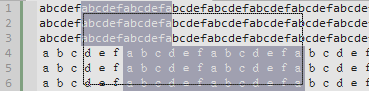](</File:cudatext-column-sel-cjk.png>) | |
| 1134 | 1084 | ||
| 1135 | - | ||
| 1085 | + | It is not a bug. In this example, user selected column block from column 7 (at line 1) until column 20 (at line 6), so column block takes columns 7...20 from all lines. On first ASCII lines, columns 7...20 take different visual area, than columns on last lines. When you copy/paste that block to another program, block may look differently. But that block contains equal number of chars on each line. | |
| 1136 | 1086 | ||
| 1137 | - | ||
| 1087 | + | Even more weird look happens when user selects column block over word-wrapped lines. | |
| 1138 | 1088 | ||
| 1139 | - | ||
| 1089 | + | [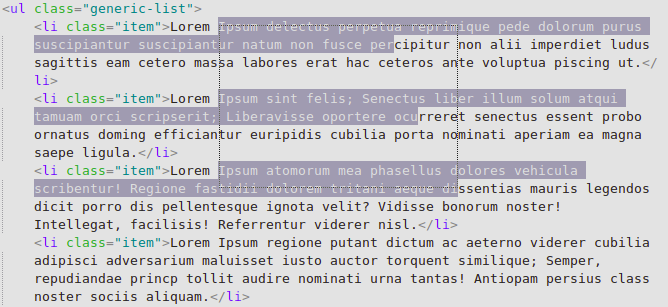](</File:cudatext-column-sel-weird.png>) | |
| 1140 | 1090 | ||
| 1141 | - | ||
| 1091 | + | Here is the code's logic in all these cases (with full-width characters and with word-wrapped lines). Code calculates (line1, column1) text position of column block left-top edge. Then code calculates (line2, column2) text position of column block right-bottom edge. Then code selects characters in range column1...column2 in all those affected lines line1...line2. And this code logic produces so weird look in word-wrapped mode. | |
| 1142 | 1092 | ||
| 1143 | 1093 | ## Horizontal scrollbar only increases but never shrinks? | |
| 1144 | 1094 | ||
| 1145 | - | ||
| 1146 | - | ||
| 1147 | - | ||
| 1095 | + | Horizontal scrollbar has unusual behaviour: its width only increases (when long lines appear in the visible area). It never shrinks when we scroll to shorter lines. It was made as a workaround to GTK2 widgetset freezes - it freezes when scrollbar shows/hides/shows/hides/etc on scrolling. | |
| 1148 | 1096 | ||
| 1149 | - | ||
| 1097 | + | You can try to disable this workaround in file atsynedit_defines.inc: | |
| 1098 | + | ``` | |
| 1150 | 1099 | {$define fix_horzscroll} //workaround for gtk2 widgetset unstable: it freezes app | |
| 1151 | - | ||
| 1152 | - | ||
| 1100 | + | //when horz-scroll hides/shows/hides/... | |
| 1101 | + | //ok also for win32 | |
| 1153 | 1102 | ``` | |
| 1154 | 1103 | ||
| 1155 | 1104 | ## more | |
| 1156 | 1105 | ||
| 1157 | 1106 | # Auto-completion lists | |
| 1158 | 1107 | ||
| 1159 | 1108 | ## General auto-completion API | |
| 1160 | 1109 | ||
| 1161 | - | ||
| 1162 | - | ||
| 1163 | - | ||
| 1110 | + | You need to install package ATSynEdit_Cmp, from repo <https://github.com/Alexey-T/ATSynEdit_Cmp> . | |
| 1164 | 1111 | ||
| 1165 | - | ||
| 1112 | + | Unit atsynedit_cmp_form (from ATSynEdit_Cmp package) has the function to show completion listbox in the editor. This listbox is not modal, it only emulates modality of some degree. It keeps editor caret blinking. While completion listbox is shown, editor doesn't get keyboard input, but listbox passes typing letters/Backspace/Left/Right to the editor, so it looks like editor gets some part of keyboard input. Listbox performs insertion of chosen item on Enter/Tab keys, and it hides on Esc-key or clicking outside of the listbox. | |
| 1113 | + | ``` | |
| 1166 | 1114 | type | |
| 1167 | - | ||
| 1168 | - | ||
| 1169 | - | ||
| 1170 | - | ||
| 1171 | - | ||
| 1172 | - | ||
| 1173 | - | ||
| 1174 | - | ||
| 1175 | - | ||
| 1176 | - | ||
| 1177 | - | ||
| 1178 | - | ||
| 1115 | + | TATCompletionPropEvent = procedure (Sender: TObject; | |
| 1116 | + | AContent: TStringList; out ACharsLeft, ACharsRight: integer) of object; | |
| 1117 | + | TATCompletionResultEvent = procedure (Sender: TObject; | |
| 1118 | + | const ASnippetId: string; ASnippetIndex: integer) of object; | |
| 1119 | + | ||
| 1120 | + | procedure EditorShowCompletionListbox(AEd: TATSynEdit; | |
| 1121 | + | AOnGetProp: TATCompletionPropEvent; | |
| 1122 | + | AOnResult: TATCompletionResultEvent = nil; | |
| 1123 | + | AOnChoose: TATCompletionResultEvent = nil; | |
| 1124 | + | const ASnippetId: string = ''; | |
| 1125 | + | ASelectedIndex: integer = 0; | |
| 1126 | + | AAllowCarets: boolean = false); | |
| 1179 | 1127 | ``` | |
| 1180 | 1128 | ||
| 1181 | - | ||
| 1129 | + | Callback AOnGetProp params: | |
| 1182 | 1130 | ||
| 1183 | - | ||
| 1131 | + | * AContent: list of lines, each line is S_id+'|'+S_text+'|'+S_desc. S_id is a prefix before actual text (good to pass here short texts: "var", "func"). S_text (it is usually second item) is text which is inserted into editor on closing listbox. After id/text several items may exist, all '|'-separated, they will show in additional listbox columns. For example, this TStringList line makes the listbox line of 3 columns: | |
| 1184 | 1132 | ||
| 1185 | - | ||
| 1186 | - | ||
| 1187 | 1133 | ``` | |
| 1134 | + | 'func|FuncName|(param1, param2)'#9'Func description'; | |
| 1135 | + | ``` | |
| 1188 | 1136 | ||
| 1189 | - | ||
| 1190 | - | ||
| 1137 | + | * * If you need to insert not only S_text but also additional substring (showing in the listbox only S_text), use such S_text: S_text+#1+S_before_caret+#1+S_after_caret (also substrings will be added before and after caret). This is used by HTML autocompletion: here S_before_caret is ">" and S_after_caret is "</tag>". | |
| 1138 | + | * At the end of lines, you may add Chr(9)+S_tooltip: string S_tooltip will show outside of listbox, in a tooltip, when user selects its line. To show multi-line tooltip, separate it with Chr(2). | |
| 1191 | 1139 | ||
| 1192 | - | ||
| 1140 | + | * ACharsLeft, ACharsRight: count of chars, to the left and right of the caret, which will be replaced by selected listbox item. These counts must be detected by app. Some app may need to count only word chars, some may need spaces/brackets. | |
| 1193 | 1141 | ||
| 1194 | - | ||
| 1142 | + | Notes: | |
| 1195 | 1143 | ||
| 1196 | - | ||
| 1197 | - | ||
| 1144 | + | * Function EditorShowCompletionListbox doesn't work for a) read-only editor, b) multi-carets. | |
| 1145 | + | * You can change colors/sizes/font of listbox: see unit source, it gives the global variable (record with many fields). | |
| 1198 | 1146 | ||
| 1199 | 1147 | ## Auto-completion using acp-files | |
| 1200 | 1148 | ||
| 1201 | - | ||
| 1149 | + | Unit atsynedit_cmp_acpfiles has the function to show auto-completion listbox, from CudaText/SynWrite .acp files. Acp file must be in the format described in the SynWrite help file. You may copy acp files from CudaText distro, or from additional lexers, ie from CudaText lexers on CudaText.SF.net. | |
| 1202 | 1150 | ||
| 1203 | - | ||
| 1151 | + | [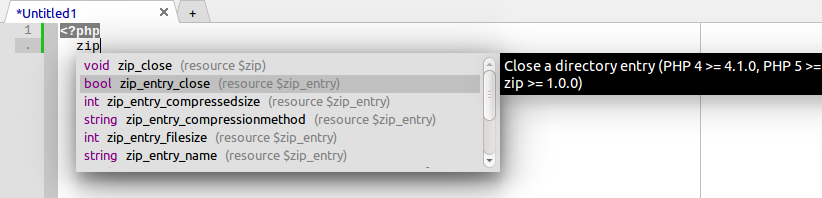](</File:cudatext-php-complete.png>) | |
| 1204 | 1152 | ||
| 1205 | 1153 | ## Auto-completion for CSS | |
| 1206 | 1154 | ||
| 1207 | - | ||
| 1155 | + | Unit atsynedit_cmp_css has the function to show auto-completion listbox, for CSS syntax. You must pass path of the file "data/autocompletespec/css_list.ini" from CudaText distro. CSS completion supports several modes: | |
| 1208 | 1156 | ||
| 1209 | - | ||
| 1210 | - | ||
| 1211 | - | ||
| 1157 | + | * caret is on css attrib before ":" char - then list of css attribs is shown (which match the substring under caret), | |
| 1158 | + | * caret is after css attrib and ":" char (before closing ";") - then list of values for this attrib is shown. | |
| 1159 | + | * and more | |
| 1212 | 1160 | ||
| 1213 | - | ||
| 1161 | + | [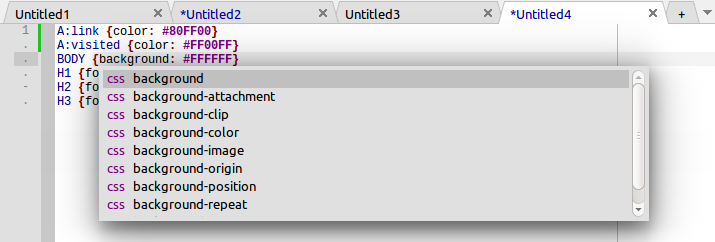](</File:cudatext-css-complete.png>) | |
| 1214 | 1162 | ||
| 1215 | 1163 | ## Auto-completion for HTML | |
| 1216 | 1164 | ||
| 1217 | - | ||
| 1165 | + | Unit atsynedit_cmp_html has the function to show auto-completion listbox, for HTML syntax. You must pass path of the file "data/autocompletespec/html_list.ini" from CudaText distro. HTML completion supports several modes: | |
| 1218 | 1166 | ||
| 1219 | - | ||
| 1220 | - | ||
| 1221 | - | ||
| 1222 | - | ||
| 1167 | + | * caret on opening/closing tag name: list of tags shown | |
| 1168 | + | * caret after tag, on attribute place before "=": list of attribs for found tag shown | |
| 1169 | + | * caret after tag, after attribute, after "=": list of values of found tag+attrib shown | |
| 1170 | + | * and more | |
| 1223 | 1171 | ||
| 1224 | - | ||
| 1172 | + | [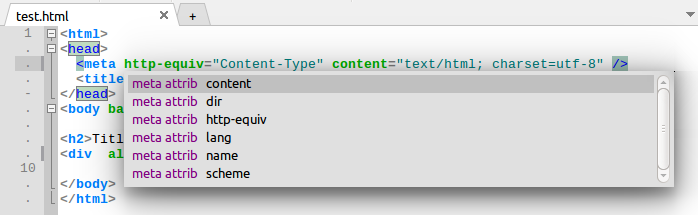](</File:cudatext-html-complete.png>) | |
| 1225 | 1173 | ||
| 1226 | 1174 | # Finder | |
| 1227 | 1175 | ||
| 1228 | - | ||
| 1229 | - | ||
| 1230 | - | ||
| 1231 | - | ||
| 1232 | - | ||
| 1233 | - | ||
| 1234 | - | ||
| 1235 | - | ||
| 1236 | - | ||
| 1237 | - | ||
| 1238 | - | ||
| 1239 | - | ||
| 1240 | - | ||
| 1241 | - | ||
| 1176 | + | Finder class TATEditorFinder is in unit atsynedit_finder. To use it, create Finder object and set its props: | |
| 1242 | 1177 | ||
| 1243 | - | ||
| 1178 | + | * Editor: editor object (text will be read automatically) | |
| 1179 | + | * StrFind: search-string (simple string or regex) | |
| 1180 | + | * StrReplace: replace-string (simple string or some regex, eg with "$0", "$1") | |
| 1181 | + | * boolean search flags: | |
| 1182 | + | * OptRegex: treat StrFind/StrReplace as regex | |
| 1183 | + | * OptCase: case-sensitive (for normal and regex modes) | |
| 1184 | + | * OptWords: whole-words search (for non-regex mode, for regex you must use "\b" specifier in search-string) | |
| 1185 | + | * OptBack: backward search (for non-regex mode) | |
| 1186 | + | * OptWrapped: continue search from top, if bottom reached (for back-search: continue from bottom, if top reached) | |
| 1187 | + | * OptInSelection: do search/replace in selection only (limitation exists: only 1st selection used) | |
| 1188 | + | * OptFromCaret: search goes from position of first caret (else: from start/end of text) | |
| 1189 | + | * OptConfirmReplace: each replace will occur after event OnConfirmReplace | |
| 1244 | 1190 | ||
| 1245 | - | ||
| 1191 | + | Dialog of demo: | |
| 1246 | 1192 | ||
| 1247 | - | ||
| 1193 | + | [](</File:atsynedit_finder.png>) | |
| 1248 | 1194 | ||
| 1249 | - | ||
| 1195 | + | Methods to find/replace text (they will place selection on found match, and scroll editor to caret, except method CountAll): | |
| 1196 | + | ``` | |
| 1250 | 1197 | function DoAction_FindSimple(const APosStart: TPoint): boolean; | |
| 1251 | - | ||
| 1252 | - | ||
| 1253 | - | ||
| 1254 | - | ||
| 1255 | - | ||
| 1256 | - | ||
| 1257 | - | ||
| 1258 | - | ||
| 1198 | + | function DoAction_FindOrReplace(AReplace, AForMany: boolean; out AChanged: boolean; | |
| 1199 | + | AUpdateCaret: boolean): boolean; | |
| 1200 | + | function DoAction_ReplaceSelected(AUpdateCaret: boolean): boolean; | |
| 1201 | + | procedure DoAction_FindAll(AResults: TATFinderResults; AWithEvent: boolean); | |
| 1202 | + | function DoAction_CountAll(AWithEvent: boolean): integer; | |
| 1203 | + | procedure DoAction_ExtractAll(AWithEvent: boolean; AMatches: TStringList; ASorted: boolean; | |
| 1204 | + | ADuplicates: TDuplicates); | |
| 1205 | + | function DoAction_ReplaceAll: integer; | |
| 1259 | 1206 | ``` | |
| 1260 | 1207 | ||
| 1261 | - | ||
| 1208 | + | Found position and len are saved in props: MatchPos, MatchLen. Internally Finder object uses ATStringBuffer to read editor lines into buffer and search inside buffer. Then ATStringBuffer methods used to calculate caret position (from buffer offset) and place caret/selection. Note for regex search: buffer contains only "\n" line ends, other ends don't happen (original file may have any ends). | |
| 1262 | 1209 | ||
| 1263 | - | ||
| 1210 | + | Finder has events: | |
| 1264 | 1211 | ||
| 1265 | - | ||
| 1266 | - | ||
| 1267 | - | ||
| 1212 | + | * OnProgress: allows to show progressbar during search | |
| 1213 | + | * OnFound: called when result found | |
| 1214 | + | * OnConfirmReplace: called before replacing text (to show confirmation) if OptConfirmReplace set | |
| 1268 | 1215 | ||
| 1269 | - | ||
| 1216 | + | Finder can handle multi-selections, by option OptInSelection. Selections are handled by CountAll, ReplaceAll. For other actions, selections don't make sense, because find-next makes new smaller selection (for found fragment) so prev big selection is lost. Tech note for replace-all: selections are looked from top to bottom, if they don't have common lines, and looked from bottom to top, if they have. This is done to not break lines, which are touched by 2+ selections. Count-all handles selections from top to bottom. | |
| 1270 | 1217 | ||
| 1271 | 1218 | # Adapters | |
| 1272 | 1219 | ||
| 1273 | 1220 | ## Adapters description | |
| 1274 | 1221 | ||
| 1275 | - | ||
| 1222 | + | To support syntax-highlighting in some way, you need | |
| 1276 | 1223 | ||
| 1277 | - | ||
| 1278 | - | ||
| 1224 | + | * Add event OnCalcHilite handler, which must fill the TATLineParts array with needed highlighting, or | |
| 1225 | + | * Create the unit with adapter class, child of TATAdapterHilite (unit atsynedit_adapters), which must fill the TATLineParts array, again. Partial code of the adapter class: | |
| 1279 | 1226 | ||
| 1280 | - | ||
| 1227 | + | ``` | |
| 1281 | 1228 | type | |
| 1282 | - | ||
| 1283 | - | ||
| 1284 | - | ||
| 1285 | - | ||
| 1286 | - | ||
| 1287 | - | ||
| 1288 | - | ||
| 1289 | - | ||
| 1290 | - | ||
| 1291 | - | ||
| 1292 | - | ||
| 1293 | - | ||
| 1294 | - | ||
| 1295 | - | ||
| 1296 | - | ||
| 1297 | - | ||
| 1298 | - | ||
| 1299 | - | ||
| 1300 | - | ||
| 1301 | - | ||
| 1302 | - | ||
| 1303 | - | ||
| 1304 | - | ||
| 1305 | - | ||
| 1229 | + | TATAdapterHilite = class(TComponent) | |
| 1230 | + | ... | |
| 1231 | + | public | |
| 1232 | + | constructor Create(AOwner: TComponent); override; | |
| 1233 | + | // | |
| 1234 | + | procedure OnEditorChange(Sender: TObject); virtual; | |
| 1235 | + | //called when editor's text changes. | |
| 1236 | + | ||
| 1237 | + | procedure OnEditorChangeEx(Sender: TObject; AChange: TATLineChangeKind; ALine, AItemCount: integer); virtual; | |
| 1238 | + | //detailed version of OnEditorChange | |
| 1239 | + | ||
| 1240 | + | procedure OnEditorIdle(Sender: TObject); virtual; | |
| 1241 | + | //called after text is changed, and pause passed (OptIdleInterval) | |
| 1242 | + | //fast changes (faster than OptIdleInterval): called only after last change | |
| 1243 | + | ||
| 1244 | + | procedure OnEditorCalcHilite(Sender: TObject; | |
| 1245 | + | var AParts: TATLineParts; | |
| 1246 | + | ALineIndex, ACharIndex, ALineLen: integer; | |
| 1247 | + | var AColorAfterEol: TColor; | |
| 1248 | + | AMainText: boolean); virtual; | |
| 1249 | + | //called to calculate hilite of entire line. | |
| 1250 | + | //ACharIndex is starting offset in this line, >0 if editor scrolled horizontally. | |
| 1251 | + | //ALineLen is len of line part, starting from ACharIndex. | |
| 1252 | + | ... | |
| 1306 | 1253 | ``` | |
| 1307 | 1254 | ||
| 1308 | - | ||
| 1255 | + | You need your custom adapter class, child of TATAdapterHilite, which must implement some of methods. You don't have to implement all of them, if your adapter doesn't need that. Then you must create an object of your adapter class, and assign this object to editor's AdapterForHilite property. | |
| 1309 | 1256 | ||
| 1310 | - | ||
| 1257 | + | The package ATSynEdit_Ex contains 2 ready adapter classes: for complex EControl .lcf lexers, and for CudaText simplified "lite" lexers. The lexer files are distributed in the CudaText repos on SourceForge. | |
| 1311 | 1258 | ||
| 1312 | 1259 | ## Adapter for EControl lexers | |
| 1313 | 1260 | ||
| 1314 | 1261 | See [[ATSynEdit EControl adapter]] | |
| 1315 | 1262 | ||
| 1316 | 1263 | # How to adapt TRegExpr upstream for ATSynEdit | |
| 1317 | 1264 | ||
| 1318 | - | ||
| 1319 | - | ||
| 1320 | - | ||
| 1321 | - | ||
| 1322 | - | ||
| 1323 | - | ||
| 1324 | - | ||
| 1325 | - | ||
| 1326 | - | ||
| 1327 | - | ||
| 1328 | - | ||
| 1329 | - | ||
| 1330 | - | ||
| 1331 | - | ||
| 1332 | - | ||
| 1333 | - | ||
| 1334 | - | ||
| 1265 | + | TRegExpr upstream is <https://github.com/andgineer/TRegExpr> . How to convert it to atsynedit_regexpr unit. | |
| 1335 | 1266 | ||
| 1336 | - | ||
| 1337 | - | ||
| 1338 | - | ||
| 1339 | - | ||
| 1340 | - | ||
| 1267 | + | * rename unit | |
| 1268 | + | * change "uses regexpr_unicodedata" to "uses ATSynEdit_UnicodeData" | |
| 1269 | + | * comment line {$I regexpr_compilers.inc} | |
| 1270 | + | * set define on: UniCode | |
| 1271 | + | * set define on: FastUnicodeData | |
| 1272 | + | * set defines off: UseSpaceChars, UseWordChars | |
| 1273 | + | * fix vars: | |
| 1341 | 1274 | ||
| 1342 | - | ||
| 1343 | - | ||
| 1344 | 1275 | ``` | |
| 1276 | + | RegExprModifierI: boolean = False; // default value for ModifierI | |
| 1277 | + | RegExprModifierR: boolean = True; // default value for ModifierR | |
| 1278 | + | RegExprModifierS: boolean = False; // default value for ModifierS | |
| 1279 | + | RegExprModifierG: boolean = True; // default value for ModifierG | |
| 1280 | + | RegExprModifierM: boolean = True; // default value for ModifierM | |
| 1281 | + | RegExprModifierX: boolean = False; // default value for ModifierX | |
| 1282 | + | ||
| 1283 | + | RegExprLineSeparators: RegExprString = #$a#$b#$c | |
| 1284 | + | {$IFDEF UniCode} | |
| 1285 | + | + #$2028#$2029#$85 | |
| 1286 | + | {$ENDIF}; | |
| 1287 | + | RegExprLinePairedSeparator: RegExprString = ''; //#$d#$a; | |
| 1288 | + | ||
| 1289 | + | FUseOsLineEndOnReplace := False; | |
| 1290 | + | FReplaceLineEnd := #10; //not sLineBreak, it is CR LF on Windows | |
| 1291 | + | ``` | |
| 1345 | 1292 | ||
| 1346 | 1293 | --- | |
| 1347 | - | ||
| 1348 | - | ||
| 1349 | - | ||
| 1294 | + | *From the Free Pascal wiki, page "ATSynEdit", as the Internet Archive kept it on 2025-09-05, last changed on 2025-04-21. Copyright stays with the author who wrote it, according to the old wiki's [[Licensing]] page. If you have concerns about this material, [message the admin](/wiki-contact).* |