

ATButton
About
ATButton is OS-independant button component, flat look. Button as usual has Caption, OnClick.
- button state can be: usual (default: light gray), mouse-over (light gray), checked (dark gray), disabled (red-gray)
- buttons have border of 1..n pixels
- prop Caption
- prop Checkable means that click toggles Checked
- prop Focusable means that button can focus (and paint frame of other color if focused)
- prop Flat: passive (not under cursor) button don't paint its backgnd and border
- prop Kind: button can have several kinds.
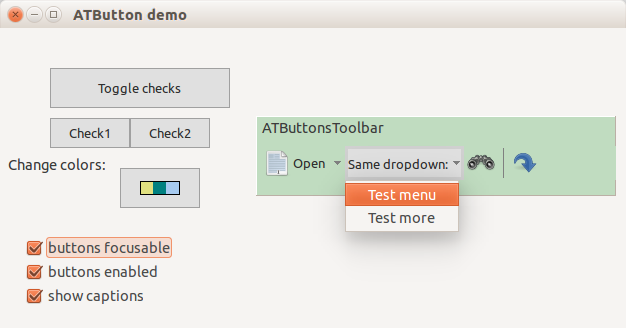
Author: Alexey Torgashin
Kinds of buttons
Buttons can have these Kind values:
- abuTextOnly: Show caption only.
- abuIconOnly: Show icon only.
- abuTextIconHorz: Show icon and caption righter it.
- abuTextIconVert: Show icon and caption below it.
- abuSeparatorHorz: Show horizontal separator line.
- abuSeparatorVert: Show vertical separator line.
Icon can be set by 2 ways:
- prop Images: TImageList; with prop ImageIndex (used first)
- prop Picture: TPicture (used if no Images/ImageIndex is set)
To paint also drop-down arrow on the right side, set Arrow=True. To make button with arrow only, set Kind=abuTextOnly and Arrow=True.
Theme
Colors/fonts of all buttons defined by global var, of type like this
type
  TATButtonTheme = record
    FontName: string;
    FontSize: integer;
    FontStyles: TFontStyles;
    ColorFont,
    ColorFontDisabled,
    ColorBgPassive,
    ColorBgOver,
    ColorBgChecked,
    ColorBgDisabled,
    ColorArrow,
    ColorBorderPassive,
    ColorBorderOver,
    ColorBorderFocused: TColor;
    MouseoverBorderWidth: integer;
    PressedBorderWidth: integer;
    PressedCaptionShiftY: integer;
    PressedCaptionShiftX: integer;
  end;

var
  ATButtonTheme: TATButtonTheme;
License
MPL 2.0 or LGPL.
Download
GitHub repository: https://github.com/Alexey-T/ATFlatControls
From the Free Pascal wiki, page "ATButton", as it stood on 2021-12-16 after a change by Alextp, out of the wiki's dump of 2024-05-26. Copyright stays with the author who wrote it, according to the old wiki's Licensing page. If you have concerns about this material, message the admin.
Talk about this page
Nobody has opened a bench for this page yet. Sign in to open one.