

ARM Embedded Tutorial - Installing Lazarus and Free Pascal: what changed
Revision 2 to 3. Removed lines have a minus sign; added lines have a plus sign.
| Old | New | Line | |
|---|---|---|---|
| 1 | 1 | ## Quickstart Installation via FPCUPdeluxe | |
| 2 | 2 | ||
| 3 | 3 | The easiest way to install Embedded Support for a huge variety of embedded controllers is to use fpcupdeluxe. | |
| 4 | 4 | ||
| 5 | 5 | Download latest(!!!) FPCUPdeluxe from | |
| 6 | 6 | ||
| 7 | 7 | [fpcupdeluxe releases on github](https://github.com/LongDirtyAnimAlf/fpcupdeluxe/releases). | |
| 8 | 8 | ||
| 9 | 9 | Make sure that you use a version \>= v1.8.2r of FPCUPdeluxe, the tutorial references features that are only in this and newer versions. | |
| 10 | 10 | ||
| 11 | 11 | As we are using trunk versions we highly recommend to create an extra installation for embedded targets so that issues in compiler/lazarus do not effect your other work. | |
| 12 | 12 | ||
| 13 | 13 | ## Steps for people mainly interested in Wio Terminal or Raspberry Pico | |
| 14 | 14 | ||
| 15 | 15 | When your primary targts of interest are the Wio Terminal or the Raspberry Pico, then installation consists of entering an installation directory for fpcupdeluxe on top left and then selecting the speedbutton for 'Wio' or 'Pico' on the bottom of the screen: | |
| 16 | 16 | ||
| 17 | - | ||
| 17 | + | 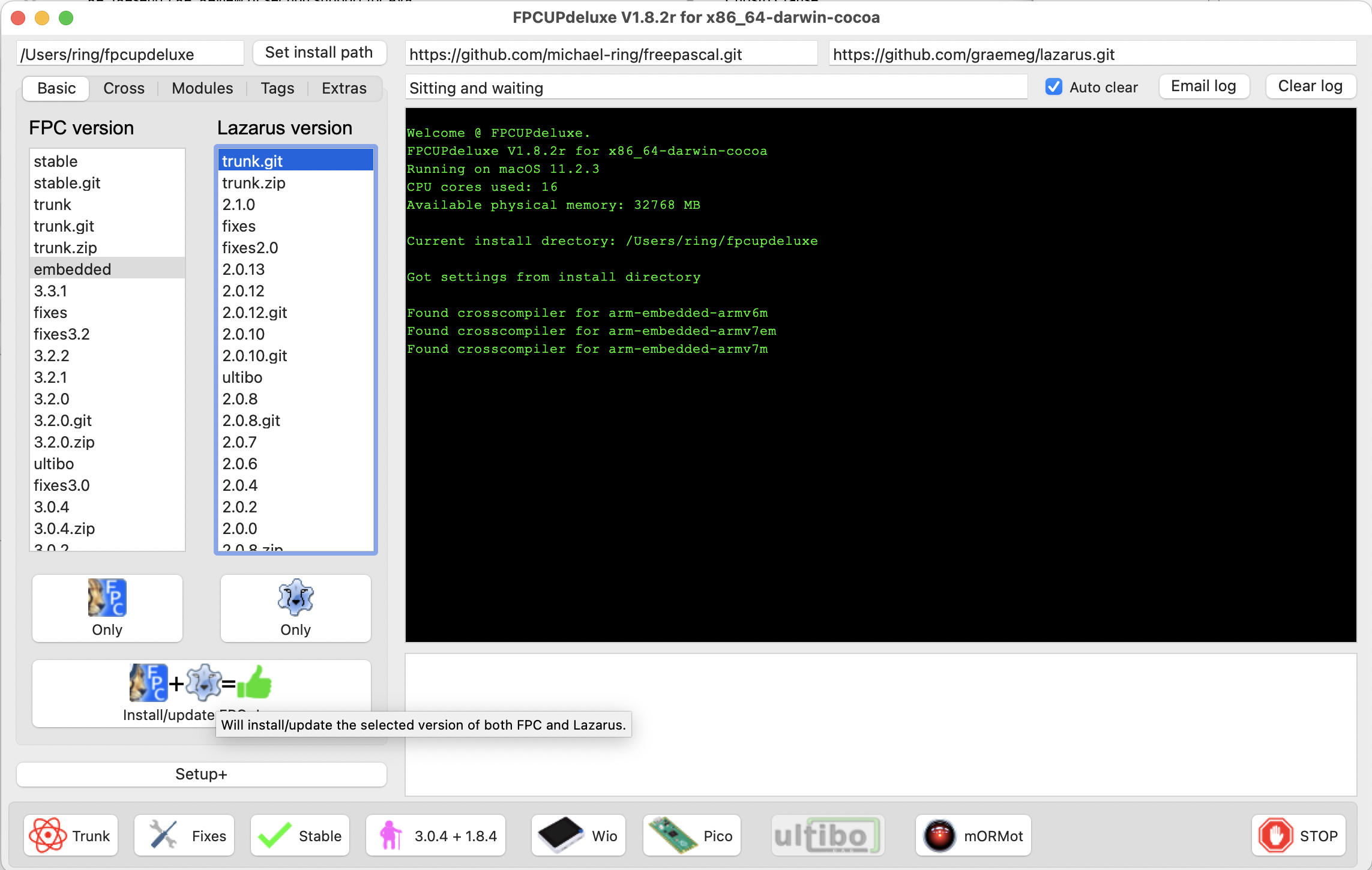 | |
| 18 | 18 | ||
| 19 | 19 | ## Steps for people interested in other targets like arm avr or espressif microcontrollers | |
| 20 | 20 | ||
| 21 | 21 | For all other targets select embedded (or trunk.git) for fpc and trunk.git for lazarus. | |
| 22 | 22 | ||
| 23 | 23 | The reason to choose embedded would be to have support for more arm-embedded controllers that are currently not yet available in fpc trunk and installing trunk.git instead of stable lazarus is a good idea because debugging for embedded targets is much improved in lazarus trunk. | |
| 24 | 24 | ||
| 25 | 25 | For all platforms besides arm trunk.git is likely the best choice for both fpc and lazarus. | |
| 26 | 26 | ||
| 27 | 27 | To build your embedded version of Lazarus follow those simple steps: | |
| 28 | 28 | ||
| 29 | 29 | - Select the target directory for your installation | |
| 30 | 30 | - Select embedded or trunk.git for fpc | |
| 31 | 31 | - Select trunk.git for lazarus | |
| 32 | 32 | ||
| 33 | 33 | Hit the Install/update FPC+Laz button. | |
| 34 | 34 | ||
| 35 | - | ||
| 35 | + |  | |
| 36 | 36 | ||
| 37 | 37 | After installation of FPC+Lazarus is done switch to the 'Cross' Tab | |
| 38 | 38 | ||
| 39 | 39 | In the Cross tab select the desired CPU and the desired OS und then click on the 'Set subarch' button to define the subarch that you would like to use: | |
| 40 | 40 | ||
| 41 | - | ||
| 41 | + | 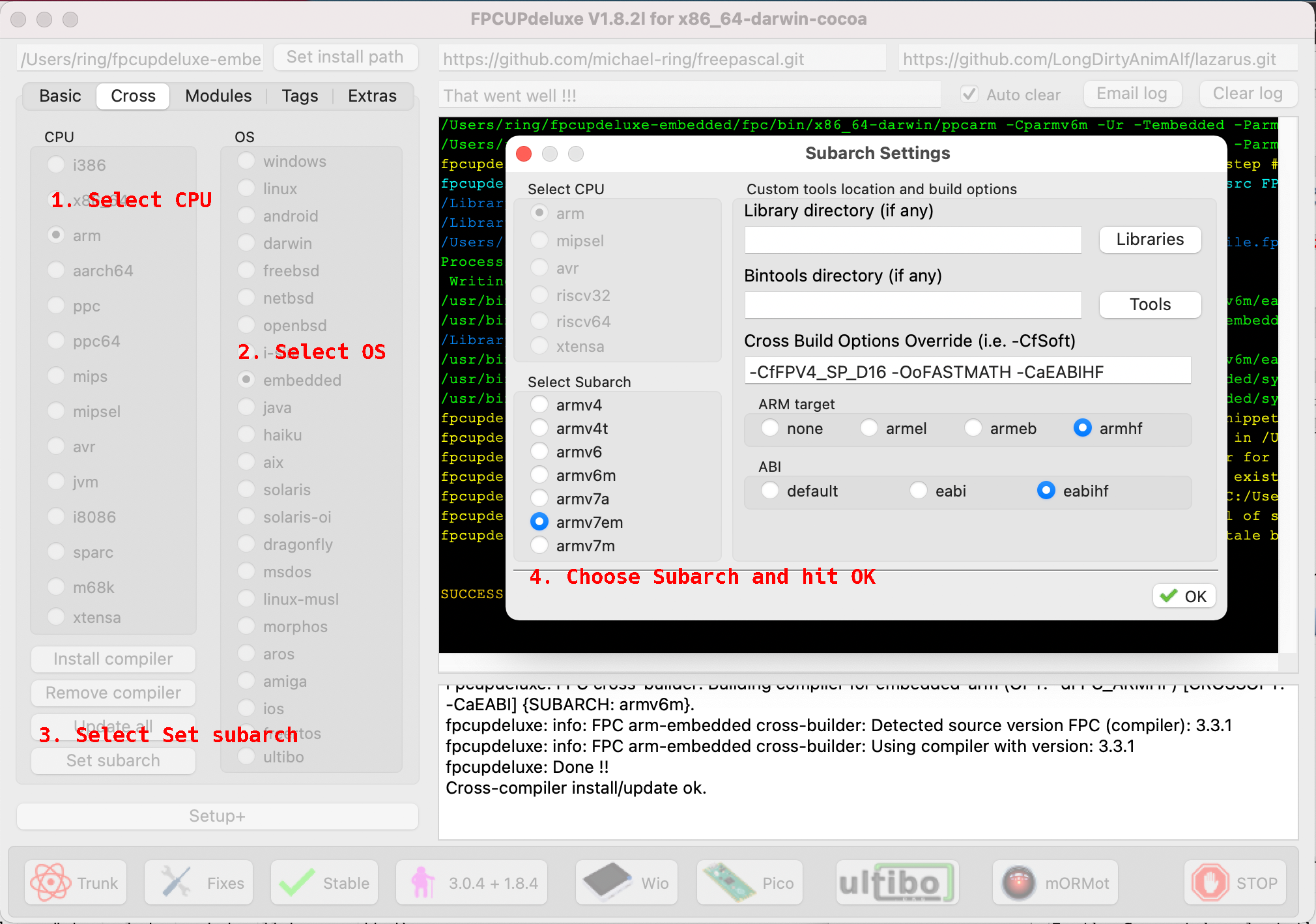 | |
| 42 | 42 | ||
| 43 | 43 | Now you can select 'Install compiler' button and the selected subarch will be installed..... | |
| 44 | 44 | ||
| 45 | 45 | You may repeat this step for all CPU's subarchs you wish to install. | |
| 46 | 46 | ||
| 47 | 47 | Some hints on Subarchs: | |
| 48 | 48 | ||
| 49 | 49 | - armv6m Subarch is good for Raspberry Pico, SAMD21 based board like the Arduino Zero or STM32F0/G0/L0 families | |
| 50 | 50 | ||
| 51 | 51 | - armv7m is for the Bluepill, Arduino Due or STM32F1/L1 | |
| 52 | 52 | ||
| 53 | 53 | - armv7em is for the Wio Terminal, Blackpill or SAMD51 / STM32F3/F4/G4/H7/L4 families | |
| 54 | 54 | ||
| 55 | 55 | - avr5 is for Arduino Uno | |
| 56 | 56 | ||
| 57 | 57 | - lx6 is for ESP32 based boards | |
| 58 | 58 | ||
| 59 | 59 | ## Install extra devel tools | |
| 60 | 60 | ||
| 61 | 61 | There is an extra module available to ease development by providing pre-compiled binaries for some usefull tools: | |
| 62 | 62 | ||
| 63 | 63 | For avr development: | |
| 64 | 64 | ||
| 65 | 65 | - avarice (gdbserver for several debug probes manufactured by Microchip) | |
| 66 | 66 | ||
| 67 | 67 | - bossac (upload firmwares to avr controllers) | |
| 68 | 68 | ||
| 69 | 69 | for arm development: | |
| 70 | 70 | ||
| 71 | 71 | - openocd (gdbserver for all kinds of debug probes) | |
| 72 | 72 | ||
| 73 | 73 | - st-util (gdbserver specially for st-link v2/v3 debug probes) | |
| 74 | 74 | ||
| 75 | 75 | for the Raspberry Pico: | |
| 76 | 76 | ||
| 77 | 77 | - openocd-picodebug (gdbserver for running a debug probe on the 2nd cpu of your pico) | |
| 78 | 78 | ||
| 79 | 79 | - openocd-rp2040 (gdbserver for using a 2nd pico as a debug probe) | |
| 80 | 80 | ||
| 81 | 81 | general: | |
| 82 | 82 | ||
| 83 | 83 | - gdb-multiarch (one gdb to debug all embedded archs available) | |
| 84 | 84 | ||
| 85 | 85 | - gdb-multiarch-8.3.1 (an older version of gdb that works better for avr) | |
| 86 | 86 | ||
| 87 | 87 | Install it by selection develtools4fpc on the Modules tab of fpcupdeluxe by selection develtools4fpc and clicking 'Install Module': | |
| 88 | 88 | ||
| 89 | - | ||
| 89 | + | 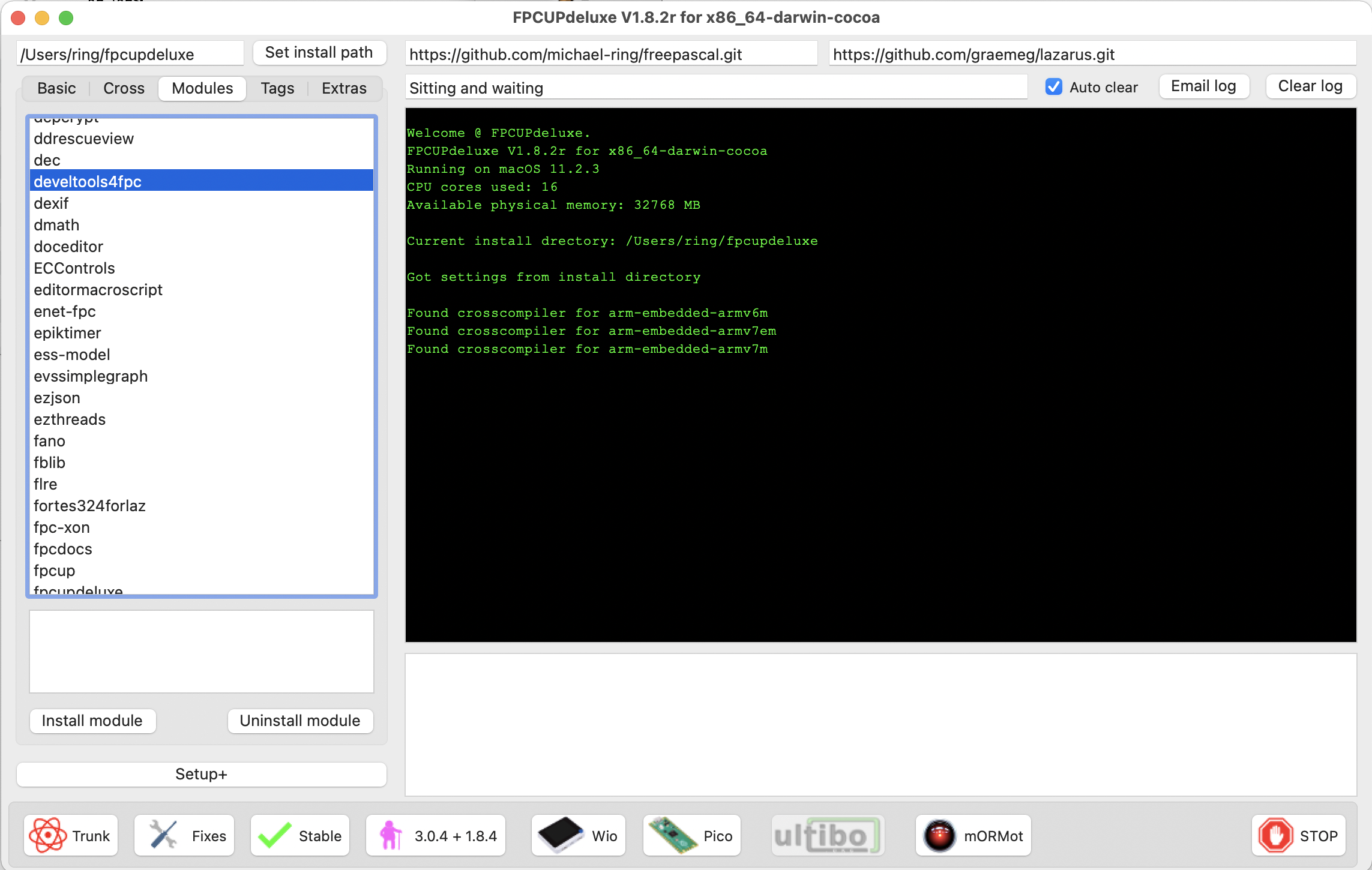 | |
| 90 | 90 | ||
| 91 | 91 | the files will then get deployed to the ccr/devtools4fpc directory inside of your fpcupdeluxe installation | |
| 92 | 92 | ||
| 93 | 93 | More information on fpcupdeluxe can be found here: [[fpcupdeluxe|FpcUpDeluxe Wiki]]. | |
| 94 | 94 | ||
| 95 | 95 | --- | |
| 96 | 96 | *From the Free Pascal wiki, page "ARM Embedded Tutorial - Installing Lazarus and Free Pascal", as it stood on 2021-04-15 after a change by MiR, out of the wiki's dump of 2024-05-26. Copyright stays with the author who wrote it, according to the old wiki's [[Licensing]] page. If you have concerns about this material, [message the admin](/wiki-contact).* |