

Hi,
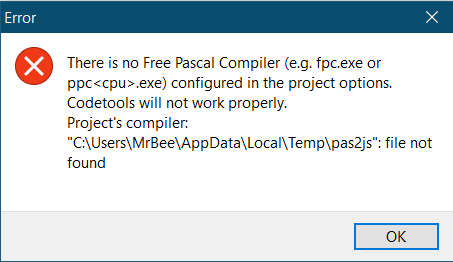
I've installed pas2js package in Lazarus. Now I could start a pas2js project using provided template and dialog. But everytime I compile a project, it complains unable to find pas2js compiler. Screenshot attached. So, how to install pas2js correctly so I could use Lazarus to write pas2js projects? Is there any additional setting or specific file? I'm using a fresh installed Lazarus IDE v.2.0.10 with FPC v.3.2.0 on Windows 10 64 bit. Thank you.
Best regards,
–Mr Bee
-------------- next part --------------
An HTML attachment was scrubbed...
URL: <http://lists.freepascal.org/pipermail/pas2js/attachments/20201004/be0e9e54/attachment-0001.htm> -------------- next part --------------
A non-text attachment was scrubbed...
Name: 1601802128585blob.jpg
Type: image/png
Size: 13257 bytes
Desc: not available
URL: <http://lists.freepascal.org/pipermail/pas2js/attachments/20201004/be0e9e54/attachment-0001.png>
Mailing lists / pas2js / 2020-10
Using pas2js with Lazarus IDE
10 messages · 6 people · –
- MMr Bee 3
- MMattias Gaertner 2
- SSven Barth 2
- MMgr. Janusz Chmiel 1
- MMichael Van Canneyt 1
- Wwarleyalex 1
Reply by email Subscribe to this list Your subscription
Read-only archive. Use j and k to move between messages.
Mr Bee wrote 9 lines
You need to set it in Tools -> Settings -> Environment -> Pas2JS -> "Path of pas2js.exe"
Regards,
Sven
-------------- next part --------------
An HTML attachment was scrubbed...
URL: <http://lists.freepascal.org/pipermail/pas2js/attachments/20201004/39b34274/attachment.htm>
You need to set it in Tools ⭢ Settings ⭢ Environment ⭢ Pas2JS ⭢ "Path of pas2js.exe"
I know. It already contains "$MakeExe(IDE,pas2js)" value (without the double quotes, of course). Also other input boxes are already had its values as well. I thought by installing pas2js package it will set it up automatically. If I have to change it, what is the value I have to fill into it? Doesn't it within FPC's bin folder?
–Mr Bee
Pada Minggu, 4 Oktober 2020 17.37.52 WIB, Sven Barth via Pas2js menulis:
Am 04.10.2020 um 11:07 schrieb Mr Bee via Pas2js:
Hi,
I've installed pas2js package in Lazarus. Now I could start a pas2js project using provided template and dialog. But everytime I compile a project, it complains unable to find pas2js compiler. Screenshot attached. So, how to install pas2js correctly so I could use Lazarus to write pas2js projects? Is there any additional setting or specific file?
You need to set it in Tools -> Settings -> Environment -> Pas2JS -> "Path of pas2js.exe"
Regards,
Sven
Mr Bee wrote 9 lines
I don't know what it should be for the released version (though pas2js is located in the $lazdir\fpc\3.2.0\bin\x86_64-win64 directory). I'm using pas2js from SVN thus I've manually set it to my compiled pas2js.exe.
Regards,
Sven
-------------- next part --------------
An HTML attachment was scrubbed...
URL: <http://lists.freepascal.org/pipermail/pas2js/attachments/20201004/82dcd339/attachment.htm>
My best approach is:
To be able to work with pas2js, you need to inform the Pas2JS compiler to the PATH.
For WINDOWS: go to → System → Advanced Options → Environment Variables → Edit
Change your Operating System PATH variable → Edit
Inform the the Path of pas2js you want to add →
D:\pas2js\pas2js-windows-1.5.1\bin
Happy coding!
I had the compiler path set manually and hard coded (not using any IDE’s constants) into the Options input. Now it complains unable to find the system unit. Do I have to set it up manually too? Lazarus has had pas2js with it since the beginning. Then the pas2js package should be able to setup all the paths automatically. It should have default values that works. If everything still need to be done manually, so what’s the point of installation package? I know everything can be setup manually. But I’m about to explain how to use pas2js with Lazarus to some newbies in my local Pascal community. I don’t want them to mess around with the system, like setting PATH environment variable. Because that's supposed to be done by the IDE, right? I hope the pas2js installation process would be simple and straightforward, like other packages.
Thank you.
–Mr Bee
Pada Minggu, 4 Oktober 2020 19.21.10 WIB, warleyalex via Pas2js menulis:
My best approach is:
To be able to work with pas2js, you need to inform the Pas2JS compiler to the PATH.
For WINDOWS: go to → System → Advanced Options → Environment Variables → Edit
Change your Operating System PATH variable → Edit
Inform the the Path of pas2js you want to add →
D:\pas2js\pas2js-windows-1.5.1\bin
Happy coding!
I know. It already contains "$MakeExe(IDE,pas2js)" value (without the double quotes, of…
Show quoted text 5 lines
$MakeExe(IDE,pas2js) on Windows returns pas2js.exe without the quotes. As this has no path, the IDe searches it using the environment variable PATH.
https://wiki.lazarus.freepascal.org/IDE_Macros_in_paths_and_filenames
Also other input boxes are already had its values as well. I thought by installing pas2js package it will set it up automatically.
There is no default location for the pas2js compiler. You can unzip it anywhere.
Maybe the pas2jsdsgn package can check and ask for the path when you create a pas2js project.
If I have to change it, what is the value I have to fill into it? Doesn't it within FPC's bin folder?
No. Here are the official downloads for pas2js:
https://wiki.freepascal.org/pas2js#Where_to_get_it
Mattias
I don't know what it should be for the released version (though pas2js is located in the…
Dear MR Barth,
It is really necessary to browse to Pas2js.exe. Default choice will really not work.
But I Am sad, that project creation template do not allow user to change default project name. it contain Project1. If user would change The project name, this new name could be automatically attached inside created html page, if user check The appropriate checkbox. Sure, I can simply change The page title by using Kalepad. And Czech characters in name are allowed when saving with UTF8 encoding from Akelpad.
-------------- next part --------------
An HTML attachment was scrubbed...
URL: <http://lists.freepascal.org/pipermail/pas2js/attachments/20201006/e4b4aa9d/attachment.htm>
Mgr. Janusz Chmiel wrote 7 lines
This is still on my todo list.
The HTML file generation needs a rework.
Michael.
It is really necessary to browse to Pas2js.exe. Default choice will really not work. But…
[...] Sure, I can simply change The page title by using Kalepad.
Or Lazarus.
And Czech characters in name are allowed when saving with UTF8 encoding from Akelpad.
Same in Lazarus.
Mattias