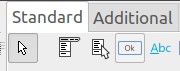
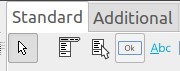
My computer uses a 43 inch TV screen for a monitor, running at 4096x2160 resolution. This is an appropriate resolution to run programs like? Firefox or LibreOffice, since its icon sizes are customizable. For my Lazarus 3.4, dated 2024-05-26, I get icons like these
i.e. an individual icon is 30x30 pixels. Since my cursor needs to be 48 pixels wide (and thus obliterates any tool help), to make it findable on the large screen, I am looking for a facility to selectively, i.e. without affecting text size in any of the editors, increase icon size in the tool bars. Does such a setting exist?
Thank you
-------------- next part --------------
An HTML attachment was scrubbed...
URL: <http://lists.lazarus-ide.org/pipermail/lazarus/attachments/20240906/7144235a/attachment.htm> -------------- next part --------------
A non-text attachment was scrubbed...
Name: Screenshot_20240906_092439.jpg
Type: image/jpeg
Size: 5685 bytes
Desc: not available
URL: <http://lists.lazarus-ide.org/pipermail/lazarus/attachments/20240906/7144235a/attachment.jpg>