Sign in Join

Live chat for Free Pascal, Lazarus, Delphi and every Pascal programmer.

Mailing lists / lazarus / 2024-03

When I brought a project from Linux to Windows it didn't open anymore

4 messages · 2 people · –

Reply by email Subscribe to this list Your subscription

Read-only archive. Use j and k to move between messages.

Arí Ricardo Ody

Hey guys!

I have a very simple Lazarus project. The most complex thing is to open a sequential file and write one line.

I decided to take it from Lazarus 3.2 on Windows to Lazarus 2.2 on Linux Mint. I took it. Everything runs right. I made several changes and tests until I thought it was the way I wanted.

(What a distro, guys. Everything works perfectly and we don't even need a Linux expert to help us use and configure it, as it occurs in other linux distros).

I decided to take my project back to Windows. I compressed all existing modules in the directory where they were .lpi, .lfm, .res, .lps, .lpr, .pas, etc. in ZIP format. Later I opened the project directory in Windows and unzipped the ZIP created in Linux.

Surprise! The project does not open correctly in Windows. The object inspector, for example, is blank. I'm starting to think that "write once compile everywhere" works, pero no mucho.

Would anyone have any guidance to resolve this problem? Or did I lose my Windows 11 version project?

Greetings from S?o Paulo - Brasil

Ar? Ricardo
-------------- next part --------------
An HTML attachment was scrubbed...
URL: <http://lists.lazarus-ide.org/pipermail/lazarus/attachments/20240317/ddad0d8d/attachment.htm>
Reply by email

Bart
to Arí Ricardo Ody
I decided to take it from Lazarus 3.2 on Windows to Lazarus 2.2 on Linux Mint. I took it. Everything runs right. I made several changes and tests until I thought it was the way I wanted.

I'm surprised this even works, since lpi format has changed.

Would anyone have any guidance to resolve this problem? Or did I lose my Windows 11 version project?

First: make a backup.

I would delete the .lps files, they contain session information and you can do without that.
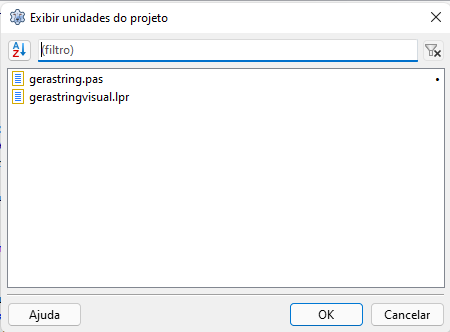
What does Menu->Project->Units say?
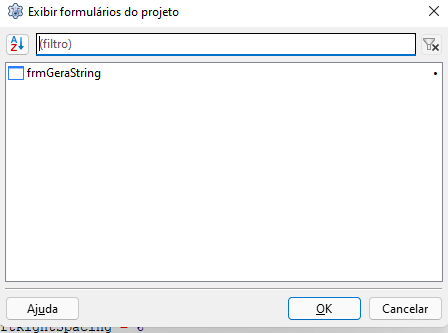
And Menu->Project-Forms?

Bart

Reply by email

Arí Ricardo Ody
to Bart

[image: image.png]

[image: image.png]

On Sun, Mar 17, 2024 at 5:24?PM Bart via lazarus <

Show quoted text 29 lines
wrote: On Sun, Mar 17, 2024 at 9:06?PM Ar? Ricardo Ody via lazarus wrote: > I decided to take it from Lazarus 3.2 on Windows to Lazarus 2.2 on Linux Mint. I took it. Everything runs right. I made several changes and tests until I thought it was the way I wanted. I'm surprised this even works, since lpi format has changed. > Would anyone have any guidance to resolve this problem? Or did I lose my Windows 11 version project? First: make a backup. I would delete the .lps files, they contain session information and you can do without that. What does Menu->Project->Units say? And Menu->Project-Forms? -- Bart -- _______________________________________________ lazarus mailing list https://lists.lazarus-ide.org/listinfo/lazarus

-------------- next part --------------
An HTML attachment was scrubbed...
URL: <http://lists.lazarus-ide.org/pipermail/lazarus/attachments/20240318/156a7831/attachment-0001.htm> -------------- next part --------------
A non-text attachment was scrubbed...
Name: image.png
Type: image/png
Size: 11379 bytes
Desc: not available
URL: <http://lists.lazarus-ide.org/pipermail/lazarus/attachments/20240318/156a7831/attachment-0002.png> -------------- next part --------------
A non-text attachment was scrubbed...
Name: image.png
Type: image/png
Size: 11647 bytes
Desc: not available
URL: <http://lists.lazarus-ide.org/pipermail/lazarus/attachments/20240318/156a7831/attachment-0003.png>

Reply by email

Bart
to Arí Ricardo Ody

On Tue, Mar 19, 2024 at 1:06?AM Ar? Ricardo Ody via lazarus wrote:
<snipped images>

Click on either the form or the unit and click OK. The IDE will open the form/unit.
If you can't see the form after that, try: menu->window->center a lost window.

Bart

Reply by email