Sign in Join

Live chat for Free Pascal, Lazarus, Delphi and every Pascal programmer.

Mailing lists / lazarus / 2023-04

Strange linker messages "undefined reference" when building on RPi4 - CompileLog_2022-04-15.log (0/1)

14 messages · 6 people · –

Reply by email Subscribe to this list Your subscription

Read-only archive. Use j and k to move between messages.

Bo Berglund

I have a project that builds fine on one RPi4 where I have installed Lazarus 2.2.6/Fpc 3.2.2 from sources.
This is a rather old device and I am trying to create a backup build unit to migrate into
On this I have installed the same versions but using fpcupdeluxe for arm-linux.

On the new unit some test projects work fine but the real target project seems to have some problems.

I have retrieved the same project from our Subversion server so the project files are the same versions.
On the original RPi4 I can compile/build/debug just fine.

But when I try compiling or building the project on the newer RPi4 I get the output below in the messages log (the full log as copied from Lazarus attached).

The problem seems to come from the Synapse package but this is installed via OnlinePackageManeger on both systems...
What does this mean:

undefined reference to `SYSTEM_$$_POS$CHAR$RAWBYTESTRING$$LONGINT'

And what can I do? Is something missing in the fpcupdeluxe installation? This has not happened to me before.

Log excerpt follows:

First this happens in the output:
----------------------------------
Note: Duplicate unit "synautil" in "SSRemoteServerLx", orphaned ppu "/home/pi/projects/SSRemoteServer/source/lib/arm-linux/synautil.ppu" Note: Duplicate unit "synautil" in "laz_synapse 40.1", ppu="/home/pi/LazFpc/Laz_2.2.6/config_lazarus/onlinepackagemanager/packages/synapse40.1/lib/arm-linux/synautil.ppu", source="/home/pi/LazFpc/Laz_2.2.6/config_lazarus/onlinepackagemanager/packages/synapse40.1/synautil.pas" Note: Duplicate unit "synaser" in "SSRemoteServerLx", orphaned ppu "/home/pi/projects/SSRemoteServer/source/lib/arm-linux/synaser.ppu" Note: Duplicate unit "synaser" in "laz_synapse 40.1", ppu="/home/pi/LazFpc/Laz_2.2.6/config_lazarus/onlinepackagemanager/packages/synapse40.1/lib/arm-linux/synaser.ppu", source="/home/pi/LazFpc/Laz_2.2.6/config_lazarus/onlinepackagemanager/packages/synapse40.1/synaser.pas" Note: Duplicate unit "synafpc" in "SSRemoteServerLx", orphaned ppu "/home/pi/projects/SSRemoteServer/source/lib/arm-linux/synafpc.ppu" Note: Duplicate unit "synafpc" in "laz_synapse 40.1", ppu="/home/pi/LazFpc/Laz_2.2.6/config_lazarus/onlinepackagemanager/packages/synapse40.1/lib/arm-linux/synafpc.ppu", source="/home/pi/LazFpc/Laz_2.2.6/config_lazarus/onlinepackagemanager/packages/synapse40.1/synafpc.pas" Note: Duplicate unit "fpserialport" in "SSRemoteServerLx", orphaned ppu "/home/pi/projects/SSRemoteServer/source/lib/arm-linux/fpserialport.ppu" Note: Duplicate unit "fpserialport" in "fpserialpkg 0.0", ppu="/home/pi/LazFpc/Laz_2.2.6/config_lazarus/cmplaz/FpSerialPort/lib/arm-linux/fpserialport.ppu", source="/home/pi/LazFpc/Laz_2.2.6/config_lazarus/cmplaz/FpSerialPort/fpserialport.pas"

Then some hints on unused variables for the units being compiled etc...

Then this:
----------------------------------------
/home/pi/projects/SSRemoteServer/source/SSRemoteServerLx.lpr(32,5) Hint: (5023) Unit "BaseUnix" not used in SSRemoteServerLx
(9022) Compiling resource
/home/pi/projects/SSRemoteServer/source/lib/arm-linux/SSRemoteServerLx.or (9015) Linking /home/pi/projects/SSRemoteServer/source/SSRemoteServerLx /usr/bin/ld: //home/pi/projects/SSRemoteServer/source/lib/arm-linux/synautil.o: in function `SYNAUTIL_$$_finalize_implicit$':
/home/pi/projects/SSRemoteServer/source/synautil.pas:(.text.n_synautil_$$_decodetimezone$ansistring$longint$$boolean+0x68): undefined reference to `SYSTEM_$$_POS$CHAR$RAWBYTESTRING$$LONGINT' /usr/bin/ld:
/home/pi/projects/SSRemoteServer/source/synautil.pas:(.text.n_synautil_$$_decodetimezone$ansistring$longint$$boolean+0x7c): undefined reference to `SYSTEM_$$_POS$CHAR$RAWBYTESTRING$$LONGINT' /usr/bin/ld:
/home/pi/projects/SSRemoteServer/source/synautil.pas:(.text.n_synautil_$$_decoderfcdatetime$ansistring$$tdatetime+0x1cc): undefined reference to `SYSTEM_$$_POS$CHAR$RAWBYTESTRING$$LONGINT' /usr/bin/ld:
/home/pi/projects/SSRemoteServer/source/synautil.pas:(.text.n_synautil_$$_dump$ansistring$ansistring+0x60): undefined reference to `SYSUTILS_$$_FILEEXISTS$RAWBYTESTRING$$BOOLEAN' /usr/bin/ld:
/home/pi/projects/SSRemoteServer/source/synautil.pas:(.text.n_synautil_$$_dumpex$ansistring$ansistring+0x60): undefined reference to `SYSUTILS_$$_FILEEXISTS$RAWBYTESTRING$$BOOLEAN'

This goes on for a while until:
--------------------------------
/home/pi/projects/SSRemoteServer/source/class_SSRemoteClientComm.pas(290,3) Hint: (5028) Local const "DLE" is not used
/home/pi/projects/SSRemoteServer/source/class_SSRemoteClientComm.pas(283,3) Hint: (5023) Unit "IniFileFuncs" not used in class_SSRemoteClientComm /home/pi/projects/SSRemoteServer/source/SSRemoteServerLx.lpr(32,5) Hint: (5023) Unit "BaseUnix" not used in SSRemoteServerLx

Now the compile is done an link starts
--------------------------------------
(9022) Compiling resource
/home/pi/projects/SSRemoteServer/source/lib/arm-linux/SSRemoteServerLx.or

(9015) Linking /home/pi/projects/SSRemoteServer/source/SSRemoteServerLx

/usr/bin/ld: //home/pi/projects/SSRemoteServer/source/lib/arm-linux/synautil.o: in function `SYNAUTIL_$$_finalize_implicit$':

/home/pi/projects/SSRemoteServer/source/synautil.pas:(.text.n_synautil_$$_decodetimezone$ansistring$longint$$boolean+0x68): undefined reference to `SYSTEM_$$_POS$CHAR$RAWBYTESTRING$$LONGINT'

/usr/bin/ld:
/home/pi/projects/SSRemoteServer/source/synautil.pas:(.text.n_synautil_$$_decodetimezone$ansistring$longint$$boolean+0x7c): undefined reference to `SYSTEM_$$_POS$CHAR$RAWBYTESTRING$$LONGINT'

/usr/bin/ld:
/home/pi/projects/SSRemoteServer/source/synautil.pas:(.text.n_synautil_$$_decoderfcdatetime$ansistring$$tdatetime+0x1cc): undefined reference to `SYSTEM_$$_POS$CHAR$RAWBYTESTRING$$LONGINT'

/usr/bin/ld:
/home/pi/projects/SSRemoteServer/source/synautil.pas:(.text.n_synautil_$$_headerstolist$tstrings+0xb0): undefined reference to `SYSTEM_$$_POS$CHAR$RAWBYTESTRING$$LONGINT'

/usr/bin/ld:
/home/pi/projects/SSRemoteServer/source/synautil.pas:(.text.n_synautil_$$_listtoheaders$tstrings+0x98): undefined reference to `SYSTEM_$$_POS$CHAR$RAWBYTESTRING$$LONGINT'

Until some 40-50 lines later:
-----------------------------
/home/pi/projects/SSRemoteServer/source/SSRemoteServerLx.lpr(239,1) Error: (9013) Error while linking

/home/pi/projects/SSRemoteServer/source/SSRemoteServerLx.lpr(239,1) Fatal:
(10026) There were 1 errors compiling module, stopping

Fatal: (1018) Compilation aborted
Error: /home/pi/LazFpc/Laz_2.2.6/fpc/bin/arm-linux/ppcarm returned an error exitcode

Bo Berglund Developer in Sweden

Reply by email

Bo Berglund
to Bo Berglund
Bo Berglund wrote 24 lines
I have a project that builds fine on one RPi4 where I have installed Lazarus 2.2.6/Fpc 3.2.2 from sources. This is a rather old device and I am trying to create a backup build unit to migrate into On this I have installed the same versions but using fpcupdeluxe for arm-linux. On the new unit some test projects work fine but the real target project seems to have some problems. I have retrieved the same project from our Subversion server so the project files are the same versions. On the original RPi4 I can compile/build/debug just fine. But when I try compiling or building the project on the newer RPi4 I get the output below in the messages log (the full log as copied from Lazarus attached). The problem seems to come from the Synapse package but this is installed via OnlinePackageManeger on both systems... What does this mean: undefined reference to `SYSTEM_$$_POS$CHAR$RAWBYTESTRING$$LONGINT' And what can I do? Is something missing in the fpcupdeluxe installation? This has not happened to me before.

So I gave up on this and decided to build a new development device using the same RPi4 but with a fresh SD-card with the latestr PiOS bullseye version.

After setting up the pi itself and installing the build requirements for Lazarus/Fpc I could use fpcupdeluxe arm-linux to install the Lazarus 2.2.6/Fpc 3.2.2 combo and set it up using OLPM the way I always do. This includes installing Synapse40 as well as a number of other packages from my list, which I always use.

And now the project as checked out via subversion builds fine and works as it should. It builds both on Windows10 and on RaspberryPi4.

So the errors I had before must be related to the older operating system (buster) and some missing dependencies maybe.

In any case I am good to go now.

Bo Berglund Developer in Sweden

Reply by email

Bo Berglund
to Bo Berglund
Bo Berglund wrote 5 lines
And now the project as checked out via subversion builds fine and works as it should. It builds both on Windows10 and on RaspberryPi4. So the errors I had before must be related to the older operating system (buster) and some missing dependencies maybe.

Well, this was *not* the main reason it turns out...

What I had done was to install the newest Lazarus/Fpc and opening the existing project in lazarus.
When I use the Quick Compile it does apparently only compile the source files and finishes OK.
But with Build/Compile it does the same but then it jumps into the linker without also compiling the dependencies, which are present in the lib directory but from the *earlier* versions...

I ran into this also on the newly installed RPi4 with bullseye Linux and then realized what was going on because here I had two projects, one that had been built previously and one that hadn't and the latter worked just fine as reported above. Both were copied over from the old system SD-card...

So what I did now was to delete the lib dir below the project dir and now the Build/Compile works just fine! It is recreated with fresh files.

So to keep in mind:
Make sure to remove any project subdirs autocreated by Lazarus/Fpc when migrating a project folder.

Bo Berglund Developer in Sweden

Reply by email

Jean SUZINEAU
to Bo Berglund

Unfortunately my lazarus is installed in French , I don't have the exact label of the menu item in English,

But usually for this kind of problem I use "Nettoyer et construire" in "Ex?cuter" menu.

I imagine that in English it's something like "Clean and build" in "Run" menu.

In this dialog you can tune what compiled files you want to delete in the various dependencies.

Reply by email

Bo Berglund
to Jean SUZINEAU
Jean SUZINEAU wrote 11 lines
Unfortunately my lazarus is installed in French , I don't have the exact label of the menu item in English, But usually for this kind of problem I use "Nettoyer et construire" in "Ex?cuter" menu. I imagine that in English it's something like "Clean and build" in "Run" menu. In this dialog you can tune what compiled files you want to delete in the various dependencies.

Right you are! :-)

I should have looked further down in the Run menu... The English name is:

Clean up and Build

That should have done it in the first place...

You never stop learning!

Bo Berglund Developer in Sweden

Reply by email

Giuliano Colla
to Bo Berglund

Il 17/04/2023 08:15, Bo Berglund via lazarus ha scritto:

You never stop learning!

Another thing I have learned with experience, is that sometimes the cleanup isn't perfect and leaves some dangling ppu which creates a problem like the one you had. It occurred to me when attempting to rebuild Lazarus, and I was getting an unexpected "undefined reference". I was trying to build a normal IDE, so I tried to build a "debug IDE" instead. With different compilation flags it was forced to rebuild everything, and it worked fine. Then I tried again a "normal IDE", and this time it went OK.

Giuliano

Do not do to others as you would have them do to you.They might have different tastes.

Reply by email

Mattias Gaertner
to Giuliano Colla
Show quoted text 9 lines
Il 17/04/2023 08:15, Bo Berglund via lazarus ha scritto: > You never stop learning! Another thing I have learned with experience, is that sometimes the cleanup isn't perfect and leaves some dangling ppu which creates a problem like the one you had. It occurred to me when attempting to rebuild Lazarus, and I was getting an unexpected "undefined reference".

Can happen when some unit is moved to another package.

I was trying to build a normal IDE, so I tried to build a "debug IDE" instead. With different compilation flags it was forced to rebuild everything, and it worked fine. Then I tried again a "normal IDE", and this time it went OK.

That's why there is "Clean all" radiobutton on the configure build lazarus dialog. It building fails, try that.

Mattias

Reply by email

Giuliano Colla
to Mattias Gaertner

Il 17/04/2023 10:32, Mattias Gaertner via lazarus ha scritto:

That's why there is "Clean all" radiobutton on the configure build lazarus dialog. It building fails, try that.

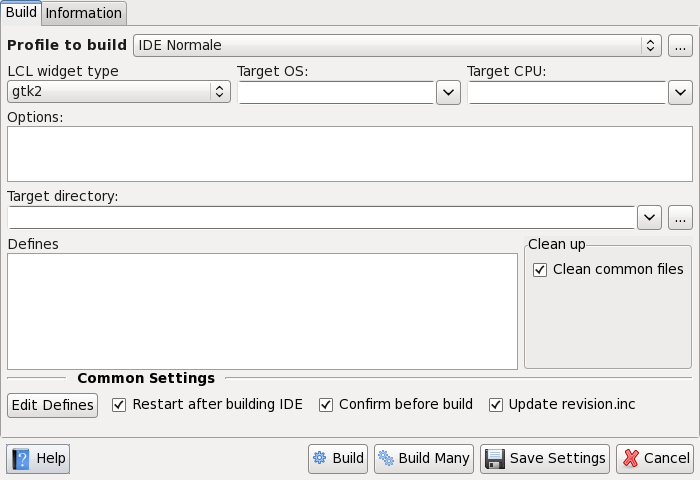
I did look in vain for that radiobutton. The only one available (Lazarus 2.2.6) is "clean common files":

Giuliano

Do not do to others as you would have them do to you.They might have different tastes. -------------- next part -------------- An HTML attachment was scrubbed... URL: <http://lists.lazarus-ide.org/pipermail/lazarus/attachments/20230418/ab4ee23e/attachment-0001.htm> -------------- next part -------------- A non-text attachment was scrubbed... Name: mkdkilikbiabfneg.png Type: image/png Size: 36091 bytes Desc: not available URL: <http://lists.lazarus-ide.org/pipermail/lazarus/attachments/20230418/ab4ee23e/attachment-0001.png>

Reply by email

John Landmesser
to Giuliano Colla
Giuliano Colla wrote 15 lines
Il 17/04/2023 10:32, Mattias Gaertner via lazarus ha scritto: > That's why there is "Clean all" radiobutton on the configure build > lazarus dialog. It building fails, try that. I did look in vain for that radiobutton. The only one available (Lazarus 2.2.6) is "clean common files": Giuliano -- Do not do to others as you would have them do to you.They might have different tastes.

I have them all on Lazarus 2.3.0 (rev main-2_3-2936-g6fda552055) FPC 3.2.2 x86_64-linux-gtk2

Perhaps resize this Dialog?

-------------- next part --------------
An HTML attachment was scrubbed...
URL: <http://lists.lazarus-ide.org/pipermail/lazarus/attachments/20230418/2ebc36d4/attachment-0001.htm> -------------- next part --------------
A non-text attachment was scrubbed...
Name: mkdkilikbiabfneg.png
Type: image/png
Size: 36091 bytes
Desc: not available
URL: <http://lists.lazarus-ide.org/pipermail/lazarus/attachments/20230418/2ebc36d4/attachment-0001.png>

Reply by email

Luca Olivetti
to Giuliano Colla: Il 17/04/2023 10:32, Mattias Gaertner via lazarus ha scritto: I did look in vain for that…

El 18/4/23 a les 12:25, Giuliano Colla via lazarus ha escrit:

I did look in vain for that radiobutton. The only one available (Lazarus 2.2.6) is "clean common files":

Strange that it's a only checkbox and not a radiobutton. In 2.2.6 (win32/linux qt5) I see a radiobutton with the options "Automatically", "Clean common files", "Clean all", then there's a checkbox "Switch after building to automatically". Maybe it's a problem with gtk2?

Bye

Luca Olivetti Wetron Automation Technology http://www.wetron.es/ Tel. +34 93 5883004 (Ext.3010) Fax +34 93 5883007

Reply by email

Luca Olivetti
to Luca Olivetti

El 18/4/23 a les 15:41, Luca Olivetti via lazarus ha escrit:

Show quoted text 10 lines
El 18/4/23 a les 12:25, Giuliano Colla via lazarus ha escrit: > I did look in vain for that radiobutton. The only one available > (Lazarus 2.2.6) is "clean common files": Strange that it's a only checkbox and not a radiobutton. In 2.2.6 (win32/linux qt5) I see a radiobutton with the options "Automatically", "Clean common files", "Clean all", then there's a checkbox "Switch after building to automatically". Maybe it's a problem with gtk2?

Nope, I rebuild the ide with gtk2 and the radiobutton is still there.

Bye

Luca Olivetti Wetron Automation Technology http://www.wetron.es/ Tel. +34 93 5883004 (Ext.3010) Fax +34 93 5883007

Reply by email

Giuliano Colla

Il 18/04/2023 12:33, Mattias Gaertner ha scritto:

Show quoted text 6 lines
Tools / Configure Build Lazarus / page Build / groupbox Clean up / Clean all https://wiki.lazarus.freepascal.org/IDE_Window:_Configure_Build_Lazarus#Buttons Mattias

I've found why the radio buttons aren't visible anymore in my setup. My installation is standard for Linux: lazarus in /usr/lib64 owned by root, build occurs in my local .lazarus folder. But there's some mix-up between source directory (read-only) and target directory (writable) In buildlazdialog.pas you find:

Show quoted text 6 lines
procedure TConfigureBuildLazarusDlg.ShowHideCleanup(aShow: Boolean); // When target directory is read-only, hide Radiobuttons and show a single checkbox. begin CleanAutoRadioButton.Visible:=aShow; CleanCommonRadioButton.Visible:=aShow; CleanAllRadioButton.Visible:=aShow; CleanOnceCheckBox.Visible:=aShow; CleanCommonCheckBox.Visible:=not aShow; end;

I just changed the ownership of /usr/lib64/lazarus, from root to me and the radiobuttons do show.

The same mix-up occurs with the QT5 directory. When attempting to build a QT5 version it complains that it cannot create the QT5 directory in the /usr/lib64/etc directory, when actually it needs only to build in the local .lazarus directory.
I'll investigate further.

Giuliano

Do not do to others as you would have them do to you.They might have different tastes.

Reply by email

Bo Berglund
to Mattias Gaertner: On Mon, 17 Apr 2023 10:11:28 +0200 Can happen when some unit is moved to another package.…
Mattias Gaertner wrote 23 lines
On Mon, 17 Apr 2023 10:11:28 +0200 Giuliano Colla via lazarus wrote: > Il 17/04/2023 08:15, Bo Berglund via lazarus ha scritto: > > > You never stop learning! > > Another thing I have learned with experience, is that sometimes the > cleanup isn't perfect and leaves some dangling ppu which creates a > problem like the one you had. It occurred to me when attempting to > rebuild Lazarus, and I was getting an unexpected "undefined > reference". Can happen when some unit is moved to another package. > I was trying to build a normal IDE, so I tried to build a > "debug IDE" instead. With different compilation flags it was forced > to rebuild everything, and it worked fine. Then I tried again a > "normal IDE", and this time it went OK. That's why there is "Clean all" radiobutton on the configure build lazarus dialog. It building fails, try that.

Please can you describe where exactly I can find this on Lazarus 2.2.6?

I don't know where I find "Configure build", is it a project option or a global settings (Below menu Project or Tools)?

If I look at the Run menu I see very far down "Configure Build+Run File...", but that does not sound like what you are discussing, right?

Bo Berglund Developer in Sweden

Reply by email

Giuliano Colla
to Bo Berglund

Il 19/04/2023 18:24, Bo Berglund via lazarus ha scritto:

Show quoted text 33 lines
On Mon, 17 Apr 2023 10:32:51 +0200, Mattias Gaertner via lazarus wrote: > On Mon, 17 Apr 2023 10:11:28 +0200 > Giuliano Colla via lazarus wrote: > >> Il 17/04/2023 08:15, Bo Berglund via lazarus ha scritto: >> >>> You never stop learning! >> Another thing I have learned with experience, is that sometimes the >> cleanup isn't perfect and leaves some dangling ppu which creates a >> problem like the one you had. It occurred to me when attempting to >> rebuild Lazarus, and I was getting an unexpected "undefined >> reference". > Can happen when some unit is moved to another package. > >> I was trying to build a normal IDE, so I tried to build a >> "debug IDE" instead. With different compilation flags it was forced >> to rebuild everything, and it worked fine. Then I tried again a >> "normal IDE", and this time it went OK. > That's why there is "Clean all" radiobutton on the configure build > lazarus dialog. It building fails, try that. > > Please can you describe where exactly I can find this on Lazarus 2.2.6? I don't know where I find "Configure build", is it a project option or a global settings (Below menu Project or Tools)? If I look at the Run menu I see very far down "Configure Build+Run File...", but that does not sound like what you are discussing, right?

It is under Tools. The last two line are about rebuilding Lazarus and changing the build options (different widgetset, different modes, etc.) The Run menu contains just options for the current project. No relation with rebuilding Lazarus.

Giuliano

Do not do to others as you would have them do to you.They might have different tastes.

Reply by email