Sign in Join

Live chat for Free Pascal, Lazarus, Delphi and every Pascal programmer.

Mailing lists / lazarus / 2019-09

LazDataDesktop: transaction handling

4 messages · 3 people · –

Reply by email Subscribe to this list Your subscription

Read-only archive. Use j and k to move between messages.

Ondrej Pokorny

Hello (Michael)!

I started to use LazDataDesktop because PgAdmin4 is horrible.

I have a problem with transactions with Postgres connection (well I tested only Postgres connection).

I found out that when using the SQL editor, I can type "COMMIT" and "ROLLBACK" - so far so good. (Well I would like to have a tool button for these commands but OK for now - I may add them in the future.)

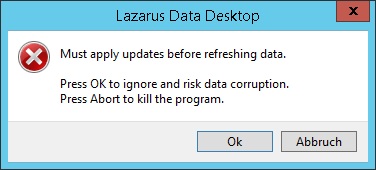
The real problem: I cannot apply edited data from the DB grid. I keep getting this error:

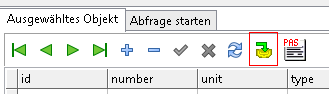
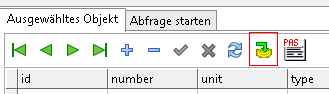
I have clicked on the tick button - it got disabled. I have also clicked on the button next to refresh - well I don't know that the button does because it has no hint and caption, but I clicked on it nevertheless :) :

But still I get the error above and the data is not written.

How can I commit the changes made in the data grid?

Thanks
Ondrej

-------------- next part --------------
An HTML attachment was scrubbed...
URL: <http://lists.lazarus-ide.org/pipermail/lazarus/attachments/20190904/8d74dcf4/attachment-0001.html> -------------- next part --------------
A non-text attachment was scrubbed...
Name: lmoehodfcphgdjdf.png
Type: image/png
Size: 6084 bytes
Desc: not available
URL: <http://lists.lazarus-ide.org/pipermail/lazarus/attachments/20190904/8d74dcf4/attachment-0002.png> -------------- next part --------------
A non-text attachment was scrubbed...
Name: cejbjkbmhimcgopc.png
Type: image/png
Size: 3887 bytes
Desc: not available
URL: <http://lists.lazarus-ide.org/pipermail/lazarus/attachments/20190904/8d74dcf4/attachment-0003.png>
Reply by email

LacaK
to Ondrej Pokorny

If data of underlaying TSQLQuery are presented and edited only thorought this DBGrid then I would add to TSQLQuery option "sqoAutoApplyUpdates". (I am not familiar with architecture of LazDataDesktop) Which causes that on every Post/Delete updates are applied to database. There will remain option to commit or rollback changes. L.

Dňa 4.9.2019 o 20:02 Ondrej Pokorny via lazarus napísal(a):

Show quoted text 28 lines
Hello (Michael)! I started to use LazDataDesktop because PgAdmin4 is horrible. I have a problem with transactions with Postgres connection (well I tested only Postgres connection). I found out that when using the SQL editor, I can type "COMMIT" and "ROLLBACK" - so far so good. (Well I would like to have a tool button for these commands but OK for now - I may add them in the future.) The real problem: I cannot apply edited data from the DB grid. I keep getting this error: I have clicked on the tick button - it got disabled. I have also clicked on the button next to refresh - well I don't know that the button does because it has no hint and caption, but I clicked on it nevertheless :) : But still I get the error above and the data is not written. How can I commit the changes made in the data grid? Thanks Ondrej

-------------- next part --------------
An HTML attachment was scrubbed...
URL: <http://lists.lazarus-ide.org/pipermail/lazarus/attachments/20190905/1906a09b/attachment.html> -------------- next part --------------
A non-text attachment was scrubbed...
Name: lmoehodfcphgdjdf.png
Type: image/png
Size: 6084 bytes
Desc: not available
URL: <http://lists.lazarus-ide.org/pipermail/lazarus/attachments/20190905/1906a09b/attachment.png> -------------- next part --------------
A non-text attachment was scrubbed...
Name: cejbjkbmhimcgopc.png
Type: image/png
Size: 3887 bytes
Desc: not available
URL: <http://lists.lazarus-ide.org/pipermail/lazarus/attachments/20190905/1906a09b/attachment-0001.png>

Reply by email

Michael Van Canneyt
to LacaK
LacaK wrote 5 lines
If data of underlaying TSQLQuery are presented and edited only thorought this DBGrid then I would add to TSQLQuery option "sqoAutoApplyUpdates". (I am not familiar with architecture of LazDataDesktop) Which causes that on every Post/Delete updates are applied to database. There will remain option to commit or rollback changes.

The grid was never meant to be editable. I simply forgot to disable that. (I myself never ever edit in a grid, it didn't appear in my head that someone would do this)

But I will :
a) Add the sqoAutoApplyUpdates option.
b) Add buttons for more explicit transaction control.

Michael.

Reply by email

Ondrej Pokorny
to Michael Van Canneyt
Michael Van Canneyt wrote 7 lines
The grid was never meant to be editable. I simply forgot to disable that. (I myself never ever edit in a grid, it didn't appear in my head that someone would do this) But I will : a) Add the sqoAutoApplyUpdates option. b) Add buttons for more explicit transaction control.

Thank you Michael. I assume I can help you with that.

I can also help with the editable grid. Editing could be enabled only if the table has a primary key or a unique index, for example. I sometimes need to edit raw data when something went wrong during the development/debugging. (And I tend to be lazy to type an UPDATE statement manually although LazDataDesktop offers a template for it :) )

Ondrej

Reply by email