Sign in Join

Live chat for Free Pascal, Lazarus, Delphi and every Pascal programmer.

Mailing lists / lazarus / 2018-12

Lazarus Release Candidate 3 of 2.0

26 messages · 7 people · –

Reply by email Subscribe to this list Your subscription

Read-only archive. Use j and k to move between messages.

Mattias Gaertner

The Lazarus team is glad to announce the third release candidate of Lazarus 2.0.

This release was built with FPC 3.0.4.
The previous release Lazarus 1.8.4 was built with FPC 3.0.4 as well.

Here is the list of fixes for Lazarus 2.0.x:
http://wiki.freepascal.org/Lazarus_2.0_fixes_branch

Here is the list of changes for Lazarus and Free Pascal: http://wiki.lazarus.freepascal.org/Lazarus_2.0.0_release_notes http://wiki.lazarus.freepascal.org/User_Changes_3.0.4

The release is available for download on SourceForge: http://sourceforge.net/projects/lazarus/files/

Choose your CPU, OS, distro and then the "Lazarus 2.0RC3" directory.

Checksums for the SourceForge files:
http://www.lazarus-ide.org/index.php?page=checksums#2_0_0RC3

Minimum requirements:

Windows:
2k, XP, Vista, 7, 8, 8.1 and 10, 32 or 64bit.

FreeBSD/Linux:
gtk 2.8 for gtk2, qt4.5 for qt, qt5.6 for qt5, 32 or 64bit.

Mac OS X:
10.5 to 10.12; Carbon (32bit), Cocoa (64bit, beta), qt and qt5 (32 or 64bit).

The svn tag is
http://svn.freepascal.org/svn/lazarus/tags/lazarus_2_0_0_RC3

For people who are blocked by SF, the Lazarus releases from SourceForge are mirrored at: ftp://ftp.freepascal.org/pub/lazarus/releases/ and later at (after some time for synchronization) http://mirrors.iwi.me/lazarus/

== Why should everybody (including you) test the release candidate? ==

In the past weeks the Lazarus team has stabilized the 2.0 fixes branch. The resulting 2.0RC3 is now stable enough to be used by any one for test purposes.

However many of the fixes and new features that where committed since the release of 1.8 required changes to the code of existing features too. While we have tested those ourself, there may still be problems that only occur with very specific configurations or one project in a million.

Yes, it may be that you are the only person with a project, that will not work in the new IDE. So if you do not test, we can not fix it.

Please do not wait for the final release, in order to test. It may be too late. Once the release is out we will have to be more selective about which fixes can be merged for further 2.0.x releases. So it may be, that we can not merge the fix you require. And then you will miss out on all the new features.

== How to test ==

Download and install the 2.0 RC3.
- On Windows you can install as a 2ndary install, that will not affect your current install:
http://wiki.lazarus.freepascal.org/Multiple_Lazarus#Installation_of_multiple_Lazarus
- On other platforms, if you install to a new location you need to use --primary-config-path

In either case you should make backups. (including your primary config)

Open your project in the current Lazarus (1.8.x), and use "Publish2 Project" from the project menu. This creates a clean copy of your project.

You can then open that copy in the RC3. Please test:
- If you can edit forms in the designer
- rename components / change properties in Object inspector / Add new events
- Add components to form / Move components on form
- Frames, if you use them
- If you can navigate the source code (e.g. jump to implementation)
- Auto completion in source code
- Compile, debug and run
- Anything else you use in your daily work

Mattias
Reply by email

Joe
to Mattias Gaertner

Hi,

In this test installation of Lazarus 2.0.0RC3 the IDE does not show the components palette, and under View -> Components the lists are empty.

This I did: Installed Linux Mint 18 Sarah 32-Bit on an old x86 notebook. Downloaded fpc-laz_3.0.4-1_i386.deb, fpc-src_3.0.4-1_i386 and lazarus-project_2.0.0RC3-0_i386.deb from
http://sourceforge.net/projects/lazarus/files/.

Then I installed the three deb files with GDebi and started the Lazarus IDE. A warning "directory lcl not found" appeared. I clicked on "Start IDE". Under Tools -> Options -> Environment, the field  "Lazarus directory" is empty.

Regards --  Joe

Reply by email

Mattias Gaertner
to Joe
Show quoted text 15 lines
Hi, In this test installation of Lazarus 2.0.0RC3 the IDE does not show the components palette, and under View -> Components the lists are empty. This I did: Installed Linux Mint 18 Sarah 32-Bit on an old x86 notebook. Downloaded fpc-laz_3.0.4-1_i386.deb, fpc-src_3.0.4-1_i386 and lazarus-project_2.0.0RC3-0_i386.deb from http://sourceforge.net/projects/lazarus/files/. Then I installed the three deb files with GDebi and started the Lazarus IDE. A warning "directory lcl not found" appeared. I clicked on "Start IDE". Under Tools -> Options -> Environment, the field "Lazarus directory" is empty.

If you installed Lazarus the first time on this computer, on start you should see "Welcome to Lazarus 2.0.0RC3" and the Lazarus directory should be set to" /usr/share/lazarus".

Are you sure you installed it for the first time?
Close the IDE, remove the ~/.lazarus directory and then start the IDE again.

Mattias

Reply by email

Joe
to Joe: In this test installation of Lazarus 2.0.0RC3 the IDE does not show the components…
Joe wrote 17 lines
Hi, In this test installation of Lazarus 2.0.0RC3 the IDE does not show the components palette, and under View -> Components the lists are empty. This I did: Installed Linux Mint 18 Sarah 32-Bit on an old x86 notebook. Downloaded fpc-laz_3.0.4-1_i386.deb, fpc-src_3.0.4-1_i386 and lazarus-project_2.0.0RC3-0_i386.deb from http://sourceforge.net/projects/lazarus/files/. Then I installed the three deb files with GDebi and started the Lazarus IDE. A warning "directory lcl not found" appeared. I clicked on "Start IDE". Under Tools -> Options -> Environment, the field  "Lazarus directory" is empty. Regards --  Joe

This problem depends on the user type of the logged on user. If we work as Administrator or Desktop-Benutzer, the components are accessible. If we work as a user of user type Default User, the components are not offered.

Joe

Reply by email

Joe
to Mattias Gaertner: On Sat, 2 Feb 2019 21:36:58 +0100 If you installed Lazarus the first time on this…
Mattias Gaertner wrote 27 lines
On Sat, 2 Feb 2019 21:36:58 +0100 Joe via lazarus wrote: > Hi, > > In this test installation of Lazarus 2.0.0RC3 the IDE does not show > the components palette, and under View -> Components the lists are > empty. > > This I did: Installed Linux Mint 18 Sarah 32-Bit on an old x86 > notebook. Downloaded fpc-laz_3.0.4-1_i386.deb, fpc-src_3.0.4-1_i386 > and lazarus-project_2.0.0RC3-0_i386.deb from > http://sourceforge.net/projects/lazarus/files/. > > Then I installed the three deb files with GDebi and started the > Lazarus IDE. A warning "directory lcl not found" appeared. I clicked > on "Start IDE". Under Tools -> Options -> Environment, the field > "Lazarus directory" is empty. If you installed Lazarus the first time on this computer, on start you should see "Welcome to Lazarus 2.0.0RC3" and the Lazarus directory should be set to" /usr/share/lazarus". Are you sure you installed it for the first time? Close the IDE, remove the ~/.lazarus directory and then start the IDE again. Mattias

Hello, Mattias,

maybe (am not sure) in a first attempt  I had installed and deinstalled Lazarus 1.6, which  is offered by this distro. Later when I tried to install RC3, GDebi told me, there was an package conflict with fpc. I did  sudo apt-get purge fpc and then sudo apt-get autoremove. Now RC3 could be installed.

Following your advice, I removed the ~/.lazarus directory of the default user, and the problem was gone.

--  Joe

Reply by email

Joe
to Joe: In this test installation of Lazarus 2.0.0RC3 the IDE does not show the components…

Two minor test findings:

Projekt -> Projekt veröffentlichen -> Zielverzeichnis: If the user selects an empty directory, nevertheless a question window "Verzeichnis leeren?" appears. Nonsense in this situation.
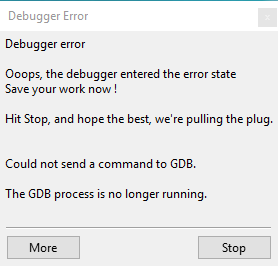
When a "Debuggerfehler" happens, the user is told "... Drücken Sie <<Stop>>", but there is no Stop button, only a "Weiter"-Button and a "Halt"-Button.

--  Joe

Reply by email

Martin Frb
to Joe
Joe wrote
When a "Debuggerfehler" happens, the user is told "... Drücken Sie <<Stop>>", but there is no Stop button, only a "Weiter"-Button and a "Halt"-Button.

That must be an issue in the translation.

There are a "More" and a "Stop" button in the English version.

-------------- next part --------------
An HTML attachment was scrubbed...
URL: <http://lists.lazarus-ide.org/pipermail/lazarus/attachments/20190203/4a1b3da4/attachment-0001.html> -------------- next part --------------
A non-text attachment was scrubbed...
Name: icdndbdiioniecam.png
Type: image/png
Size: 4895 bytes
Desc: not available
URL: <http://lists.lazarus-ide.org/pipermail/lazarus/attachments/20190203/4a1b3da4/attachment-0001.png>

Reply by email

Bart
to Joe
PM Joe wrote
If for any reason the '.compiled'-file of a test project can't be written, during compiling a message window "Fehler beim Schreiben der Datei" appears. It contains two buttons: "Abbruch" und "Abbrechen" (something like "Cancellation" and "Cancel").

#: lclstrconsts.rsmbabort
msgid "Abort"
msgstr "Abbruch"

#: lclstrconsts.rscancelrecordhint
msgctxt "lclstrconsts.rscancelrecordhint"
msgid "Cancel"
msgstr "Abbrechen"

#: lclstrconsts.rsmbcancel
msgctxt "lclstrconsts.rsmbcancel"
msgid "Cancel"
msgstr "Abbrechen"

So there seems to be a dialog with [mbCancel,mbAbort] somewehere? (From your post I gather there ar _only_ 2 buttons?)

If you set language to English, what do the buttons say?

B.t.w. Google translate suggest "Abtreibung" as translation for Abort (it does not give any other suggestions), at least we don't use that one ;-)

Bart

Reply by email

Joe
to Bart
Bart wrote
So there seems to be a dialog with [mbCancel,mbAbort] somewehere? (From your post I gather there ar_only_ 2 buttons?

Yes, the dialog with title "Fehler beim Schreiben der Datei" has only two buttons.
I beg your pardon for this silly question: Where do I set the language of Lazarus to English?

--  Joe

Reply by email

Bart
to Joe
PM Joe wrote
Yes, the dialog with title "Fehler beim Schreiben der Datei" has only two buttons.

That by itself is silly.

Show quoted text 6 lines
I beg your pardon for this silly question: Where do I set the language of Lazarus to English? lazarus mailing list https://lists.lazarus-ide.org/listinfo/lazarus

Menu->Tools->Options->Environment->General: select "English [en]" from the dropdownlist.
You'll have to restart the IDE for the language to change.

Bart

Reply by email

Bart
to Bart
PM Bart wrote
> So there seems to be a dialog with [mbCancel,mbAbort] somewehere?
function TLazarusBuilder.SaveIDEMakeOptions(Profile: TBuildLazarusProfile;
  Flags: TBuildLazarusFlags): TModalResult;
var
  Filename: String;
  fs: TFileStreamUTF8;
  OptionsAsText: String;
begin
...
  except
    on E: Exception do begin
      Result:=IDEMessageDialog(lisLazBuildErrorWritingFile,
        Format(lisLazBuildUnableToWriteFile, [Filename, LineEnding])
        +E.Message,
        mtError,[mbCancel,mbAbort]);  <<<=====  There it is
      exit;
    end;
  end;
  Result:=mrOk;
end;

It does not seem to matter wether the user clicks Cancel or Abort in this dialog though ;-)

Bart

Reply by email

Joe
to Mattias Gaertner: The Lazarus team is glad to announce the third release candidate of Lazarus 2.0. This…

I have a TListBox called LogBox in a test project and write strings with LogBox.Items.Add(stringvar) to LogBox. But the lines don't follow each other without space. There is space with approximately a half line hight between them. In Delphi, the lines in TListBox follow each other without this space.  Is this a Lazarus bug or did I miss something?

--  Joe

Reply by email

Bart
to Bart: function TLazarusBuilder.SaveIDEMakeOptions(Profile: TBuildLazarusProfile; Flags:…

On Mon, Feb 4, 2019 at 11:25 PM Bart wrote:

Sorry, not this one:

function TLazarusBuilder.SaveIDEMakeOptions(Profile: TBuildLazarusProfile; Flags: TBuildLazarusFlags): TModalResult;

but this one (in ide/project.pp):

function TProject.SaveStateFile(const CompilerFilename, CompilerParams: string;
  Complete: boolean): TModalResult;
...
  except
    on E: Exception do begin
      Result:=IDEMessageDialog(lisPkgMangErrorWritingFile,
        Format(lisProjMangUnableToWriteStateFileForProjectError,
               [IDAsString, LineEnding, E.Message]),
        mtError,[mbAbort,mbCancel]); <<== here
      exit;
    end;
  end;
  Result:=mrOk;
end;
Bart

Reply by email

Martin Frb
to Mattias Gaertner
Mattias Gaertner wrote 8 lines
On Mon, 4 Feb 2019 23:34:51 +0100 Bart via lazarus wrote: > And there seem to be at least 3 more dialogs with [mbCancel,mbAbort] > as buttons in the ide directory ... On hindsight it probably would be wiser to use mbIgnore and mbAbort. Mattias

InputFileDialog

Reading the code for InputFileDialog....
InputFileDialog is a modal form itself, and if you press ok, it does some tests.
If the tests fail, it asks in another modal dlg. (the one with mbAbort/mbCancel
Abort =>  InputFileDialog  closes with mrCancel
Cancel =>  InputFileDialog   stays open, and lets you select again

So maybe some of them did/do diff things, and other got copied and pasted?

Reply by email

Bo Berglund
to Joe: I have a TListBox called LogBox in a test project and write strings with…
Joe wrote 5 lines
I have a TListBox called LogBox in a test project and write strings with LogBox.Items.Add(stringvar) to LogBox. But the lines don't follow each other without space. There is space with approximately a half line hight between them. In Delphi, the lines in TListBox follow each other without this space.  Is this a Lazarus bug or did I miss something?

Did you set the font of the list to something unusual?

Bo Berglund Developer in Sweden

Reply by email

Werner Pamler
to Joe: I have a TListBox called LogBox in a test project and write strings with…
Joe wrote 5 lines
I have a TListBox called LogBox in a test project and write strings with LogBox.Items.Add(stringvar) to LogBox. But the lines don't follow each other without space. There is space with approximately a half line hight between them. In Delphi, the lines in TListBox follow each other without this space.  Is this a Lazarus bug or did I miss something?

Did you set "Style" to "lbOwnerdrawFixed" and "ItemHeight" to a nonzero value? In this case the line height is given by "ItemHeight". Default "Style" is "lbStandard" where "ItemHeight" is forced to 0 which means that the line height is calculated from the font size.

Reply by email