Sign in Join

Live chat for Free Pascal, Lazarus, Delphi and every Pascal programmer.

Mailing lists / lazarus / 2018-05

How to use two different versions of FPC

21 messages · 13 people · –

Reply by email Subscribe to this list Your subscription

Read-only archive. Use j and k to move between messages.

Gabor Boros

Hi All,

My main development toolset is FPC 3.0.4 and Lazarus fixes_1_8. Sometimes I try some things with Lazarus trunk also. It is easy. But now build up a new development machine from scratch with RHEL 7.5 on it and try to utilize FPC trunk too (with Lazarus trunk). I use "--primary-config-path" option always, so Lazarus config placement is not a problem. But the two FPC versions coexist. I found a solution from 2012 on the forum (see the link below). Is BigChimp's suggestion (1.-6.) a good starting point nowadays or something changed meanwhile in this topic. I will build everything (Lazarus fixes_1_8 and trunk, FPC trunk) from source except the actual stable FPC (now 3.0.4).

https://forum.lazarus.freepascal.org/index.php/topic,15716.msg85158.html#msg85158

Gabor

Reply by email

shoKwave
to Gabor Boros
Gabor Boros wrote 7 lines
Is BigChimp's suggestion (1.-6.) a good starting point nowadays or something changed meanwhile in this topic. I will build everything (Lazarus fixes_1_8 and trunk, FPC trunk) from source except the actual stable FPC (now 3.0.4). https://forum.lazarus.freepascal.org/index.php/topic,15716.msg85158.html#msg85158

Hi Gabor,

it's a good starting point but I have some corrections.

* Install systemwide FPC and whatever primary Lazarus install you want
* Get another FPC, e.g. from SVN, make all, make install under e.g. ~/fpcdev
* make softlink from ~/fpcdev/lib/fpc/<version>/ppcbinary to ~/fpcdev/bin
* Generate an fpc.cfg in ~/fpcdev/lib/fpc/etc directory using fpcmkcfg
* Get/compile another Lazarus using make
FPC=~/fpcdev/whereverbin/ppcbinary so Laz gets compiled with the right FPC
* Run secondary Lazarus with --primary-config path set to a new directory, e.g. ~/lazarusdev/
* Set up secondary Lazarus Options/Paths, specifying FPC directory as ~/fpcdev/wherever...

#3 is new. The link is not generated by make so you'll have to create it by yourself.

#4 is slightly different. On Linux and MacOS fpc expects the fpc.cfg to be in the relative path "../etc/fpc.cfg"  (see
https://linux.die.net/man/5/fpc.cfg).

Hope this helps.

Ingo

Reply by email

Joost van der Sluis
to Giuliano Colla

Op 08-05-18 om 13:46 schreef Giuliano Colla via Lazarus:

Show quoted text 11 lines
E.G. you may have a full tree (fpc+Lazarus) in ~/development/ another one in ~/production and a third one in ~/experiments. The main trick, as far as fpc is concerned, is to have as fpc executable an fpc.sh (a name which is accepted by Lazarus) which sets up whatever is needed. This is a sample of fpc.sh: > #!/bin/sh # This script starts the fpc compiler installed by fpcup # > and ignores any system-wide fpc.cfg files # Note: maintained by fpcup; > do not edit directly, your edits will be lost. > /home/colla/development/fpc/bin/x86_64-linux/fpc -n > @/home/colla/development/fpc/bin/x86_64-linux/fpc.cfg "$@"

That's more a hack then a solution, and the real solution is simple and also works outside Lazarus: place the fpc.cfg in ~/experiments/etc, ~/development/etc etc, as already suggested by Ingo. Or, even better, just alongside the compiler-executable. You can call 'fpc -va' to check which configuration file is used.

See the documentation for more info:
https://www.freepascal.org/docs-html/user/usersu10.html

Regards,

Joost.

Reply by email

Mark Morgan Lloyd
to Joost van der Sluis
Joost van der Sluis wrote 16 lines
Op 08-05-18 om 13:46 schreef Giuliano Colla via Lazarus:> E.G. you may have a full tree (fpc+Lazarus) in ~/development/ another > one in ~/production and a third one in ~/experiments. The main trick, as > far as fpc is concerned, is to have as fpc executable an fpc.sh (a name > which is accepted by Lazarus) which sets up whatever is needed. This is > a sample of fpc.sh:> >> #!/bin/sh # This script starts the fpc compiler installed by fpcup # >> and ignores any system-wide fpc.cfg files # Note: maintained by fpcup; >> do not edit directly, your edits will be lost. >> /home/colla/development/fpc/bin/x86_64-linux/fpc -n >> @/home/colla/development/fpc/bin/x86_64-linux/fpc.cfg "$@" That's more a hack then a solution, and the real solution is simple and also works outside Lazarus: place the fpc.cfg in ~/experiments/etc, ~/development/etc etc, as already suggested by Ingo. Or, even better, just alongside the compiler-executable. You can call 'fpc -va' to check which configuration file is used. See the documentation for more info:

On Linux and Solaris I have a /usr/local/bin/fpc.d directory containing multiple versions. In /usr/local/bin I basically have

fpc
fpc.d
fpcres
ppcx64 -> ppcx64-3.0.2
ppcx64-2.6.4 -> /usr/local/lib/fpc/2.6.4/ppcx64
ppcx64-3.0.0 -> /usr/local/lib/fpc/3.0.0/ppcx64

It works well except for building FPC itself when I have to modify the ppcx64 symlink, and there were problems with trunk at some point when it ignored instruction to install into e.g. fpc.d/2.7.1

Mark Morgan Lloyd markMLl .AT. telemetry.co .DOT. uk [Opinions above are the author's, not those of his employers or colleagues]

Reply by email

Alfred
to Joost van der Sluis: Op 08-05-18 om 13:46 schreef Giuliano Colla via Lazarus: That's more a hack then a…

************************
That's more a hack then a solution, and the real solution is simple and also works outside Lazarus: place the fpc.cfg in ~/experiments/etc, ~/development/etc etc, as already suggested by Ingo. Or, even better, just alongside the compiler-executable. You can call 'fpc -va' to check which configuration file is used.
************************

Fpcup(deluxe) uses the fpc.sh - hack to prevent fpc from picking up a config that has not been generated by fpcup itself ! That is why the -n switch is used, in combination with @. Fpcup(deluxe) wants the FPC/Lazarus install to isolate itself in all cases.

Reply by email

Giuliano Colla
to Joost van der Sluis: Op 08-05-18 om 13:46 schreef Giuliano Colla via Lazarus: That's more a hack then a…

Il 09/05/2018 12:34, Joost van der Sluis via Lazarus ha scritto:

That's more a hack then a solution

I fail to grasp why startlazarus should be a feature, and fpc.sh should be a hack.

Having multiple fpc.cfg files, as it may be required by multiple fpc installations requires invoking the compiler with the appropriate parameters. A script is just the most comfortable way to achieve this result.

Launching an executable via another program or a script which sets up the appropriate environment according the user needs is a standard well established practice, since the dawn of Unix.

Giuliano

Reply by email

Joost van der Sluis
to Giuliano Colla

Op 10-05-18 om 14:05 schreef Giuliano Colla via Lazarus:

Show quoted text 5 lines
Il 09/05/2018 12:34, Joost van der Sluis via Lazarus ha scritto: > That's more a hack then a solution I fail to grasp why startlazarus should be a feature, and fpc.sh should be a hack.

Startlazarus is also a hack, because on Windows you can not overwrite an executable which is open and the design is kept consistent between OS'es.

You can perfectly fine use just 'lazarus' on Linux, I never use 'startlazarus'.

Having multiple fpc.cfg files, as it may be required by multiple fpc installations requires invoking the compiler with the appropriate parameters. A script is just the most comfortable way to achieve this result.

This is not true. And it amazes me that people think that. I've never understood the use of scripts like 'fpcup'. Multiple fpc installations do not need any command-line parameters. me. Due to fpc's multi-platform nature the core developers have had multiple versions on their systems from the beginning. And then it is really annoying to have all kind of parameters to start the compiler. So there are several solutions for that build into fpc itself. One such feature is the 'fpc' binary, which calls the proper compiler 'ppcx64', 'ppc386' etc.

Another feature is the system that checks for the proper configuration-files.

But it is even possible to use one fpc.cfg configuration file for multiple fpc-versions. This is even the default-setup!

Don't believe me? Take a look at the default fpc.cfg, it contains lines like: "Fu/usr/lib/fpc/$fpcversion/units/$fpctarget"

Why do you think the $fpcversion and $fpctarget macros are there? Because it is impossible to keep two versions of fpc installed alongside each other?

Launching an executable via another program or a script which sets up the appropriate environment according the user needs is a standard well established practice, since the dawn of Unix.

Oh, you may do so. But it is unnecessary and confusing in the fpc-case. Off-course you can configure Lazarus to use fpc.sh. But what do you do in a terminal? Wouldn't it be easier to just call 'fpc_304' and 'fpc_trunk'? Or /path/to/compiler/versiona/fpc and /path/to/compiler/versionb/fpc?

Believe me when I say that most fpc-developers have really difficult setups, which a lot of different versions of fpc installed. And they do not use scripts like fpcup. They also don't type magically looking command lines. They use just the features already build into the compiler.

Imho the only reason that people are using fpcup is because when they have a problem or question about how to setup fpc, people on the forum and mailinglist always come with the solution: use fpcup. Instead of explaining how they can set it up themselves.

(On linux: Just install both the 3.0.4 and 3.0.2 rpm, and they will run nicely along each other.)

Regards,

Joost.

Reply by email

Michael Van Canneyt
to Joost van der Sluis
Joost van der Sluis wrote 11 lines
Oh, you may do so. But it is unnecessary and confusing in the fpc-case. Off-course you can configure Lazarus to use fpc.sh. But what do you do in a terminal? Wouldn't it be easier to just call 'fpc_304' and 'fpc_trunk'? Or /path/to/compiler/versiona/fpc and /path/to/compiler/versionb/fpc? Believe me when I say that most fpc-developers have really difficult setups, which a lot of different versions of fpc installed. And they do not use scripts like fpcup. They also don't type magically looking command lines. They use just the features already build into the compiler.

Indeed. I have 13 versions installed, dating back to version 2.0.0 No tricks needed.

Michael.

Reply by email

patspiper
to Gabor Boros: My main development toolset is FPC 3.0.4 and Lazarus fixes_1_8. Sometimes I try some…
Gabor Boros wrote 10 lines
My main development toolset is FPC 3.0.4 and Lazarus fixes_1_8. Sometimes I try some things with Lazarus trunk also. It is easy. But now build up a new development machine from scratch with RHEL 7.5 on it and try to utilize FPC trunk too (with Lazarus trunk). I use "--primary-config-path" option always, so Lazarus config placement is not a problem. But the two FPC versions coexist. I found a solution from 2012 on the forum (see the link below). Is BigChimp's suggestion (1.-6.) a good starting point nowadays or something changed meanwhile in this topic. I will build everything (Lazarus fixes_1_8 and trunk, FPC trunk) from source except the actual stable FPC (now 3.0.4).

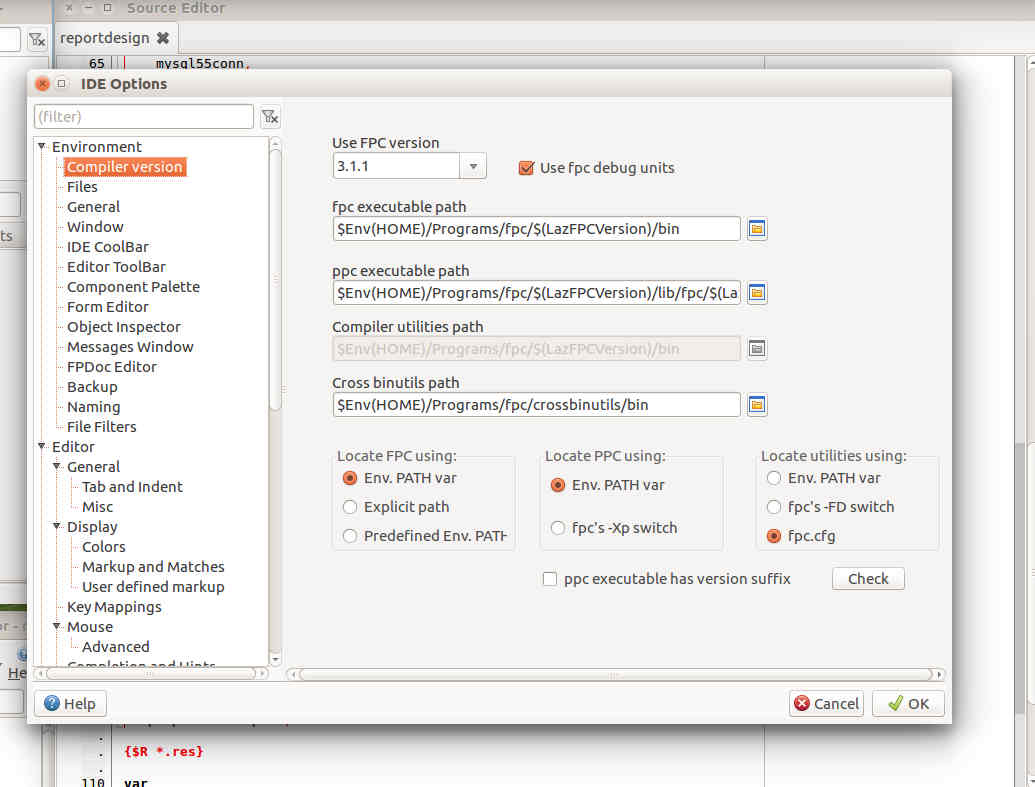
Attached snapshot is work in progress

Stephano

-------------- next part --------------
A non-text attachment was scrubbed...
Name: FPCversion.jpg
Type: image/jpeg
Size: 78274 bytes
Desc: not available
URL: <http://lists.lazarus-ide.org/pipermail/lazarus/attachments/20180510/b89aa15f/attachment-0001.jpg>

Reply by email

patspiper
to Gabor Boros: My main development toolset is FPC 3.0.4 and Lazarus fixes_1_8. Sometimes I try some…
Gabor Boros wrote 10 lines
My main development toolset is FPC 3.0.4 and Lazarus fixes_1_8. Sometimes I try some things with Lazarus trunk also. It is easy. But now build up a new development machine from scratch with RHEL 7.5 on it and try to utilize FPC trunk too (with Lazarus trunk). I use "--primary-config-path" option always, so Lazarus config placement is not a problem. But the two FPC versions coexist. I found a solution from 2012 on the forum (see the link below). Is BigChimp's suggestion (1.-6.) a good starting point nowadays or something changed meanwhile in this topic. I will build everything (Lazarus fixes_1_8 and trunk, FPC trunk) from source except the actual stable FPC (now 3.0.4).

Attached snapshot is work in progress

Stephano
-------------- next part --------------
A non-text attachment was scrubbed...
Name: FPCversion.jpg
Type: image/jpeg
Size: 58712 bytes
Desc: not available
URL: <http://lists.lazarus-ide.org/pipermail/lazarus/attachments/20180510/6bf10066/attachment-0001.jpg>

Reply by email

Thierry B.
to Joost van der Sluis: Op 10-05-18 om 14:05 schreef Giuliano Colla via Lazarus: Startlazarus is also a hack,…

Le 10/05/2018 à 14:31, Joost van der Sluis via Lazarus a écrit :

Show quoted text 18 lines
Op 10-05-18 om 14:05 schreef Giuliano Colla via Lazarus: > Il 09/05/2018 12:34, Joost van der Sluis via Lazarus ha scritto: >> That's more a hack then a solution > > I fail to grasp why startlazarus should be a feature, and fpc.sh > should be a hack. Startlazarus is also a hack, because on Windows you can not overwrite an executable which is open and the design is kept consistent between OS'es. You can perfectly fine use just 'lazarus' on Linux, I never use 'startlazarus'. > Having multiple fpc.cfg files, as it may be required by multiple fpc > installations requires invoking the compiler with the appropriate > parameters. A script is just the most comfortable way to achieve this > result.

Here is the script I use since several years, that maintain 2 or 3 freepascal/lazarus sets and cross compile from linux to win32 (i don't need more).
I didn't wrote it, guess I grabbed it from "buildfaq" documentation and added modified it thereafter. I have to removed hard coded paths inside but since I had not changes setup for 10 years, it works! And only one ~/.fpc.cfg

https://pastebin.com/eMsq5JLD

TB

Reply by email

Mattias Gaertner
to Joost van der Sluis
Show quoted text 7 lines
On 05/10/2018 04:35 PM, patspiper via Lazarus wrote: > > Attached snapshot is work in progress Sorry, but I don't think this is an improvement. For new users this looks like a nightmare. It should be hidden, at least, imho. Or better: make it a plugin.

This is a plugin.

Mattias

Reply by email

Joost van der Sluis
to Mattias Gaertner
Mattias Gaertner wrote 5 lines
>> Attached snapshot is work in progress > Sorry, but I don't think this is an improvement. For new users this > looks like a nightmare. It should be hidden, at least, imho. Or better: > make it a plugin. This is a plugin.

In that case: nothing said. Nice work! ;)

Joost.

Reply by email

patspiper
to Joost van der Sluis: Sorry, but I don't think this is an improvement. For new users this looks like a…
Joost van der Sluis wrote 7 lines
On 05/10/2018 04:35 PM, patspiper via Lazarus wrote: > > Attached snapshot is work in progress Sorry, but I don't think this is an improvement. For new users this looks like a nightmare. It should be hidden, at least, imho. Or better: make it a plugin.

As Mattias has pointed out, it is a plugin (IDE package), and definitely not for the faint of heart.

Once one creates a standardized folder hierarchy for the different fpc versions, it becomes a matter of a few clicks to switch versions.

Stephano

Reply by email

Michael Ring
to patspiper

Do you have plans to make it possible to switch debuggers in the same plugin, too?

This would be very helpful for embedded targets, it is always a pain to reconfigure gdb when switching between an embedded and a native target.

Could it also be possible to make this plugin project based?

Looks very promising,

Michael

patspiper wrote 16 lines
On 11/05/18 16:17, Joost van der Sluis via Lazarus wrote: > On 05/10/2018 04:35 PM, patspiper via Lazarus wrote: >> >> Attached snapshot is work in progress > > Sorry, but I don't think this is an improvement. For new users this > looks like a nightmare. It should be hidden, at least, imho. Or > better: make it a plugin. As Mattias has pointed out, it is a plugin (IDE package), and definitely not for the faint of heart. Once one creates a standardized folder hierarchy for the different fpc versions, it becomes a matter of a few clicks to switch versions. Stephano

Reply by email

patspiper
to Michael Ring
Michael Ring wrote
Do you have plans to make it possible to switch debuggers in the same plugin, too?

No, as switching debuggers is already possible in the debugging section.

Show quoted text 6 lines
This would be very helpful for embedded targets, it is always a pain to reconfigure gdb when switching between an embedded and a native target. Could it also be possible to make this plugin project based?

I see now why you asked about debugger switching :)

This feat could be tackled once the plugin is finalized.

Looks very promising,

Currently a couple of the options (such as fpc debug units) have not been implemented yet, but the basic features work like a charm.

Stephano

Show quoted text 18 lines
Am 11.05.18 um 15:40 schrieb patspiper via Lazarus: > On 11/05/18 16:17, Joost van der Sluis via Lazarus wrote: >> On 05/10/2018 04:35 PM, patspiper via Lazarus wrote: >>> >>> Attached snapshot is work in progress >> >> Sorry, but I don't think this is an improvement. For new users this >> looks like a nightmare. It should be hidden, at least, imho. Or >> better: make it a plugin. > > As Mattias has pointed out, it is a plugin (IDE package), and > definitely not for the faint of heart. > > Once one creates a standardized folder hierarchy for the different > fpc versions, it becomes a matter of a few clicks to switch versions. > > Stephano

Reply by email

Jesus Reyes A.
to patspiper: As Mattias has pointed out, it is a plugin (IDE package), and definitely not for the…

En Fri, 11 May 2018 08:40:28 -0500, patspiper via Lazarus

Show quoted text 16 lines
On 11/05/18 16:17, Joost van der Sluis via Lazarus wrote: > On 05/10/2018 04:35 PM, patspiper via Lazarus wrote: >> >> Attached snapshot is work in progress > > Sorry, but I don't think this is an improvement. For new users this > looks like a nightmare. It should be hidden, at least, imho. Or better: > make it a plugin. As Mattias has pointed out, it is a plugin (IDE package), and definitely not for the faint of heart. Once one creates a standardized folder hierarchy for the different fpc versions, it becomes a matter of a few clicks to switch versions. Stephano

An easy way to switch the compiler is nice, but I think that it would be nicer if it could be organized in compiler profiles so you can have compilers with the same version but with or without debug info or compiled with different options. Then a compiler profile could be specified/selected by build mode so it could be stored in the session or the project file. :)

Jesus Reyes A.

Reply by email

Anthony Walter
to Jesus Reyes A.

I am not sure if this will help, but I place this script as "setup" in any fpc directory:

#!/bin/bash

if [ -z ${OLDPATH+x} ]; then
OLDPATH=$PATH
else
PATH=$OLDPATH
fi

BASE="$( cd "$( dirname "${BASH_SOURCE[0]}" )" && pwd )" export PPC_CONFIG_PATH=$BASE/bin
rm $PPC_CONFIG_PATH/fpc.cfg > /dev/null 2>&1
$PPC_CONFIG_PATH/fpcmkcfg -d basepath=$BASE/lib/fpc/\$FPCVERSION -o $PPC_CONFIG_PATH/fpc.cfg
export PATH=$PPC_CONFIG_PATH:$OLDPATH

Then when I want to change compilers, I go to the fpc folder with the version I want to use and execute:

. ./setup

This sources the script setup, and changes the fpc version. Example:

user at debian: fpc
*bash: fpc: command not found*
user at debian: cd $HOME/Development/FreePascal/fpc-trunk user at debian: . ./setup
user at debian: fpc -iV
*3.1.1*
user at debian: cd $HOME/Development/FreePascal/fpc-3.0.0 user at debian: . ./setup
user at debian: fpc -iV
*3.0.0*

What this script does is save the old path, put the bin folder of fpc in the path, set the PPC_CONFIG_PATH variable, and generate a new bin/fpc.cfg. You can then have as many fpc compiler versions as will fit on disk, and change compilers easily.

So in summary, copy my script above to each fpc folder, name it setup, chmod +x setup, and . ./setup to change to a specific compiler. -------------- next part --------------
An HTML attachment was scrubbed...
URL: <http://lists.lazarus-ide.org/pipermail/lazarus/attachments/20180512/5b24de10/attachment.html>

Reply by email

patspiper
to Jesus Reyes A.: En Fri, 11 May 2018 08:40:28 -0500, patspiper via Lazarus An easy way to switch the…
Jesus Reyes A. wrote 27 lines
En Fri, 11 May 2018 08:40:28 -0500, patspiper via Lazarus escribió: > On 11/05/18 16:17, Joost van der Sluis via Lazarus wrote: >> On 05/10/2018 04:35 PM, patspiper via Lazarus wrote: >>> >>> Attached snapshot is work in progress >> >> Sorry, but I don't think this is an improvement. For new users this >> looks like a nightmare. It should be hidden, at least, imho. Or >> better: make it a plugin. > > As Mattias has pointed out, it is a plugin (IDE package), and > definitely not for the faint of heart. > > Once one creates a standardized folder hierarchy for the different > fpc versions, it becomes a matter of a few clicks to switch versions. > > Stephano An easy way to switch the compiler is nice, but I think that it would be nicer if it could be organized in compiler profiles so you can have compilers with the same version but with or without debug info or compiled with different options. Then a compiler profile could be specified/selected by build mode so it could be stored in the session or the project file. :)

Compiler profiles that can be selected in project options as well as in Tools/Options (for IDE rebuilding) would be very nice indeed.

Currently I am investigating how to enable fpc debug units in a suitable way.

Stephano

Reply by email