Sign in Join

Live chat for Free Pascal, Lazarus, Delphi and every Pascal programmer.

Mailing lists / lazarus / 2017-06

Questionnaire GUI component

8 messages · 4 people · –

Reply by email Subscribe to this list Your subscription

Read-only archive. Use j and k to move between messages.

Sandro Cumerlato

Hello,
I need a GUI component to implement a Questionnaire (label + combo boxes right aligned), all in a line like this:

Question 1? (Option A) (Option B)

Is it already available or can you please suggest me a way to implement it quickly? (TComboBox is not what I am looking for)

Thank You in advance.

Sandro Cumerlato
-------------- next part --------------
An HTML attachment was scrubbed...
URL: <http://lists.lazarus-ide.org/pipermail/lazarus/attachments/20170630/e7810454/attachment.html>

Reply by email

Adrian De Armas
to Sandro Cumerlato

Why don't you try with Frames?
I think It can implement what u need quickly. Just make the special layout you need and then just copy the frames.

http://wiki.freepascal.org/Frames

2017-06-30 15:33 GMT-03:00 Sandro Cumerlato via Lazarus <

Show quoted text 23 lines
: Hello, I need a GUI component to implement a Questionnaire (label + combo boxes right aligned), all in a line like this: Question 1? (Option A) (Option B) Is it already available or can you please suggest me a way to implement it quickly? (TComboBox is not what I am looking for) Thank You in advance. Sandro Cumerlato -- _______________________________________________ Lazarus mailing list http://lists.lazarus-ide.org/listinfo/lazarus

-------------- next part --------------
An HTML attachment was scrubbed...
URL: <http://lists.lazarus-ide.org/pipermail/lazarus/attachments/20170630/a884c7b6/attachment.html>

Reply by email

Sandro Cumerlato
to Adrian De Armas

Thank you Adrian for your reply,
I can create a good layout with Frames, but it looks like I cannot create multiple frames on the same form... Duplicate name: A component named "Frame1" already exists.

I tried to create an array of Frames at runtime:

Question 1? (Option A) (Option B)
Question 2? (Option A) (Option B)
Question 3? (Option A) (Option B)
Question 4? (Option A) (Option B)
...
Question 200? (Option A) (Option B)

var
  MyFrames: array[1..200] of TFrame1;

Where am I wrong?

Thank you for your help.

Sandro Cumerlato

[image: Inline images 1]

[image: Inline images 2]

Adrian De Armas wrote 33 lines
Why don't you try with Frames? I think It can implement what u need quickly. Just make the special layout you need and then just copy the frames. http://wiki.freepascal.org/Frames 2017-06-30 15:33 GMT-03:00 Sandro Cumerlato via Lazarus < >: > Hello, > I need a GUI component to implement a Questionnaire (label + combo boxes > right aligned), all in a line like this: > > Question 1? (Option A) (Option B) > > Is it already available or can you please suggest me a way to implement > it quickly? (TComboBox is not what I am looking for) > > Thank You in advance. > > Sandro Cumerlato > > > -- > _______________________________________________ > Lazarus mailing list > > http://lists.lazarus-ide.org/listinfo/lazarus > >

-------------- next part --------------
An HTML attachment was scrubbed...
URL: <http://lists.lazarus-ide.org/pipermail/lazarus/attachments/20170630/0fbae60b/attachment-0001.html> -------------- next part --------------
A non-text attachment was scrubbed...
Name: Error.png
Type: image/png
Size: 5125 bytes
Desc: not available
URL: <http://lists.lazarus-ide.org/pipermail/lazarus/attachments/20170630/0fbae60b/attachment-0002.png> -------------- next part --------------
A non-text attachment was scrubbed...
Name: Frame1.png
Type: image/png
Size: 2543 bytes
Desc: not available
URL: <http://lists.lazarus-ide.org/pipermail/lazarus/attachments/20170630/0fbae60b/attachment-0003.png>

Reply by email

Mattias Gaertner
to Sandro Cumerlato
Show quoted text 20 lines
Thank you Adrian for your reply, I can create a good layout with Frames, but it looks like I cannot create multiple frames on the same form... Duplicate name: A component named "Frame1" already exists. I tried to create an array of Frames at runtime: Question 1? (Option A) (Option B) Question 2? (Option A) (Option B) Question 3? (Option A) (Option B) Question 4? (Option A) (Option B) ... Question 200? (Option A) (Option B) var MyFrames: array[1..200] of TFrame1; Where am I wrong?

Give your frames unique names.

DisableAutoSizing;
try
  for i:=1 to 200 do begin
    MyFrames[i]:=TFrame1.Create(Self);
    with MyFrames[i] do begin
      Name:='MyFrame'+IntToStr(i);
      Top:=i*Height;
      Parent:=Self;
    end;
  end;
finally
  EnableAutoSizing;
end;

Mattias

Reply by email

Sandro Cumerlato
to Mattias Gaertner

Thank you Mattias,
unique names solved the issue, I was wrongly naming frames: MyFrames[i].Name := Format('Frame%d', [i]);

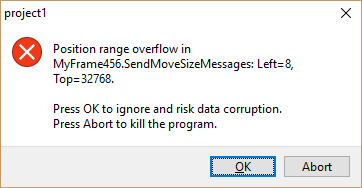
Last question: I am creating Frames within a ScrollBox, but it look like there is a limit of the ScrollBox height to 32768 pixels.

I'd like to display up to 500 questions (Frames), how can I solve this issue?

[image: Inline images 1]

On 30 June 2017 at 22:59, Mattias Gaertner via Lazarus <

Show quoted text 50 lines
wrote: On Fri, 30 Jun 2017 22:46:17 +0200 Sandro Cumerlato via Lazarus wrote: > Thank you Adrian for your reply, > I can create a good layout with Frames, but it looks like I cannot create > multiple frames on the same form... Duplicate name: A component named > "Frame1" already exists. > > I tried to create an array of Frames at runtime: > > Question 1? (Option A) (Option B) > Question 2? (Option A) (Option B) > Question 3? (Option A) (Option B) > Question 4? (Option A) (Option B) > ... > Question 200? (Option A) (Option B) > > > var > MyFrames: array[1..200] of TFrame1; > > > Where am I wrong? Give your frames unique names. DisableAutoSizing; try for i:=1 to 200 do begin MyFrames[i]:=TFrame1.Create(Self); with MyFrames[i] do begin Name:='MyFrame'+IntToStr(i); Top:=i*Height; Parent:=Self; end; end; finally EnableAutoSizing; end; Mattias -- _______________________________________________ Lazarus mailing list http://lists.lazarus-ide.org/listinfo/lazarus

-------------- next part --------------
An HTML attachment was scrubbed...
URL: <http://lists.lazarus-ide.org/pipermail/lazarus/attachments/20170630/f9cfb3fa/attachment.html> -------------- next part --------------
A non-text attachment was scrubbed...
Name: ScrollBox.png
Type: image/png
Size: 6031 bytes
Desc: not available
URL: <http://lists.lazarus-ide.org/pipermail/lazarus/attachments/20170630/f9cfb3fa/attachment.png>

Reply by email

Mattias Gaertner
to Sandro Cumerlato
Show quoted text 9 lines
Thank you Mattias, unique names solved the issue, I was wrongly naming frames: MyFrames[i].Name := Format('Frame%d', [i]); Last question: I am creating Frames within a ScrollBox, but it look like there is a limit of the ScrollBox height to 32768 pixels. I'd like to display up to 500 questions (Frames), how can I solve this issue?

I guess you don't expect the user to scroll 32.000+. Instead he should only scroll your 500 items. Use a TStringgrid (it supports comboboxes) or implement your own grid using a TScrollBar and a few of your frames - enough to cover the client area.

Mattias

Reply by email

Sandro Cumerlato
to Mattias Gaertner

Thank you Mattias for your suggestion,
I will give a try with the TStringGrid component.

Good night.

Sandro Cumerlato

On 30 June 2017 at 23:35, Mattias Gaertner via Lazarus <

Show quoted text 27 lines
wrote: On Fri, 30 Jun 2017 23:10:25 +0200 Sandro Cumerlato via Lazarus wrote: > Thank you Mattias, > unique names solved the issue, I was wrongly naming frames: > MyFrames[i].Name := Format('Frame%d', [i]); > > Last question: I am creating Frames within a ScrollBox, but it look like > there is a limit of the ScrollBox height to 32768 pixels. > > I'd like to display up to 500 questions (Frames), how can I solve this > issue? I guess you don't expect the user to scroll 32.000+. Instead he should only scroll your 500 items. Use a TStringgrid (it supports comboboxes) or implement your own grid using a TScrollBar and a few of your frames - enough to cover the client area. Mattias -- _______________________________________________ Lazarus mailing list http://lists.lazarus-ide.org/listinfo/lazarus

-------------- next part --------------
An HTML attachment was scrubbed...
URL: <http://lists.lazarus-ide.org/pipermail/lazarus/attachments/20170630/6f705ac9/attachment-0001.html>

Reply by email

Luiz Americo Pereira Camara
to Sandro Cumerlato: I need a GUI component to implement a Questionnaire (label + combo boxes right aligned),…

2017-06-30 15:33 GMT-03:00 Sandro Cumerlato via Lazarus <

Show quoted text 9 lines
: Hello, I need a GUI component to implement a Questionnaire (label + combo boxes right aligned), all in a line like this: Question 1? (Option A) (Option B)

You can look at
https://github.com/blikblum/luipack/blob/master/vtvextras/vtvutils/vtjsonex.pas The layout is a bit different

Example:
https://github.com/blikblum/luipack/tree/master/vtvextras/vtvutils/demos/jsonquestiontree

For boolean values i use:
https://github.com/blikblum/luipack/blob/master/luicontrols/jsonmediators.pas

Example:
https://github.com/blikblum/luipack/tree/master/luicontrols/demos/jsonbooleangroup

Luiz
-------------- next part --------------
An HTML attachment was scrubbed...
URL: <http://lists.lazarus-ide.org/pipermail/lazarus/attachments/20170704/ce1154f7/attachment-0001.html>

Reply by email