Sign in Join

Live chat for Free Pascal, Lazarus, Delphi and every Pascal programmer.

Mailing lists / lazarus / 2017-05

visual appearance of ReadOnly state widgets

11 messages · 5 people ·

Reply by email Subscribe to this list Your subscription

Read-only archive. Use j and k to move between messages.

Graeme Geldenhuys

Hi,

Is it normal for read-only LCL widgets to look identical to their Read/Write state?

For example in fpGUI read-only widgets look visibly different. See attached animated GIF.

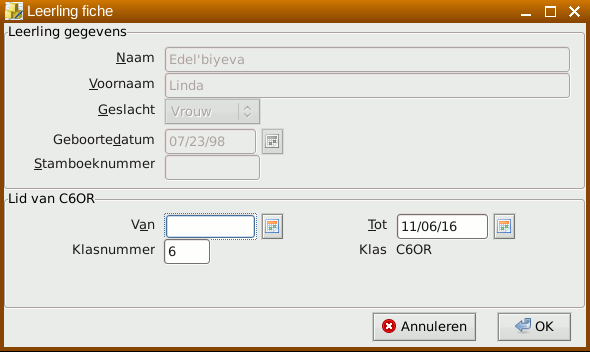
But with a LCL application I'm working on, read-only widgets don't have any indication that they are only slight
change is in the Calendar ComboBox widget where the icon is greyed out.

And to make matters worse, a ReadOnly TComboBox allows me to change the focusitem via a mouse, adding to the confusion.

I'm using LCL-GTK2 in the second screenshot, but this application run on Linux, Windows and OSX.

Is my only LCL option to make them ReadOnly = False, and Enabled = False?

Regards,
Graeme

-------------- next part --------------
A non-text attachment was scrubbed...
Name: readonly_test.gif
Type: image/gif
Size: 22398 bytes
Desc: not available
URL: <http://lists.lazarus-ide.org/pipermail/lazarus/attachments/20170510/cd202e77/attachment-0001.gif> -------------- next part --------------
A non-text attachment was scrubbed...
Name: screenshot_lcl.png
Type: image/png
Size: 23446 bytes
Desc: not available
URL: <http://lists.lazarus-ide.org/pipermail/lazarus/attachments/20170510/cd202e77/attachment-0001.png>

Reply by email

Alexey
to Graeme Geldenhuys
Graeme Geldenhuys wrote
And to make matters worse, a ReadOnly TComboBox allows me to change the focusitem via a mouse, adding to the confusion.

It is made like in Delphi's r/o combobox. In Lazarus better use Enabled:=false and it has indication for some controls. Not for all. I suggested indication for disabled Grid.

Regards, Alexey

Reply by email

Vojtěch Čihák

Hi,
 
I just did a little test in Qt Designer.
There seems to be no difference in QLineEdit (TEdit). There is sometimes difference in editable and non-editable QComboBox (depends on style - QtCurve, Oxygen, Breeze are different, Windows style is identical).  
OTOH, your fpGUI read-only controls looks like disabled, which may be confusing.  
V.

Reply by email

Graeme Geldenhuys
to Alexey: It is made like in Delphi's r/o combobox. In Lazarus better use Enabled:=false and it has…
Alexey wrote
It is made like in Delphi's r/o combobox.

Well, then both are broken.

In Lazarus better use Enabled:=false and it has indication for some controls.

1) The problem with Enabled = False is that in then greys the text too. Thus making in very hard to read. See attached screenshot. Alos see the difference in fpGUI's ReadOnly = True where the text is still in Black - only the background indication changed.

2) Some controls?? Here we go with the LCL inconsistency again. :-/

Regards,
Graeme
-------------- next part --------------
A non-text attachment was scrubbed...
Name: Screenshot_enabled_false.png
Type: image/png
Size: 10650 bytes
Desc: not available
URL: <http://lists.lazarus-ide.org/pipermail/lazarus/attachments/20170510/6dad1764/attachment.png>

Reply by email

Graeme Geldenhuys
to Vojtěch Čihák:   I just did a little test in Qt Designer. There seems to be no difference in QLineEdit…
Vojtěch Čihák wrote
your fpGUI read-only controls looks like disabled, which may be confusing.

In fpGUI, with Enabled = False, the text is greyed out too. Same for buttons in ComboBoxes, Edit Button widgets etc. In read-only mode the text is still in Black (or whatever text color the component was set at), and buttons are still visually "enabled".

Regards,
Graeme

Reply by email

Graeme Geldenhuys
to zeljko
zeljko wrote
> For example in fpGUI read-only widgets look visibly different. > See attached animated GIF. Looks pretty wrong to me. It's big difference between ReadOnly and Enabled.

Well, they visually indicate to the end-user the ReadOnly or Enabled state, without the user having to guess or do trial-and-error (try and change something in a widget, just to find out you can't). LCL gives no visual cues.

Regards,
Graeme

fpGUI Toolkit - a cross-platform GUI toolkit using Free Pascal http://fpgui.sourceforge.net/ My public PGP key: http://tinyurl.com/graeme-pgp

Reply by email

zeljko
to Graeme Geldenhuys
Graeme Geldenhuys wrote 10 lines
On 2017-05-10 17:21, zeljko wrote: >> For example in fpGUI read-only widgets look visibly different. >> See attached animated GIF. > Looks pretty wrong to me. It's big difference between ReadOnly and > Enabled. Well, they visually indicate to the end-user the ReadOnly or Enabled state, without the user having to guess or do trial-and-error (try and change something in a widget, just to find out you can't). LCL gives no visual cues.

Again: it's not LCL, but widgetset (win32, qt, gtk2 etc). If widgetset gives some visual feedback about readonly state then LCL shows it exactly like it is. No more no less.

zeljko

Reply by email