Sign in Join

Live chat for Free Pascal, Lazarus, Delphi and every Pascal programmer.

Mailing lists / lazarus / 2017-01

I can't save any file using IDE (Windows)

4 messages · 2 people ·

Reply by email Subscribe to this list Your subscription

Read-only archive. Use j and k to move between messages.

Marcos Douglas B. Santos

Hi,

I updated my IDE, revision 54011, and now I can't save any file. To reproduce this bug just:
1. open IDE
2. save project1
3. save unit1

If you try to compile, you'll see that unit1 is missing (not saved).

Lazarus 1.7 r54011M FPC 3.0.1 i386-win32-win32/win64

Someone could help?

Best regards,
Marcos Douglas
Reply by email

Mattias Gaertner
to Marcos Douglas B. Santos

On Fri, 27 Jan 2017 13:23:36 -0200
"Marcos Douglas B. Santos via Lazarus"

Show quoted text 14 lines
Hi, I updated my IDE, revision 54011, and now I can't save any file. To reproduce this bug just: 1. open IDE 2. save project1 3. save unit1 If you try to compile, you'll see that unit1 is missing (not saved). Lazarus 1.7 r54011M FPC 3.0.1 i386-win32-win32/win64 Someone could help?

Sorry. My fault Fixed.

Mattias

Reply by email

Marcos Douglas B. Santos
to Mattias Gaertner

On Fri, Jan 27, 2017 at 1:56 PM, Mattias Gaertner via Lazarus <

Show quoted text 5 lines
wrote: > > Someone could help? Sorry. My fault Fixed.

Was fast, thank you!

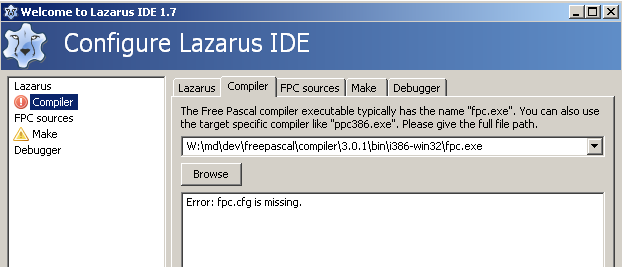
But now I have a strange error. Please, see the image below. I didn't change my compiler or paths and I can garantee that my fpc.cfg exists in the same directory that fpc.exe.

[image: Inline image 1]

Marcos Douglas
-------------- next part --------------
An HTML attachment was scrubbed...
URL: <http://lists.lazarus-ide.org/pipermail/lazarus/attachments/20170127/abfcbb56/attachment-0001.html> -------------- next part --------------
A non-text attachment was scrubbed...
Name: image.png
Type: image/png
Size: 23596 bytes
Desc: not available
URL: <http://lists.lazarus-ide.org/pipermail/lazarus/attachments/20170127/abfcbb56/attachment-0001.png>

Reply by email

Marcos Douglas B. Santos
to Marcos Douglas B. Santos
Marcos Douglas B. Santos wrote
But now I have a strange error. Please, see the image below. I didn't change my compiler or paths and I can garantee that my fpc.cfg exists in the same directory that fpc.exe.

I reseted my environmentoptions.xml and now it works.

Marcos Douglas

Reply by email