Sign in Join

Live chat for Free Pascal, Lazarus, Delphi and every Pascal programmer.

Mailing lists / lazarus / 2016-09

Launching External Tool Cmd.exe in Windows

10 messages · 4 people · –

Reply by email Subscribe to this list Your subscription

Read-only archive. Use j and k to move between messages.

Lars

Hi, Lazarus has the nice feature of being able to launch an external tool.

I'm trying to launch a console app...

So I put C:\Windows\System32\cmd.exe in the program file name for the external tool. This does nothing and gives no error message. Also add the parameter /k and it still does nothing.

Any idea how to get lazarus to launch a simple cmd.exe instance as an external tool? Should this be filed as a bug if it doesn't work?

Other things I will try... COMSPEC... but still cmd.exe should work, no?
Reply by email

shoKwave
to Lars

Hi,

I simply tried putting a TProcess and a TButton on a form and used following code

procedure TForm1.Button1Click(Sender: TObject);
begin
   Process1.ApplicationName:='c:\windows\system32\cmd.exe';
   Process1.Execute;
end;

Works for me on a Win10 32bit machine with FPC 3.0.0 and Lazarus 1.6.

Ingo

Lars wrote 14 lines
Hi, Lazarus has the nice feature of being able to launch an external tool. I'm trying to launch a console app... So I put C:\Windows\System32\cmd.exe in the program file name for the external tool. This does nothing and gives no error message. Also add the parameter /k and it still does nothing. Any idea how to get lazarus to launch a simple cmd.exe instance as an external tool? Should this be filed as a bug if it doesn't work? Other things I will try... COMSPEC... but still cmd.exe should work, no?

Reply by email

Mattias Gaertner
to Lars: Hi, Lazarus has the nice feature of being able to launch an external tool. I'm trying to…
Show quoted text 12 lines
Hi, Lazarus has the nice feature of being able to launch an external tool. I'm trying to launch a console app... So I put C:\Windows\System32\cmd.exe in the program file name for the external tool. This does nothing and gives no error message. Also add the parameter /k and it still does nothing. Any idea how to get lazarus to launch a simple cmd.exe instance as an external tool? Should this be filed as a bug if it doesn't work? Other things I will try... COMSPEC... but still cmd.exe should work, no?

I added two options "Show console" and "Hide window". Enable Show console and disable Hide window and cmd.exe will be shown in a console window.

Mattias

Reply by email

Lars
to shoKwave: I simply tried putting a TProcess and a TButton on a form and used following code…
shoKwave wrote 13 lines
Hi, I simply tried putting a TProcess and a TButton on a form and used following code procedure TForm1.Button1Click(Sender: TObject); begin Process1.ApplicationName:='c:\windows\system32\cmd.exe'; Process1.Execute; end; Works for me on a Win10 32bit machine with FPC 3.0.0 and Lazarus 1.6.

To clarify I meant the external tools in the IDE that allow you to launch a tool from the IDE tools menu...
i.e. not actual lazarus coding, but a tool to launch from the IDE. Most text editors have this feature, lazarus has really good access to lots of macros that fill in values.

For some reason cmd.exe /k doesn't launch the command line from lazarus external tools in the menu. /k option keeps the command line window open

Reply by email

Mattias Gaertner
to Lars
Show quoted text 11 lines
On Thu, September 22, 2016 3:08 am, Mattias Gaertner wrote: > > I added two options "Show console" and "Hide window". Enable Show > console and disable Hide window and cmd.exe will be shown in a console > window. > > Mattias Oh, when did you add this, long ago or just recent... which release... or is it only on the latest github/svn. Thanks, I did not see this option

Just recently, as in today.

Mattias

Reply by email

Lars
to Mattias Gaertner
Mattias Gaertner wrote 8 lines
> Oh, when did you add this, long ago or just recent... which release... > or is it only on the latest github/svn. Thanks, I did not see this > option Just recently, as in today. Mattias

Any idea what workarounds people used before? Surely someone used cmd.exe before as an external tool in an older version. I tend to not use the latest version from source control. But I can, if I have to!

Reply by email

shoKwave
to Lars: To clarify I meant the external tools in the IDE that allow you to launch a tool from the…
Lars wrote 6 lines
To clarify I meant the external tools in the IDE that allow you to launch a tool from the IDE tools menu... i.e. not actual lazarus coding, but a tool to launch from the IDE. Most text editors have this feature, lazarus has really good access to lots of macros that fill in values.

I'm sorry, I totally misread your mail.

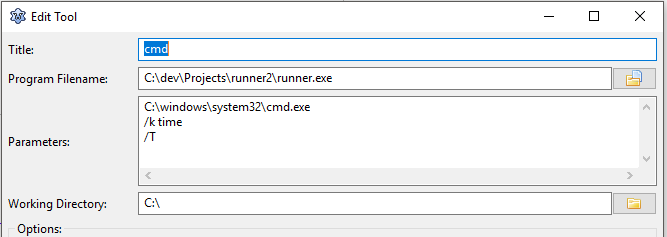
As a workaround (Mathias already fixed it in trunk) you could use a simple program to start the program you actually want to run. I attached an example (runner.lpi). It just starts the program given in the 1st parameter with all following parameters.

The picture shows how I used it to run the time command inside the cmd.exe.

Hope this helps you.

Ingo
-------------- next part --------------
A non-text attachment was scrubbed...
Name: lazarus.PNG
Type: image/png
Size: 9185 bytes
Desc: not available
URL: <http://lists.lazarus-ide.org/pipermail/lazarus/attachments/20160923/89b45706/attachment-0001.png> -------------- next part --------------
program runner;

uses SysUtils, Process;
var AProc: TProcess;
    i: Integer;
begin
  //Any Parameters at all?
  if ParamCount > 0 then
  begin
    //Create the Process
    AProc:= TProcess.Create(NIL);
    //First parameter is the program to run
    AProc.Executable := ParamStr(1);
    //Add Parameters
    if ParamCount > 1 then
    begin
      for i := 2 to ParamCount do
      begin
        AProc.Parameters.Add(ParamStr(i));
      end;
    end;
    //Run and free the Process
    try
      AProc.Execute;
    finally
      AProc.Free;
    end;
  end;
end.

Reply by email

Cyrax
to Lars: Any idea what workarounds people used before? Surely someone used cmd.exe before as an…
Lars wrote 15 lines
On Thu, September 22, 2016 3:45 pm, Mattias Gaertner wrote: >> Oh, when did you add this, long ago or just recent... which release... >> or is it only on the latest github/svn. Thanks, I did not see this >> option > > Just recently, as in today. > > > Mattias Any idea what workarounds people used before? Surely someone used cmd.exe before as an external tool in an older version. I tend to not use the latest version from source control. But I can, if I have to!

In Tools->Configure External tools...->Add dialog, input these:

Title : Command Prompt
Program Filename : $Env(COMSPEC)
Parameters : '/c "start "Command Prompt" "%COMSPEC%""'

If single line contains at least one space to separate parameters then whole line will be enclosed with double quotes automatically, thus making it one parameter option. Single quotes at the beginning and the end will prevent this.

In Parameters text box, you can have multiple lines and those lines will be one parameter per line.

Reply by email

Lars
to Cyrax
Cyrax wrote 13 lines
> Any idea what workarounds people used before? Surely someone used > cmd.exe before as an external tool in an older version. I tend to not > use the latest version from source control. But I can, if I have to! > In Tools->Configure External tools...->Add dialog, input these: Title : Command Prompt Program Filename : $Env(COMSPEC) Parameters : '/c "start "Command Prompt" "%COMSPEC%""'

Genius! Any idea how to launch a console app using this trick?

i.e. I develop a console app in lazarus (the $TargetFile()) and want to launch it but leave it open. Cmd /k was what I thought.

other option would be to make a ms dos batch file, that launches a command window, and run it. Or like the other poster said, create a launcher program

Reply by email