Sign in Join

Live chat for Free Pascal, Lazarus, Delphi and every Pascal programmer.

Mailing lists / lazarus / 2016-09

editor: Horizontal scrollbar position after pressing ENTER

3 messages · 2 people · –

Reply by email Subscribe to this list Your subscription

Read-only archive. Use j and k to move between messages.

Graeme Geldenhuys

Hi,

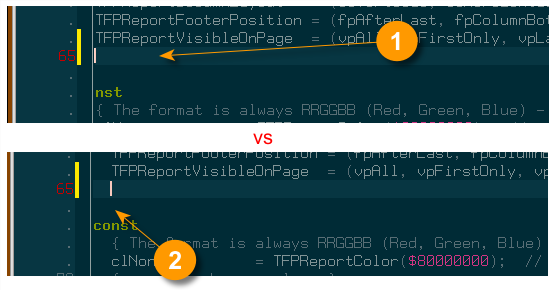
Please see attached screenshot to help explain. When I have a long line of code that causes horizontal scrolling and I press ENTER to start a new line, the cursor moves to the correct indentation level, but the editor view is still scrolled a few spaces off the screen (see (1) in screenshot). See of the word "const" is only partially visible two lines down.

What I would like to see after pressing ENTER is that the editor scrolls back to column 0, and the edit cursor placed in the normal indented position. As indicated by (2) in the screenshot. Note how the word "const" is now fully visible.

Is there a editor setting that alters the behaviour of (1) somewhere? I had a look through the various editor settings, but can't see anything obvious.

Regards,
Graeme
fpGUI Toolkit - a cross-platform GUI toolkit using Free Pascal http://fpgui.sourceforge.net/ My public PGP key: http://tinyurl.com/graeme-pgp -------------- next part -------------- A non-text attachment was scrubbed... Name: screenshot01.png Type: image/png Size: 26909 bytes Desc: not available URL: <http://lists.lazarus-ide.org/pipermail/lazarus/attachments/20160906/1816a380/attachment-0001.png>

Reply by email

Martin Frb
to Graeme Geldenhuys
Graeme Geldenhuys wrote
When I have a long line of code that causes horizontal scrolling and I press ENTER to start a new line, the cursor moves to the correct indentation level, but the editor view is still scrolled a few spaces off the screen

....

What I would like to see after pressing ENTER is that the editor scrolls back to column 0

....

Is there a editor setting that alters the behaviour of (1) somewhere? I had a look through the various editor settings, but can't see anything obvious.

unfortunately not.

you could try to re-assign the enter key to an editor macro, and in the macro perform the line-break, and then try and find a way to scroll to zero.

begin
ecLineBreak;
ecScrollLeft;
ecScrollLeft;
ecScrollLeft;
ecScrollLeft;  // as many as you may need
end.

Reply by email

Graeme Geldenhuys
to Martin Frb
Martin Frb wrote
you could try to re-assign the enter key to an editor macro,

For now I've simply disabled "Auto Indent" and that seems like a sufficient work-around.

Regards,
Graeme

Reply by email