Sign in Join

Live chat for Free Pascal, Lazarus, Delphi and every Pascal programmer.

Mailing lists / lazarus / 2024-01

DBGrid displays Float as integer

10 messages · 4 people · –

Reply by email Subscribe to this list Your subscription

Read-only archive. Use j and k to move between messages.

John Landmesser

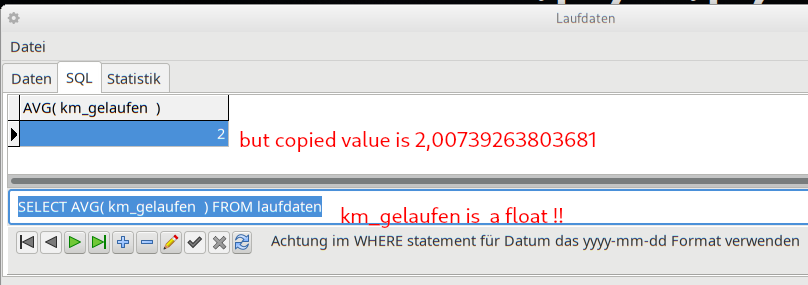
An SQL satatement on a float field is displayed as an integer field in a DBGrid. The fields are created "on the fly" they are not static!

SQL statement is:

"SELECT AVG( km_gelaufen? ) FROM laufdaten"

SQL returns the correct value "2,00739263803681" if i copy the value in DBGrid, but DBGrid itself shows only integer value.

Any idea how to correct that?

It is a SQlite database.

Info:

Lazarus 3.99 (rev main_3_99-1333-g5c01e6a88e) FPC 3.2.2 x86_64-linux-gtk2

Tipps are welcome ..,
-------------- next part --------------
An HTML attachment was scrubbed...
URL: <http://lists.lazarus-ide.org/pipermail/lazarus/attachments/20240131/336b3e59/attachment-0001.htm> -------------- next part --------------
A non-text attachment was scrubbed...
Name: uy07kNDNSh0Li7Lv.png
Type: image/png
Size: 36530 bytes
Desc: not available
URL: <http://lists.lazarus-ide.org/pipermail/lazarus/attachments/20240131/336b3e59/attachment-0001.png>

Reply by email

Santi
to John Landmesser

El 31/01/2024 a las 14:32, n Landmesser via lazarus escribi?:

Show quoted text 13 lines
An SQL satatement on a float field is displayed as an integer field in a DBGrid. The fields are created "on the fly" they are not static! SQL statement is: "SELECT AVG( km_gelaufen? ) FROM laufdaten" SQL returns the correct value "2,00739263803681" if i copy the value in DBGrid, but DBGrid itself shows only integer value.

Look the format of the field component.
Is it a TIntegerField? Maybe you selected the wrong field type, it should be a TFloatField
If it is a TFloatField, look at display format. Maybe you haven't selected the number of decimal properly.

Show quoted text 11 lines
Any idea how to correct that? It is a SQlite database. Info: Lazarus 3.99 (rev main_3_99-1333-g5c01e6a88e) FPC 3.2.2 x86_64-linux-gtk2 Tipps are welcome ..,
Saludos Santi -------------- next part -------------- An HTML attachment was scrubbed... URL: <http://lists.lazarus-ide.org/pipermail/lazarus/attachments/20240131/44fc4d82/attachment-0001.htm> -------------- next part -------------- A non-text attachment was scrubbed... Name: uy07kNDNSh0Li7Lv.png Type: image/png Size: 36530 bytes Desc: not available URL: <http://lists.lazarus-ide.org/pipermail/lazarus/attachments/20240131/44fc4d82/attachment-0001.png>

Reply by email

John Landmesser
to Santi
Santi wrote 20 lines
El 31/01/2024 a las 14:32, n Landmesser via lazarus escribi?: > > An SQL satatement on a float field is displayed as an integer field > in a DBGrid. The fields are created "on the fly" they are not static! > > > > SQL statement is: > > "SELECT AVG( km_gelaufen? ) FROM laufdaten" > > SQL returns the correct value "2,00739263803681" if i copy the value > in DBGrid, but DBGrid itself shows only integer value. > Look the format of the field component. Is it a TIntegerField? Maybe you selected the wrong field type, it should be a TFloatField If it is a TFloatField, look at display format. Maybe you haven't selected the number of decimal properly.

There is just the Database and a TQuery and the? DBGrid , i execute the SQL code and lazarus DBGrid shows the result as described above.

No static fielddefs with format options. The result field creates lazarus "on the fly"
-------------- next part --------------
An HTML attachment was scrubbed...
URL: <http://lists.lazarus-ide.org/pipermail/lazarus/attachments/20240131/05342b56/attachment-0001.htm> -------------- next part --------------
A non-text attachment was scrubbed...
Name: uy07kNDNSh0Li7Lv.png
Type: image/png
Size: 36530 bytes
Desc: not available
URL: <http://lists.lazarus-ide.org/pipermail/lazarus/attachments/20240131/05342b56/attachment-0001.png>

Reply by email

LacaK
to John Landmesser

Hi,

IMO AVG() should produce floating point result.

https://www.sqlite.org/lang_aggfunc.html#aggfunclist: The result of avg() is always a floating point value whenever there is at least one non-NULL input even if all inputs are integers.

In SQLite plays role column affinity. I expect that "km_gelaufen" is of NUMERIC or REAL affinity.

What result (in TDBGrid) gives: SELECT CAST(AVG(km_gelaufen)? AS REAL) FROM laufdaten ?

L.

Show quoted text 8 lines
Ok, *solution* is to CAST AS Varchar the result: SELECT CAST(AVG(km_gelaufen)? AS VARCHAR) FROM laufdaten But? i don't understand why i do have to cast the result ...

-------------- next part --------------
An HTML attachment was scrubbed...
URL: <http://lists.lazarus-ide.org/pipermail/lazarus/attachments/20240201/b0928208/attachment.htm>

Reply by email

John Landmesser
to LacaK
LacaK wrote 26 lines
Hi, IMO AVG() should produce floating point result. https://www.sqlite.org/lang_aggfunc.html#aggfunclist: The result of avg() is always a floating point value whenever there is at least one non-NULL input even if all inputs are integers. In SQLite plays role column affinity. I expect that "km_gelaufen" is of NUMERIC or REAL affinity. What result (in TDBGrid) gives: SELECT CAST(AVG(km_gelaufen)? AS REAL) FROM laufdaten ? L. > > Ok, *solution* is to CAST AS Varchar the result: > > SELECT CAST(AVG(km_gelaufen)? AS VARCHAR) FROM laufdaten > > But? i don't understand why i do have to cast the result ... > >

In my SQlite Database laufdaten.db column "km_gelaufen"? is of Type float. But SQlite does not know this type and if i understood that correct SQLite? creates this type as needed?!

If i execute: "SELECT CAST(AVG(km_gelaufen) *AS REAL*) FROM laufdaten" the known problem of integer only shows up again.

BUT:

If i execute this "SELECT CAST(AVG(km_gelaufen)? AS REAL) FROM laufdaten " in SQliteStudio it works as it should.

Is DBgrid or Zeos Access components? the culpit? I don't know.

But? for me at the moment its ok now because i know how to circumvent this problem with CAST() as VARCHAR

-------------- next part --------------
An HTML attachment was scrubbed...
URL: <http://lists.lazarus-ide.org/pipermail/lazarus/attachments/20240201/3ac94f4c/attachment.htm>

Reply by email

Michael Van Canneyt
to John Landmesser
John Landmesser wrote 14 lines
In my SQlite Database laufdaten.db column "km_gelaufen"? is of Type float. But SQlite does not know this type and if i understood that correct SQLite? creates this type as needed?! If i execute: "SELECT CAST(AVG(km_gelaufen) *AS REAL*) FROM laufdaten" the known problem of integer only shows up again. BUT: If i execute this "SELECT CAST(AVG(km_gelaufen)? AS REAL) FROM laufdaten " in SQliteStudio it works as it should. Is DBgrid or Zeos Access components? the culpit? I don't know.

For Object pascal, sqlite is something of a problem as it does not have real "types".

The following works:

sqlite> create table abc (id int);
sqlite> insert into abc values ('xyz');

Which is of course total nonsense. It should refuse the insert, but it does not.

The FPC database layer will do its best to detect the type of a result field, but there is no guarantee that it will be the correct type, or that the actual data will be of the correct type.
You will experience problems with data such as the above.

What you can do is to check

YourQuery.Fields[0].ClassName

if it has something different from TFloatField or TBCDField, then you know it has not correctly detected the type.

But if you value correctness and integrity of your data, don't use sqlite. At best it should be used for config or textual data. Anything else is risky.

Michael.

Reply by email

LacaK
to John Landmesser: In my SQlite Database laufdaten.db column "km_gelaufen"? is of Type float. But SQlite…
Show quoted text 8 lines
If i execute: "SELECT CAST(AVG(km_gelaufen) *AS REAL*) FROM laufdaten" the known problem of integer only shows up again. BUT: If i execute this "SELECT CAST(AVG(km_gelaufen)? AS REAL) FROM laufdaten " in SQliteStudio it works as it should.

Ok then it is clear that SQLite produces result as expected

Is DBgrid or Zeos Access components? the culpit? I don't know.

Do you use Zeos components not SQLdb (TSQLQuery)?
Can you test datatype of TField created at runtime? For example place somewhere after dataset is Open-ed something like: ShowMessage(Fieldtypenames[Query1.Fields[0].DataType]);

L.
-------------- next part --------------
An HTML attachment was scrubbed...
URL: <http://lists.lazarus-ide.org/pipermail/lazarus/attachments/20240201/bce77378/attachment.htm>

Reply by email

John Landmesser
to Michael Van Canneyt: For Object pascal, sqlite is something of a problem as it does not have real "types". The…
Show quoted text 8 lines
But if you value correctness and integrity of your data, don't use sqlite. At best it should be used for config or textual data. Anything else is risky. Michael.

Thanks for this clarification !

It is just a protocol of my jogging hobby,? so no live is in danger :-)

And now i know my jogging in second half of year 2023 was shorter but 1 second quicker per km.

Is'nt that a value statistik? Yeah!!

Thanks for lazarus ...

JohnML

Reply by email

John Landmesser
to LacaK: Ok then it is clear that SQLite produces result as expected Do you use Zeos components…
LacaK wrote 21 lines
> If i execute: "SELECT CAST(AVG(km_gelaufen) *AS REAL*) FROM > laufdaten" the known problem of integer only shows up again. > > BUT: > > If i execute this "SELECT CAST(AVG(km_gelaufen)? AS REAL) FROM > laufdaten " in SQliteStudio it works as it should. > Ok then it is clear that SQLite produces result as expected > Is DBgrid or Zeos Access components? the culpit? I don't know. > Do you use Zeos components not SQLdb (TSQLQuery)? Can you test datatype of TField created at runtime? For example place somewhere after dataset is Open-ed something like: ShowMessage(Fieldtypenames[Query1.Fields[0].DataType]); L.

I am happy with the result i get ... no more searching needed, see also last post of Michael van Cannyet
-------------- next part --------------
An HTML attachment was scrubbed...
URL: <http://lists.lazarus-ide.org/pipermail/lazarus/attachments/20240201/55b8be6f/attachment.htm>

Reply by email