Balázs Székely wrote 8 lines
Hi Michael,
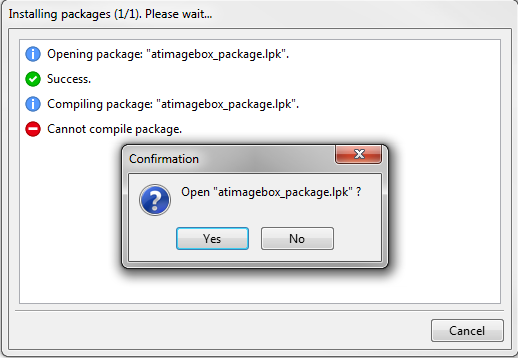
I tried to install a package using the package manager (Brook framework).
> The package manager tells me the compile failed.
> How can I see what the actual error is ?
>
The Message Window is not obscured by OPM, usually I check the error
messages there.
Duh ! I should have checked that...
The message window was obscured in my case.
Damn this docked IDE, I can't get used to it ;-)
Show quoted text 6 lines
Ideally you shouldn't see any error messages :), however there are too many
Lazarus/FPC version/widgetsets. I cannot check each package on every single
platform. This should be the package maintainers job.
In Lazarus trunk there is a small improvement though, if a package is not
tested against a specific widgetset/Laz/FPC version, OPM will warn you,
that the package compile might fail.
OK, seems like a good idea.
BTW, the message was not meant to point out that there is a broken package. I understand perfectly you cannot check every possible package out there. I simply didn't see the messages window.
for completeness sake, here is the actual error:
brookfclfcgibroker.pas(23,12) Fatal: Cannot find CustFCGI used by BrookFCLFCGIBroker of package BrookRT.
Show quoted text 7 lines
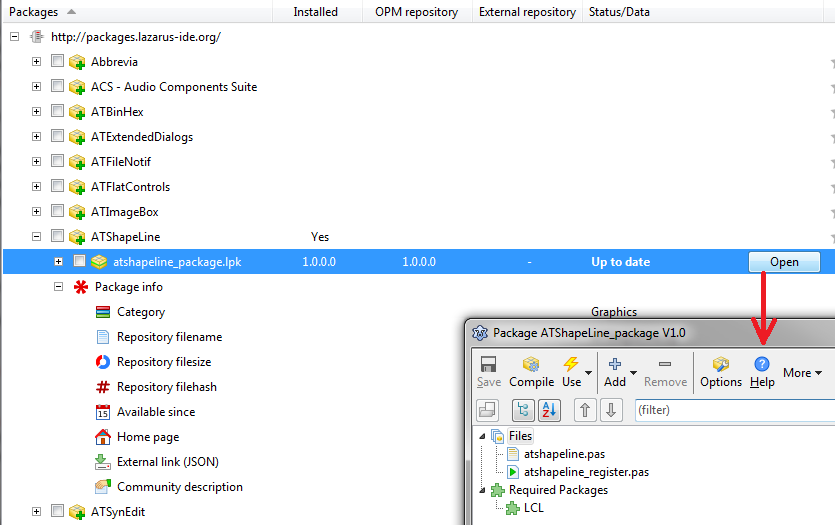
Or must I open the package manually, compile manually to see the error ?
> If so, why isn't there a 'open this package' entry in the list of packages
> ?
>
This is a good idea, I can add an "open this package" entry.
Yes, please. That would be really handy ! See below.
Show quoted text 10 lines
have no easy way of locating the package.
> In the options, I found where the OLPM downloads the packages,
> but to get there on a mac involves an insane amount of clicking,
> provided I managed to remember the location where the package is supposed
> to
> be...
>
Please click the "Local Repo" button(see attachment) , it will open a file
manager window with the folder where the packages are installed.
Yes, I did that before mailing.
But when I open a package in this dialog, it shows me an empty file list :(
So, in order to open the package, I must then
* remember the location
* close this dialog and go to the 'open package file' dialog in the package menu.
* Browse to home directory.
* Enable showing hidden files with Cmd-Shift-Period to be able to select the .lazarus directory (this is Mac!)
* Continue to correct directory
* Open package file.
And then I see the correct file list in the package...
Now you will understand why I think the 'open this package' entry is a good idea ;-)
Thanks for looking at this :-)
Michael.