Sign in Join

Live chat for Free Pascal, Lazarus, Delphi and every Pascal programmer.

Mailing lists / lazarus / 2015-06

QuestionDlg block mouse and keyboard input under OSX

11 messages · 3 people · –

Reply by email Subscribe to this list Your subscription

Read-only archive. Use j and k to move between messages.

Graeme Geldenhuys

Hi,

Attached is a very simple test project. It uses a QuestionDlg() in the form's OnShow (eg: to ask a user if they want online or offline access for the application). It was purposely added there to ask a question before the main form is shown. This LCL application works perfectly under Windows, Linux and FreeBSD. But it blocks mouse and keyboard input under OSX - so the user can't actually answer the question and get into the application! The only thing I can do is click the red "x" button in the dialog title area, but that is no real solution.

Is this a know issue under OSX? Anybody have a work-around?

ps:
Regarding the attached archive. I added the extra extension ".removeme" to overcome stupid spam/virus checks. Please remove the extra extension and unpack as normal.

Regards,
Graeme

-------------- next part --------------
An HTML attachment was scrubbed...
URL: <http://lists.lazarus.freepascal.org/pipermail/lazarus/attachments/20150615/5f3b976b/attachment.html> -------------- next part --------------
A non-text attachment was scrubbed...
Name: lcl_questiondlg.tgz.RemoveMe
Type: application/octet-stream
Size: 2944 bytes
Desc: not available
URL: <http://lists.lazarus.freepascal.org/pipermail/lazarus/attachments/20150615/5f3b976b/attachment.obj>
Reply by email

Balazs Szekely
to Graeme Geldenhuys

Hi,? Cannot reproduce(OSX 10.8.2, Lazarus trunk SVN: 1.5): https://youtu.be/zNT-dHOzalM ???

regards,Bal?zs

From: Graeme Geldenhuys
To:
Sent: Monday, June 15, 2015 3:25 PM
Subject: [Lazarus] QuestionDlg block mouse and keyboard input under OSX

#yiv7948260297 .yiv7948260297sw_message P{margin:0px;padding:0px;}#yiv7948260297 .yiv7948260297sw_message {FONT-SIZE:12pt;FONT-FAMILY:Tahoma, Arial, Helvetica, sans-serif;background:white;}#yiv7948260297 .yiv7948260297sw_message blockquote{margin-left:5px;padding-left:5px;border-left:2px solid #144fae;color:#144fae;}#yiv7948260297 .yiv7948260297sw_message blockquote blockquote{border-left:2px solid #006312;color:#006312;}#yiv7948260297 .yiv7948260297sw_message blockquote blockquote blockquote{border-left:2px solid #8e5656;color:#8e5656;}#yiv7948260297 .yiv7948260297sw_message blockquote blockquote blockquote blockquote{border-left:2px solid #888;color:#888;}Hi,

Attached is a very simple test project. It uses a QuestionDlg() in the form's OnShow (eg: to ask a user if they want online or offline access for the application). It was purposely added there to ask a question before the main form is shown. This LCL application works perfectly under Windows, Linux and FreeBSD. But it blocks mouse and keyboard input under OSX - so the user can't actually answer the question and get into the application! The only thing I can do is click the red "x" button in the dialog title area, but that is no real solution.

Is this a know issue under OSX? Anybody have a work-around?

ps:
Regarding the attached archive. I added the extra extension ".removeme" to overcome stupid spam/virus checks. Please remove the extra extension and unpack as normal.

Regards,
? Graeme

?

Reply by email

Dmitry Boyarintsev
to Graeme Geldenhuys: Attached is a very simple test project. It uses a QuestionDlg() in the form's OnShow (eg:…

On Mon, Jun 15, 2015 at 8:25 AM, Graeme Geldenhuys <

Show quoted text 6 lines
wrote: Is this a know issue under OSX? Anybody have a work-around? Please bug report. I'll take a look tonight.

thanks,
Dmitry
-------------- next part --------------
An HTML attachment was scrubbed...
URL: <http://lists.lazarus.freepascal.org/pipermail/lazarus/attachments/20150615/4948705e/attachment.html>

Reply by email

Graeme Geldenhuys
to Balazs Szekely: Hi,? Cannot reproduce(OSX 10.8.2, Lazarus trunk SVN: 1.5): https://youtu.be/zNT-dHOzalM…
Balazs Szekely wrote
Cannot reproduce(OSX 10.8.2, Lazarus trunk SVN: 1.5)

Thanks for trying. Here is my video showing the problem.

http://youtu.be/Z_2KkQrpiXY

The odd characters that appear in the console window around 24seconds is me trying to use the arrow keys or TAB and ENTER key to click a button.

My last resort was to click the red "x" button.

Regards,
- Graeme -

fpGUI Toolkit - a cross-platform GUI toolkit using Free Pascal http://fpgui.sourceforge.net/

Reply by email

Dmitry Boyarintsev
to Graeme Geldenhuys: Thanks for trying. Here is my video showing the problem. http://youtu.be/Z_2KkQrpiXY The…

On Mon, Jun 15, 2015 at 9:17 AM, Graeme Geldenhuys <

Show quoted text 5 lines
wrote: Thanks for trying. Here is my video showing the problem. No, sir, this is not an issue! Please don't bug report.

That's OSX feature.

You're trying to launch GUI application "not from a bundle". OSX considers the application as command-line utility and passes all user input to the console, rather than GUI.

OSX is using "bundles" to organize GUI application files. Bundles are shown as a single file in the file system (for non-advanced users), but instead this is a directory with a very strict structure and some extra files in it (including the executable file).

So what you can do. In the terminal do the following: cd project1.app/Contents/MacOS
./project1

thanks,
Dmitry
-------------- next part --------------
An HTML attachment was scrubbed...
URL: <http://lists.lazarus.freepascal.org/pipermail/lazarus/attachments/20150615/6daf6bcc/attachment.html>

Reply by email

Graeme Geldenhuys
to Dmitry Boyarintsev
Dmitry Boyarintsev wrote
So what you can do. In the terminal do the following: cd project1.app/Contents/MacOS ./project1

Ah. Thank you very much for that info. It is working now. I'll try and close/cancel the bug report. I'm very new to development under OSX - I guess it shows. ;-)

Regards,
- Graeme -

fpGUI Toolkit - a cross-platform GUI toolkit using Free Pascal http://fpgui.sourceforge.net/

Reply by email

Dmitry Boyarintsev
to Graeme Geldenhuys

On Mon, Jun 15, 2015 at 9:35 AM, Graeme Geldenhuys <

Show quoted text 7 lines
wrote: Ah. Thank you very much for that info. It is working now. I'll try and close/cancel the bug report. I'm very new to development under OSX - I guess it shows. ;-) The next big thing for a new OSX developer is to get debugger working:

http://wiki.freepascal.org/GDB_on_OS_X_Mavericks_and_Xcode_5

Lots of forum threads about the issue as well.

thanks,
Dmitry
-------------- next part --------------
An HTML attachment was scrubbed...
URL: <http://lists.lazarus.freepascal.org/pipermail/lazarus/attachments/20150615/06c3f6ad/attachment.html>

Reply by email

Graeme Geldenhuys
to Dmitry Boyarintsev
Dmitry Boyarintsev wrote
> The next big thing for a new OSX developer is to get debugger working:

Up to now, I've been debugging (on OSX) with tiOPF logging units. I've actually just finished following all those instructions (homebrew, code signing etc). Everything seems to have gone smoothly (I got all the same output as the wiki) and I can now run applications via Lazarus IDE.

Unfortunately breakpoints don't seem to work at all. :-/ I'll try for a little while longer, otherwise I'll switch back to tiOPF's logging units.

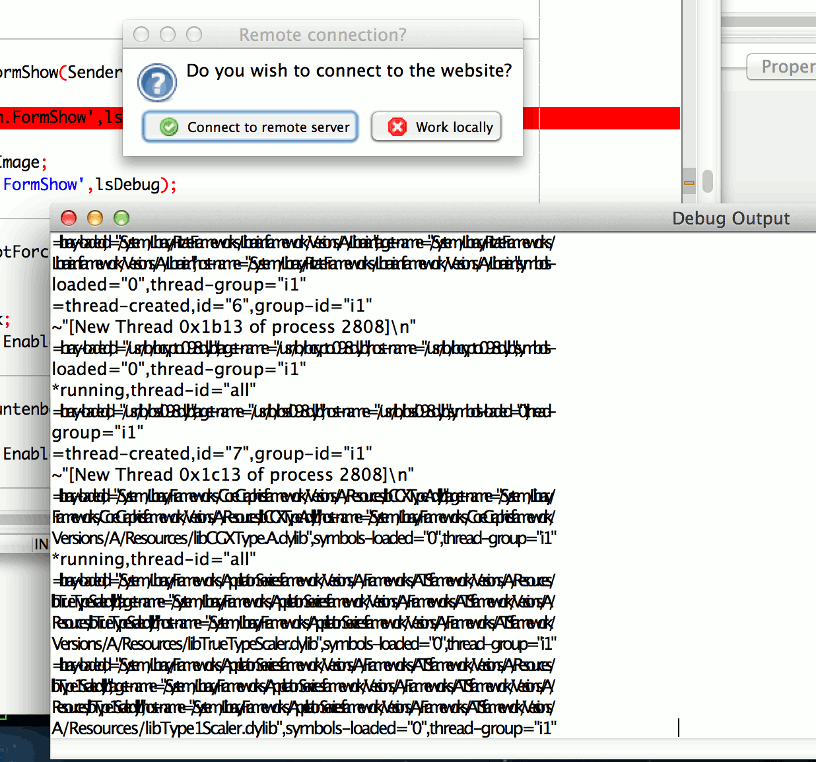
Double unfortunately, using Lazarus's Debug Output window is totally useless too, because starting my application generates what seem like 100-200k lines (probably exaggerated a bit) of output. The other problem is as soon as I scroll that window contents it all renders corrupted text (multiple lines seems painted over each other).

So far developing for OSX is a real pain. It makes Linux or FreeBSD look like a walk in the park.

Regards,
- Graeme -

fpGUI Toolkit - a cross-platform GUI toolkit using Free Pascal http://fpgui.sourceforge.net/

Reply by email

Graeme Geldenhuys
to Graeme Geldenhuys

[mailing list admins never approved my previous post from yesterday]

Graeme Geldenhuys wrote
100-200k lines (probably exaggerated a bit) of output. The other problem is as soon as I scroll that window contents it all renders corrupted text (multiple lines seems painted over each other).

See screenshot...

http://geldenhuys.co.uk/~graemeg/laz_osx_corrupt_text_rendering.png

Regards,
- Graeme -

fpGUI Toolkit - a cross-platform GUI toolkit using Free Pascal http://fpgui.sourceforge.net/

Reply by email

Dmitry Boyarintsev
to Graeme Geldenhuys

On Tue, Jun 16, 2015 at 9:48 AM, Graeme Geldenhuys <

Show quoted text 6 lines

Could you please copy-paste (cmd+c , cmd+v) the contents to a text file?

thanks,
Dmitry
-------------- next part --------------
An HTML attachment was scrubbed...
URL: <http://lists.lazarus.freepascal.org/pipermail/lazarus/attachments/20150617/ed03142f/attachment.html>

Reply by email