Sign in Join

Live chat for Free Pascal, Lazarus, Delphi and every Pascal programmer.

Mailing lists / lazarus / 2014-10

Find dialog too tight for translations

25 messages · 8 people · –

Reply by email Subscribe to this list Your subscription

Read-only archive. Use j and k to move between messages.

Giuliano Colla

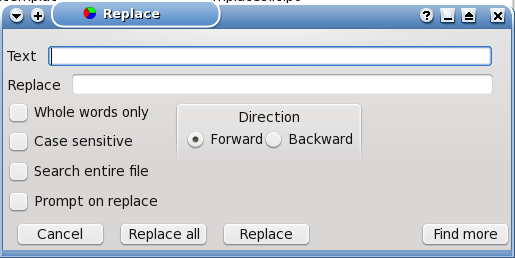
I've found a problem in the find dialogue, when used in a language different from English.

In English it's already a bit crowded:

http://www.bononiadocta.it/Lazarus/Finddialog.en.png

but once translated it becomes horrible:

http://www.bononiadocta.it/Lazarus/Finddialog.it.png http://www.bononiadocta.it/Lazarus/Finddialog.hu.png

The same problem arises with the Replace dialogue. With some resizing they could be fixed, but I've stumbled into a problem.

The source containing the form is FindDlgUnit in /lcl/forms (which is part of the LCLBase package), while the .lrs is loaded by the Dialogs unit (also part of the same package).
But editing the form and then recompiling the package apparently doesn't update the .lrs, because the dialogue appears unchanged.

What's the proper way of updating the .lrs, in order to have a dialogue which can fit non-English languages?

Giuliano

Giuliano Colla Project planning question: when it's 90% done, are we halfway or not yet?

Reply by email

Mattias Gaertner
to Giuliano Colla
Show quoted text 10 lines
Giuliano Colla hat am 23. Oktober 2014 um 14:12 geschrieben: I've found a problem in the find dialogue, when used in a language different from English. In English it's already a bit crowded: http://www.bononiadocta.it/Lazarus/Finddialog.en.png

I changed the layout a bit so that the options do not overlap anymore. The buttons are now autosized.

[...] The source containing the form is FindDlgUnit in /lcl/forms (which is part of the LCLBase package), while the .lrs is loaded by the Dialogs unit (also part of the same package).

There is no lrs file anymore. What version are you using?

Show quoted text 5 lines
But editing the form and then recompiling the package apparently doesn't update the .lrs, because the dialogue appears unchanged. What's the proper way of updating the .lrs, in order to have a dialogue which can fit non-English languages?

Mattias

Reply by email

Giuliano Colla
to Mattias Gaertner

Il 23/10/2014 14:49, Mattias Gaertner ha scritto:

[...]

Show quoted text 8 lines
> > > In English it's already a bit crowded: > > http://www.bononiadocta.it/Lazarus/Finddialog.en.png I changed the layout a bit so that the options do not overlap anymore. The buttons are now autosized.

Thanks a lot.

Show quoted text 5 lines
> [...] > The source containing the form is FindDlgUnit in /lcl/forms (which is > part of the LCLBase package), while the .lrs is loaded by the Dialogs > unit (also part of the same package). There is no lrs file anymore. What version are you using?

The trunk version, and I took for good the comments I found there. However, for my information, what should I have done to make it accept my correction?
Apparently recompiling the LCLBase Package, with just FindDialogUnit modified wasn't enough.

Giuliano

Giuliano Colla Project planning question: when it's 90% done, are we halfway or not yet?

Reply by email

waldo kitty
to Giuliano Colla: I've found a problem in the find dialogue, when used in a language different from English.
Giuliano Colla wrote 8 lines
I've found a problem in the find dialogue, when used in a language different from English. In English it's already a bit crowded: http://www.bononiadocta.it/Lazarus/Finddialog.en.png but once translated it becomes horrible:

is that your layout? i've never used it but my first suggestion would be to place "direction" under "text" and the "forward/backward" selectors under the text field... that moves everything else down a ""line""... ignore me if i'm (way?) off-base ;)

NOTE: No off-list assistance is given without prior approval. Please *keep mailing list traffic on the list* unless private contact is specifically requested and granted.

Reply by email

Giuliano Colla
to waldo kitty

Il 23/10/2014 19:35, waldo kitty ha scritto:

Show quoted text 6 lines
is that your layout? i've never used it but my first suggestion would be to place "direction" under "text" and the "forward/backward" selectors under the text field... that moves everything else down a ""line""... ignore me if i'm (way?) off-base ;)

No, that's the "official" layout provided by LCL.
It's rather old, I think, and, I presume, not much used. The IDE editor uses his own dialogue, which is larger but much better organized.
Maybe it's worth a revision, together with the "replace" dialogue, which suffers of the same problems.

Giuliano

Giuliano Colla Project planning question: when it's 90% done, are we halfway or not yet?

Reply by email

Giuliano Colla
to Juha Manninen

Il 23/10/2014 20:52, Juha Manninen ha scritto:

Show quoted text 5 lines
On Thu, Oct 23, 2014 at 9:19 PM, Giuliano Colla wrote: > Maybe it's worth a revision, together with the "replace" dialogue, which > suffers of the same problems. +1

Not to reinvent the wheel, I've taken as a guideline the find/replace dialog of the IDE editor, and the changes just made by Matthias. What has come out is:

http://www.bononiadocta.it/Lazarus/Finddialog1.en.png

and:

http://www.bononiadocta.it/Lazarus/Finddialog2.en.png

In both all translations I tested fit without problems. The "Directions" box moves to the right following the length of the strings of the checkboxes.

If nobody comes out with better ideas/suggestion, I'll post the patch in the bugtracker.

Giuliano

Giuliano Colla Project planning question: when it's 90% done, are we halfway or not yet?

Reply by email

Jürgen Hestermann
to Giuliano Colla
Giuliano Colla wrote 8 lines
Not to reinvent the wheel, I've taken as a guideline the find/replace dialog of the IDE editor, and the changes just made by Matthias. What has come out is: http://www.bononiadocta.it/Lazarus/Finddialog1.en.png and: http://www.bononiadocta.it/Lazarus/Finddialog2.en.png In both all translations I tested fit without problems. The "Directions" box moves to the right following the length of the strings of the checkboxes. If nobody comes out with better ideas/suggestion, I'll post the patch in the bugtracker. Giuliano

Why is the "Direction" box placed on the right of all other options? IMO it is just another option as all the others so it should be put below these other options. This would also avoid the problem of moving this box when text becomes long.

And I would change the text from "Direction" to "Search Direction" to make it clear, of what purpose this direction option is.

Reply by email

Giuliano Colla
to Jürgen Hestermann

Il 24/10/2014 10:39, J?rgen Hestermann ha scritto:

Show quoted text 23 lines
Am 2014-10-24 um 00:09 schrieb Giuliano Colla: > Not to reinvent the wheel, I've taken as a guideline the find/replace > dialog of the IDE editor, and the changes just made by Matthias. > What has come out is: > http://www.bononiadocta.it/Lazarus/Finddialog1.en.png > and: > http://www.bononiadocta.it/Lazarus/Finddialog2.en.png > In both all translations I tested fit without problems. The > "Directions" box moves to the right following the length of the > strings of the checkboxes. > If nobody comes out with better ideas/suggestion, I'll post the patch > in the bugtracker. > Giuliano Why is the "Direction" box placed on the right of all other options? IMO it is just another option as all the others so it should be put below these other options. This would also avoid the problem of moving this box when text becomes long. And I would change the text from "Direction" to "Search Direction" to make it clear, of what purpose this direction option is.

Thank you for the feedback. The reason to keep it to the right was simply that it was there before.
I'll try your layout and we'll see what comes out.

Giuliano

Giuliano Colla Project planning question: when it's 90% done, are we halfway or not yet?

Reply by email

waldo kitty
to Jürgen Hestermann: Why is the "Direction" box placed on the right of all other options? IMO it is just…
J?rgen Hestermann wrote
Why is the "Direction" box placed on the right of all other options? IMO it is just another option as all the others so it should be put below these other options. This would also avoid the problem of moving this box when text becomes long.

this is similar to my suggestion posted previously ;)

NOTE: No off-list assistance is given without prior approval. Please *keep mailing list traffic on the list* unless private contact is specifically requested and granted.

Reply by email

Giuliano Colla
to waldo kitty

Il 24/10/2014 17:19, waldo kitty ha scritto:

Show quoted text 9 lines
On 10/24/2014 4:39 AM, J?rgen Hestermann wrote: > Why is the "Direction" box placed on the right of all other options? > IMO it is just another option as all the others so it should be put > below > these other options. This would also avoid the problem of moving > this box when text becomes long. this is similar to my suggestion posted previously ;)

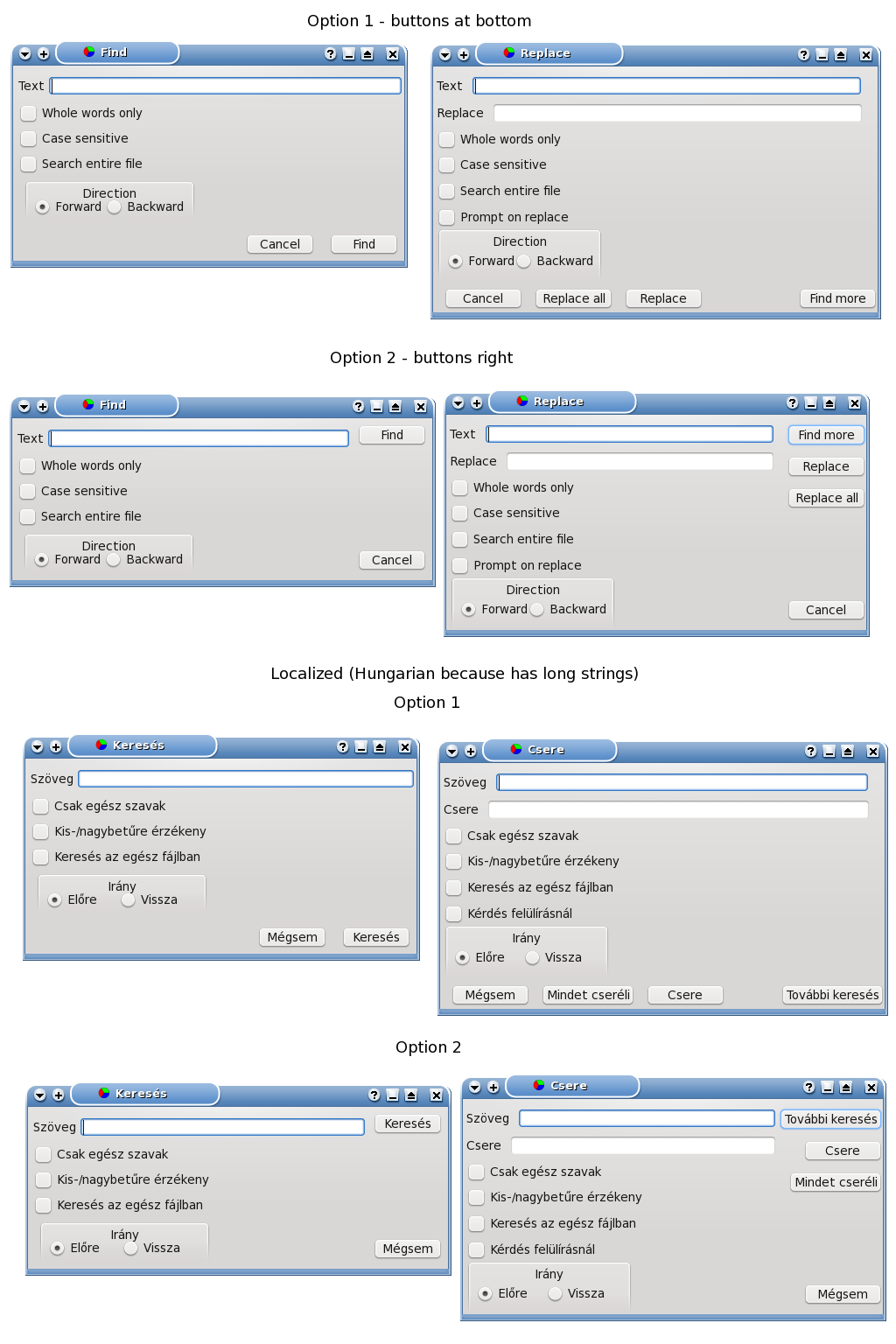
Taking into account all suggestions, I came out with two possible layouts:

Option 1 = Buttons at the bottom of the form (like in my previous version)

Option 2 = Buttons at the right of the form (like in the original version)

(there's also a help button, which is not visible by default, but it may become visible, if the appropriate option is selected. It would go either at the extreme right, or at the bottom, moving nearby button right or up because of anchoring):

http://www.bononiadocta.it/Lazarus/Dialogues/Dialogues.png

I've put in the image also a localized version, to see what it looks like when strings become much longer.
I'd choose option 2 because bottom line risks to become crowded if the help button is added, but I'd like to hear other opinions.

Giuliano

Giuliano Colla Project planning question: when it's 90% done, are we halfway or not yet?

Reply by email

Jürgen Hestermann
to Giuliano Colla
Giuliano Colla wrote 9 lines
Taking into account all suggestions, I came out with two possible layouts: Option 1 = Buttons at the bottom of the form (like in my previous version) Option 2 = Buttons at the right of the form (like in the original version) (there's also a help button, which is not visible by default, but it may become visible, if the appropriate option is selected. It would go either at the extreme right, or at the bottom, moving nearby button right or up because of anchoring): http://www.bononiadocta.it/Lazarus/Dialogues/Dialogues.png I've put in the image also a localized version, to see what it looks like when strings become much longer. I'd choose option 2 because bottom line risks to become crowded if the help button is added, but I'd like to hear other opinions. Giuliano

I would prefer option 1.
It is a clear list with bottons on the bottom as usual. The other options look more or less confusing to me. Having the buttons on the right looks as if
they have nothing to do with the whole dialog.

Reply by email

Jürgen Hestermann
to Bart
Bart wrote
I prefer buttons on right, especially in ReplaceDlg, otherwise there is a lot of empty space next to the checkboxes.

With the buttons on the right the same empty space exists between the options on the left and the buttons which tears apart what should be together.
Empty space is no issue if it is just that: Empty space (see Google web page). But if things that belong to each other are put so far apart it is confusing IMO.

Reply by email

waldo kitty
to Giuliano Colla: Il 24/10/2014 17:19, waldo kitty ha scritto: Taking into account all suggestions, I came…
Giuliano Colla wrote 5 lines
Taking into account all suggestions, I came out with two possible layouts: Option 1 = Buttons at the bottom of the form (like in my previous version) Option 2 = Buttons at the right of the form (like in the original version)

i like them both... option 2 is like a lot of stuff that i work with... i have no preference between them at this time... maybe provide both so that implementers can choose which they prefer in their project?

NOTE: No off-list assistance is given without prior approval. Please *keep mailing list traffic on the list* unless private contact is specifically requested and granted.

Reply by email

waldo kitty
to Giuliano Colla: Il 24/10/2014 17:19, waldo kitty ha scritto: Taking into account all suggestions, I came…
Giuliano Colla wrote 5 lines
Taking into account all suggestions, I came out with two possible layouts: Option 1 = Buttons at the bottom of the form (like in my previous version) Option 2 = Buttons at the right of the form (like in the original version)

i forgot to ask in my previous post... have you seen the find/replace dialog in notepad++? it is tabbed with four tabs and is similar to your option 2...

[aside][ramble] i use notepad++ a lot... especially for editing multiple files... largest project so far was editing 1000 data files with searches and replaces across all of them at once... they were for a satellite tracking program's ability to use different "common names" for the objects... when you have hundreds of objects that result from explosions or collisions and you want to use a different name, it comes in handy to work across multiple files as well... [/ramble] [/aside]

NOTE: No off-list assistance is given without prior approval. Please *keep mailing list traffic on the list* unless private contact is specifically requested and granted.

Reply by email

Giuliano Colla
to waldo kitty: i like them both... option 2 is like a lot of stuff that i work with... i have no…

Il 25/10/2014 18:49, waldo kitty ha scritto:

Show quoted text 15 lines
On 10/24/2014 5:34 PM, Giuliano Colla wrote: > Taking into account all suggestions, I came out with two possible > layouts: > > Option 1 = Buttons at the bottom of the form (like in my previous > version) > > Option 2 = Buttons at the right of the form (like in the original > version) i like them both... option 2 is like a lot of stuff that i work with... i have no preference between them at this time... maybe provide both so that implementers can choose which they prefer in their project?

It would appear that the majority is for Option 2. However, before submitting a patch, I'd like to see if the proposal of a user selectable layout is viable. Not only to satisfy also the minority, but also to clean up the situation, which currently IMO isn't too much satisfactory.

The idea of a selectable configuration has triggered the following considerations.

What happens now is that in lcl/forms you have two units, one for the Find dialog and one for the Replace dialog, each one with its form. You must use them to design your forms. Once you're happy with them, you must copy the code into one of the files included by the Dialogs unit which loads also the lfm files generated when compiling the other units. IOW quite a complicate situation, not too clean.
I gather that this is made necessary to avoid a circular dependency: you cannot include a unit which uses LCLBase into the package LCLBase itself.

A cleaner solution would be to build those dialogs in code, like the other ones in the Dialogs unit, without loading an lfm file from stream. Besides the advantage of providing a configurable layout, this solution could be implemented with an ancestor class of a generic Find/replace dialog, from which those two dialogs could be derived. This would provide the extra bonus to give to users the option of building their own custom dialogs, deriving them from the ancestor class, for special usage. A find/replace dialog used in an editor of po files may need the options of selecting MsgId/MsgStr, an application may need to enable/disable a search based on regular expressions, etc. I'd like to investigate if this path can be followed without too many difficulties.

Any observations?

Giuliano

Giuliano Colla Project planning question: when it's 90% done, are we halfway or not yet?
Reply by email

Mattias Gaertner
to Giuliano Colla
Giuliano Colla hat am 26. Oktober 2014 um 23:58 geschrieben: [...] IOW quite a complicate situation, not too clean.

True.

I gather that this is made necessary to avoid a circular dependency: you cannot include a unit which uses LCLBase into the package LCLBase itself.

Actually it is more complicated:
The LCLBase contains abstract units, while the LCL contains the implementation. A form needs the LCL to function.
Please report the bug.

A cleaner solution would be to build those dialogs in code, like the other ones in the Dialogs unit, without loading an lfm file from stream.

+1

Mattias

Reply by email

Giuliano Colla
to waldo kitty: i forgot to ask in my previous post... have you seen the find/replace dialog in…

Il 25/10/2014 19:13, waldo kitty ha scritto:

Show quoted text 14 lines
On 10/24/2014 5:34 PM, Giuliano Colla wrote: > Taking into account all suggestions, I came out with two possible > layouts: > > Option 1 = Buttons at the bottom of the form (like in my previous > version) > > Option 2 = Buttons at the right of the form (like in the original > version) i forgot to ask in my previous post... have you seen the find/replace dialog in notepad++? it is tabbed with four tabs and is similar to your option 2...

No, I didn't because I don't use Windows. Therefore I'm unfamiliar with Windows-only applications.

Show quoted text 9 lines
[aside][ramble] i use notepad++ a lot... especially for editing multiple files... largest project so far was editing 1000 data files with searches and replaces across all of them at once... they were for a satellite tracking program's ability to use different "common names" for the objects... when you have hundreds of objects that result from explosions or collisions and you want to use a different name, it comes in handy to work across multiple files as well... [/ramble] [/aside]

Well, if you had had a nicer Find/Replace dialogue, you could have developed a Lazarus application (possibly multi-threaded) to perform your simultaneous search/replace across thousands of files ;-)

Giuliano

Giuliano Colla Project planning question: when it's 90% done, are we halfway or not yet?
Reply by email

Vincent Snijders
to Giuliano Colla: Il 24/10/2014 17:19, waldo kitty ha scritto: Taking into account all suggestions, I came…

2014-10-24 23:34 GMT+02:00 Giuliano Colla :

Show quoted text 33 lines
Il 24/10/2014 17:19, waldo kitty ha scritto: > On 10/24/2014 4:39 AM, J?rgen Hestermann wrote: > >> Why is the "Direction" box placed on the right of all other options? >> IMO it is just another option as all the others so it should be put below >> these other options. This would also avoid the problem of moving >> this box when text becomes long. >> > > this is similar to my suggestion posted previously ;) > > Taking into account all suggestions, I came out with two possible layouts: Option 1 = Buttons at the bottom of the form (like in my previous version) Option 2 = Buttons at the right of the form (like in the original version) (there's also a help button, which is not visible by default, but it may become visible, if the appropriate option is selected. It would go either at the extreme right, or at the bottom, moving nearby button right or up because of anchoring): http://www.bononiadocta.it/Lazarus/Dialogues/Dialogues.png I've put in the image also a localized version, to see what it looks like when strings become much longer. I'd choose option 2 because bottom line risks to become crowded if the help button is added, but I'd like to hear other opinions. I prefer http://www.bononiadocta.it/Lazarus/Finddialog2.en.png and if it

is not clear that the options are in two columns, maybe a there should be groupbox around it both columns. To me it seems foolish to leave such an area wasted because you want search direction in the same column.

Vincent
-------------- next part --------------
An HTML attachment was scrubbed...
URL: <http://lists.lazarus.freepascal.org/pipermail/lazarus/attachments/20141028/2630b352/attachment-0001.html>

Reply by email

Frederic Da Vitoria
to Giuliano Colla: Il 24/10/2014 17:19, waldo kitty ha scritto: Taking into account all suggestions, I came…

2014-10-24 23:34 GMT+02:00 Giuliano Colla :

Show quoted text 33 lines
Il 24/10/2014 17:19, waldo kitty ha scritto: > On 10/24/2014 4:39 AM, J?rgen Hestermann wrote: > >> Why is the "Direction" box placed on the right of all other options? >> IMO it is just another option as all the others so it should be put below >> these other options. This would also avoid the problem of moving >> this box when text becomes long. >> > > this is similar to my suggestion posted previously ;) > > Taking into account all suggestions, I came out with two possible layouts: Option 1 = Buttons at the bottom of the form (like in my previous version) Option 2 = Buttons at the right of the form (like in the original version) (there's also a help button, which is not visible by default, but it may become visible, if the appropriate option is selected. It would go either at the extreme right, or at the bottom, moving nearby button right or up because of anchoring): http://www.bononiadocta.it/Lazarus/Dialogues/Dialogues.png I've put in the image also a localized version, to see what it looks like when strings become much longer. I'd choose option 2 because bottom line risks to become crowded if the help button is added, but I'd like to hear other opinions. Giuliano

I believe there is another difference in your layouts: the width of the input fields is different, so that the screen copies are misleading, if the input zones had the same width, the version with buttons at the right would be always wider than the version with buttons at the bottom. I prefer putting the buttons at the bottom because of this: it either allows to have a window less wide (I prefer to have this dialog high than wide because I feel it has less chances of getting in the way) or it allows to make the input zone wider, which is nice when inputting large search strings. I don't have Lazarus here now, so that I can't check: are these dialogues real dialogues (non-resizable) or can they be resized?

Frederic Da Vitoria (davitof) Membre de l'April - ? promouvoir et d?fendre le logiciel libre ? - http://www.april.org -------------- next part -------------- An HTML attachment was scrubbed... URL: <http://lists.lazarus.freepascal.org/pipermail/lazarus/attachments/20141028/d791f128/attachment.html>

Reply by email

Giuliano Colla
to Vincent Snijders: 2014-10-24 23:34 GMT+02:00 Giuliano Colla : is not clear that the options are in two…

Il 28/10/2014 06:27, Vincent Snijders ha scritto:

Show quoted text 11 lines
[..] I prefer http://www.bononiadocta.it/Lazarus/Finddialog2.en.png and if it is not clear that the options are in two columns, maybe a there should be groupbox around it both columns. To me it seems foolish to leave such an area wasted because you want search direction in the same column.

There's already a panel to help anchoring, but with no border to keep previous appearance.
However I'm more and more convinced that a configurable layout is the best way to go. As soon as I'm rid of some urgencies I'll submit a patch to this effect, so that it can be judged if it provides enough options to satisfy different tastes/needs.

Giuliano

Giuliano Colla Project planning question: when it's 90% done, are we halfway or not yet?

Reply by email

Giuliano Colla
to Frederic Da Vitoria: 2014-10-24 23:34 GMT+02:00 Giuliano Colla : I believe there is another difference in your…

Il 28/10/2014 09:51, Frederic Da Vitoria ha scritto:

Show quoted text 13 lines
[..] I believe there is another difference in your layouts: the width of the input fields is different, so that the screen copies are misleading, if the input zones had the same width, the version with buttons at the right would be always wider than the version with buttons at the bottom. I prefer putting the buttons at the bottom because of this: it either allows to have a window less wide (I prefer to have this dialog high than wide because I feel it has less chances of getting in the way) or it allows to make the input zone wider, which is nice when inputting large search strings. I don't have Lazarus here now, so that I can't check: are these dialogues real dialogues (non-resizable) or can they be resized?

Those dialogues are just forms, and therefore resizeable. Your comments add to the others to help defining which layout options to provide.

Giuliano

Giuliano Colla Project planning question: when it's 90% done, are we halfway or not yet?

Reply by email

waldo kitty
to Giuliano Colla: Il 25/10/2014 19:13, waldo kitty ha scritto: No, I didn't because I don't use Windows.…
Giuliano Colla wrote 15 lines
Il 25/10/2014 19:13, waldo kitty ha scritto: > On 10/24/2014 5:34 PM, Giuliano Colla wrote: >> Taking into account all suggestions, I came out with two possible layouts: >> >> Option 1 = Buttons at the bottom of the form (like in my previous version) >> >> Option 2 = Buttons at the right of the form (like in the original version) > > i forgot to ask in my previous post... have you seen the find/replace dialog > in notepad++? it is tabbed with four tabs and is similar to your option 2... > No, I didn't because I don't use Windows. Therefore I'm unfamiliar with Windows-only applications.

i'll try to attach the four views, one of each tab in the dialogue... this is for informational purposes only and to maybe help develop further ideas...

one thing i found interesting is that while one tab might appear to have a lot of white space, that space is used when other tabs are selected as you can see in each image... my cropping may not be accurate but the dialog's size doesn't change at all when each tab is selected...

Show quoted text 12 lines
> [aside][ramble] i use notepad++ a lot... especially for editing multiple > files... largest project so far was editing 1000 data files with searches and > replaces across all of them at once... they were for a satellite tracking > program's ability to use different "common names" for the objects... when you > have hundreds of objects that result from explosions or collisions and you > want to use a different name, it comes in handy to work across multiple files > as well... [/ramble] [/aside] > Well, if you had had a nicer Find/Replace dialogue, you could have developed a Lazarus application (possibly multi-threaded) to perform your simultaneous search/replace across thousands of files ;-)

hahahaha!! nice topic save ;) but seriously, what i needed at the time was an editor to handle many many text files at once and allow me to see and approve each change... i definitely didn't need to be trying to develop my own editor ;)

in any case, here's the attachments... hopefully ;)

NOTE: No off-list assistance is given without prior approval. Please *keep mailing list traffic on the list* unless private contact is specifically requested and granted. -------------- next part -------------- A non-text attachment was scrubbed... Name: np++multidialog1.png Type: image/png Size: 18821 bytes Desc: not available URL: <http://lists.lazarus.freepascal.org/pipermail/lazarus/attachments/20141028/913a08eb/attachment-0004.png> -------------- next part -------------- A non-text attachment was scrubbed... Name: np++multidialog2.png Type: image/png Size: 20496 bytes Desc: not available URL: <http://lists.lazarus.freepascal.org/pipermail/lazarus/attachments/20141028/913a08eb/attachment-0005.png> -------------- next part -------------- A non-text attachment was scrubbed... Name: np++multidialog3.png Type: image/png Size: 18737 bytes Desc: not available URL: <http://lists.lazarus.freepascal.org/pipermail/lazarus/attachments/20141028/913a08eb/attachment-0006.png> -------------- next part -------------- A non-text attachment was scrubbed... Name: np++multidialog4.png Type: image/png Size: 17324 bytes Desc: not available URL: <http://lists.lazarus.freepascal.org/pipermail/lazarus/attachments/20141028/913a08eb/attachment-0007.png>

Reply by email

Giuliano Colla
to Mattias Gaertner: True. Actually it is more complicated: The LCLBase contains abstract units, while the LCL…

Il 27/10/2014 09:41, Mattias Gaertner ha scritto:

Show quoted text 11 lines
> Giuliano Colla hat am 26. Oktober 2014 um 23:58 > geschrieben: > [...] > > Please report the bug. > A cleaner solution would be to build those dialogs in code, like the > other ones in the Dialogs unit, without loading an lfm file from stream. +1

After fighting some times with AutoSize, Anchoring and Constraints to provide acceptable layouts with the different options enabled or not, and the different lengths of translations, I've posted in the bugtracker a patch to get rid of the .lfm and build the Find Dialogue in code.

http://bugs.freepascal.org/view.php?id=26980

The default layout is similar to the original one, but I've added a new option (frButtonsAtBottom) to provide an alternative layout. If approved, I'll clean it up from the debug code, and apply the same recipe to the Replace Dialogue, which is in the same conditions.

Giuliano

Giuliano Colla Project planning question: when it's 90% done, are we halfway or not yet?

Reply by email