

Hi,
Apologies in advance for this off topic message.
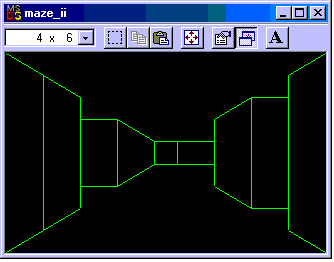
I am looking for a demo in Pascal / Delphi / Lazarus (* preferred) of generating a 2D maze and letting the user walk through the maze in simple 3D graphics with lines (e.g. not ASCII) but using graphics. For example, looking down a corridor it would be drawn as single point perspective with a square and diagonal lines from the corners. I have found a "pascal" demo of something similar on the web, but in reality it is mostly assembler for TP7. The ASM code is unreadable and undocumented and I also want pure pascal code so that it is portable. Does anyone here have any code that does this? Maybe you have written a demo like this in the past, or know of one. Best Regards,Peter WilliamsHobart, Australia
-------------- next part --------------
An HTML attachment was scrubbed...
URL: <http://lists.lazarus.freepascal.org/pipermail/lazarus/attachments/20110507/bff31e6a/attachment.html>
Mailing lists / lazarus / 2011-05
OT : Wanted demo to generate and walk through a 2D in 3D simple graphics.
19 messages · 5 people · –
- PPeter Williams 8
- KKjow 6
- GGraeme Geldenhuys 3
- KKostas Michalopoulos 1
- MMassimo Soricetti 1
Reply by email Subscribe to this list Your subscription
Read-only archive. Use j and k to move between messages.
2011/5/7 Peter Williams <pewilliams2010 at li****>:
Does anyone here have any code that does this? Maybe you have written a demo like this in the past, or know of one.
There are many game developer books covering this topic. There are even Pascal implementation of Wolfenstein 3D and Doom 3D. Just google a bit and you should find it. I have seen and read about these years ago, but they should still be floating somewhere on the net. I even went as far as implementing a 3D algorithm (of the original Doom 3D) described in one of my game graphics books - by creating a 2D maze and rendering it in 3D.
There is also a Pascal / Delphi Game Developers website somewhere - maybe you will find more help there.
Apologies in advance for this off topic message. I am looking for a demo in Pascal /…
2011/5/7 Peter Williams :
Show quoted text 15 lines
I don't know algorithms to generate 2D mazes, but for graphic part, if you download latest svn of GLScene (not the one on Lazarus CCR, but official GLScene [ http://sourceforge.net/projects/glscene/ ]) and you look for "portal" demo, you'll find something that could help you. There are also a lot of demos, also for walk through the scene.
Regards,
Kjow
Apologies in advance for this off topic message. I am looking for a demo in Pascal /…
Il 07/05/2011 02:33, Peter Williams ha scritto:
Show quoted text 7 lines
Look for "Quake2 delphi" project, I am one of the guys that translated the entire source code of Q2 engine from C to delphi, years ago. (??? "years" ago? OH my... :-)
For your needs it's probably an overkill, but I don't think you will stop with your base idea once you make it work :-)
Hi,
Show quoted text 21 lines
Thanks for the info about Quake 2 for Delphi. I had a look at it and as you said it is overkill for my needs. :-) I would be lost in the code. Great job on the conversion. Best Regards,Peter
Show quoted text 5 lines
-------------- next part --------------
An HTML attachment was scrubbed...
URL: <http://lists.lazarus.freepascal.org/pipermail/lazarus/attachments/20110508/4da8a193/attachment.html>
Apologies in advance for this off topic message. I am looking for a demo in Pascal /…
Peter Williams wroteHi,
Hi
Show quoted text 5 lines
My current Lazarus project is this:
http://dl.dropbox.com/u/5698454/rtwnb1.png
http://dl.dropbox.com/u/5698454/rtwrksv.png
(a brush-based 3D world editor)


At the past i wrote this in haXe/Flash 9:
http://dl.dropbox.com/u/5698454/rf2.html
So i probably have the knowledge required :-). What exactly do you need? Do you have a link to something similar? Is it like this?
http://www.codeproject.com/KB/recipes/mazegen/mazegen2.png
(BTW that article - http://www.codeproject.com/KB/recipes/mazegen.aspx - also describes a maze generation algorithm)
Or like this:
http://www.xul.fr/html5/images/maze.jpg

Kostas "Bad Sector" Michalopoulos
Hi Kostas,
Kostas Michalopoulos wrote 32 lines
I was originally wanting to display a maze like:
but in fact it would be must cooler to render the walls like:
My application for this is that I have written a map generator which is a digital terrain model program. It creates a map with possible exits in 10 directions... 8 compass points + up or down. Obviously the start and end points only have a single exit and the other points (or rooms) of the island only have two exits.
I could have chosen with my program to expand every room (location) on my island in all directions so that a player could move in all directions, but instead I have chosen to keep all the original exits as it is generated (only 2 per location).
My island generator has an option to save the data and it can be used by a text adventure game I have written. It is NOT a Doom like game where you go around shooting monsters, but a text game where you enter commands with the keyboard.
I need to use a "maze" displaying program so that the player can view the map as he/she moves around within it. Your program seems like it would be excellent for this task.
Please privately email me to continue this discussion and I hope to see the code for you program. Full credit will naturally be given to you for the software. Note that this is NOT a commercial application and is freeware and just for fun.
Best Regards,
Peter
Show quoted text 8 lines
2011/5/11 Peter Williams <peterericwilliams at g***>:
It is NOT a Doom like game where you go around shooting monsters, but a text game where you enter commands with the keyboard.
Ha, good old MUD (multi-user dungeon) games... Oh much much time I have waisted playing those at the place of my studies. :-) We never had any graphics though, even for the maps... we had to memories it all, or scribble it on paper.
Apologies in advance for this off topic message. I am looking for a demo in Pascal /…
2011/5/7 Peter Williams :
Show quoted text 15 lines
I made a trivial demo (33 rows of code), here the win32 binary:
http://www.kjow.net/download.php?get=Maze3D.7z
Do you mean something like this?
(you can modify in real time "x" on the left to change the 3D maze on the right)
This is a very trivial thing to do with GLScene (official svn) and easily can be added a way to navigate inside the maze. Otherwise it is multiplatform (Windows [32/64], Linux [32/64], MacOSX).
Regards,
Kjow
2011/5/12 Kjow :
Otherwise it is multiplatform (Windows [32/64], Linux [32/64], MacOSX).
I forgot a thing, you can rotate the view by clicking in 3D view and moving mouse. If you click with both mouse buttons simultaneusly (left-right) and move the mouse up and down you can zoom in/out (you can use scroll wheel also)
PS in my last post: Otherwise -> Moreover.
Hi,
Kjow wrote 11 lines
That's exactly what I need. Would you mind please archiving it and uploading it to http://hotfile.com -- file sharing website.
Also, what changes would need to be made to allow the user to user the arrow cursor keys to move forward and backwards (up and down arrow) and turn left and right (left and right arrow)...? Such that the user can move through the maze?
That's really the only change that I can see that needs to be made.
I also need to source code please.
Thanks.
Best Regards,
Peter
Show quoted text 7 lines
2011/5/12 Peter Williams :
Show quoted text 16 lines
I added a very very simple movement system, but just to see a way how it can be done... well, it isn't a good way.
Best thing should be the use of GLFPSMovement, but I never used yet.
http://www.kjow.net/download.php?get=Maze3D_with_sources.7z
GLScene is easy for starting something, but then, if the project will grow up, it is needed a skill even more greater.
use:
svn co https://glscene.svn.sourceforge.net/svnroot/glscene/trunk GLScene
Today's revision have some issues, use r5699 that works well. Later, today, these issues should be fixed.
I can suggest you to take a look to the many many demos that are downloaded with sources.
..\lazarus\components\GLScene\DemosLCL
..\lazarus\components\GLScene\Demos (here there more demos for Delphi, not yet translated for Lazarus)
and to follow GLScene forum:
https://sourceforge.net/apps/phpbb/glscene/
Regards,
Kjow
Hi Kjow,
Kjow wrote 23 lines
Thank you for your hard work and the source code.
Show quoted text 6 lines
I used the above command and got GLScene...
U GLScene
Checked out revision 5713.
Today's revision have some issues, use r5699 that works well. Later, today, these issues should be fixed.
I don't see how to obtain r5699. Perhaps those issues are now fixed?
Show quoted text 9 lines
I will check this out.
Regards, Kjow
Best Regards,
Peter
Show quoted text 6 lines
2011/5/13 Peter Williams :
Thank you for your hard work and the source code.
Don't worry :)
It isn't so hard :)
Show quoted text 6 lines
Well, it seems to be fixed since r5707. However I just updated to latest r5713 and it seems to works well :)
To update/revert to a specific svn revision, just put at the end of svn command "-r xxxx" where xxxx is the revision you want, e.g.:
svn up -r 5699
Regards,
Kjow
Hi Kjow,
Kjow wrote 20 lines
I now have GLScene "At revision 5718." and I cannot install it's LPK packages. I am getting 2 fatal errors. See here for details:
---
The other issue with your program (and this is really not a problem except that I want to extend your code) is that I want to use my own maze generating code which creates a maze with 10 directions... all compass points plus up and down. The problem is that I need to be able to draw up or down _stairs_ at any of the 8 possible compass points. That is the challenge for you, if you are up to it. :-)
I already have the code for generating my type of 10 directions maze. Let me know if you want it.
Best Regards,
Peter
Show quoted text 10 lines
2011/5/13 Peter Williams : Don't worry :) It isn't so hard :) Well, it seems to be fixed…
Hi Kjow,
Kjow wrote 5 lines
I notice that you're on gmail... although your email address uses antispam measures. If you'd like to use gmail to chat then I am frequently online. Just use the gmail chat feature if you see me online.
Best Regards,
Peter
Show quoted text 10 lines
I now have GLScene "At revision 5718." and I cannot install it's LPK packages. I am…
2011/5/14 Peter Williams :
Show quoted text 12 lines
Maybe you can use more "spaces" to extend directions, but I didn't understand totally.
To make up/down maybe you can use a progressbar and every step indicates the floor...
I haven't time to extra works at now, I already work from 9 to 11 hours/day at a main project. Extra time is really scant.
However, I suggest you to practice a bit with GLScene and learn how it works. It is so powerful that can make things really easy... but it need a bit of practice to start.
Official forum is a good start.
Best regards,
Kjow
Hi Kjow,
Kjow wrote 18 lines
I don't understand your meaning for the progressbar. Stairs up or down should be drawn in place of walls. That is how up or down exits should be shown.
Your code generates mazes with exits for N, S, E, W. It is missing the exits for NE, NW, SE, SW as we as each of these exits can go up or down a level. This is defined as a 2D array with a level (up, level, down) for each element defining stairs (or not).
Show quoted text 9 lines
I have reported the errors in compiling GLScene to the forum as well as my instructions on the field variable which has it's definition missing 2 x "identifier idents no member" fatal errors. This should be a simply matter of defining this.
Best Regards,
Peter
Show quoted text 10 lines
Peter Williams wroteI don't understand your meaning for the progressbar. Stairs up or down should be drawn in place of walls. That is how up or down exits should be shown.
Well just a thought...instead of you wanting everybody else to implement YOUR software, maybe you should try and implement some things *yourself*?? If you don't implement your own software, you might never learn how to maintain it yourself too.