Sign in Join

Live chat for Free Pascal, Lazarus, Delphi and every Pascal programmer.

Mailing lists / lazarus / 2010-11

Custom draw menu

31 messages · 11 people · –

Reply by email Subscribe to this list Your subscription

Read-only archive. Use j and k to move between messages.

Birger Jansen

Hi all,

I am trying to add some custom paint routines to a menu. From some previous messages I understand that there is no CustomDraw event that I can use. Looking at the TMenuItem component I don't see any code at all that does the drawing of the menu.

I'm not realy experienced in LCL code, but can somebody give me a hint about where to look for the code that does the painting of a TMenu / TMenuItem?

Kind regards,
Birger Jansen

Reply by email

Joost van der Sluis
to Birger Jansen
Birger Jansen wrote 5 lines
Hi all, I am trying to add some custom paint routines to a menu. From some previous messages I understand that there is no CustomDraw event that I can use. Looking at the TMenuItem component I don't see any code at all that does the drawing of the menu. I'm not realy experienced in LCL code, but can somebody give me a hint about where to look for the code that does the painting of a TMenu / TMenuItem?

If it uses native controls, you have to ask Microsoft. I doubt they will give you the code, though. ;)

Joost.

Reply by email

Birger Jansen
to Joost van der Sluis
If it uses native controls, you have to ask Microsoft. I doubt they will give you the code, though. ;) Joost.

I can try...
But there has to be a link somewhere between the TMenuItem class and the code that actually draws this menu, right? How does Windows knwt that is has to look for a TMenu control and then draw the menu?

Kind regards,
Birger

Reply by email

Sven Barth
to Birger Jansen
Birger Jansen wrote 7 lines
> If it uses native controls, you have to ask Microsoft. I doubt they will > give you the code, though. ;) > > Joost. I can try... But there has to be a link somewhere between the TMenuItem class and the code that actually draws this menu, right? How does Windows knwt that is has to look for a TMenu control and then draw the menu?

Basically the LCL creates a native menu item (e.g. for Windows API, for GTK2, for QT, etc). This native item knows how to draw itself (cause that's implemented in the used widgetset) and the LCL just passes necessary information (e.g. Caption, Checked, etc) to the native item.

The glue code between the LCL and that native widgetset is in lcl/interfaces/<widgetset>. For menues on Win32/64 you'd look at lcl/interfaces/win32/win32wsmenus.pp

Regards,
Sven

Reply by email

Paul Ishenin
to Birger Jansen: I can try... But there has to be a link somewhere between the TMenuItem class and the…
Birger Jansen wrote 6 lines
> If it uses native controls, you have to ask Microsoft. I doubt they will > give you the code, though. ;) > > Joost. I can try... But there has to be a link somewhere between the TMenuItem class and the code that actually draws this menu, right? How does Windows knwt that is has to look for a TMenu control and then draw the menu?

If we speak about windows only (win32/win64) then you can look at win32wsmenus.pas. We are drawing windows menu there. I don't remember exactly what is the reason that we draw the menu but iirc we do this to support glyphs. There you can find both code for vista and pre vista menu drawing.

Best regards,
Paul Ishenin.

Reply by email

Felipe Monteiro de Carvalho
to Birger Jansen: I am trying to add some custom paint routines to a menu. From some previous messages I…

One solution for this would be implementing a new control based on TCustomControl which implements a menu. Then it can be fully customizable. I already started a set of custom-drawn controls, although they are very initial still. More info here:

http://wiki.lazarus.freepascal.org/Lazarus_Custom_Drawn_Controls

If you want to follow this route I can help you.

Felipe Monteiro de Carvalho

Reply by email

Graeme Geldenhuys
to Felipe Monteiro de Carvalho

On 5 November 2010 18:39, Felipe Monteiro de Carvalho >

http://wiki.lazarus.freepascal.org/Lazarus_Custom_Drawn_Controls If you want to follow this route I can help you.

So we finally came full circle. :-) Maybe you should just use fpGUI or MSEgui and save yourself at least 5 years of work. ;-)

Regards, ? - Graeme - _______________________________________________ fpGUI - a cross-platform Free Pascal GUI toolkit http://opensoft.homeip.net:8080/fpgui/

Reply by email

Graeme Geldenhuys
to Paul Ishenin: If we speak about windows only (win32/win64) then you can look at win32wsmenus.pas. We…
Paul Ishenin wrote
win32wsmenus.pas. We are drawing windows menu there. I don't remember exactly what is the reason that we draw the menu but iirc we do this to support glyphs.

Interesting. Why do you think the native Win API Menu control don't support glyphs. VCL is a wrapper for Win API controls, and it supports glyphs in menus - no custom drawing. So do MFC apps as far as I know.

Regards, ? - Graeme - _______________________________________________ fpGUI - a cross-platform Free Pascal GUI toolkit http://opensoft.homeip.net:8080/fpgui/

Reply by email

Paul Ishenin
to Graeme Geldenhuys
Graeme Geldenhuys wrote
VCL is a wrapper for Win API controls, and it supports glyphs in menus - no custom drawing. So do MFC apps as far as I know.

Why do you think VCL has no custom drawing? Did you study their code or just think so? If the last then try the first.

Best regards,
Paul Ishenin.

Reply by email

Felipe Monteiro de Carvalho
to Graeme Geldenhuys: On 5 November 2010 18:39, Felipe Monteiro de Carvalho > So we finally came full circle.…
Graeme Geldenhuys wrote
So we finally came full circle. :-) ?Maybe you should just use fpGUI or MSEgui and save yourself at least 5 years of work. ;-)

They are not compatible with my existing code.

LCL-fpgui could be a solution, but then the entire UI turns non-native in Mac for example. I want to merge native and non-native pieces, choosing between them occording to the project's needs. It could be interresting to find an way to plug-in fpgui controls, but for the simple controls that I currently require: buttons, track bar, group box; it is easier and more reliable to roll my own.

Also, this idea is nothing new, wxWidgets also has both: custom drawn and native versions of controls. They call this wxUniversal as far as I remember.

Felipe Monteiro de Carvalho

Reply by email

Sergei Gorelkin
to Paul Ishenin: Why do you think VCL has no custom drawing? Did you study their code or just think so? If…

Paul Ishenin ?????:

Show quoted text 6 lines
06.11.2010 0:59, Graeme Geldenhuys wrote: > VCL is a wrapper for Win API controls, and it supports > glyphs in menus - no custom drawing. So do MFC apps as far as I know. Why do you think VCL has no custom drawing? Did you study their code or just think so? If the last then try the first.

In VCL, TMenuItem has OnDrawItem, OnMeasureItem and OnAdvancedDrawItem events (first one is somewhat deprecated in favour of the last one). A beautiful design, imagine assigning the same event handlers to each of 100+ menu items in a complex application.

As for the WinAPI, it indeed supports glyphs in menuitems, but the result is visually unusable in all Windows versions up to Vista. It simply does not insert margins anywhere, neither between adjacent menuitems nor between glyph and text in a single item. It was fixed in Vista+, but again for themed drawing only: switch the theming off and you get the same result as in Windows 95.

You typically don't see this ugliness in real life, because authors either use menus without glyphs or use custom drawing. All major GUI frameworks, including VCL and LCL, use their own drawing of menu items as well. And then they have to implement 'native look and feel' for all Windows versions:
- Windows 95
- Windows 98 (items in menubar are 'embossed', not painted with highlight color, remember that?)
- Windows 2000 (IIRC introduces a couple of new system colors for menus)
- Windows XP themed (XP doesnt't actually have built-in theme for menus, so it's 'flat' menus, mostly like Win95, but have to be painted in different colors to respect theme)
- Windows XP nonthemed (which one it resembles most, 95, 98 or 2000?)
- And finally comes Vista+ with a built-in theme which should be painted using completely different approach.

Regards,
Sergei

Reply by email

Graeme Geldenhuys
to Paul Ishenin: Why do you think VCL has no custom drawing? Did you study their code or just think so? If…
Paul Ishenin wrote
Why do you think VCL has no custom drawing? Did you study their code or just think so? If the last then try the first.

1) Because VCL claims to be a wrapper around Windows _native_ components. Apparently a claim LCL also tries to make, yet more and more custom control are appearing in LCL. Make one wonder if LCL shouldn't re-evaluate their original design goals.

2) I don't look at copyright code period. I do not want to taint myself, because I am a component and framework developer as well. Make me wonder, why are you looking and studying copyright code, and how tainted is LCL code by now?

Anyway so if LCL's Main Menu component is custom drawn, that would explain why I saw what I did, and as described in my latest LCL bug report regarding the Main Menu bar not appearing native under Win2000 (as reported by me) and WinXP (as reported Vincent).

This still doesn't answer my question as to why you think the native menu bar component under Windows can't draw glyphs, and then why LCL needs a custom drawn component for it. But hey, I'm not the person developing the LCL that claims to use native components on all platforms - I'm just a mere developer making some observations from the side lines.

Regards, ? - Graeme - _______________________________________________ fpGUI - a cross-platform Free Pascal GUI toolkit http://opensoft.homeip.net:8080/fpgui/

Reply by email

Graeme Geldenhuys
to Paul Ishenin: These controls are not part of LCL. Paul Ishenin.
Paul Ishenin wrote
These controls are not part of LCL.

Well if core members of the Lazarus project starts suggesting to users that more custom components should be created, then I am afraid the "original design goal" of LCL is all but lost. I've had an argument like this before in this mailing list, and it was pointed out to me that fpGUI is custom draw, LCL in *not*. LCL is only a wrapper of native components, and that is how the Lazarus team wants it to stay.... well, now clearly that design goal is wrong at this time, isn't it? So excuse me for just being a bit confused.

To make my statement factual, here is a quote from Mattias (I just took the first link Google gave me, there are plenty more): "Keep in mind that using the native widgets has several advantages:
- native look. Even when user switches theme or OS.
- widgetset specific goodies: e.g. tab menu of gtk notebook, unicode input method, assistive technology, hardware acceleration, network support (X client/server modell).
So basically every drawing should be avoided in the LCL or at least use only high level drawing functions."
http:/msg22277.html

Again, this brings me to the question, why is the MenuBar in LCL under Windows not a native component? The native component _can_ have glyphs in menu items. Clearly somebody needs to do quality control over what goes into LCL and why custom drawn components get used when native components can apparently do a better job. If no such control exists, I suggest simply make LCL totally custom drawn, have a much more stable framework, less bugs and simply ask the native components theme engine to do to the painting. Qt does this, yet it is 'perceived' as a native widgetset on all platforms it supports, and even in the LCL. And yes, Qt is custom drawn, it does have hardware acceleration, it does change as OS themes changes, it does support assistive technologies, and "network support under X" has nothing to do with native controls by the way (X-Window doesn't have native controls), the latter is all the x protocol itself.

Regards, ? - Graeme - _______________________________________________ fpGUI - a cross-platform Free Pascal GUI toolkit http://opensoft.homeip.net:8080/fpgui/

Reply by email

Graeme Geldenhuys
to Sergei Gorelkin: Paul Ishenin ?????: In VCL, TMenuItem has OnDrawItem, OnMeasureItem and…
Sergei Gorelkin wrote 6 lines
As for the WinAPI, it indeed supports glyphs in menuitems, but the result is visually unusable in all Windows versions up to Vista. It simply does not insert margins anywhere, neither between adjacent menuitems nor between glyph and text in a single item. It was fixed in Vista+, but again for themed drawing only: switch the theming off and you get the same result as in Windows 95.

OK, so that explains menu items (as in the items in dropdown menus or popup menus), but that doesn't explain the TMainMenu bar. Nobody puts images in those (well no app I have ever seen in the last 15 years), and that's the component two bug reports were raised about, in two different windows versions.

Thanks Sergei for explaining some of the reasoning for custom drawn menu items though. It seems nobody else knew the exact answer.

Regards, ? - Graeme - _______________________________________________ fpGUI - a cross-platform Free Pascal GUI toolkit http://opensoft.homeip.net:8080/fpgui/

Reply by email

Felipe Monteiro de Carvalho
to Graeme Geldenhuys: Well if core members of the Lazarus project starts suggesting to users that more custom…
Graeme Geldenhuys wrote
Well if core members of the Lazarus project starts suggesting to users that more custom components should be created, then I am afraid the "original design goal" of LCL is all but lost.

I call this flexibility. Having a choice between native and custom drawn controls is better then having only 1 option.

Felipe Monteiro de Carvalho

Reply by email

Sergei Gorelkin
to Graeme Geldenhuys: OK, so that explains menu items (as in the items in dropdown menus or popup menus), but…

Graeme Geldenhuys ?????:

Show quoted text 7 lines
OK, so that explains menu items (as in the items in dropdown menus or popup menus), but that doesn't explain the TMainMenu bar. Nobody puts images in those (well no app I have ever seen in the last 15 years), and that's the component two bug reports were raised about, in two different windows versions.

Which bug reports? I fail to find something related in Lazarus bugtracker, although I may be using wrong keywords.

I remember some UI design guide from M$, telling not to put images in menubars. Maybe everyone is just following that guide :-)
Anyway, 'native' glyph support actually maps to Bitmap property of TMenuItem, and ImageList+ImageIndex properties map to custom draw (yes WinAPI requires a separate bitmap handle for every item).

Regards,
Sergei

Reply by email

Paul Ishenin
to Graeme Geldenhuys: 1) Because VCL claims to be a wrapper around Windows _native_ components. Apparently a…
Graeme Geldenhuys wrote
1) Because VCL claims to be a wrapper around Windows _native_ components. Apparently a claim LCL also tries to make, yet more and more custom control are appearing in LCL. Make one wonder if LCL shouldn't re-evaluate their original design goals.

LCL menu bar is a native menu bar. Only drawing is made on LCL-win32 side but menu handles are native menu handles :) Moreover, non win32 menus are using native drawing.

2) I don't look at copyright code period. I do not want to taint myself, because I am a component and framework developer as well. Make me wonder, why are you looking and studying copyright code, and how tainted is LCL code by now?

Because I'm a delphi developer at my other 2 works and when I have some problem I debug into VCL to see why I have it. Strange that you did not debug there and did not study the code when you were delphi developer too.

Best regards,
Paul Ishenin.

Reply by email

Paul Ishenin
to Graeme Geldenhuys: Well if core members of the Lazarus project starts suggesting to users that more custom…
Graeme Geldenhuys wrote 5 lines
On 5 November 2010 20:37, Paul Ishenin wrote: > These controls are not part of LCL. Well if core members of the Lazarus project starts suggesting to users that more custom components should be created, then I am afraid the "original design goal" of LCL is all but lost.

I don't like that Felipe has suggested that too. Instead of fixing the problem he suggested to invest someone time into a completely different task. This is how you usually do in this mail list with suggesting your fpGUI when someone finds a problem in LCL.

Best regards,
Paul Ishenin.

Reply by email

Graeme Geldenhuys
to Sergei Gorelkin: Graeme Geldenhuys ?????: Which bug reports? I fail to find something related in Lazarus…
Sergei Gorelkin wrote
Which bug reports? I fail to find something related in Lazarus bugtracker, although I may be using wrong keywords.

That raises yet another problem. Nothing can be found in Mantis because the searching is absolutely useless - the worst I have seen in any application ever. I can't even find my own open bug reports from months or years ago. That must say something of how bad Mantis is. Even Mozilla's bug tracker (doesn't look pretty by default), but works a damn lot better.

The bug report in question is listed below. And in the comments Vincent also raised the bug on XP.

http://mantis.freepascal.org/view.php?id=17752

Yes, Paul already fixed it, but that is not the point here. The question was why it was custom drawn in the first place, when I thought LCL strives to only be a wrapper framework for native controls.

I remember some UI design guide from M$, telling not to put images in menubars. Maybe everyone is just following that guide :-)

Images in menus (menu bar, popups etc) are pretty pointless anyway, because there is clear text plaining each item already. Images are meant for toolbars as far as I'm concerned. Why, because toolbars normal doesn't contain text to describe what each item is.

Regards, ? - Graeme - _______________________________________________ fpGUI - a cross-platform Free Pascal GUI toolkit http://opensoft.homeip.net:8080/fpgui/

Reply by email

Graeme Geldenhuys
to Paul Ishenin: LCL menu bar is a native menu bar. Only drawing is made on LCL-win32 side but menu…
Paul Ishenin wrote
LCL menu bar is a native menu bar. Only drawing is made on LCL-win32 side but menu handles are native menu handles :)

This sounds more like defeating the point of what LCL is trying to be. With your logic I can say fpGUI is a native widgets too, because it uses native window handles for every component, I just does the drawing itself. :)

Because I'm a delphi developer at my other 2 works and when I have some problem I debug into VCL to see why I have it. Strange that you did not debug there and did not study the code when you were delphi developer too.

Of course I did, but that was last done when D7 was released (what is that....10+ years ago already). I haven't used Delphi for a very very long time, and have no idea how the VCL code looks like any more. The only Borland thing I still look at, is the Kylix 3 help manuals lying on my desk.

Regards, ? - Graeme - _______________________________________________ fpGUI - a cross-platform Free Pascal GUI toolkit http://opensoft.homeip.net:8080/fpgui/

Reply by email

Žilvinas Ledas
to Graeme Geldenhuys: OK, so that explains menu items (as in the items in dropdown menus or popup menus), but…
Graeme Geldenhuys wrote
OK, so that explains menu items (as in the items in dropdown menus or popup menus), but that doesn't explain the TMainMenu bar. Nobody puts images in those (well no app I have ever seen in the last 15 years),

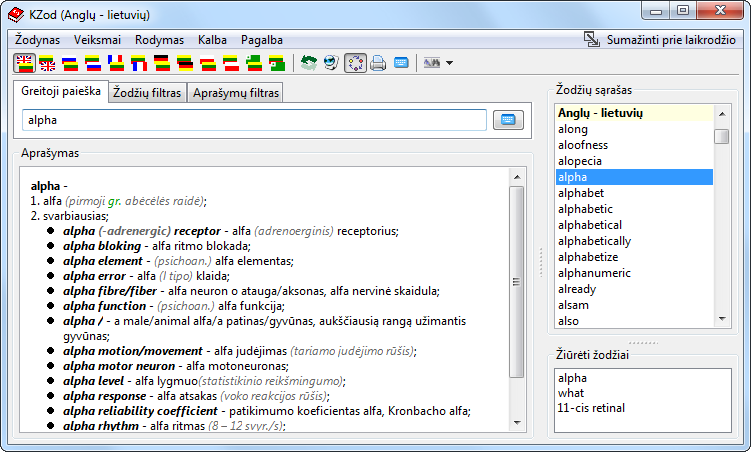
I put it there ;)
Maybe it is not the best design decision, but I think it is good sometimes:
http://2.bp.blogspot.com/_3-IaodGIbVQ/TMHY-l9M4sI/AAAAAAAAAak/AbtShWq0ZUQ/s1600/KZod_screen_win7.png So, don't disgard use-cases even if you do not see them used :)

Regards
?ilvinas Ledas

Reply by email

Paul Ishenin
to Graeme Geldenhuys: This sounds more like defeating the point of what LCL is trying to be. With your logic I…
Graeme Geldenhuys wrote
This sounds more like defeating the point of what LCL is trying to be. With your logic I can say fpGUI is a native widgets too, because it uses native window handles for every component, I just does the drawing itself. :)

Not exactly. If we are using HMenu we get all the messages it broadscasts and we have the native behavior with clicks, etc.

There is nothing wrong if we will use native drawing for menus where it is possible. Say no glyphs in the menubar, and Menu.OwnerDraw property is set to False. But we must also have methods to draw the menu ourself since we need to support glyphs and OwnerDraw property in the future. Therefore implementing native draw for menus is a time waste although I'm not againt that and already thought to do this few times.

Best regards,
Paul Ishenin.

Reply by email

José Mejuto
to Graeme Geldenhuys: OK, so that explains menu items (as in the items in dropdown menus or popup menus), but…

Hello Lazarus-List,

Saturday, November 6, 2010, 11:44:59 PM, you wrote:

GG> OK, so that explains menu items (as in the items in dropdown menus or GG> popup menus), but that doesn't explain the TMainMenu bar. Nobody puts GG> images in those (well no app I have ever seen in the last 15 years), GG> and that's the component two bug reports were raised about, in two GG> different windows versions.
GG> Thanks Sergei for explaining some of the reasoning for custom drawn GG> menu items though. It seems nobody else knew the exact answer.

There are more reasons to use the native component that many people are not aware of them, like (in windows) using native Menu control with custom paint si not the same as using a full custom paint control, in example screen readers will work with native control custom painted while they will not work in something like fpGUI. That's not a defect of fpGUI ;)

Best regards, Jos?

Reply by email

Sven Barth
to Graeme Geldenhuys: That raises yet another problem. Nothing can be found in Mantis because the searching is…
Graeme Geldenhuys wrote 11 lines
On 7 November 2010 04:56, Sergei Gorelkin wrote: > Which bug reports? I fail to find something related in Lazarus bugtracker, > although I may be using wrong keywords. That raises yet another problem. Nothing can be found in Mantis because the searching is absolutely useless - the worst I have seen in any application ever. I can't even find my own open bug reports from months or years ago. That must say something of how bad Mantis is. Even Mozilla's bug tracker (doesn't look pretty by default), but works a damn lot better.

Huh? Finding my own open reports in Mantis is a no-brainer:

Go to "View Issues", if there is a "+" before "Search" then click it to enable the advanced filters. Click on "Reporter" which will initialize a combobox. There you can select "[MySelf]" (you have to be logged in) or search your name. Then click on "Hide Status" and select "closed". Now press "Apply filter" and be happy.

And there's even an easier way: Go to "My view" (you have to be logged in) and click on "reported by me". :)

Show quoted text 9 lines
> I remember some UI design guide from M$, telling not to put images in > menubars. > Maybe everyone is just following that guide :-) Images in menus (menu bar, popups etc) are pretty pointless anyway, because there is clear text plaining each item already. Images are meant for toolbars as far as I'm concerned. Why, because toolbars normal doesn't contain text to describe what each item is.

I don't think that they are pointless. Images are easier to recognize than texts. That's why I love TortoiseSVN's Explorer integration so much (no argues about svn vs. git please): each menu item has a different glyph and thus you can very easily and fast navigate the menu by just recognizing the image in front of the item.

Regards,
Sven

Reply by email

Graeme Geldenhuys
to José Mejuto: GG> OK, so that explains menu items (as in the items in dropdown menus or GG> popup…
Jos? Mejuto wrote
with custom paint si not the same as using a full custom paint control, in example screen readers will work with native control custom painted while they will not work in something like fpGUI.

And you are totally wrong. Please research the matter before you make such general comments. Custom painting and custom drawn toolkits can just as easily have support for screen readers or any other assistive technologies. Qt being a case in point on all platforms it supports. GTK2 being a case in point under Linux (to me GTK2 is just like fpGUI
- custom drawn because X11 has no native widget support). After a recent message in the FPC mailing list by somebody else (and due to my personal interest in the matter), I have a renewed interest in adding Assistive Technologies support to fpGUI too. After some research that I have done, this is not so hard to do. Simply hook into the assistive technology libraries or API's under the various platforms. It's just like using any other 3rd party library (eg: for 3D graphics you hook into DirectX or OpenGL - assistive technologies are exactly the same).

Regards, ? - Graeme - _______________________________________________ fpGUI - a cross-platform Free Pascal GUI toolkit http://opensoft.homeip.net:8080/fpgui/

Reply by email

Graeme Geldenhuys
to Sven Barth: Huh? Finding my own open reports in Mantis is a no-brainer: Go to "View Issues", if there…
Sven Barth wrote
search your name. Then click on "Hide Status" and select "closed". Now press "Apply filter" and be happy.

Ok, but if you are in the "Lazarus" project you don't see the reports in the sub-project "Patches". So now I have to try and remember if something I posted 1.5 years ago was under "Lazarus" or under "Patches" etc..

The searching for somebody else's report is in more difficult because the keyword search it totally useless too.

thus you can very easily and fast navigate the menu by just recognizing the image in front of the item.

Or do the unthinkable, and actually read the text of each item. In many cases the icons are inappropriate, has no real relation to the item, is in appropriate for the locale etc etc. Read some HIG documents and you will see what I mean - they all tell the same story.

Regards, ? - Graeme - _______________________________________________ fpGUI - a cross-platform Free Pascal GUI toolkit http://opensoft.homeip.net:8080/fpgui/

Reply by email

Sven Barth
to Graeme Geldenhuys
Graeme Geldenhuys wrote 9 lines
On 7 November 2010 13:58, Sven Barth wrote: > search your name. Then click on "Hide Status" and select "closed". Now press > "Apply filter" and be happy. Ok, but if you are in the "Lazarus" project you don't see the reports in the sub-project "Patches". So now I have to try and remember if something I posted 1.5 years ago was under "Lazarus" or under "Patches" etc..

Well... I always search inside "All projects" and restrict the search area by the category if necessary. That's sufficient for me most of the time...

The searching for somebody else's report is in more difficult because the keyword search it totally useless too.

THAT is a different matter. ^^

Show quoted text 7 lines
> thus you can very easily and fast navigate the menu by just recognizing the > image in front of the item. Or do the unthinkable, and actually read the text of each item. In many cases the icons are inappropriate, has no real relation to the item, is in appropriate for the locale etc etc. Read some HIG documents and you will see what I mean - they all tell the same story.

Eh... didn't I just say that going by an icon is faster than going by a text? Why do you think toolbars normally contain mostly icons instead of text? Correct: we humans can easier recognize images instead of texts. Ok, texts might be considered as images as well, but one has to interpret them to get their meaning, while you can easily associate a certain meaning with a glyph, even when the glyph and the meaning aren't related.

I didn't say that the icons of TortoiseSVN are appropiate for their tasks (but I didn't say that they aren't either), but they are different and that's the point: you can go by the icon to select the correct task.

If I take the 7zip Explorer integration as another example: I always have to search where in the popup menu that item is, but the TortoiseSVN main items (commit, update, other tasks) are easily found (in the case you haven't installed another Tortoise* which uses the same icons ^^ - which I haven't, cause I prefer using Git the command line way).

Regards,
Sven

Reply by email

Graeme Geldenhuys
to Sven Barth
Sven Barth wrote
text? Why do you think toolbars normally contain mostly icons instead of text?

Um, here is the default setup on my Gnome desktop. All toolbars have icons PLUS text. Pretty pointless, and uses lots more space. I guess Gnome HIG needs to decide what the want.... text or icons, but definitely not both.

The attached screenshots shows Firefox (top), gEdit (middle) and Nautilus (bottom).

Regards, ? - Graeme - _______________________________________________ fpGUI - a cross-platform Free Pascal GUI toolkit http://opensoft.homeip.net:8080/fpgui/ -------------- next part -------------- A non-text attachment was scrubbed... Name: Screenshot.png Type: image/png Size: 20955 bytes Desc: not available URL: <http://lists.lazarus.freepascal.org/pipermail/lazarus/attachments/20101107/6b3edb69/attachment-0001.png>

Reply by email

hector fiandor
to Graeme Geldenhuys

I am trying to do something with TDbf in my Lazarus 0.9.27 FPC 2.2.3 under my poor experience with Delphi5 Databases, but I can see how a lack of knowledge I suffer.

I will appreciate very much the suggestions of how to obtain some literature about TDbf.

Thanks in advance,

Regards,

Ing. H?ctor F. Fiandor Rosario

_______________________________________________
fpGUI - a cross-platform Free Pascal GUI toolkit
http://opensoft.homeip.net:8080/fpgui/

__________ Informacin de ESET Smart Security, versin de la base de firmas de virus 5594 (20101105) __________

ESET Smart Security ha comprobado este mensaje.

http://www.eset.com

--------------------------------------------------------------------------------

Show quoted text 16 lines
-- _______________________________________________ Lazarus mailing list http://lists.lazarus.freepascal.org/mailman/listinfo/lazarus __________ Informacisn de ESET Smart Security, versisn de la base de firmas de virus 5594 (20101105) __________ ESET Smart Security ha comprobado este mensaje. http://www.eset.com
Este mensaje le ha llegado mediante el servicio de correo electronico que ofrece Infomed para respaldar el cumplimiento de las misiones del Sistema Nacional de Salud. La persona que envia este correo asume el compromiso de usar el servicio a tales fines y cumplir con las regulaciones establecidas Infomed: http://www.sld.cu/

Reply by email