Sign in Join

Live chat for Free Pascal, Lazarus, Delphi and every Pascal programmer.

Mailing lists / fpc-pascal / 2019-04

Lazarus Release 2.0.2

33 messages · 14 people · –

Reply by email Subscribe to this list Your subscription

Read-only archive. Use j and k to move between messages.

Mattias Gaertner

The Lazarus team is glad to announce the release of Lazarus 2.0.2.

This release was built with FPC 3.0.4.
The previous release Lazarus 2.0.0 was built with FPC 3.0.4 as well.

Here is the list of changes for Lazarus and Free Pascal: http://wiki.lazarus.freepascal.org/Lazarus_2.0.0_release_notes http://wiki.lazarus.freepascal.org/User_Changes_3.0.4

Here is the list of fixes for Lazarus 2.0.x:
http://wiki.freepascal.org/Lazarus_2.0_fixes_branch

The release is available for download on SourceForge: http://sourceforge.net/projects/lazarus/files/

Choose your CPU, OS, distro and then the "Lazarus 2.0.2" directory.

Checksums for the SourceForge files:
http://www.lazarus-ide.org/index.php?page=checksums#2_0_2

Minimum requirements:

Windows:
2k, XP, Vista, 7, 8, 8.1 and 10, 32 or 64bit.

FreeBSD/Linux:
gtk 2.8 for gtk2, qt4.5 for qt, qt5.6 for qt5, 32 or 64bit.

Mac OS X:
10.5 to 10.12; Carbon (32bit), Cocoa (64bit, beta), qt and qt5 (32 or 64bit).

The svn tag is
http://svn.freepascal.org/svn/lazarus/tags/lazarus_2_0_2

For people who are blocked by SF, the Lazarus releases from SourceForge are mirrored at: ftp://ftp.freepascal.org/pub/lazarus/releases/ and later at (after some time for synchronization) http://mirrors.iwi.me/lazarus/

Mattias

Reply by email

Rainer Stratmann
to Mattias Gaertner

Are there plans to merge some windows?

Like here (best solution):
https://cdn.portableapps.com/GeanyPortable.png

Because I think it is no more up to date.
I don't know any other Software that uses so many windows across the whole desktop. It would be more userfriendly to merge at least the main window with the code window. So that on top of the code window there are the buttons of the main window. Also the output window could be one tab of the search window.

Very often I use the search dialog.

It would be way more userfriendly if the search word (for example) can be double clicked and then is transferred automatically in a field at the bottom of the code window.

Like here:
http://3.bp.blogspot.com/-4GQwMug5bzE/VgN5qaECs7I/AAAAAAAAEdM/4jPugE78oWw/ s1600/kate5.png

Or here:
http://www.linuxandubuntu.com/uploads/2/1/1/5/21152474/4726430_orig.jpg

CEST Mattias Gaertner wrote 45 lines
The Lazarus team is glad to announce the release of Lazarus 2.0.2. This release was built with FPC 3.0.4. The previous release Lazarus 2.0.0 was built with FPC 3.0.4 as well. Here is the list of changes for Lazarus and Free Pascal: http://wiki.lazarus.freepascal.org/Lazarus_2.0.0_release_notes http://wiki.lazarus.freepascal.org/User_Changes_3.0.4 Here is the list of fixes for Lazarus 2.0.x: http://wiki.freepascal.org/Lazarus_2.0_fixes_branch The release is available for download on SourceForge: http://sourceforge.net/projects/lazarus/files/ Choose your CPU, OS, distro and then the "Lazarus 2.0.2" directory. Checksums for the SourceForge files: http://www.lazarus-ide.org/index.php?page=checksums#2_0_2 Minimum requirements: Windows: 2k, XP, Vista, 7, 8, 8.1 and 10, 32 or 64bit. FreeBSD/Linux: gtk 2.8 for gtk2, qt4.5 for qt, qt5.6 for qt5, 32 or 64bit. Mac OS X: 10.5 to 10.12; Carbon (32bit), Cocoa (64bit, beta), qt and qt5 (32 or 64bit). The svn tag is http://svn.freepascal.org/svn/lazarus/tags/lazarus_2_0_2 For people who are blocked by SF, the Lazarus releases from SourceForge are mirrored at: ftp://ftp.freepascal.org/pub/lazarus/releases/ and later at (after some time for synchronization) http://mirrors.iwi.me/lazarus/ Mattias _______________________________________________ fpc-pascal maillist - http://lists.freepascal.org/cgi-bin/mailman/listinfo/fpc-pascal

Reply by email

Mgr. Janusz Chmiel
to Rainer Stratmann: Are there plans to merge some windows? Like here (best solution):…

Because I do not see at all and I Am using screen reader NVDA, it would be ideal, if so much of Lazarus GUI would be 100 % accessible. But I know, that it is very complex to retain screen readers accessibility, friendly look for sighted users and fast IDE responsiveness. For now, I would like to thank you, that you have allowed visually impaired users to use edit field inside source code wiev. Screen readers users are even notified about line number on focus. Sure, because it is not standard Windows Microsoft Edit control, it is impossible to use CTRL+SHIFT+arrow keys to assign some block of text with screen reader, but I know, that also commercial Delphi which uses his own controls not standard Windows controls from Microsoft have similar issue. The most difficulty question is to determine, what is more complex. Modify Lazarus component sources or customize NVDA screen reader for accessibility of non standard controls.

Reply by email

Sven Barth
to Rainer Stratmann: Are there plans to merge some windows? Like here (best solution):…

Rainer Stratmann schrieb am Di., 16. Apr.
2019, 13:47:

Show quoted text 14 lines
Are there plans to merge some windows? Like here (best solution): https://cdn.portableapps.com/GeanyPortable.png Because I think it is no more up to date. I don't know any other Software that uses so many windows across the whole desktop. It would be more userfriendly to merge at least the main window with the code window. So that on top of the code window there are the buttons of the main window. Also the output window could be one tab of the search window.

You can install the AnchorDockingDsgn package and have all windows integrated (except for forms which need an additional package).

Regards,
Sven

Reply by email

Martin Frb
to Mgr. Janusz Chmiel: Because I do not see at all and I Am using screen reader NVDA, it would be ideal, if so…

About ctrl+shift+arrow key: Do you know any documentation on how to implement this. What API to call, to let the screen reader know?

Also for other modifications needed, any documentation?

On 16/04/2019 14:31, Mgr. Janusz Chmiel wrote: > For now, I would like to thank you, that you have allowed visually > impaired users to use edit field inside source code wiev. Screen > readers users are even notified about line number on focus. Sure, > because it is not standard Windows Microsoft Edit control, it is > impossible to use CTRL+SHIFT+arrow keys to assign some block of text > with screen reader, but I know, that also commercial Delphi which uses > his own controls not standard Windows controls from Microsoft have > similar issue. > The most difficulty question is to determine, what is more complex. > Modify Lazarus component sources or customize NVDA screen reader for > accessibility of non standard controls.

Reply by email

geneb
to Rainer Stratmann: Are there plans to merge some windows? Like here (best solution):…
Rainer Stratmann wrote 5 lines
Are there plans to merge some windows? Like here (best solution): https://cdn.portableapps.com/GeanyPortable.png

Rainer, there's an add-on that's included with Lazarus that will "dock" all the windows to give a more "modern" Delphi UI vs the standard Delphi 7 UI.

g.

Proud owner of F-15C 80-0007 http://www.f15sim.com - The only one of its kind. http://www.diy-cockpits.org/coll - Go Collimated or Go Home. Some people collect things for a hobby. Geeks collect hobbies. ScarletDME - The red hot Data Management Environment A Multi-Value database for the masses, not the classes. http://scarlet.deltasoft.com - Get it _today_!

Reply by email

Ralf Quint
to Rainer Stratmann: Are there plans to merge some windows? Like here (best solution):…
Rainer Stratmann wrote 10 lines
Are there plans to merge some windows? Like here (best solution): https://cdn.portableapps.com/GeanyPortable.png Because I think it is no more up to date. I don't know any other Software that uses so many windows across the whole desktop. It would be more userfriendly to merge at least the main window with the code window. So that on top of the code window there are the buttons of the main window. Also the output window could be one tab of the search window.

I seriously hope that this NEVER becomes a default setting for Lazarus.

Anyone who seriously develops software, specially desktop applications, is/should be using at least two (better 3 monitors). And the "many" different windows allow easily to spread those out to those various screens as needed. One screen has the source code and associated windows, the second one the debugging windows, and the third one has the actually tested application screen.

Something like this would be a major PITA with those stupid docked windows. That's only something that makes sense for someone who's tinkering along on a laptop or such...

Ralf

---
This email has been checked for viruses by Avast antivirus software. https://www.avast.com/antivirus

Reply by email

Mattias Gaertner
to Ralf Quint
Show quoted text 7 lines
[...] Anyone who seriously develops software, specially desktop applications, is/should be using at least two (better 3 monitors). And the "many" different windows allow easily to spread those out to those various screens as needed. One screen has the source code and associated windows, the second one the debugging windows, and the third one has the actually tested application screen.

It is not a fixed docking. You can undock any window and place them on other screens. Or dock only some and place them on another screen.

Mattias

Reply by email

Rainer Stratmann
to Ralf Quint: I seriously hope that this NEVER becomes a default setting for Lazarus. Anyone who…
CEST Ralf Quint wrote
On 4/16/2019 4:46 AM, Rainer Stratmann wrote: Anyone who seriously develops software, specially desktop applications, is/should be using at least two (better 3 monitors).

That is completely new for me that the amount of monitors is an indication of how professional someone can write good software.

Show quoted text 5 lines
And the "many" different windows allow easily to spread those out to those various screens as needed. One screen has the source code and associated windows, the second one the debugging windows, and the third one has the actually tested application screen.

For you that may makes sense.
But for me that seems like pretending who has the biggest car.

Show quoted text 15 lines
Something like this would be a major PITA with those stupid docked windows. That's only something that makes sense for someone who's tinkering along on a laptop or such... Ralf --- This email has been checked for viruses by Avast antivirus software. https://www.avast.com/antivirus _______________________________________________ fpc-pascal maillist - http://lists.freepascal.org/cgi-bin/mailman/listinfo/fpc-pascal

Reply by email

Mattias Gaertner
to Rainer Stratmann
Show quoted text 11 lines
On Dienstag, 16. April 2019 14:34:05 CEST Sven Barth via fpc-pascal wrote: > You can install the AnchorDockingDsgn package and have all windows > integrated (except for forms which need an additional package). That sounds good for both use cases. But how can I install/activate it. I tried with apt-get install AnchorDockingDsgn But that does not work.

It's a Lazarus package (lpk).

Mattias

Reply by email

Rainer Stratmann
to Rainer Stratmann: That sounds good for both use cases. But how can I install/activate it. I tried with…
CEST Rainer Stratmann wrote
But how can I install/activate it.

I found an instruction, but I got an error:

lazarus.pp(1,1) Fatal: Kann anchordockingdsgn nicht finden verwendet von Lazarus. Check if package AnchorDockingDsgn creates anchordockingdsgn.ppu, check nothing deletes this file and check that no two packages have access to the unit source..

Reply by email

Ralf Quint
to Rainer Stratmann: That is completely new for me that the amount of monitors is an indication of how…
Rainer Stratmann wrote 14 lines
On Dienstag, 16. April 2019 11:37:56 CEST Ralf Quint wrote: > On 4/16/2019 4:46 AM, Rainer Stratmann wrote: > Anyone who seriously develops software, specially desktop applications, > is/should be using at least two (better 3 monitors). That is completely new for me that the amount of monitors is an indication of how professional someone can write good software. > And the "many" > different windows allow easily to spread those out to those various > screens as needed. One screen has the source code and associated > windows, the second one the debugging windows, and the third one has the > actually tested application screen. For you that may makes sense. But for me that seems like pretending who has the biggest car.

Schwachfug. (Bollocks for the Anglophiles around here)

It's just a very efficient way to work, as you don't have two switch back and forth between hidden/overlapped windows. A two screen solution was even available back in the good old days of DOS, when you ran your application on color (xGA) screen and your debugging and source window(s) on an additional monchrome (Hercules/MDA) monitor. One of the reasons why the Borland IDEs where lightyears ahead of Microsoft and the other guys.

And this not only is an efficient way to program, but also for other, everyday work. A lot of my clients, once they have used a 2-screen setup would never go back to a single screen and dread when they have to work off a single screen laptop (or tablet) for example.

Ralf

---
This email has been checked for viruses by Avast antivirus software. https://www.avast.com/antivirus

Reply by email

Ralf Quint
to Mattias Gaertner: On Tue, 16 Apr 2019 11:37:56 -0700 It is not a fixed docking. You can undock any window…
Mattias Gaertner wrote 12 lines
On Tue, 16 Apr 2019 11:37:56 -0700 Ralf Quint wrote: > [...] > Anyone who seriously develops software, specially desktop > applications, is/should be using at least two (better 3 monitors). > And the "many" different windows allow easily to spread those out to > those various screens as needed. One screen has the source code and > associated windows, the second one the debugging windows, and the > third one has the actually tested application screen. It is not a fixed docking. You can undock any window and place them on other screens. Or dock only some and place them on another screen.

Have yet to see this work. I always ran into the problem that I needed to change the overall graphics driver setting to "full screen" a window over more than just the active monitor. Which is kind of pointless for most work with multi-screen setups. I will test this on this latest Lazarus version sometime later today on one of my secondary PCs.

But I still think that this should not be the default setting...

Ralf

---
This email has been checked for viruses by Avast antivirus software. https://www.avast.com/antivirus

Reply by email

Ralf Quint
to Martin Frb: And for those with American English: B*S* But I really dont see where to put 2nd, let…
Martin Frb wrote 7 lines
On 16/04/2019 22:03, Ralf Quint wrote: > > Schwachfug. (Bollocks for the Anglophiles around here) And for those with American English: B*S* But I really dont see where to put 2nd, let alone a 3rd  50 inch screen. ;) ;) ;)

Showoff! :P

Ralf ;-)

PS: Seriously, I rather buy 2 (or 3) smaller 24" or 27" monitors than one 50". Maximizing any window on such a big screen (even if it would support a pixel resolution that would be the same as 2-3 smaller screens) is still a HUGE downside, beside the mere cost...

---
This email has been checked for viruses by Avast antivirus software. https://www.avast.com/antivirus

Reply by email

Tomas Hajny
to Ralf Quint: Schwachfug. (Bollocks for the Anglophiles around here) It's just a very efficient way to…
Ralf Quint wrote
On 4/16/2019 11:49 AM, Rainer Stratmann wrote:

.
.

> That is completely new for me that the amount of monitors is an > indication of > how professional someone can write good software.

.
.

It's just a very efficient way to work, as you don't have two switch back and forth between hidden/overlapped windows. A two screen solution

.
.

Could we get back on-topic, please?

First, this is fpc-pascal list, not Lazarus list. Announcement of new release was OK, discussion about Lazarus IDE features doesn't belong here.

Second, discussion about two options already existing in parallel (docking and independent windows) might not have too much sense even on a Lazarus list, but that's just my personal view.

Third, discussion about the most appropriate number of monitors is completely off-topic unless this is something like alt.ergonomy group or whatever that would be called. Please, stop it (everybody).

Thanks

Tomas
(one of FPC mailing list moderators)

Reply by email

Martin Frb
to Ralf Quint: Showoff! :P Ralf ;-) PS: Seriously, I rather buy 2 (or 3) smaller 24" or 27" monitors than
Ralf Quint wrote 10 lines
On 4/16/2019 1:11 PM, Martin Frb wrote: > On 16/04/2019 22:03, Ralf Quint wrote: >> >> Schwachfug. (Bollocks for the Anglophiles around here) > And for those with American English: B*S* > > But I really dont see where to put 2nd, let alone a 3rd  50 inch > screen. ;) ;) ;) Showoff! :P

You did read my next line? "not"

Show quoted text 5 lines
PS: Seriously, I rather buy 2 (or 3) smaller 24" or 27" monitors than one 50". Maximizing any window on such a big screen (even if it would support a pixel resolution that would be the same as 2-3 smaller screens) is still a HUGE downside, beside the mere cost...

You are preaching to the choir

I never maximize any of the IDE windows.
Typically I have 2 source editors, side by side, full height (which means I need another screen for the IDE main bar, and msg window).

But screens space belongs in the category: You don't miss what you don't know.
I remember hacking 68k asm on a 14 inch tube.... I was perfectly happy with then, with the space I had.

Reply by email

Mattias Gaertner
to Rainer Stratmann: I found an instruction, but I got an error: lazarus.pp(1,1) Fatal: Kann anchordockingdsgn…
Show quoted text 9 lines
On Dienstag, 16. April 2019 21:02:50 CEST Rainer Stratmann wrote: > But how can I install/activate it. I found an instruction, but I got an error: lazarus.pp(1,1) Fatal: Kann anchordockingdsgn nicht finden verwendet von Lazarus. Check if package AnchorDockingDsgn creates anchordockingdsgn.ppu, check nothing deletes this file and check that no two packages have access to the unit source..

What did you do?

Packages / Install Packages
Select anchordockingdsgn on the right side and click "Install selection".
Then "Save and rebuild IDE".

Mattias

Reply by email

Benito van der Zander
to Martin Wynne: I have only 2 eyes, so I'm going to find 3 screens a problem. Martin.

Hi,

since I need glasses, it is already troublesome to read a single screen.

With strong glasses just one point on the screen is really sharp and when the glasses shift a little, you end up seeing only on one eye properly

Cheers,
Benito

Martin Wynne wrote 6 lines
I have only 2 eyes, so I'm going to find 3 screens a problem. Martin. _______________________________________________ fpc-pascal maillist  -  http://lists.freepascal.org/cgi-bin/mailman/listinfo/fpc-pascal

Reply by email

Bo Berglund
to Mattias Gaertner: The Lazarus team is glad to announce the release of Lazarus 2.0.2. This release was built…
Mattias Gaertner wrote
Here is the list of fixes for Lazarus 2.0.x: http://wiki.freepascal.org/Lazarus_2.0_fixes_branch

Thanks, I decided to check out the branch 2.0.x rather than tag 2.0.0 and then 2.0.2 etc,
Seems like it would be easier to go forward if one is on the fixes branch, right?
Just svn update followed by:
make clean
make bigide

It took a little while today since I was on the tag earlier, so I checked out the fixes branch separately. But going forward I expect a svn update will run pretty quickly and then a normal make of bigide is straightforward too.

Thanks for having the repositories available so easily!

Bo Berglund Developer in Sweden

Reply by email

geneb
to Martin Frb: And for those with American English: B*S* But I really dont see where to put 2nd, let…
Martin Frb wrote 10 lines
On 16/04/2019 22:03, Ralf Quint wrote: > > Schwachfug. (Bollocks for the Anglophiles around here) And for those with American English: B*S* But I really dont see where to put 2nd, let alone a 3rd  50 inch screen. ;) ;) ;) ... not (unfortunately)

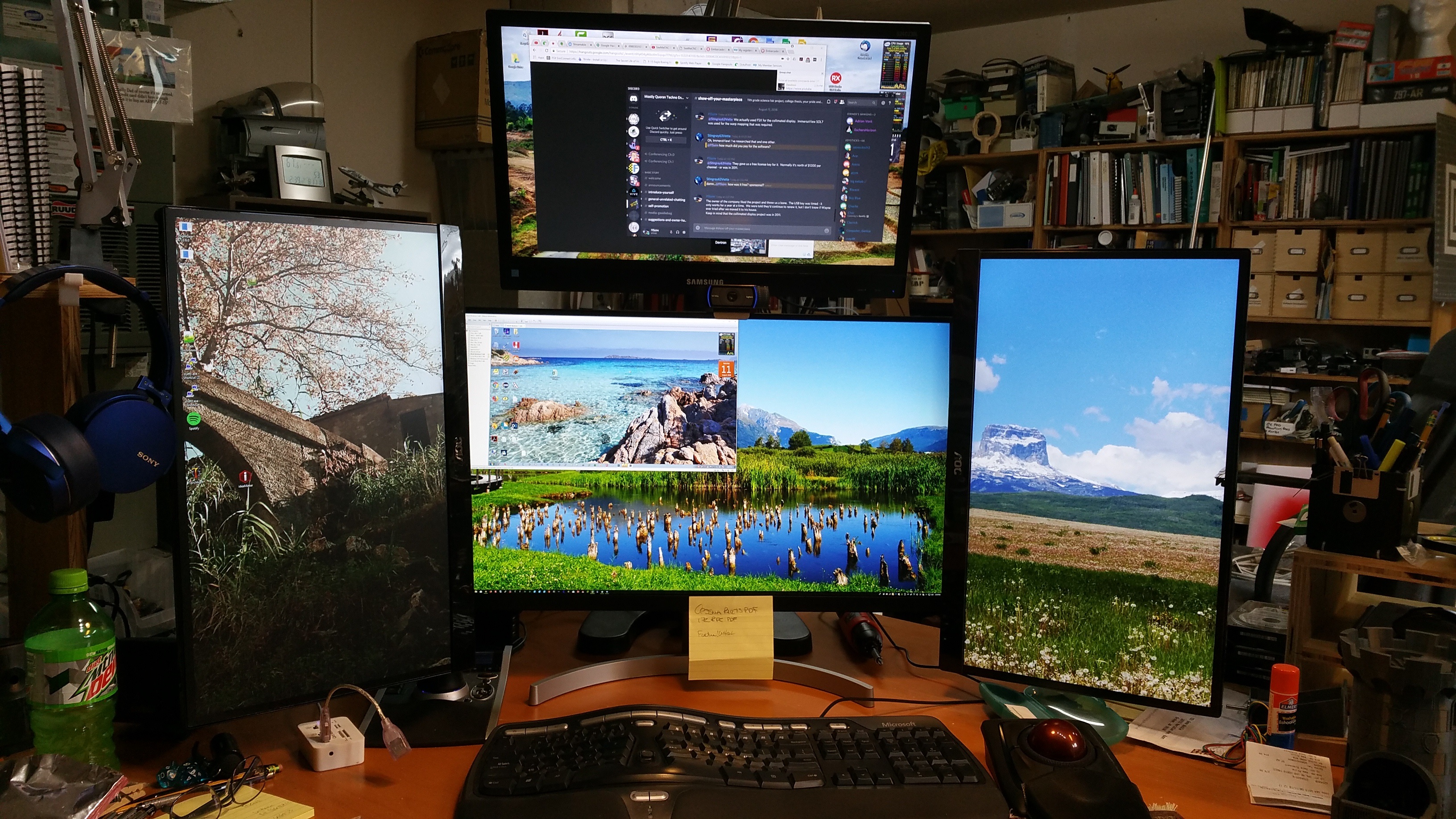
https://www.geneb.org/images/aug-2018-bstation-upd.jpg

Center is 27" 4k, sides and top are 24" 1080p. The only way to fly. :D

g.

Proud owner of F-15C 80-0007 http://www.f15sim.com - The only one of its kind. http://www.diy-cockpits.org/coll - Go Collimated or Go Home. Some people collect things for a hobby. Geeks collect hobbies. ScarletDME - The red hot Data Management Environment A Multi-Value database for the masses, not the classes. http://scarlet.deltasoft.com - Get it _today_!

Reply by email

Rainer Stratmann
to Mattias Gaertner: On Tue, 16 Apr 2019 21:13:52 +0200 What did you do? Packages / Install Packages Select…
CEST Mattias Gaertner wrote 19 lines
On Tue, 16 Apr 2019 21:13:52 +0200 Rainer Stratmann wrote: > On Dienstag, 16. April 2019 21:02:50 CEST Rainer Stratmann wrote: > > But how can I install/activate it. > > I found an instruction, but I got an error: > > lazarus.pp(1,1) Fatal: Kann anchordockingdsgn nicht finden verwendet > von Lazarus. Check if package AnchorDockingDsgn creates > anchordockingdsgn.ppu, check nothing deletes this file and check that > no two packages have access to the unit source.. What did you do? Packages / Install Packages Select anchordockingdsgn on the right side and click "Install selection". Then "Save and rebuild IDE".

Yes.
I sent you an email to

Did you receive the email?

Mattias _______________________________________________ fpc-pascal maillist - http://lists.freepascal.org/cgi-bin/mailman/listinfo/fpc-pascal

Reply by email

Joao Schuler
to Rainer Stratmann

Hello,
For the past 10 days, I've seen really strange speed problems at my end.

In 2 Ubuntu virtualbox VMs (16.04 and 18.04), my neural networks are running at half speed than usual. The host is a WIN 10 computer. Neural networks are both CPU and memory bound. Therefore, there is something affecting either CPU or memory.

Testing on Google Cloud, the speed is normal. This made me think that the speed problem was local to the testing environment. Just for peace of mind, I sent a string concatenation algorithm implemented in FPC to a friend to measure speed. To my shock, the same speed problem I was experiencing at my end is also happening at his end. This makes me believe that my problem isn't isolated.

Trying to find why things are slower at my end, I reverted my code to the code I had 4 months ago and also reverted the compiler to the same version I was using before (Stable 3.0.4). There was no luck.

Therefore, something really strange is going on:

- It's not a compilation problem. I moved binaries from an environment that doesn't have the speed problem to an environment that has the speed problem and I can verify the problem even with a binary built from a good machine.
- So far, it affects Ubuntu 16.04 and 18.04 (I haven't tested in other distros). WIN10 is good.
- A binary that works well on Google Cloud is slow with my own virtualbox VMs 16.04 and 18.04.
- It also affects at least 1 notebook with Ubuntu 16.04 installed as host OS.
- My CPU reports: cpu_meltdown spectre_v1 spectre_v2 spec_store_bypass l1tf
- String concatenation is also affected making me to suspect about something wrong at malloc/libc.
- Numerical results from neural networks are correct. So far, it's a speed problem.

My question to you is: if anyone from you suspects that something might be wrong at OS level affecting either your CPU speed or malloc/libc/memory at your end that might be related to what I'm seeing here, please share. I have algorithms running at my end from a quarter to half of the original speed.

Reply by email

Sven Barth
to Joao Schuler
Joao Schuler wrote
Hello,

It's better not to reply to an existing mail with a completely new topic, cause now your mail is burrowed deep in the "Lazarus Release 2.0.2" thread.
Better write directly to the list without replying.

Regards,
Sven

Reply by email

Graeme Geldenhuys
to Rainer Stratmann: That is completely new for me that the amount of monitors is an indication of how…
Rainer Stratmann wrote 5 lines
> Anyone who seriously develops software, specially desktop applications, > is/should be using at least two (better 3 monitors). That is completely new for me that the amount of monitors is an indication of how professional someone can write good software.

True, there probably is no direct correlation between multiple monitors and professional developers.....

But G*D damn, having multiple monitors are super useful when it comes to desktop management. I started off with 2 monitors and 3 virtual desktops (same apps always on same virtual desktops), and for the last 5 years have been working on three monitors (hardly ever use virtual desktops these days). 2 monitors were already a massive upgrade and 3 seems to be the sweet spot for me (desk space and peripheral vision).

My setup:

21" vertical on the left (1080x1920)
27" landscape in the middle (2560x1440)
21" vertical on the right (1080x1920)

All aligned on the top edge of the monitors.

e-mail client, web browser, console windows, help files (eg: pdfs, chm or inf) are normally on the outer monitors, and development tools are always in the middle. I absolutely love this setup!

Regards,
Graeme

fpGUI Toolkit - a cross-platform GUI toolkit using Free Pascal http://fpgui.sourceforge.net/ My public PGP key: http://tinyurl.com/graeme-pgp

Reply by email

Rainer Stratmann
to Mattias Gaertner: On Tue, 16 Apr 2019 21:13:52 +0200 What did you do? Packages / Install Packages Select…
CEST Mattias Gaertner wrote
Packages / Install Packages Select anchordockingdsgn on the right side and click "Install selection". Then "Save and rebuild IDE".

Habe jetzt das ganz neue Debian 10 - mit apt-get install lazarus (2.0.0) - auf einem Rechner und es so wie oben beschrieben probiert.

Der Complier sagt: kann anchordockpgk nicht finden

Rainer

Mattias _______________________________________________ fpc-pascal maillist - http://lists.freepascal.org/cgi-bin/mailman/listinfo/fpc-pascal

Reply by email