Sign in Join

Live chat for Free Pascal, Lazarus, Delphi and every Pascal programmer.

Mailing lists / fpc-pascal / 2017-05

FPC Graphics options?

203 messages · 22 people · –

Reply by email Subscribe to this list Your subscription

Read-only archive. Use j and k to move between messages.

James Richters

I have a few console graphics applications that I originally wrote in Turbo Pascal that I have been able to convert over to Free Pascal and now have windows versions of these programs. I notice that unless I run my program on a 3.5GHz machine or faster, the graphics are fairly slow. By slow, I mean noticeably slower than they were on a Pentium 233 DOS machine with Turbo Pascal. The intended computers for these programs are simple inexpensive PCs with motherboard video, no dedicated video cards, I think it should be possible for any modern computer to severely out perform a Pentium 233 with a VGA card in it, so I'm not sure what the issue is. I am just using the graph unit for windows, and I wonder if there is a more efficient method of creating a full screen graphics only application than to use the graph unit? I am only looking for it to work under windows and the main issue I would like to solve is the speed of drawing things on the screen like lines and arcs. It would be nice if I am also able to get away from BGI fonts and use True Type fonts instead. I don't need 3D rendering or anything so complicated, just to draw lines and arcs and maybe ellipses as well as various text, and flood fill closed shapes with some solid color.

Any Suggestions?

Sven Barth
to James Richters
James Richters wrote 22 lines
I have a few console graphics applications that I originally wrote in Turbo Pascal that I have been able to convert over to Free Pascal and now have windows versions of these programs. I notice that unless I run my program on a 3.5GHz machine or faster, the graphics are fairly slow. By slow, I mean noticeably slower than they were on a Pentium 233 DOS machine with Turbo Pascal. The intended computers for these programs are simple inexpensive PCs with motherboard video, no dedicated video cards, I think it should be possible for any modern computer to severely out perform a Pentium 233 with a VGA card in it, so I’m not sure what the issue is. I am just using the graph unit for windows, and I wonder if there is a more efficient method of creating a full screen graphics only application than to use the graph unit? I am only looking for it to work under windows and the main issue I would like to solve is the speed of drawing things on the screen like lines and arcs. It would be nice if I am also able to get away from BGI fonts and use True Type fonts instead. I don’t need 3D rendering or anything so complicated, just to draw lines and arcs and maybe ellipses as well as various text, and flood fill closed shapes with some solid color. Any Suggestions?

You could try the units ptcgraph or sdlgraph as alternatives (both are part of FPC). Other than that you could try to investigate why the graphic unit is so slow on Windows...

Regards,
Sven

Graeme Geldenhuys
to James Richters: I have a few console graphics applications that I originally wrote in Turbo Pascal that I…
James Richters wrote
Any Suggestions?

Speed:
In recent graphics work I've done, I've noticed that FPC is fantastic at created cross-platform applications. But the generated binaries are NOT fast at all - no matter how many compiler parameters and artificial speed optimisations we tried to implement. Sloppy Java code ended up 3x faster than the best I could get out of FPC generated binaries.

I'm not saying this is your performance problem (especially comparing a 3Ghs PC vs a 233Mhz PC) - there certainly seems to be another problem contributing to your speed issue.

Graphics:
I highly recommend you take a look as AggPas. It is a 100% high quality sub-pixel rendering engine - hand ported from the original C++ code. The latest and most up to date AggPas (there are a few forks from the original) can be found in the fpGUI code repository. The AggPas code is totally independent of the rest of fpGUI, so you can write per console applications that uses AggPas and render to any image format, byte array etc.

For examples of what AggPas can do, take a look at this following websites:

Agg (Anti-Grain Geomerty):
http://www.antigrain.com/about/

AggPas (Pascal port):
http://crossgl.com/aggpas/aggpas-demo.htm

Latest AggPas code:

https://github.com/graemeg/fpGUI/tree/develop/src/corelib/render/software

Regards,
Graeme

fpGUI Toolkit - a cross-platform GUI toolkit using Free Pascal http://fpgui.sourceforge.net/ My public PGP key: http://tinyurl.com/graeme-pgp
Brian
to Graeme Geldenhuys

I have an older project (Virtual Pascal) using DPMI32 and writing to the graphics card , and had the same issue as you when deciding which graphics library to use for Linux. In my case , part of the application is GUI and part is very fast 2D pixel graphics (points lines , polygons etc.)

The first approach in porting to Linux was to write directly to the Linux graphics frame buffer and bypassing X11 entirely. This is very fast but that leaves you without many of the benefits of Linux.

The second approach was to write directly to X11 , but writing a lot of pixel data to the X11 server will cause the X11 server to bog down and even crash. X11 is a server so that approach was ruled out.

The chosen approach is to use SDL2.0+. If you are coming from pixel based BGI graphics where everything is pixel based , SDL takes a bit of getting used to , as everything (SDL 2.0) is based on textures. You write to a texture and render it to the graphics card as and when or periodically.

In your case if you have a lot of pixel writing , SDL 2.0 has a very clever mechanism where you can render to a software (CPU memory) frame buffer at whatever rate you want and render (copy) that frame buffer to the graphics card at say 60Hz frame rate which make things appear faster than the eye can perceive.

Here is basically how to do it.

http://gigi.nullneuron.net/gigilabs/sdl2-pixel-drawing/

There is a nice Image and TTF library with SDL 2.0

Brian

View this message in context: http://free-pascal-general.1045716.n5.nabble.com/FPC-Graphics-options-tp5728513p5728518.html Sent from the Free Pascal - General mailing list .
Jon Foster
to Graeme Geldenhuys: Speed: In recent graphics work I've done, I've noticed that FPC is fantastic at created…
Graeme Geldenhuys wrote 14 lines
On 2017-05-11 19:43, James Richters wrote: > Any Suggestions? Speed: In recent graphics work I've done, I've noticed that FPC is fantastic at created cross-platform applications. But the generated binaries are NOT fast at all - no matter how many compiler parameters and artificial speed optimisations we tried to implement. Sloppy Java code ended up 3x faster than the best I could get out of FPC generated binaries. I'm not saying this is your performance problem (especially comparing a 3Ghs PC vs a 233Mhz PC) - there certainly seems to be another problem contributing to your speed issue.

Wow, Graeme! That's harsh. One of the last set of benchmarks I did that focused on integer math and procedure call speed came out as follows:

Run 1M numbers
Intel 2GHz 2016:
===================================
pascal: 2:09s - 2:12
c: 2:06s - 3:05
Java 2:11s - 2:24
js (JIT): 2:23s - 2:27
python: 36:43s - 37:02
php: 38:16s - 40:45
js (interp): 60:51s - 64:10
perl: 69:19s - 74:26

Times are in minutes:seconds.

"Pascal" is, of course, FPC. I believe I used fpc 2.6.4 w/ -O2 on that run. Its been a while. The code that was used was as identical as it could be for each of the languages represented. I was interested in the speed of the languages' general mechanics, not special features that one might have over the others. These are the performance ranges from my Linux box running at 2GHz. I ran four runs each. On average the Pascal code performed about the same for each run and the C code, for whatever reason, tended to get slower.

Two things surprised me when I ran this: the Java speed and the speed of the initial JavaScript run. I used SpiderMonkey (Mozilla) for the JS test and OpenJDK 6 for Java. Both apparently have *VERY* effective JIT compilers. You can see from the "js (interp)" entry what you would expect if the benchmark were run in a browser. But I think Chrome(ium) is/are starting to ship with JIT enabled in V8. I didn't bother to find out how to turn off JIT in OpenJDK. If I had, I'd expect it to fall in the 40minut range like the rest of the interpreters.

As far as raw computational power I'd pit FPC against any native-code-compiled language, especially considering the register calling convention. I've rewritten several of the standard *nix routines provided by GNU simply because I can do it 100x or more faster in FPC.

In short if your suffering a performance issue I'd look to the libraries in use for poor implementations. Like anything else, bad software can be written with FPC too.

A funny story:

Back in 2000 I wrote a TStringList replacement because the Delphi/Kylix version was astoundingly slow (specifically TStringList.IndexOf()). I thought I'd get fancy and provide a mode where I'd keep the list sorted and use a binary search to find elements. I figured it'd be fast because reordering the list was just moving pointers. In either mode it was way faster than the Borland's implementation. Fast forward to about 2010 and I was parsing millions of Apache log lines and using my trusty string list when I noticed it was taking a LOT longer than expected. I turned off the fancy sorted-binary-search mode and performance was significantly better. But that left me scratching my head. What was wrong with my logic?

Last year I finally got mad at it and took a closer look. Since I could not find a flaw in my logic I looked at the assembly code produced by FPC. Turns out that every time you assign a long string to a variable it makes a function call to inc & dec the use counter as necesary. This was adding a *HUGE* performance penalty! I now fake FPC out by casting to pointers to move the strings in the list, since I'm not actually changing the use count. The performance gain was staggering!

Sent from my Debian Linux workstation -- http://www.debian.org/intro/about Jon Foster JF Possibilities, Inc.
Marco van de Voort
to James Richters: I have a few console graphics applications that I originally wrote in Turbo Pascal that I…

In our previous episode, James Richters said:

Show quoted text 6 lines
I have a few console graphics applications that I originally wrote in Turbo Pascal that I have been able to convert over to Free Pascal and now have windows versions of these programs. I notice that unless I run my program on a 3.5GHz machine or faster, the graphics are fairly slow. By slow, I mean noticeably slower than they were on a Pentium 233 DOS machine with Turbo Pascal.

This is wingraph based? Or what unit and compiler target do you actually use?

The logical progression would be a TPaintbox in a lazarus gui environment.

Marco van de Voort
to Graeme Geldenhuys: Speed: In recent graphics work I've done, I've noticed that FPC is fantastic at created…

In our previous episode, Graeme Geldenhuys said:

Show quoted text 8 lines
Speed: In recent graphics work I've done, I've noticed that FPC is fantastic at created cross-platform applications. But the generated binaries are NOT fast at all - no matter how many compiler parameters and artificial speed optimisations we tried to implement. Sloppy Java code ended up 3x faster than the best I could get out of FPC generated binaries.

(Quite confusing paragraph mixing up graphics (which is typically bound in speed by the drawing API that you use) and generated code speed, what did you actually mean?)

Graeme Geldenhuys
to Marco van de Voort
Marco van de Voort wrote
(Quite confusing paragraph mixing up graphics (which is typically bound in speed by the drawing API that you use) and generated code speed, what did you actually mean?)

I was discussed heavily in the Lazarus Forum. The test was a 3D software raycaster (think Doom or Wolfenstein games, but with 3d camera angles). Virtually identical code between Object Pascal, C and Java was written, using the exact same window size and rendering world. The Object Pascal code compiled with FPC managed to get a dismal 8 FPS maximum. The C and Java code managed to run between 35-45 FPS.

When the application runs, most of the time spent is finding intersection points in the raycasting engine and rendering each frame to the image buffer. In overall comparison, very little time is spent bit-blitting the image buffer to the screen.

I felt the test was a good one, as 90-95% is spent in the ray-casting engine, not the graphics API. Also, as the different language implementations were near identical, it was a good compiler comparison - to see how good they can optimise near identical written code.

The results shouldn't have come as too much of a surprise though. It was often said, in this mailing list, that FPC's goal is maintainability and multiple platform support. Good optimised binaries is a distant third. The same comparison has been made numerous times between Delphi and FPC, and the same answer was always given. FPC supports multiple CPU's and OSes, and at the time Delphi only supported x86, so Borland could do more optimisations.

Anyway, I don't want to hijack this thread with this discussion, rather see the discussion in the Lazarus Forum - Graphics section. The test code was posted there too.

Regards,
Graeme

fpGUI Toolkit - a cross-platform GUI toolkit using Free Pascal http://fpgui.sourceforge.net/ My public PGP key: http://tinyurl.com/graeme-pgp
Marco van de Voort
to Graeme Geldenhuys

In our previous episode, Graeme Geldenhuys said:

When the application runs, most of the time spent is finding intersection points in the raycasting engine and rendering each frame to the image buffer. In overall comparison, very little time is spent bit-blitting the image buffer to the screen.

Ah ok, so a tight loop benchmark.

Graeme Geldenhuys
to Marco van de Voort
Marco van de Voort wrote
Ah ok, so a tight loop benchmark.

And lots of colour value loop-ups. Nothing wrong with that - how else are you supposed to implement a software raycaster.

It must be noted, my intention was not to implement a "benchmark". I had a Java implementation, but preferred to continue my work using Object Pascal. So I ported the code, and then noticed the terrible performance
- so canned that idea after numerous failed attempts to improve what FPC generated. Obviously, normal desktop apps work fine with FPC, and if you do graphics work, make sure you offload as much as possible to a GPU.

Regards,
Graeme

fpGUI Toolkit - a cross-platform GUI toolkit using Free Pascal http://fpgui.sourceforge.net/ My public PGP key: http://tinyurl.com/graeme-pgp
Felipe Monteiro de Carvalho
to Graeme Geldenhuys: I was discussed heavily in the Lazarus Forum. The test was a 3D software raycaster (think…
Graeme Geldenhuys wrote
The results shouldn't have come as too much of a surprise though. It was often said, in this mailing list, that FPC's goal is maintainability and multiple platform support. Good optimised binaries is a distant third.

I don't think it is the case since Java is multiplaform also. IMHO what happened is simple: 10 years ago Java was laughting stock, infamous for being so slow. Then Oracle and IBM invested millions to make Java top-dog, probably inferior only to C++. In the same time frame FPC devs were already satisfied with the speed, so people worked on adding support for more platforms and fixing bugs. So that's it. Java has multi-billion dollar companies behind it. We don't.

Java probably has developers who work full-time only in improving speed. It was just a question of time until they would catch up.

I honestly thought 10 years ago that C++, Java, C# were only temporary stuff, waiting to be dropped for the "next great thing". While Objective C indeed proved to be temporary (Apple now loves Swift), but the big 3 seam to have arrived to stay. From those I guess C# is the least safe, but C++ and Java look deeply entrenched.

Felipe Monteiro de Carvalho
Graeme Geldenhuys
to Felipe Monteiro de Carvalho
Felipe Monteiro de Carvalho wrote
I don't think it is the case since Java is multiplaform also. IMHO ...snip... Java has multi-billion dollar companies behind it. We don't.

Apples and Oranges. I honest don't care much about how things arrived where they are today. The bottom line is that Java now generates extremely efficient code, even if the written source code is not of highest quality, or not manually optimised by the developer. FPC can't do that (yet).

Use the right tool for the job. FPC is not the right tool for software rendered games (which rely on fast optimised binaries), but FPC is perfect for many other areas.

Regards,
Graeme

fpGUI Toolkit - a cross-platform GUI toolkit using Free Pascal http://fpgui.sourceforge.net/ My public PGP key: http://tinyurl.com/graeme-pgp
Adriaan van Os
to Graeme Geldenhuys: And lots of colour value loop-ups. Nothing wrong with that - how else are you supposed to…
Graeme Geldenhuys wrote 5 lines
On 2017-05-12 10:28, Marco van de Voort wrote: > Ah ok, so a tight loop benchmark. And lots of colour value loop-ups. Nothing wrong with that - how else are you supposed to implement a software raycaster.

Instead of complaining, one should do exact profiling, to determine the cause of the delay. And then report precise facts. I never have speed-problems in Pascal. One should start by choosing the right method. There is always a smarter (e.g. faster) way to do things.

Regards,

Adriaan van Os

Graeme Geldenhuys
to Jon Foster: Wow, Graeme! That's harsh. One of the last set of benchmarks I did that focused on…
Jon Foster wrote
One of the last set of benchmarks I did that

Please note, I did not set out to implement a benchmark. I think all purpose written benchmarks are bias and unrealistic. I implemented a legit software raycaster for a game I was developing. Initially I was going to implement it in Java, but then thought I would rather like to use my much loved Object Pascal language. That plan failed in the end.

Two things surprised me when I ran this: the Java speed and the speed of the initial JavaScript run. I used SpiderMonkey (Mozilla) for the JS test and OpenJDK 6 for Java.

I was developing with Java 8 (OpenJDK). And yes, Java speed is phenomenal these days. A far cry from the performance seen in the late 90's.

In short if your suffering a performance issue I'd look to the libraries in use for poor implementations. Like anything else, bad software can be written with FPC too.

Both the Java and Object Pascal code was poorly written - because they were very closely based on a JavaScript implementation which was meant for a 4KBytes competition (see how much your can do in just 4KB).

Still, the Java compiler did a better job in optimising the final binary code. The developers in the Lazarus Forum made numerous suggestions on how to improve the speed of the Object Pascal version. I tried everything they suggested and maybe gained 2-5 FPS in the end. Still nothing compared to the performance of the Java or C versions, where no manual optimisation was applied.

Regards,
Graeme

fpGUI Toolkit - a cross-platform GUI toolkit using Free Pascal http://fpgui.sourceforge.net/ My public PGP key: http://tinyurl.com/graeme-pgp
Marco van de Voort
to Graeme Geldenhuys: And lots of colour value loop-ups. Nothing wrong with that - how else are you supposed to…

In our previous episode, Graeme Geldenhuys said:

> Ah ok, so a tight loop benchmark. And lots of colour value loop-ups. Nothing wrong with that - how else are you supposed to implement a software raycaster.

I mean it does an awful lot of calculation with very overviewable, localizzed datastructures that are thus very optimizable. Moreover, the achilles heal of Java, GC, doesn't come into play large scale.

A lot of graphics code will have such heavy loops of code, but a raycaster is extreme since it is purely calculating, and few applications, even if graphical in nature will have this kind of code as only rate determining code. And then I'm not even talking about auto-vectorization.

In general FPC and Delphi code is fine, unless you touch such domains, where it all depends if you implemented all optimizations and transformations in the book.

Functional language interpreters are afaik another such special case, where small differences can be amplified enormously. No doubt FPC will score relatively bad against the corporate (sponsored) behemoths there too

Lies, damned lies and benchmarks.

It must be noted, my intention was not to implement a "benchmark".

Yes. But you do try to make a performance point with a samplesize of 1, which is not exactly a typical one.

Graeme Geldenhuys
to Marco van de Voort
Marco van de Voort wrote
Lies, damned lies and benchmarks.

:) I went as far as I could with my project and Object Pascal. I welcome a compiler guru to dissect the FPC and C binaries and do ASM comparisons to see where GCC did a better job - in the hopes that such compiler optimisations could one day filter back into FPC. That is all above my skill level. I also fully understand that optimisation at such a level is not a top priority for the Free Pascal team, and the effort vs gains vs targeted (real-world) usage is very limited. Like I said, FPC is very good at other things, which is fine for 99% of use cases (mine and others).

Regards,
Graeme

fpGUI Toolkit - a cross-platform GUI toolkit using Free Pascal http://fpgui.sourceforge.net/ My public PGP key: http://tinyurl.com/graeme-pgp
Marco van de Voort
to Graeme Geldenhuys: :) I went as far as I could with my project and Object Pascal. I welcome a compiler guru…

In our previous episode, Graeme Geldenhuys said:

> Lies, damned lies and benchmarks.

(from the other posts I get that the program was relatively short, and maybe even one single compilation unit? Benchmark smells)

:) I went as far as I could with my project and Object Pascal. I welcome a compiler guru to dissect the FPC and C binaries and do ASM comparisons to see where GCC did a better job

I'm not a real guru, but you learn at least the jargon a bit after almost two decades on compiler lists.

Well, my guess is the devels already know. And it depends on how commonly useful the optimizations are.

My guess improvements in CSE and loop invariant hoisting would be the most logical improvement areas.

Did you try ppcjvm on the fpc code btw? Could show if it is mainly in the JIT or the actual compiler.

- in the hopes that such compiler optimisations could one day filter back

Show quoted text 5 lines
into FPC. That is all above my skill level. I also fully understand that optimisation at such a level is not a top priority for the Free Pascal team, and the effort vs gains vs targeted (real-world) usage is very limited. Like I said, FPC is very good at other things, which is fine for 99% of use cases (mine and others).

Most of the people seem to be busy to process relatively higher level external systems(like json) and pass them to even higher level languages (like javascript), often over relatively slow network links.

That said, I had a 5GBit/s camera blazing in the lab with one of our applications lately. If you really want to, a lot is possible, also with Delphi FPC/Lazarus.

Graeme Geldenhuys
to Marco van de Voort
Marco van de Voort wrote
(from the other posts I get that the program was relatively short, and maybe even one single compilation unit? Benchmark smells)

As I'm always told when reporting issues... supply a small example program that shows the problem. I wasn't going to post the full source code for a whole game, just to show that the raycasting engine is where the slowdown happens. My profiling already narrowed that part down. So I posted a single unit as a small example program. No other intentions were implied.

Did you try ppcjvm on the fpc code btw?

No, I've never used the JVM backend of FPC. Time permitting, I'll give it a try - simply out of curiosity.

Regards,
Graeme

fpGUI Toolkit - a cross-platform GUI toolkit using Free Pascal http://fpgui.sourceforge.net/ My public PGP key: http://tinyurl.com/graeme-pgp
Jon Foster
to Graeme Geldenhuys: Please note, I did not set out to implement a benchmark. I think all purpose written…
Graeme Geldenhuys wrote 32 lines
On 2017-05-12 00:57, Jon Foster wrote: > One of the last set of benchmarks I did that Please note, I did not set out to implement a benchmark. I think all purpose written benchmarks are bias and unrealistic. I implemented a legit software raycaster for a game I was developing. Initially I was going to implement it in Java, but then thought I would rather like to use my much loved Object Pascal language. That plan failed in the end. > Two things surprised me when I ran this: the Java speed and the speed of > the initial JavaScript run. I used SpiderMonkey (Mozilla) for the JS test > and OpenJDK 6 for Java. I was developing with Java 8 (OpenJDK). And yes, Java speed is phenomenal these days. A far cry from the performance seen in the late 90's. > In short if your suffering a performance issue I'd look to the libraries in > use for poor implementations. Like anything else, bad software can be > written with FPC too. Both the Java and Object Pascal code was poorly written - because they were very closely based on a JavaScript implementation which was meant for a 4KBytes competition (see how much your can do in just 4KB). Still, the Java compiler did a better job in optimising the final binary code. The developers in the Lazarus Forum made numerous suggestions on how to improve the speed of the Object Pascal version. I tried everything they suggested and maybe gained 2-5 FPS in the end. Still nothing compared to the performance of the Java or C versions, where no manual optimisation was applied.

I don't suppose you could post a link to the Lazarus forum discussion. I'm extremely curious and so far my hunting on the forum hasn't turned up anything.

THX!

Sent from my Debian Linux laptop -- http://www.debian.org/intro/about Jon Foster JF Possibilities, Inc.
Nikolay Nikolov
to Sven Barth: You could try the units ptcgraph or sdlgraph as alternatives (both are part of FPC).…
Sven Barth wrote 26 lines
On 11.05.2017 20:43, James Richters wrote: > I have a few console graphics applications that I originally wrote in > Turbo Pascal that I have been able to convert over to Free Pascal and > now have windows versions of these programs. I notice that unless I run > my program on a 3.5GHz machine or faster, the graphics are fairly > slow. By slow, I mean noticeably slower than they were on a Pentium > 233 DOS machine with Turbo Pascal. The intended computers for these > programs are simple inexpensive PCs with motherboard video, no dedicated > video cards, I think it should be possible for any modern computer to > severely out perform a Pentium 233 with a VGA card in it, so I’m not > sure what the issue is. I am just using the graph unit for windows, > and I wonder if there is a more efficient method of creating a full > screen graphics only application than to use the graph unit? I am > only looking for it to work under windows and the main issue I would > like to solve is the speed of drawing things on the screen like lines > and arcs. It would be nice if I am also able to get away from BGI fonts > and use True Type fonts instead. I don’t need 3D rendering or anything > so complicated, just to draw lines and arcs and maybe ellipses as well > as various text, and flood fill closed shapes with some solid color. > > > > Any Suggestions? You could try the units ptcgraph or sdlgraph as alternatives (both are part of FPC). Other than that you could try to investigate why the graphic unit is so slow on Windows...

If you want to keep your old code, try ptcgraph! If you want to use the "legacy" graph unit api, ptcgraph is pretty much as fast as you can go :) It should be faster than the regular graph unit under windows. If it's still not fast enough for you, you should switch to a more modern api, but this requires rewriting your code. And afaik, sdlgraph is broken and has never worked, so don't waste time with it.

Disclaimer: I'm the author of ptcgraph, so I'm obviously biased, but that also means I've done a lot of work on porting the "legacy" graph unit api to modern platforms. Ultimately, it's up to you to decide what to use, but since you already have code, that uses the graph unit, trying ptcgraph should be the cheapest option, requiring almost no changes to the code.

Best regards,
Nikolay

Graeme Geldenhuys
to Jon Foster: I don't suppose you could post a link to the Lazarus forum discussion. I'm extremely…
Jon Foster wrote
I don't suppose you could post a link to the Lazarus forum discussion. I'm extremely curious and so far my hunting on the forum hasn't turned up anything.

Indeed, searching the Lazarus Forums is 99% luck, 1% relevant.

The start of the thread:
http://forum.lazarus.freepascal.org/index.php/topic,35555.0.html

My Object Pascal version:

http://forum.lazarus.freepascal.org/index.php/topic,35555.msg235937.html#msg235937

My Java version:

http://forum.lazarus.freepascal.org/index.php/topic,35555.msg236090.html#msg236090

JavaScript and C versions:

http://forum.lazarus.freepascal.org/index.php/topic,35555.msg236352.html#msg236352

Improved JavaScript versions:

http://forum.lazarus.freepascal.org/index.php/topic,35555.msg236356.html#msg236356

PLEASE NOTE:
Many of the guys there did not pay attention to detail. The demo should run at an exact resolution, and the camera viewpoint should be in the centre of the tunnel. Some versions posted by others, the camera viewpoint is on the edge of the tunnel or at different resolutions. So when you do comparisons, make sure everything is exactly the same, otherwise you don't get accurate comparisons.

Regards,
Graeme

fpGUI Toolkit - a cross-platform GUI toolkit using Free Pascal http://fpgui.sourceforge.net/ My public PGP key: http://tinyurl.com/graeme-pgp
Nikolay Nikolov
to Marco van de Voort: In our previous episode, Graeme Geldenhuys said: (Quite confusing paragraph mixing up…
Marco van de Voort wrote 11 lines
In our previous episode, Graeme Geldenhuys said: > Speed: > In recent graphics work I've done, I've noticed that FPC is fantastic > at created cross-platform applications. But the generated binaries > are NOT fast at all - no matter how many compiler parameters and > artificial speed optimisations we tried to implement. Sloppy Java > code ended up 3x faster than the best I could get out of FPC > generated binaries. (Quite confusing paragraph mixing up graphics (which is typically bound in speed by the drawing API that you use) and generated code speed, what did you actually mean?)

Indeed, Graeme's example (a software raytracer) has absolutely *nothing* to do with the slowness of the win32/win64 graph unit. The bottleneck in the graph unit implementation is the speed of the windows gdi drawing routines, which were never really designed to be used in the way Turbo Pascal's graph unit works. Because the TP7 graph unit was designed for DOS, where you get direct access to the video hardware, normally, there's simply no concept for double buffering. TP7 graph unit programs never really render a full frame and then call SwapBuffers(), they just draw on the screen and it's immediately visible. The way the win32/win64 graph unit is implemented, is by effectively doing the equivalent of SwapBuffers() after each graph procedure/function call that draws something. Ptcgraph uses a different approach and that's why it is in practice much faster. All the ptcgraph graph drawing procedures and functions render to a software framebuffer, which is periodically blitted to the screen in a separate thread (at about 60 fps, but the framerate isn't really controlled). This works great, especially on modern multicore CPUs. Of course, this goes up to a point, where the resolution gets too high for software rendering and the framerate drops somewhat (but this happens at Full HD resolutions, that TP7 programs are unlikely to use - and even there the speed may be acceptable, if the CPU is fast enough). The main disadvantage is that you get a CPU core loaded at 100%, but this isn't really that much worse, compared to what certain "modern" applications do :) I even know a happy ptcgraph user, who uses ptcgraph in Full HD resolutions on a Raspberry PI. :) So, please, try ptcgraph and see if it makes a difference for you.

Best regards,
Nikolay

Graeme Geldenhuys
to Nikolay Nikolov
Nikolay Nikolov wrote
All the ptcgraph graph drawing procedures and functions render to a software framebuffer, which is periodically blitted to the screen

And that is exactly what I suggested (or implied), but just using AggPas. Your unit obvious saves some time if it is already API compatible with the TP Graph unit.

Regards,
Graeme

fpGUI Toolkit - a cross-platform GUI toolkit using Free Pascal http://fpgui.sourceforge.net/ My public PGP key: http://tinyurl.com/graeme-pgp
Nikolay Nikolov
to Graeme Geldenhuys
Graeme Geldenhuys wrote
Your unit obvious saves some time if it is already API compatible with the TP Graph unit.

Yes, that's exactly what I'm saying. It's a drop-in replacement for the graph unit. It runs TP7 BGI (or FPC programs for go32v2 for that matter) graphic demos with only a recompilation under Windows or Linux. The only reason we haven't replaced the regular graph unit yet, is backward compatibility with the previous win32 graph unit, which has some extra windowsisms, which aren't compatible with ptcgraph (and will never be, because they are not platform independent). And, as you probably know, backward compatibility is followed religiously by the FPC project ;-)

Nikolay

Jon Foster
to Michael Schnell: Thanks for sharing ! Funny that JS (Text) with JIT is so good, and that Python (binary…
Michael Schnell wrote 5 lines
On 12.05.2017 01:57, Jon Foster wrote: > > One of the last set of benchmarks I did that focused on integer math > and procedure call speed came out as follows: Thanks for sharing !

You're welcome.

Show quoted text 7 lines
> pascal: 2:09s - 2:12 > js (JIT): 2:23s - 2:27 > python: 36:43s - 37:02 Funny that JS (Text) with JIT is so good, and that Python (binary byte-code, also supposed to use a kind of JIT), is so bad.

As you can tell from the figures Python, at least v2.7.x as supplied with Deb7, does not perform any kind of native-code compilation. The performance hit of interpretation is unavoidable. Python does provide tools to byte-code compile into *.pyc or *.pyo files and attempts to do so automatically (if it has write perms). This removes the parsing step and is essentially what PHP "accelerators" (other than HipHop) do. Parsing can really add to "launch" time, which really hurts web app performance, since so little is accomplished with each invocation.

There is also "cython" which turns a variation of Python into C usable as a Python extension. But this is not an automatic process.

So to compare apples to apples you have to compare Python to the "JS (interp)" time. However interpreter bench marking is fraught with even more peril than compiler bench marking since so much of interpreter performance is based on what can be offloaded to the machine code parts. Something like a routine to XOR encode a string will be 100x (or more) faster if provided in a language construct or native-code backed method, rather than writing the same thing with the language itself. In fact this is one of the things that Python might suck at since it has immutable strings. You have to decompose it to a "list" of "characters", do the transform, then recompose it back to a string. This would hurt Java too as its string implementation is immutable as well.

Speaking of Java ... that's a hard comparison to make. There are so many Java implementations. Good performance with OpenJDK does not necessarily make good Android performance, or good performance using any other Java environment. Just at SpiderMonkey's JS times are not necessarily indicative of Google's V8. I should load NodeJS and try it out. :-) But I really don't care enough to. This is also why Google has been "silently" moving towards a compile-at-install-time methodology. About bloody time! I was looking for a way to do that in the mid '80s.

Sent from my Debian Linux laptop Jon Foster JF Possibilities, Inc.
Graeme Geldenhuys
to Jon Foster
Jon Foster wrote
Speaking of Java ... that's a hard comparison to make. There are so many Java implementations.

Doesn't IBM, Linux, FreeBSD etc use OpenJDK? I was also under the impression that Oracle now also uses OpenJDK as the base for their releases - with some of their own additions. If this is all correct, it means they all pretty much use the same Java VM and Compiler implementations.

Regards,
Graeme

fpGUI Toolkit - a cross-platform GUI toolkit using Free Pascal http://fpgui.sourceforge.net/ My public PGP key: http://tinyurl.com/graeme-pgp
Unknown author
to Graeme Geldenhuys: Speed: In recent graphics work I've done, I've noticed that FPC is fantastic at created…
Graeme Geldenhuys wrote 10 lines
On 2017-05-11 19:43, James Richters wrote: > Any Suggestions? Speed: In recent graphics work I've done, I've noticed that FPC is fantastic at created cross-platform applications. But the generated binaries are NOT fast at all - no matter how many compiler parameters and artificial speed optimisations we tried to implement. Sloppy Java code ended up 3x faster than the best I could get out of FPC generated binaries.

What about things like opengl, i.e. ZenGL?

Or you use something else for graphics?

Since opengl are just wrappers around librarie that call c code, it shouldn't be slow and should be the same speed as any C++ wrapper other than the wrapper itself having bottlenecks?

But depends what you mean by graphics I guess.

Unknown author
to Jon Foster: Wow, Graeme! That's harsh. One of the last set of benchmarks I did that focused on…
Jon Foster wrote 20 lines
On 05/11/2017 02:48 PM, Graeme Geldenhuys wrote: > On 2017-05-11 19:43, James Richters wrote: >> Any Suggestions? > > Speed: > In recent graphics work I've done, I've noticed that FPC is > fantastic > at created cross-platform applications. But the generated binaries > are NOT fast at all - no matter how many compiler parameters and > artificial speed optimisations we tried to implement. Sloppy Java > code ended up 3x faster than the best I could get out of FPC > generated binaries. > > I'm not saying this is your performance problem (especially > comparing > a 3Ghs PC vs a 233Mhz PC) - there certainly seems to be another > problem contributing to your speed issue. Wow, Graeme! That's harsh. One of the last set of benchmarks I did that focused on integer math and procedure call speed came out as follows:

I think he specifically meant graphics apps, not general apps

But I'm not sure

Sven Barth
to Unknown author
Show quoted text 28 lines
On 2017-05-11 18:57, Jon Foster wrote: > > On 05/11/2017 02:48 PM, Graeme Geldenhuys wrote: >> >> On 2017-05-11 19:43, James Richters wrote: >>> >>> Any Suggestions? >> >> >> Speed: >> In recent graphics work I've done, I've noticed that FPC is fantastic >> at created cross-platform applications. But the generated binaries >> are NOT fast at all - no matter how many compiler parameters and >> artificial speed optimisations we tried to implement. Sloppy Java >> code ended up 3x faster than the best I could get out of FPC >> generated binaries. >> >> I'm not saying this is your performance problem (especially comparing >> a 3Ghs PC vs a 233Mhz PC) - there certainly seems to be another >> problem contributing to your speed issue. > > Wow, Graeme! That's harsh. One of the last set of benchmarks I did > that focused on integer math and procedure call speed came out as > follows: I think he specifically meant graphics apps, not general apps

While a raytracer is indeed a graphics app it's mainly about CPU computation in this case and not interfacing with the GPU like OpenGL does (of course one can write a raytracer to take advantage of the parallel architecture of a GPU, but that's bot the case in this specific example).

Regards,
Sven

James Richters
to Sven Barth: You could try the units ptcgraph or sdlgraph as alternatives (both are part of FPC).…

Thanks for the help and advice with this. I've been trying to figure out how a lot of this works. Here's where I'm at

You could try the units ptcgraph or sdlgraph as alternatives (both are part of FPC).

These seemed like the easiest things to start with.

ptcgraph: I'm having 2 issues trying ptcgraph, 1, I can't seem to get it to be completely full screen 1280x1024 seems to be the largest I can make it. 2, The graphics window created by ptcgraph does not respond with wincrt.

Sdlgraph: I have not been able to successfully execute with SDLgraph, I can compile it, but when I try to run it I get "The application was unable to start correctly (0xc000007b) Click Ok to close the Application" I have no idea what this even means or how to do anything about it... maybe I am missing some component to use sdlgraph

Porting them to Lazarus (GUI) is not an option?

I have tried to port to Lazarus but that would be a monumental task, these are not little programs, they are over 25,000 lines of code and to change the project over to a windows GUI would require an entire re-write which I don't have time for. A Console application with using graph and wincrt is suitable for everything else but I just have this screen performance issue

I'm not saying this is your performance problem (especially comparing a 3Ghs PC vs a 233Mhz PC) - there certainly seems to be another problem contributing to your speed issue.

This may be a general processing issue and I'm just noticing it on screen performance. The target computers for this application are 64bit windows 10 PC's with integrated graphics on motherboard (no separate GPU), however I am running with win32 because I cannot figure out how to compile my console application to be a 64bit application. I have installed 'fpc-3.0.2.i386-win32.cross.x86_64-win64.exe' but I don't see any fp.exe to run so I'm a bit lost with it.

I highly recommend you take a look as AggPas. It is a 100% high quality sub-pixel rendering engine

AggPas looks awesome, but can I use it with my console application? I downloaded it and can't even run the sample programs included with it.. maybe they are Delphi examples or something? I think I'm a bit over my head with that unless I can find an example of how to make a console application with it.

Graeme Geldenhuys
to James Richters

On 2017-05-15 11:51, James Richters wrote:
ication to be a 64bit

application. I have installed 'fpc-3.0.2.i386-win32.cross.x86_64-win64.exe' but I don't see any fp.exe to run so I'm a bit lost with it.

Yes, I don't know why the Free Pascal team doesn't make official 64-bit versions of FPC. I always end up having to compile my own full 64-bit FPC - which is very easy by the way.

AggPas looks awesome, but can I use it with my console application?

Yes, you definitely can. I use AggPas in multiple headless servers too as console or CGI applications.

I downloaded it and can't even run the sample programs included with it.. maybe they are Delphi examples or something?

Correct, unfortunately the demos are all GUI based demos at this time, but any of the actual drawing code inside those demos will be exactly the same for a console application.

Probably the easiest way to get your feet wet with AggPas is to use the agg_2D.pas (for non-GUI apps) unit. It doesn't give you the full power of AggPas, but presents you with a Agg2D object where you simply need to make graphic drawing method calls.

For example:
   // Star shape
   agg^.LineCap(CapRound);
   agg^.LineWidth(5);
   agg^.LineColor($32 ,$cd ,$32 );
   c1.Construct(0, 0 , 255, 200);
   c2.Construct(0, 0, 255, 50);
   agg^.FillLinearGradient(100, 100, 150, 150, c1, c2);
   agg^.Star(100 ,150 ,30 ,70 ,55 ,5 );

Attached is a console app example using the agg_2D.pas unit. It also uses the FPImage units (included with FPC) to generate a "test.png" image as output. You could use Memory Images too, depending on your application needs.

Compile the example with the following command

   $ fpc -FUunits -Fu../ -Fi../ Agg2DConsole.dpr

Adjust the -Fu and -Fi paths to match your environment, or simply save the Agg2DConsole.dpr into the "agg-demos" directory and compile with the above command.

Regards,
Graeme

fpGUI Toolkit - a cross-platform GUI toolkit using Free Pascal http://fpgui.sourceforge.net/ My public PGP key: http://tinyurl.com/graeme-pgp
James Richters
to Graeme Geldenhuys

Thank you for the console example. I really don't have anything too complicated, just basic 1 pixel wide lines, arcs and simple text the most complex shapes are outlines of ellipses. I don't have any surfaces or textures or anything really complicated. I did appreciate how much better 1 pixel wide lines and curves appear with the anti-aliasing and sub-pixel accuracy provides.

Earlier message 66 lines
-----Original Message----- From: fpc-pascal On Behalf Of Graeme Geldenhuys Sent: Monday, May 15, 2017 7:33 AM To: Subject: Re: [fpc-pascal] FPC Graphics options? On 2017-05-15 11:51, James Richters wrote: ication to be a 64bit > application. I have installed > 'fpc-3.0.2.i386-win32.cross.x86_64-win64.exe' but I don't see any > fp.exe to run so I'm a bit lost with it. Yes, I don't know why the Free Pascal team doesn't make official 64-bit versions of FPC. I always end up having to compile my own full 64-bit FPC - which is very easy by the way. > AggPas looks awesome, but can I use it with my console application? Yes, you definitely can. I use AggPas in multiple headless servers too as console or CGI applications. > I downloaded it and can't even run the sample programs included with > it.. maybe they are Delphi examples or something? Correct, unfortunately the demos are all GUI based demos at this time, but any of the actual drawing code inside those demos will be exactly the same for a console application. Probably the easiest way to get your feet wet with AggPas is to use the agg_2D.pas (for non-GUI apps) unit. It doesn't give you the full power of AggPas, but presents you with a Agg2D object where you simply need to make graphic drawing method calls. For example: // Star shape agg^.LineCap(CapRound); agg^.LineWidth(5); agg^.LineColor($32 ,$cd ,$32 ); c1.Construct(0, 0 , 255, 200); c2.Construct(0, 0, 255, 50); agg^.FillLinearGradient(100, 100, 150, 150, c1, c2); agg^.Star(100 ,150 ,30 ,70 ,55 ,5 ); Attached is a console app example using the agg_2D.pas unit. It also uses the FPImage units (included with FPC) to generate a "test.png" image as output. You could use Memory Images too, depending on your application needs. Compile the example with the following command $ fpc -FUunits -Fu../ -Fi../ Agg2DConsole.dpr Adjust the -Fu and -Fi paths to match your environment, or simply save the Agg2DConsole.dpr into the "agg-demos" directory and compile with the above command. Regards, Graeme -- fpGUI Toolkit - a cross-platform GUI toolkit using Free Pascal http://fpgui.sourceforge.net/ My public PGP key: http://tinyurl.com/graeme-pgp
Graeme Geldenhuys
to James Richters
James Richters wrote
I did appreciate how much better 1 pixel wide lines and curves appear with the anti-aliasing and sub-pixel accuracy provides.

Indeed, AGG (and AggPas) does a fantastic job and high quality line and text rendering with sub-pixel accuracy.

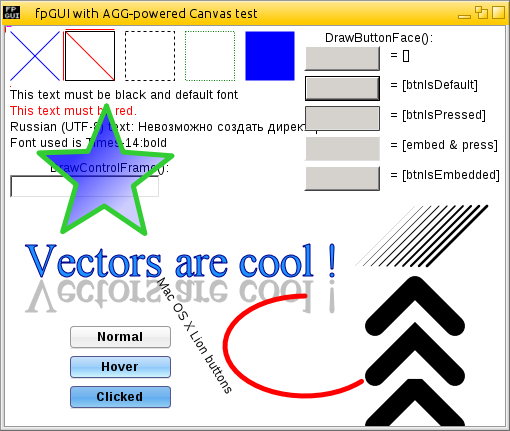
Here is the output of a fpGUI + AggPas example. Everything seen, is rendered via AggPas’s API - no bitmaps have been used.

http://fpgui.sourceforge.net/images/full/fpgui_agg-powered.png

Anyway, I hope you find a suitable solution to your problem. I think you have ample choice now. ;-)

Regards,
Graeme

fpGUI Toolkit - a cross-platform GUI toolkit using Free Pascal http://fpgui.sourceforge.net/ My public PGP key: http://tinyurl.com/graeme-pgp
James Richters
to Graeme Geldenhuys

I am trying to run your sample program. I am able to compile it, but when I try to run it I get:

Agg2dconsole.exe - System Error
The Program can't start because freetype.dll is missing from your computer. Try reinstalling the program to fix the problem

Any ideas?

Earlier message 26 lines
-----Original Message----- From: fpc-pascal On Behalf Of Graeme Geldenhuys Sent: Monday, May 15, 2017 10:52 AM To: Subject: Re: [fpc-pascal] FPC Graphics options? On 2017-05-15 15:45, James Richters wrote: > I did appreciate how much better 1 pixel wide lines and curves appear > with the anti-aliasing and sub-pixel accuracy provides. Indeed, AGG (and AggPas) does a fantastic job and high quality line and text rendering with sub-pixel accuracy. Here is the output of a fpGUI + AggPas example. Everything seen, is rendered via AggPas’s API - no bitmaps have been used. http://fpgui.sourceforge.net/images/full/fpgui_agg-powered.png Anyway, I hope you find a suitable solution to your problem. I think you have ample choice now. ;-) Regards, Graeme -- fpGUI Toolkit - a cross-platform GUI toolkit using Free Pascal http://fpgui.sourceforge.net/ My public PGP key: http://tinyurl.com/graeme-pgp _______________________________________________
Graeme Geldenhuys
to James Richters
James Richters wrote 5 lines
Agg2dconsole.exe - System Error The Program can't start because freetype.dll is missing from your computer. Try reinstalling the program to fix the problem Any ideas?

Sorry about that. AggPas uses the FreeType library (preferred - more features that GDI) or Windows GDI for font support. Seeing as that demo doesn't output text, I really should have disabled font support via

   {$DEFINE AGG2D_NO_FONT}

at the top of the unit, but I forgot to do that. So, you can do the above and recompile or...

Alternatively, simply copy the freetype.dll into the same directory as the executable, or in your Windows System path. You can find a copy included with fpGUI's code repository in a ZIP file located at:

<fpgui>/extras/freetype_windows/freetype.zip

Regards,
Graeme

fpGUI Toolkit - a cross-platform GUI toolkit using Free Pascal http://fpgui.sourceforge.net/ My public PGP key: http://tinyurl.com/graeme-pgp
Unknown author
to James Richters: I am trying to run your sample program. I am able to compile it, but when I try to run…
James Richters wrote 7 lines
I am trying to run your sample program. I am able to compile it, but when I try to run it I get: Agg2dconsole.exe - System Error The Program can't start because freetype.dll is missing from your computer. Try reinstalling the program to fix the problem Any ideas?

Captain Obvious: install FreeType for your OS? don't forget it for your destination OS(es), too ;) O:)

NOTE: No off-list assistance is given without prior approval. *Please keep mailing list traffic on the list* unless private contact is specifically requested and granted.
Jon Foster
to Graeme Geldenhuys: Doesn't IBM, Linux, FreeBSD etc use OpenJDK? I was also under the impression that Oracle…
Graeme Geldenhuys wrote 10 lines
On 2017-05-13 18:02, Jon Foster wrote: > Speaking of Java ... that's a hard comparison to make. There are so many > Java implementations. Doesn't IBM, Linux, FreeBSD etc use OpenJDK? I was also under the impression that Oracle now also uses OpenJDK as the base for their releases - with some of their own additions. If this is all correct, it means they all pretty much use the same Java VM and Compiler implementations.

I can't really speak for most of those as I'm not interested in the Java platform. The language is too inflexible and on some, if not many platforms its interpreted. As you saw in my chart that hurts. Linux doesn't use Java. Its just another piece software installed by the user when they want it. Which means they are free to install whatever derivative of Java they choose. I imagine that most distributions will provide OpenJDK as a default Java solution, because its Open Source. For FreeBSD OpenJDK may be the only option.

But I suppose my point was more for things that are off the typical desktop. There are others, like Google, that provide Java implementations that are free to do whatever the author wishes so long as they adhere to the byte-code standard. The short of it is: when developing for various platforms Java performance is likely to vary more widely than expected. There are probably a number of platforms that still use or fallback to interpretation and other implementation details will vary. Just as using M$ C, GCC, ... for a windoze platform may produce different performance results. But Java has the potential for a much broader range of variance.

So to say, "Java is fast." Is not necessarily true depending on who's implementation you're using. I tested OpenJDK 1.6.0 on Linux. I didn't test anyone else's implementation. Would be interesting to compare OpenJDK on the ARM powered CHIP vs. Dalvik on a similarly spec'd Android device. :-)

Sent from my Debian Linux workstation -- http://www.debian.org/intro/about Jon Foster JF Possibilities, Inc.
James Richters
to Graeme Geldenhuys: Sorry about that. AggPas uses the FreeType library (preferred - more features that GDI)…

I put freetype.dll in with the sample program and I was able to successfully compile it, and I can even run it without any errors, but I never get any graphics display.. am I missing some obvious step? I am compiling and running it with the Free Pascal text mode IDE, I added the paths to aggpas to my directories so it is finding them and using them. I can trace into the program and I see it is going into aggpas units, but I do not get any graphical window, I don't get any errors either, it just runs and exits.

James

Earlier message 32 lines
-----Original Message----- From: fpc-pascal On Behalf Of Graeme Geldenhuys Sent: Monday, May 15, 2017 11:57 AM To: Subject: Re: [fpc-pascal] FPC Graphics options? On 2017-05-15 16:28, James Richters wrote: > Agg2dconsole.exe - System Error The Program can't start because > freetype.dll is missing from your computer. Try reinstalling the > program to fix the problem > > Any ideas? Sorry about that. AggPas uses the FreeType library (preferred - more features that GDI) or Windows GDI for font support. Seeing as that demo doesn't output text, I really should have disabled font support via {$DEFINE AGG2D_NO_FONT} at the top of the unit, but I forgot to do that. So, you can do the above and recompile or... Alternatively, simply copy the freetype.dll into the same directory as the executable, or in your Windows System path. You can find a copy included with fpGUI's code repository in a ZIP file located at: <fpgui>/extras/freetype_windows/freetype.zip Regards, Graeme -- fpGUI Toolkit - a cross-platform GUI toolkit using Free Pascal http://fpgui.sourceforge.net/ My public PGP key: http://tinyurl.com/graeme-pgp _______________________________________________
Nikolay Nikolov
to James Richters: Thanks for the help and advice with this. I've been trying to figure out how a lot of…
James Richters wrote 6 lines
Thanks for the help and advice with this. I've been trying to figure out how a lot of this works. Here's where I'm at > You could try the units ptcgraph or sdlgraph as alternatives (both are part of FPC). These seemed like the easiest things to start with. ptcgraph: I'm having 2 issues trying ptcgraph, 1, I can't seem to get it to be completely full screen 1280x1024 seems to be the largest I can make it. 2, The graphics window created by ptcgraph does not respond with wincrt.

1. use ptcgraph from fpc trunk, that supports resolutions higher than 1280x1024
2. use ptccrt instead of wincrt

Nikolay

Nikolay Nikolov
to Nikolay Nikolov
Nikolay Nikolov wrote 16 lines
On 05/15/2017 01:51 PM, James Richters wrote: > Thanks for the help and advice with this. I've been trying to figure > out how a lot of this works. Here's where I'm at > >> You could try the units ptcgraph or sdlgraph as alternatives (both >> are part of FPC). > These seemed like the easiest things to start with. > > ptcgraph: I'm having 2 issues trying ptcgraph, 1, I can't seem > to get it to be completely full screen 1280x1024 seems to be the > largest I can make it. 2, The graphics window created by ptcgraph > does not respond with wincrt. 1. use ptcgraph from fpc trunk, that supports resolutions higher than 1280x1024

Sorry, I still haven't updated it in fpc trunk. Use the trunk version from the ptcpas sourceforge repo:

https://sourceforge.net/p/ptcpas/code/HEAD/tree/trunk/

Nikolay

James Richters
to Nikolay Nikolov

Thank you, I will try that version and also change to ptcgraph.

Earlier message 30 lines
-----Original Message----- From: fpc-pascal On Behalf Of Nikolay Nikolov Sent: Monday, May 15, 2017 4:32 PM To: Subject: Re: [fpc-pascal] FPC Graphics options? On 05/15/2017 11:25 PM, Nikolay Nikolov wrote: > > > On 05/15/2017 01:51 PM, James Richters wrote: >> Thanks for the help and advice with this. I've been trying to figure >> out how a lot of this works. Here's where I'm at >> >>> You could try the units ptcgraph or sdlgraph as alternatives (both >>> are part of FPC). >> These seemed like the easiest things to start with. >> >> ptcgraph: I'm having 2 issues trying ptcgraph, 1, I can't seem >> to get it to be completely full screen 1280x1024 seems to be the >> largest I can make it. 2, The graphics window created by ptcgraph >> does not respond with wincrt. > 1. use ptcgraph from fpc trunk, that supports resolutions higher than > 1280x1024 Sorry, I still haven't updated it in fpc trunk. Use the trunk version from the ptcpas sourceforge repo: https://sourceforge.net/p/ptcpas/code/HEAD/tree/trunk/ Nikolay
Unknown author
to Sven Barth: While a raytracer is indeed a graphics app it's mainly about CPU computation in this case…
Sven Barth wrote 13 lines
>> Wow, Graeme! That's harsh. One of the last set of benchmarks I did >> that focused on integer math and procedure call speed came out as >> follows: > > > I think he specifically meant graphics apps, not general apps While a raytracer is indeed a graphics app it's mainly about CPU computation in this case and not interfacing with the GPU like OpenGL does (of course one can write a raytracer to take advantage of the parallel architecture of a GPU, but that's bot the case in this specific example).

Graeme will need to clarify whether he was trying to be harsh on FPC entirely, or just specifically in some areas.. :-)

But Nikolay Nikolov's replacement unit should tell if fpc is as fast as turbopascal, as he claims it is a direct replacement and is super fast.... Then it's not fpc's fault but some problem in the default unit that was not optimized? I don't know, never tried Nikolay's unit. But that also depends on whether Graeme was using that code from that unit too.

Any claims that something is slow depends entirely on 1 million parameters...
Then there are even those projects out there like FastMM but that's probably another aside unrelated

Graeme Geldenhuys
to James Richters: I put freetype.dll in with the sample program and I was able to successfully compile it,…
James Richters wrote
see it is going into aggpas units, but I do not get any graphical window, I don't get any errors either, it just runs and exits.

The example is a pure console application with no output to any display. Instead it generates a "test.png" file as its output. If you ran the Agg2DConsole binary from a command line, there should be a "test.png" image in that same directory.

As I mentioned, AggPas can use allocated memory, array, a memory image etc as its rendering buffer. If you want a graphical console program (eg: using Linux Console Framebuffer) using AggPas, then render your application output via AggPas to a memory image, then bitblit that image to the console graphics output in whatever paint event you have available.

Using AggPas with desktop GUI applications works pretty much identical as above, except it bitblit's the memory image to the Window Canvas.

Regards,
Graeme

fpGUI Toolkit - a cross-platform GUI toolkit using Free Pascal http://fpgui.sourceforge.net/ My public PGP key: http://tinyurl.com/graeme-pgp
Graeme Geldenhuys
to Unknown author: Graeme will need to clarify whether he was trying to be harsh on FPC entirely, or just…
Graeme will need to clarify whether he was trying to be harsh on FPC entirely, or just specifically in some areas.. :-)

I'll try and clarify... I believe FPC generates slow (or slower than Delphi, GCC and Java) code no matter what. The saving grace is that you don't really notice it on normal event-based desktop applications. Writing a game is a whole different story. Games are way more sensitive to performance.

Now the game I wrote, was a desktop GUI application. It was slow under Linux, FreeBSD and Windows. So the results were consistent, no matter what GUI API was used.... Be that fpGUI (via GDI), fpGUI (via X11) or LCL-GTK2. In all cases, game rendering was to a memory image, then once done, that memory image was bitblit to the Window Canvas.

The Java and GCC versions did the same, but were faster.

That's all I can say about. Make your own assumptions - read into it any conspiracy theories or what-not. ;-) At this point I don't really care, as I already moved on with that project, using OpenGL instead (both for Java and Object Pascal).

Regards,
Graeme

fpGUI Toolkit - a cross-platform GUI toolkit using Free Pascal http://fpgui.sourceforge.net/ My public PGP key: http://tinyurl.com/graeme-pgp
James Richters
to Unknown author: Graeme will need to clarify whether he was trying to be harsh on FPC entirely, or just…

I have managed to get ptcgraph and ptccrt to work with my program and I can report that there is an AMAZING increase in graphics performance! It is pretty much a drop in replacement and I did not change any compiler settings. I did have to make a few minor changes to get it to work, not enough to change the speed of anything.

I am getting an error 217 access violation when I try to use outtextXY after a SetTextJustify(2,2); (Top, Right justify) but with the graph unit my text was in the correct place and not off the screen.

I also no longer have the 'graphwindow' handle variable so I had to comment out anything that was using it like

SetWindowTextA(graphicwindow,graphwindowtext);
And
ShowWindow(graphwindow, SW_SHOW);
So I just commented them out for now.    I'm hoping there is a way to get around the graphwindow variable because I was using the above 2 functions and I don't know how else to determine the graphic window handle... but the performance gain and ease of implementation will make working out any other issues worth the effort.  Any advice on how I can capture the graph window handle would be appreciated

Thank you for the help with this.

Jim

Earlier message 28 lines
-----Original Message----- From: fpc-pascal On Behalf Of Sent: Monday, May 15, 2017 5:50 PM To: FPC-Pascal users discussions Subject: Re: [fpc-pascal] FPC Graphics options? On 2017-05-15 01:02, Sven Barth via fpc-pascal wrote: >>> Wow, Graeme! That's harsh. One of the last set of benchmarks I did >>> that focused on integer math and procedure call speed came out as >>> follows: >> >> >> I think he specifically meant graphics apps, not general apps > > While a raytracer is indeed a graphics app it's mainly about CPU > computation in this case and not interfacing with the GPU like OpenGL > does (of course one can write a raytracer to take advantage of the > parallel architecture of a GPU, but that's bot the case in this > specific example). > Graeme will need to clarify whether he was trying to be harsh on FPC entirely, or just specifically in some areas.. :-) But Nikolay Nikolov's replacement unit should tell if fpc is as fast as turbopascal, as he claims it is a direct replacement and is super fast.... Then it's not fpc's fault but some problem in the default unit that was not optimized? I don't know, never tried Nikolay's unit. But that also depends on whether Graeme was using that code from that unit too. Any claims that something is slow depends entirely on 1 million parameters... Then there are even those projects out there like FastMM but that's probably another aside unrelated _______________________________________________
James Richters
to Graeme Geldenhuys: The example is a pure console application with no output to any display. Instead it…

Yes, I did get the test.png file.. I understand the concept now. Aggpas figures out what the status of the pixels should be then you update the screen with those pixels.

Earlier message 26 lines
-----Original Message----- From: fpc-pascal On Behalf Of Graeme Geldenhuys Sent: Monday, May 15, 2017 6:05 PM To: Subject: Re: [fpc-pascal] FPC Graphics options? On 2017-05-15 20:50, James Richters wrote: > see it is going into aggpas units, but I do not get any graphical > window, I don't get any errors either, it just runs and exits. The example is a pure console application with no output to any display. Instead it generates a "test.png" file as its output. If you ran the Agg2DConsole binary from a command line, there should be a "test.png" image in that same directory. As I mentioned, AggPas can use allocated memory, array, a memory image etc as its rendering buffer. If you want a graphical console program (eg: using Linux Console Framebuffer) using AggPas, then render your application output via AggPas to a memory image, then bitblit that image to the console graphics output in whatever paint event you have available. Using AggPas with desktop GUI applications works pretty much identical as above, except it bitblit's the memory image to the Window Canvas. Regards, Graeme -- fpGUI Toolkit - a cross-platform GUI toolkit using Free Pascal http://fpgui.sourceforge.net/ My public PGP key: http://tinyurl.com/graeme-pgp _______________________________________________
Nikolay Nikolov
to James Richters: I have managed to get ptcgraph and ptccrt to work with my program and I can report that…
James Richters wrote
I have managed to get ptcgraph and ptccrt to work with my program and I can report that there is an AMAZING increase in graphics performance! It is pretty much a drop in replacement and I did not change any compiler settings. I did have to make a few minor changes to get it to work, not enough to change the speed of anything. I am getting an error 217 access violation when I try to use outtextXY after a SetTextJustify(2,2); (Top, Right justify) but with the graph unit my text was in the correct place and not off the screen.

Can you send me a small program that demonstrates the problem, so I can try to reproduce it and fix it?

Show quoted text 7 lines
I also no longer have the 'graphwindow' handle variable so I had to comment out anything that was using it like SetWindowTextA(graphicwindow,graphwindowtext); And ShowWindow(graphwindow, SW_SHOW); So I just commented them out for now. I'm hoping there is a way to get around the graphwindow variable because I was using the above 2 functions and I don't know how else to determine the graphic window handle... but the performance gain and ease of implementation will make working out any other issues worth the effort. Any advice on how I can capture the graph window handle would be appreciated

Unfortunately, you can't do that and it's actually the main reason why ptcgraph is fast. Even if you modify the ptcgraph source, so that you get the window handle, it would do you no good, because the window is created in a different thread and this means that you cannot draw to the window from your program's thread. In fact, all the ptcgraph drawing routines actually render to an internal software buffer and issue no winapi drawing 's the reason ptcgraph is fast and the regular graph unit is slow - the winapi drawing routines are really the bottleneck in this case and not the speed of the code, generated by FPC.

I know this is not ideal, but probably the easiest option is to find a suitable bgi .chr font pack or try a ttf to .chr conversion tool. If you own a copy of Turbo Pascal (or Turbo C/C++), you can use the .chr fonts that came with it. Unfortunately, other solutions are hard - they involve e.g. linking the freetype library, using it to render to a software buffer, and then blitting this buffer to the ptcgraph canvas with PutImage. Or doing a similar thing with winapi functions, but by drawing the text on a DIB (device independent bitmap, basically a memory buffer, holding an image) that you created, instead of on the window directly, then reading from the DIB and blitting it with PutImage once again.

Best regards,
Nikolay

James Richters
to Nikolay Nikolov

Thank you for the explanation. For now I can live without the windows API calls, It does work to manually switch back and forth to the text console window, and I'm really the only one who does that as I sometimes perform some diagnostic functions in there. The performance gains are worth it.

Is there a way to just turn off the windows title bar when the window is created, or change the initial name of the window?

I'll just stick with my BGI fonts for now, if I want to move into true type fonts I'll look into doing something as you suggest with the buffer.

I did figure out what my 217 error was, it just happened to be the only time I right justified something, but it was actually in a unit where I neglected to change graph to ptcgraph, and that caused the error.

Thanks again for the help, this is a great quick fix and huge performance gain.

James

Earlier message 27 lines
-----Original Message----- From: fpc-pascal On Behalf Of Nikolay Nikolov Sent: Monday, May 15, 2017 8:46 PM To: Subject: Re: [fpc-pascal] FPC Graphics options? On 05/16/2017 01:37 AM, James Richters wrote: > I have managed to get ptcgraph and ptccrt to work with my program and I can report that there is an AMAZING increase in graphics performance! It is pretty much a drop in replacement and I did not change any compiler settings. I did have to make a few minor changes to get it to work, not enough to change the speed of anything. > > I am getting an error 217 access violation when I try to use outtextXY after a SetTextJustify(2,2); (Top, Right justify) but with the graph unit my text was in the correct place and not off the screen. Can you send me a small program that demonstrates the problem, so I can try to reproduce it and fix it? > > I also no longer have the 'graphwindow' handle variable so I had to > comment out anything that was using it like > > SetWindowTextA(graphicwindow,graphwindowtext); > And > ShowWindow(graphwindow, SW_SHOW); > So I just commented them out for now. I'm hoping there is a way to get around the graphwindow variable because I was using the above 2 functions and I don't know how else to determine the graphic window handle... but the performance gain and ease of implementation will make working out any other issues worth the effort. Any advice on how I can capture the graph window handle would be appreciated Unfortunately, you can't do that and it's actually the main reason why ptcgraph is fast. Even if you modify the ptcgraph source, so that you get the window handle, it would do you no good, because the window is created in a different thread and this means that you cannot draw to the window from your program's thread. In fact, all the ptcgraph drawing routines actually render to an internal software buffer and issue no winapi drawing 's the reason ptcgraph is fast and the regular graph unit is slow - the winapi drawing routines are really the bottleneck in this case and not the speed of the code, generated by FPC. I know this is not ideal, but probably the easiest option is to find a suitable bgi .chr font pack or try a ttf to .chr conversion tool. If you own a copy of Turbo Pascal (or Turbo C/C++), you can use the .chr fonts that came with it. Unfortunately, other solutions are hard - they involve e.g. linking the freetype library, using it to render to a software buffer, and then blitting this buffer to the ptcgraph canvas with PutImage. Or doing a similar thing with winapi functions, but by drawing the text on a DIB (device independent bitmap, basically a memory buffer, holding an image) that you created, instead of on the window directly, then reading from the DIB and blitting it with PutImage once again. Best regards, Nikolay
Sven Barth
"Nikolay Nikolov" wrote
> I also no longer have the 'graphwindow' handle variable so I had to

comment out anything that was using it like

Show quoted text 5 lines
> > SetWindowTextA(graphicwindow,graphwindowtext); > And > ShowWindow(graphwindow, SW_SHOW); > So I just commented them out for now. I'm hoping there is a way to

get around the graphwindow variable because I was using the above 2 functions and I don't know how else to determine the graphic window handle... but the performance gain and ease of implementation will make working out any other issues worth the effort. Any advice on how I can capture the graph window handle would be appreciated

Unfortunately, you can't do that and it's actually the main reason why

ptcgraph is fast. Even if you modify the ptcgraph source, so that you get the window handle, it would do you no good, because the window is created in a different thread and this means that you cannot draw to the window from your program's thread. In fact, all the ptcgraph drawing routines actually render to an internal software buffer and issue no winapi drawing 's the reason ptcgraph is fast and the regular graph unit is slow - the winapi drawing routines are really the bottleneck in this case and not the speed of the code, generated by FPC.

Hmm? But he only wants to change the tttle of the window. Even on Windows that should work from a different thread. However a platform independent SetWindowTitle() for ptcgraph would be rather useful I guess.

Though I'd like to know why he needs ShowWindow()...

Regards,
Sven

James Richters
to Sven Barth
Hmm? But he only wants to change the title of the window. Even on Windows that should work from a different thread. However a platform independent SetWindowTitle() for ptcgraph would be rather useful I guess.

I did a quick test and ran one program that did a writeln of it’s handle, then put that handle in another program and ran it and I was able to change the window title of the first program with the second program. So if ptcgraph also had the graphwindow : handle variable I think it would work.

Though I'd like to know why he needs ShowWindow()...

My application is purposefully designed not to use a mouse… It’s CNC control software and mice, even optical ones out in dusty shops are tedious and difficult… it’s often difficult to even find a place to put a mouse, nevermind seeing a pointer when the screen is full of sawdust. So I have keyboard commands that get me back to the console window where I can look at some things like the contents of some variables, then when I’m done I hit another key and it puts me back on the graphics window. I just use both crt and pctcrt and do things like crt.readkey and pctcrt.readkey to know which screen got the input. I can get by without ShowWindow() because I can alt-tab between the windows without a mouse, and admittedly there isn’t a huge use for the console window, but it is a lot nicer for the program to put the correct window on top by itself.

It would be nice if I could:

1. The above mentioned ShowWindow()
2. Make the graph window full screen always, it normally does not come up full screen it’s the correct size for full screen but mispositioned.. I can probably fix this in a shortcut that starts it but would be nice if the program itself forced full screen
3. Get rid of the windows titlebar all together, I could just draw my own. I was able to shut the title bar off with the graph unit, but the window would still be the size of the screen minus the bar. I believe if the titlebar was defined to be shut off before the window was created, or shortly after then I could have completely full screen with no title bar. But I don’t know where or how the window is created to do that.
4. If I can’t get rid of the titlebar, then setting a custom window title would be nice, preferably after my program was running so I could put status information up there, but if not possible then a one time custom title bar name would be great.

James

Earlier message 24 lines
From: fpc-pascal On Behalf Of Sven Barth via fpc-pascal Sent: Tuesday, May 16, 2017 2:00 AM To: FPC-Pascal users discussions Cc: Sven Barth Subject: Re: [fpc-pascal] FPC Graphics options? Am 16.05.2017 02:46 schrieb "Nikolay Nikolov" < >: >> I also no longer have the 'graphwindow' handle variable so I had to comment out anything that was using it like >> >> SetWindowTextA(graphicwindow,graphwindowtext); >> And >> ShowWindow(graphwindow, SW_SHOW); >> So I just commented them out for now. I'm hoping there is a way to get around the graphwindow variable because I was using the above 2 functions and I don't know how else to determine the graphic window handle... but the performance gain and ease of implementation will make working out any other issues worth the effort. Any advice on how I can capture the graph window handle would be appreciated > > Unfortunately, you can't do that and it's actually the main reason why ptcgraph is fast. Even if you modify the ptcgraph source, so that you get the window handle, it would do you no good, because the window is created in a different thread and this means that you cannot draw to the window from your program's thread. In fact, all the ptcgraph drawing routines actually render to an internal software buffer and issue no winapi drawing 's the reason ptcgraph is fast and the regular graph unit is slow - the winapi drawing routines are really the bottleneck in this case and not the speed of the code, generated by FPC. Hmm? But he only wants to change the tttle of the window. Even on Windows that should work from a different thread. However a platform independent SetWindowTitle() for ptcgraph would be rather useful I guess. Though I'd like to know why he needs ShowWindow()... Regards, Sven
Nikolay Nikolov
to Sven Barth: comment out anything that was using it like get around the graphwindow variable because I…
Sven Barth wrote 31 lines
Am 16.05.2017 02:46 schrieb "Nikolay Nikolov" < >: >> I also no longer have the 'graphwindow' handle variable so I had to comment out anything that was using it like >> >> SetWindowTextA(graphicwindow,graphwindowtext); >> And >> ShowWindow(graphwindow, SW_SHOW); >> So I just commented them out for now. I'm hoping there is a way to get around the graphwindow variable because I was using the above 2 functions and I don't know how else to determine the graphic window handle... but the performance gain and ease of implementation will make working out any other issues worth the effort. Any advice on how I can capture the graph window handle would be appreciated > > Unfortunately, you can't do that and it's actually the main reason why ptcgraph is fast. Even if you modify the ptcgraph source, so that you get the window handle, it would do you no good, because the window is created in a different thread and this means that you cannot draw to the window from your program's thread. In fact, all the ptcgraph drawing routines actually render to an internal software buffer and issue no winapi drawing 's the reason ptcgraph is fast and the regular graph unit is slow - the winapi drawing routines are really the bottleneck in this case and not the speed of the code, generated by FPC. Hmm? But he only wants to change the tttle of the window. Even on Windows that should work from a different thread. However a platform independent SetWindowTitle() for ptcgraph would be rather useful I guess.

I can easily add this option to ptcgraph. I'll do it tonight.

Show quoted text 11 lines
Though I'd like to know why he needs ShowWindow()... Regards, Sven _______________________________________________ fpc-pascal maillist - http://lists.freepascal.org/cgi-bin/mailman/listinfo/fpc-pascal
Nikolay Nikolov
to James Richters: I did a quick test and ran one program that did a writeln of it’s handle, then put that…
James Richters wrote 35 lines
> Hmm? But he only wants to change the title of the window. Even on Windows that should work from a different thread. However a platform independent SetWindowTitle() for ptcgraph would be rather useful I guess. I did a quick test and ran one program that did a writeln of it’s handle, then put that handle in another program and ran it and I was able to change the window title of the first program with the second program. So if ptcgraph also had the graphwindow : handle variable I think it would work. >Though I'd like to know why he needs ShowWindow()... My application is purposefully designed not to use a mouse… It’s CNC control software and mice, even optical ones out in dusty shops are tedious and difficult… it’s often difficult to even find a place to put a mouse, nevermind seeing a pointer when the screen is full of sawdust. So I have keyboard commands that get me back to the console window where I can look at some things like the contents of some variables, then when I’m done I hit another key and it puts me back on the graphics window. I just use both crt and pctcrt and do things like crt.readkey and pctcrt.readkey to know which screen got the input. I can get by without ShowWindow() because I can alt-tab between the windows without a mouse, and admittedly there isn’t a huge use for the console window, but it is a lot nicer for the program to put the correct window on top by itself. It would be nice if I could: 1. The above mentioned ShowWindow() 2. Make the graph window full screen always, it normally does not come up full screen it’s the correct size for full screen but mispositioned.. I can probably fix this in a shortcut that starts it but would be nice if the program itself forced full screen

Yes, you can do this, if you set:

   FullscreenGraph := true;

In the beginning of your program (before InitGraph). Tonight I'll also add the option for changing the title bar text, when in windowed mode.

Show quoted text 63 lines
1. 2. Get rid of the windows titlebar all together, I could just draw my own. I was able to shut the title bar off with the graph unit, but the window would still be the size of the screen minus the bar. I believe if the titlebar was defined to be shut off before the window was created, or shortly after then I could have completely full screen with no title bar. But I don’t know where or how the window is created to do that. 3. If I can’t get rid of the titlebar, then setting a custom window title would be nice, preferably after my program was running so I could put status information up there, but if not possible then a one time custom title bar name would be great. James *From:* fpc-pascal *On Behalf Of *Sven Barth via fpc-pascal *Sent:* Tuesday, May 16, 2017 2:00 AM *To:* FPC-Pascal users discussions *Cc:* Sven Barth *Subject:* Re: [fpc-pascal] FPC Graphics options? Am 16.05.2017 02:46 schrieb "Nikolay Nikolov" < >: >> I also no longer have the 'graphwindow' handle variable so I had to comment out anything that was using it like >> >> SetWindowTextA(graphicwindow,graphwindowtext); >> And >> ShowWindow(graphwindow, SW_SHOW); >> So I just commented them out for now. I'm hoping there is a way to get around the graphwindow variable because I was using the above 2 functions and I don't know how else to determine the graphic window handle... but the performance gain and ease of implementation will make working out any other issues worth the effort. Any advice on how I can capture the graph window handle would be appreciated > > Unfortunately, you can't do that and it's actually the main reason why ptcgraph is fast. Even if you modify the ptcgraph source, so that you get the window handle, it would do you no good, because the window is created in a different thread and this means that you cannot draw to the window from your program's thread. In fact, all the ptcgraph drawing routines actually render to an internal software buffer and issue no winapi drawing 's the reason ptcgraph is fast and the regular graph unit is slow - the winapi drawing routines are really the bottleneck in this case and not the speed of the code, generated by FPC. Hmm? But he only wants to change the tttle of the window. Even on Windows that should work from a different thread. However a platform independent SetWindowTitle() for ptcgraph would be rather useful I guess. Though I'd like to know why he needs ShowWindow()... Regards, Sven _______________________________________________ fpc-pascal maillist - http://lists.freepascal.org/cgi-bin/mailman/listinfo/fpc-pascal
Jon Foster
to Graeme Geldenhuys: I'll try and clarify... I believe FPC generates slow (or slower than Delphi, GCC and…
Graeme Geldenhuys wrote 23 lines
On 2017-05-15 22:50, wrote: > Graeme will need to clarify whether he was trying to be harsh on FPC > entirely, or just specifically in some areas.. :-) I'll try and clarify... I believe FPC generates slow (or slower than Delphi, GCC and Java) code no matter what. The saving grace is that you don't really notice it on normal event-based desktop applications. Writing a game is a whole different story. Games are way more sensitive to performance. Now the game I wrote, was a desktop GUI application. It was slow under Linux, FreeBSD and Windows. So the results were consistent, no matter what GUI API was used.... Be that fpGUI (via GDI), fpGUI (via X11) or LCL-GTK2. In all cases, game rendering was to a memory image, then once done, that memory image was bitblit to the Window Canvas. The Java and GCC versions did the same, but were faster. That's all I can say about. Make your own assumptions - read into it any conspiracy theories or what-not. ;-) At this point I don't really care, as I already moved on with that project, using OpenGL instead (both for Java and Object Pascal).

I think the key word in Graeme's complaint is "game". And I'm willing to bet that most of his envisioned gaming scenarios deal with a lot of floating point math and the more advanced math functions. A quick glance over his example code and I'm willing to bet that the "math" unit providing the sqrt(), cos(), sin() and others is the bottle neck. But that's just a knee-jerk reaction. Seems to me I read a while back that a ton of effort had not gone into them.

There are only two software projects in the world that continue to impress me with each new release: the Linux Kernel and FPC, which amuses me since I remember the first version of FPC I saw. '99 I think it was. I laughed and moved on. I wish I had the time provide some concrete info on where Graeme's problem is because I'd really like to see FPC shine here too. But it will probably be a while before I can give it proper treatment.

Sent from my Debian Linux laptop Jon Foster JF Possibilities, Inc.
Sven Barth
to Jon Foster
"Jon Foster" wrote
There are only two software projects in the world that continue to

impress me with each new release: the Linux Kernel and FPC, which amuses me since I remember the first version of FPC I saw. '99 I think it was. I laughed and moved on. I wish I had the time provide some concrete info on where Graeme's problem is because I'd really like to see FPC shine here too. But it will probably be a while before I can give it proper treatment.

Now if only there'd be a publicly visible "like" functionality in e-mails :D

Regards,
Sven

James Richters
to Nikolay Nikolov: Yes, you can do this, if you set: FullscreenGraph := true; In the beginning of your…
Yes, you can do this, if you set: FullscreenGraph := true;

I tried this and it does make a full screen graphics window without the windows title bar on top, which I like, however if I task switch out of the graphics window, then task switch back to it, my keyboard no longer responds via ptccrt. I do this quite often, even launching things from within my program that I expect to be on top of it, for example I will launch a text editor and wait for it to be closed before my program continues.

For non-full screen use, are there any variable I can set that would specify the graph windows position on the screen, or force the window to be maximized?

I was able to switch back and forth to the ptcgraph window by doing the following:

  {$H+}
   SetConsoleTitle(ConsoleTitle); //Change name of Console window so it’s not the same as the graph window
   Sleep(60); //give windows some time to make the change
   GraphWindow:=FindWindow(nil,Pchar(paramstr(0)+#0#0));  //Figure out handle for graph window with FindWindow()
  // the following all work with the handle obtained for the ptcgraph window with the above method
   setwindowtextA(graphwindow,GraphTitle);
   ShowWindow(graphwindow,SW_show);
   SetActiveWindow(graphwindow);
   SetForegroundWindow(graphwindow);

It would be handy if GraphWindow was set to the ptcgraph window handle to make it compatible with the graph unit

Thanks for the help with this, I really appreciate it

James

Earlier message 80 lines
From: fpc-pascal On Behalf Of Nikolay Nikolov Sent: Tuesday, May 16, 2017 7:45 AM To: Subject: Re: [fpc-pascal] FPC Graphics options? On 05/16/2017 01:27 PM, James Richters wrote: > Hmm? But he only wants to change the title of the window. Even on Windows that should work from a different thread. However a platform independent SetWindowTitle() for ptcgraph would be rather useful I guess. I did a quick test and ran one program that did a writeln of it’s handle, then put that handle in another program and ran it and I was able to change the window title of the first program with the second program. So if ptcgraph also had the graphwindow : handle variable I think it would work. >Though I'd like to know why he needs ShowWindow()... My application is purposefully designed not to use a mouse… It’s CNC control software and mice, even optical ones out in dusty shops are tedious and difficult… it’s often difficult to even find a place to put a mouse, nevermind seeing a pointer when the screen is full of sawdust. So I have keyboard commands that get me back to the console window where I can look at some things like the contents of some variables, then when I’m done I hit another key and it puts me back on the graphics window. I just use both crt and pctcrt and do things like crt.readkey and pctcrt.readkey to know which screen got the input. I can get by without ShowWindow() because I can alt-tab between the windows without a mouse, and admittedly there isn’t a huge use for the console window, but it is a lot nicer for the program to put the correct window on top by itself. It would be nice if I could: 1. The above mentioned ShowWindow() 2. Make the graph window full screen always, it normally does not come up full screen it’s the correct size for full screen but mispositioned.. I can probably fix this in a shortcut that starts it but would be nice if the program itself forced full screen Yes, you can do this, if you set: FullscreenGraph := true; In the beginning of your program (before InitGraph). Tonight I'll also add the option for changing the title bar text, when in windowed mode. 3. 4. Get rid of the windows titlebar all together, I could just draw my own. I was able to shut the title bar off with the graph unit, but the window would still be the size of the screen minus the bar. I believe if the titlebar was defined to be shut off before the window was created, or shortly after then I could have completely full screen with no title bar. But I don’t know where or how the window is created to do that. 5. If I can’t get rid of the titlebar, then setting a custom window title would be nice, preferably after my program was running so I could put status information up there, but if not possible then a one time custom title bar name would be great. James From: fpc-pascal On Behalf Of Sven Barth via fpc-pascal Sent: Tuesday, May 16, 2017 2:00 AM To: FPC-Pascal users discussions Cc: Sven Barth Subject: Re: [fpc-pascal] FPC Graphics options? Am 16.05.2017 02:46 schrieb "Nikolay Nikolov" < >: >> I also no longer have the 'graphwindow' handle variable so I had to comment out anything that was using it like >> >> SetWindowTextA(graphicwindow,graphwindowtext); >> And >> ShowWindow(graphwindow, SW_SHOW); >> So I just commented them out for now. I'm hoping there is a way to get around the graphwindow variable because I was using the above 2 functions and I don't know how else to determine the graphic window handle... but the performance gain and ease of implementation will make working out any other issues worth the effort. Any advice on how I can capture the graph window handle would be appreciated > > Unfortunately, you can't do that and it's actually the main reason why ptcgraph is fast. Even if you modify the ptcgraph source, so that you get the window handle, it would do you no good, because the window is created in a different thread and this means that you cannot draw to the window from your program's thread. In fact, all the ptcgraph drawing routines actually render to an internal software buffer and issue no winapi drawing 's the reason ptcgraph is fast and the regular graph unit is slow - the winapi drawing routines are really the bottleneck in this case and not the speed of the code, generated by FPC. Hmm? But he only wants to change the tttle of the window. Even on Windows that should work from a different thread. However a platform independent SetWindowTitle() for ptcgraph would be rather useful I guess. Though I'd like to know why he needs ShowWindow()... Regards, Sven
James Richters
to Nikolay Nikolov: Unfortunately, I didn't have the time to do it tonight (I'm kinda bad at time estimates…

Join the bad time estimate club! The help is very much appreciated and whatever time you can allow for it great.

James

Earlier message 16 lines
-----Original Message----- From: fpc-pascal On Behalf Of Nikolay Nikolov Sent: Tuesday, May 16, 2017 5:42 PM To: Subject: Re: [fpc-pascal] FPC Graphics options? On 05/16/2017 02:45 PM, Nikolay Nikolov wrote: > > > Tonight I'll also add the option for changing the title bar text, when > in windowed mode. Unfortunately, I didn't have the time to do it tonight (I'm kinda bad at time estimates ;-) ), but I'll probably implement it during the weekend. Nikolay
Unknown author
to Graeme Geldenhuys: I'll try and clarify... I believe FPC generates slow (or slower than Delphi, GCC and…
Graeme Geldenhuys wrote 23 lines
On 2017-05-15 22:50, wrote: > Graeme will need to clarify whether he was trying to be harsh on FPC > entirely, or just specifically in some areas.. :-) I'll try and clarify... I believe FPC generates slow (or slower than Delphi, GCC and Java) code no matter what. The saving grace is that you don't really notice it on normal event-based desktop applications. Writing a game is a whole different story. Games are way more sensitive to performance. Now the game I wrote, was a desktop GUI application. It was slow under Linux, FreeBSD and Windows. So the results were consistent, no matter what GUI API was used.... Be that fpGUI (via GDI), fpGUI (via X11) or LCL-GTK2. In all cases, game rendering was to a memory image, then once done, that memory image was bitblit to the Window Canvas. The Java and GCC versions did the same, but were faster. That's all I can say about. Make your own assumptions - read into it any conspiracy theories or what-not. ;-) At this point I don't really care, as I already moved on with that project, using OpenGL instead (both for Java and Object Pascal).

But any game ends up using opengl anyway, doesnt' it? Sorry I'm not a big game programmer. Want to be, some day.

i.e. if you end up using opengl, or its successor, why does it even matter if FPC pure games without any libs are slow?

AFAIR the doom and quake ports ran pretty fast, but I'm not sure, as I didn't play them much. Can't remember.

Unknown author
to Jon Foster: I think the key word in Graeme's complaint is "game". And I'm willing to bet that most of…
Jon Foster wrote 8 lines
I think the key word in Graeme's complaint is "game". And I'm willing to bet that most of his envisioned gaming scenarios deal with a lot of floating point math and the more advanced math functions. A quick glance over his example code and I'm willing to bet that the "math" unit providing the sqrt(), cos(), sin() and others is the bottle neck. But that's just a knee-jerk reaction. Seems to me I read a while back that a ton of effort had not gone into them.

Could those math routines just be written in assembly with a FastXXX unit? i.e. FastMM is a fast memory manager, so you could have a FastCRT, fastWhatever, FastMath...

At one time the fpc system units or sysutils was written in a lot of assembly, then they changed it to more pascal so it was more readable for people like me who stay away from assembly :-) Not because assembly is bad or anything, I just like living in high level procedural land, instead of low level assembly machine land.

Unknown author
to James Richters: I have managed to get ptcgraph and ptccrt to work with my program and I can report that…
James Richters wrote 6 lines
I have managed to get ptcgraph and ptccrt to work with my program and I can report that there is an AMAZING increase in graphics performance! It is pretty much a drop in replacement and I did not change any compiler settings. I did have to make a few minor changes to get it to work, not enough to change the speed of anything.

So it can't be an fpc problem, but a unit module problem that someone didn't spend time optimizing which has little to do with fpc but more to do with the way the units were written?

Or is the ptcgraph/ptccrt in assembly code to avoid FPC mode objcfpc compilation and use assembly instead? Sorry I have not looked at it.. don't know.

Sven Barth
Show quoted text 30 lines
On 2017-05-15 17:27, Graeme Geldenhuys wrote: > > On 2017-05-15 22:50, wrote: >> >> Graeme will need to clarify whether he was trying to be harsh on FPC >> entirely, or just specifically in some areas.. :-) > > > I'll try and clarify... I believe FPC generates slow (or slower than > Delphi, GCC and Java) code no matter what. The saving grace is that > you don't really notice it on normal event-based desktop applications. > Writing a game is a whole different story. Games are way more > sensitive to performance. > > Now the game I wrote, was a desktop GUI application. It was slow under > Linux, FreeBSD and Windows. So the results were consistent, no matter > what GUI API was used.... Be that fpGUI (via GDI), fpGUI (via X11) or > LCL-GTK2. In all cases, game rendering was to a memory image, then > once done, that memory image was bitblit to the Window Canvas. > > The Java and GCC versions did the same, but were faster. > > That's all I can say about. Make your own assumptions - read into it > any conspiracy theories or what-not. ;-) At this point I don't really > care, as I already moved on with that project, using OpenGL instead > (both for Java and Object Pascal). > But any game ends up using opengl anyway, doesnt' it? Sorry I'm not a big

game programmer. Want to be, some day.

No, OpenGL is not a given. E.g. on Windows you can use DirectX and depending on the demands of your game a TCanvas might be completely sufficient.
Also Graeme was talking about a raytracer which is a completely different beast compared to OpenGL/DirectX/Vulkan. While a raytracer *might* use one of those APIs for output of the final image the main task is the calculation of said image and *that* is where Graeme said that FPC had problems.

Regards,
Sven

Sven Barth
to Unknown author: Could those math routines just be written in assembly with a FastXXX unit? i.e. FastMM is…
Show quoted text 13 lines
On 2017-05-16 09:10, Jon Foster wrote: > I think the key word in Graeme's complaint is "game". And I'm willing > to bet that most of his envisioned gaming scenarios deal with a lot of > floating point math and the more advanced math functions. A quick > glance over his example code and I'm willing to bet that the "math" > unit providing the sqrt(), cos(), sin() and others is the bottle neck. > But that's just a knee-jerk reaction. Seems to me I read a while back > that a ton of effort had not gone into them. > Could those math routines just be written in assembly with a FastXXX

unit? i.e. FastMM is a fast memory manager, so you could have a FastCRT, fastWhatever, FastMath...

At one time the fpc system units or sysutils was written in a lot of

assembly, then they changed it to more pascal so it was more readable for people like me who stay away from assembly :-) Not because assembly is bad or anything, I just like living in high level procedural land, instead of low level assembly machine land.

It has nothing to do with readability. It's about portability instead as FPC supports many different CPUs all with their own assembly language and quirks.
Though that stops no one from implementing platform specific routines which was done for some platforms (e.g. the x86 ones).

Regards,
Sven

Sven Barth
to Unknown author: So it can't be an fpc problem, but a unit module problem that someone didn't spend time…
Show quoted text 11 lines
On 2017-05-15 17:37, James Richters wrote: > > I have managed to get ptcgraph and ptccrt to work with my program and > I can report that there is an AMAZING increase in graphics > performance! It is pretty much a drop in replacement and I did not > change any compiler settings. I did have to make a few minor changes > to get it to work, not enough to change the speed of anything. > So it can't be an fpc problem, but a unit module problem that someone
didn't spend time optimizing which has little to do with fpc but more to do
with the way the units were written?
Or is the ptcgraph/ptccrt in assembly code to avoid FPC mode objcfpc

compilation and use assembly instead? Sorry I have not looked at it.. don't know.

You don't need to look at the code you merely need to look at the mails that Nikolay has written in this thread. There he writes that the stock graph unit and the PTC graph unit both use different approaches to interact with the Windows API this allowing the latter not to have the same bottleneck as the former.

Regards,
Sven

Unknown author
to Unknown author: Could those math routines just be written in assembly with a FastXXX unit? i.e. FastMM is…
Show quoted text 10 lines
On 2017-05-16 09:10, Jon Foster wrote: > I think the key word in Graeme's complaint is "game". And I'm willing > to bet that most of his envisioned gaming scenarios deal with a lot of > floating point math and the more advanced math functions. A quick > glance over his example code and I'm willing to bet that the "math" > unit providing the sqrt(), cos(), sin() and others is the bottle neck. > But that's just a knee-jerk reaction. Seems to me I read a while back > that a ton of effort had not gone into them. >
Show quoted text 5 lines
Could those math routines just be written in assembly with a FastXXX unit? i.e. FastMM is a fast memory manager, so you could have a FastCRT, fastWhatever, FastMath...

Upon further inspection it seems fpc already uses internal functions such as
fpc_in_sqrt_real

which are defined as integers that fpc references magically somehow internally..

So probably already fast, but I'd have to check further.

I don't know how internal functions work. Internal to the compiler source code, internal as in direct cpu calls that the cpu so gladly gives you?

Unknown author
to Unknown author: Could those math routines just be written in assembly with a FastXXX unit? i.e. FastMM is…
Show quoted text 14 lines
On 2017-05-16 09:10, Jon Foster wrote: > I think the key word in Graeme's complaint is "game". And I'm willing > to bet that most of his envisioned gaming scenarios deal with a lot of > floating point math and the more advanced math functions. A quick > glance over his example code and I'm willing to bet that the "math" > unit providing the sqrt(), cos(), sin() and others is the bottle neck. > But that's just a knee-jerk reaction. Seems to me I read a while back > that a ton of effort had not gone into them. > Could those math routines just be written in assembly with a FastXXX unit? i.e. FastMM is a fast memory manager, so you could have a FastCRT, fastWhatever, FastMath...

Doh!
Someone already thought of this

Quote: "FastMath is a Delphi math library that is optimized for fast performance (sometimes at the cost of not performing error checking or losing a little accuracy). It uses hand-optimized assembly code to achieve much better performance then the equivalent functions provided by the Delphi RTL."

Github:
https://github.com/neslib/FastMath

Whether it ports over to fpc, I don't know

Unknown author
to Marco van de Voort
Show quoted text 9 lines
In our previous episode, said: > > i.e. if you end up using opengl, or its successor, why does it even > matter if FPC pure games without any libs are slow? You still need to calculate all the vertices that you send to the graphics card, even if the GPU renders then.

True so a test to confirm that the calculating functions/procedure are really the bottleneck, would need to be written, and compare it to the equivalent c++ program with the same calculations

It would just be silly to start optimizing the calculation functions without any evidence that those are the issue..

If it's fpc's internal functions such as sqrt() I wonder what those internal functions actually are. Right now they are just magic, pointing to a magic number, in my mind

Michael Van Canneyt
to Unknown author
Show quoted text 21 lines
On 2017-05-17 02:57, wrote: > In our previous episode, said: >> >> i.e. if you end up using opengl, or its successor, why does it even >> matter if FPC pure games without any libs are slow? > > You still need to calculate all the vertices that you send to the > graphics > card, even if the GPU renders then. > True so a test to confirm that the calculating functions/procedure are really the bottleneck, would need to be written, and compare it to the equivalent c++ program with the same calculations It would just be silly to start optimizing the calculation functions without any evidence that those are the issue.. If it's fpc's internal functions such as sqrt() I wonder what those internal functions actually are. Right now they are just magic, pointing to a magic number, in my mind

They are mostly functions for which the compiler generates code directly instead of calling actual pascal functions (although that still happens e.g. for writeln).

You really need to check the generated code for the problem case. If I understood the thread, Graeme published his ray-tracing code on a forum, so it can probably be used as a base for examining the problem.

Michael.

Graeme Geldenhuys
to Unknown author: But any game ends up using opengl anyway, doesnt' it? Sorry I'm not a big game…
But any game ends up using opengl anyway, doesnt' it?

They shouldn't have too. I love the retro style low-fidelity games. They are perfectly possible to implement without OpenGL using GCC or Java. But I couldn't achieve the same with FPC - what this whole discussion was about in the Lazarus Forum (and now here it seems).

AFAIR the doom and quake ports ran pretty fast,

Are you talking about the Object Pascal implementations? If so, where they compiled with FPC or Delphi? As far as I know they where compiled with Delphi, and thus should have much better performance.

Regards,
Graeme

fpGUI Toolkit - a cross-platform GUI toolkit using Free Pascal http://fpgui.sourceforge.net/ My public PGP key: http://tinyurl.com/graeme-pgp
Graeme Geldenhuys
to Sven Barth: game programmer. Want to be, some day. No, OpenGL is not a given. E.g. on Windows you can…
Sven Barth wrote
While a raytracer *might* use one of those APIs for output of the final image the main task is the calculation of said image and *that* is where Graeme said that FPC had problems.

100% correct. I tried the blitting of the image using SDL with OpenGL, but as expected, that made no performance difference, because 95% of the application's time was spend generating the memory image (raycaster engine) - all done in pure software.

Regards,
Graeme

fpGUI Toolkit - a cross-platform GUI toolkit using Free Pascal http://fpgui.sourceforge.net/ My public PGP key: http://tinyurl.com/graeme-pgp
Reimar Grabowski
to Graeme Geldenhuys: They shouldn't have too. I love the retro style low-fidelity games. They are perfectly…
Show quoted text 5 lines
On 2017-05-17 06:12, wrote: > But any game ends up using opengl anyway, doesnt' it? They shouldn't have too. I love the retro style low-fidelity games. They are perfectly possible to implement without OpenGL using GCC or Java.

Na, having 30 or 45 FPS while doing absolutely no gameplay hardly qualifies. There are collision detection/response, maybe a physics engine, player input reaction, sound processing and enemy "AI" which will all bring the framerate down. And most successful (meaning released on consoles and not only on steam) retro low-fi looking games nowadays are done using Unity or Unreal Engine. Even if their style looks old the graphics are often much more complex to render than what you would think.

But I couldn't achieve the same with FPC - what this whole discussion was about in the Lazarus Forum (and now here it seems).

If you identify the bottlenecks there may be a solution.

R.

Graeme Geldenhuys
to Reimar Grabowski: On Wed, 17 May 2017 09:57:11 +0200 (CEST) Can you elaborate? I know you have to…
Reimar Grabowski wrote
But I don't get why you have to *calculate* *all*.

The CPU (your program) calculates all the 3D vertex points, as objects (made out of vertex points) move through the scene. Lots of triangles really.

The GPU calculates the individual pixel colors based on those vertex points (using shaders and textures). eg: CPU calculates 3 points of a triangle. The GPU calculates all the points between those 3 points, making up the triangle color. The GPU also does clipping calculations based on the viewpoint (camera position) in the 3D scene.

So if you work out how many vertex points there are, compared to everything that the GPU has to do (a LOT more points and calculations), the CPU does relatively little in comparison.

Regards,
Graeme

fpGUI Toolkit - a cross-platform GUI toolkit using Free Pascal http://fpgui.sourceforge.net/ My public PGP key: http://tinyurl.com/graeme-pgp
Graeme Geldenhuys
to Reimar Grabowski: On Wed, 17 May 2017 10:57:58 +0100 Na, having 30 or 45 FPS while doing absolutely no…
Reimar Grabowski wrote
Na, having 30 or 45 FPS while doing absolutely no gameplay hardly qualifies. There are collision detection/response, maybe a physics engine, player input reaction, sound processing and enemy "AI" which will all bring the framerate down.

I know that perfectly well. I only posted the code for a small demo. My real game had all the above functionality. It generated a 3D world, generated textures (yes, I didn't use bitmaps), randomly places the character, has First Person view, character movement through the 3D world using a mouse or keyboard, the player has the ability to alter the 3D world, can jump, drop off cliffs (fall) etc. All this was done using the software raycaster, and Java gives me 40 FPS very consistently in 800x600 resolution (actually 320x200 upscaled to 800x600 - giving the nice pixelated effect).

My code in the Lazarus Forum showed an attempt to simply move (fly) through a much smaller 3D world, but it couldn't come close to the 40 FPS mark I saw with Java. As I said, it barely reached 8 FPS.

My system is a i7 3.5Ghz system with 32GB RAM. It it's definitely not my system that can't keep up either. Especially if you remember back in the day, Wolfenstein 3D, which was also a software raycaster game, ran very smoothly on a 486 PC.

Regards,
Graeme

fpGUI Toolkit - a cross-platform GUI toolkit using Free Pascal http://fpgui.sourceforge.net/ My public PGP key: http://tinyurl.com/graeme-pgp
Marco van de Voort
to Graeme Geldenhuys

In our previous episode, Graeme Geldenhuys said:

Show quoted text 6 lines
> qualifies. There are collision detection/response, maybe a physics > engine, player input reaction, sound processing and enemy "AI" which > will all bring the framerate down. I know that perfectly well. I only posted the code for a small demo. My real game had all the above functionality.

The point is that a software raytracing renderer is not a aselect representative of a small game.

Raytracers like Povray are routinely used as benchmarks, both CPU and compilers.

Graeme Geldenhuys
to Marco van de Voort
Marco van de Voort wrote
Raytracers like Povray are routinely used as benchmarks

RayCasting RayTracing.

You are referring to "raytracing" programs. I'm talking about raycasting.

The difference: As explained by somebody after I did a quick google search to save time:

"
wolfenstein3d used raycasting. Raycasting is based on sending out a "ray" along each line of sight from the viewer, and incrementally moving along that line of sight until the ray hits an object.

Ray Tracing involves letting rays reflect off of objects to produce a realistic-looking scene with reflections and shadows. Ray tracing is hard to do fast enough to include in a game. if you want to see some examples visit http://www.povray.org/
"

Regards,
Graeme

fpGUI Toolkit - a cross-platform GUI toolkit using Free Pascal http://fpgui.sourceforge.net/ My public PGP key: http://tinyurl.com/graeme-pgp
Reimar Grabowski
to Graeme Geldenhuys: The CPU (your program) calculates all the 3D vertex points, as objects (made out of…
Show quoted text 6 lines
On 2017-05-17 14:28, Reimar Grabowski wrote: > But I don't get why you have to *calculate* *all*. The CPU (your program) calculates all the 3D vertex points, as objects (made out of vertex points) move through the scene. Lots of triangles really.

Nonsense.
Most of the time you just load the vertex positions from file. No even if you calculate your objects most are static (meaning their vertex positions in object space do not change). So they are calculated once and then sent to the GPU once. Animations are mostly done sending scalars/matrices/quaternions as uniforms to the corresponding shader. Skeletal animation may be done on the CPU (if you need the fully transformed mesh for anything CPU side, but you seldom do).

The GPU calculates the individual pixel colors based on those vertex points (using shaders and textures).

You mean fragment colors not pixel colors.

Show quoted text 6 lines
eg: CPU calculates 3 points of a triangle. The GPU calculates all the points between those 3 points, making up the triangle color. The GPU also does clipping calculations based on the viewpoint (camera position) in the 3D scene.

Camera position?
OpenGL has no concept of a camera.
Clipping is done based on the clip-space positions of the vertices after the last vertex processing stage.

So if you work out how many vertex points there are,

Some million for a typical game scene, which makes it sound scary to calculate them all every frame when you only have 16ms to do user input processing/sound/physics/enemy AI/etc. if you target 60fps. Heck even 32ms is not much and that's as low as you can go.

compared to everything that the GPU has to do (a LOT more points and calculations), the CPU does relatively little in comparison.

And still too much.

So the question remains:

Why do you have to *calculate* *all*?

R.

Michael Van Canneyt
to Reimar Grabowski
Reimar Grabowski wrote 8 lines
> compared to > everything that the GPU has to do (a LOT more points and calculations), > the CPU does relatively little in comparison. And still too much. So the question remains: Why do you have to *calculate* *all*?

Because you want to create an image ? That's what a ray-tracer does AFAIK.

I'm not an expert, but I remember writing POVRay scenes that took forever to calculate e.g. a chess board with pieces on it. Admittedly, a long time ago.

You assume that you have a GPU to do a lot of work for you because it renders on screen, but what if you don't want to render the scene on screen, but in a bitmap, without GPU...

Michael.

Reimar Grabowski
to Graeme Geldenhuys: I know that perfectly well. I only posted the code for a small demo. My real game had all…
All this was done using the software raycaster, and Java gives me 40 FPS very consistently in 800x600 resolution (actually 320x200 upscaled to 800x600 - giving the nice pixelated effect).

I don't doubt that Java is fast (actually it's currently my most used language) but 320x200 (original Doom resolution) and 40 FPS on your rig is amazingly slow as well.

My code in the Lazarus Forum showed an attempt to simply move (fly) through a much smaller 3D world, but it couldn't come close to the 40 FPS mark I saw with Java. As I said, it barely reached 8 FPS.

Yes, I get that, but the interesting point is what does the profiler say? Where are the bottlenecks?

R.

Graeme Geldenhuys
to Reimar Grabowski: On Thu, 18 May 2017 09:02:45 +0100 Nonsense. Most of the time you just load the vertex…
Reimar Grabowski wrote
> The GPU also does clipping calculations > based on the viewpoint (camera position) in the 3D scene. Camera position? OpenGL has no concept of a camera.

Yes, yes, but you know what I mean. Camera, View Point, Player View whatever. And yes I know there is no "real camera", its the scene that moves in the opposite direction to the user input.

Why do you have to *calculate* *all*?

My original project was to implement a _software_ raycaster, so no GPU, no OpenGL etc. Old old early 90's style programming.

This thread is getting a bit ridiculous - just like the Lazarus Forum thread did. Bottom line is, the exact same code (identical, just the language syntax that differed) produced acceptable results with GCC and Java. It didn't with FPC. We all now know FPC doesn't do such a great job at optimisation (I know the reasons why), and that the graphics API's is also not to blame. So lets leave ,
Graeme

fpGUI Toolkit - a cross-platform GUI toolkit using Free Pascal http://fpgui.sourceforge.net/ My public PGP key: http://tinyurl.com/graeme-pgp
Ryan Joseph
to Graeme Geldenhuys: Yes, yes, but you know what I mean. Camera, View Point, Player View whatever. And yes I…
On May 18, 2017, at 8:23 PM, Graeme Geldenhuys wrote: This thread is getting a bit ridiculous - just like the Lazarus Forum thread did. Bottom line is, the exact same code (identical, just the language syntax that differed) produced acceptable results with GCC and Java. It didn't with FPC. We all now know FPC doesn't do such a great job at optimisation (I know the reasons why), and that the graphics API's is also not to blame. So lets leave ’m making a game now with FPC and that example is pretty disturbing. I haven’t had any problems yet (it’s a 2D isometric engine on SDL/OpenGL) but that’s going to haunt my dreams anytime something comes up. :) Fortunately there’s no reason to write code like that so hopefully FPC is still a good choice for making games.

Has there been any good explanation by the compiler team as to why that code performed so terribly? I saw there were many optimizations that could be made (Floor() is stupid slow for some reason in FPC) but still that’s no excuse. The compiler must be doing something really stupid for it mess up like that but how can we know?

Regards,
Ryan Joseph

Ryan Joseph
to Reimar Grabowski: On Thu, 18 May 2017 09:02:45 +0100 Nonsense. Most of the time you just load the vertex…
Show quoted text 7 lines
On May 18, 2017, at 7:42 PM, Reimar Grabowski wrote: Nonsense. Most of the time you just load the vertex positions from file. No calculations at all. And even if you calculate your objects most are static (meaning their vertex positions in object space do not change). So they are calculated once and then sent to the GPU once. Animations are mostly done sending scalars/matrices/quaternions as uniforms to the corresponding shader. Skeletal animation may be done on the CPU (if you need the fully transformed mesh for anything CPU side, but you seldom do).

I only have some game experience but it’s common to need to perform some sort of viewport culling/sorting before you can send the data to OpenGL. As you may know you need to format the vertex, texture and color data into an array and generating that array can require signification calculations. In my isometric engine the sorting process got terribly complicated and CPU intensive, so much so in fact it won’t be able to run on mobile like I planned.

Regards,
Ryan Joseph

Unknown author
to Graeme Geldenhuys: Yes, yes, but you know what I mean. Camera, View Point, Player View whatever. And yes I…
Graeme Geldenhuys wrote 23 lines
On 2017-05-18 13:42, Reimar Grabowski wrote: >> The GPU also does clipping calculations >> based on the viewpoint (camera position) in the 3D scene. > Camera position? > OpenGL has no concept of a camera. Yes, yes, but you know what I mean. Camera, View Point, Player View whatever. And yes I know there is no "real camera", its the scene that moves in the opposite direction to the user input. > Why do you have to *calculate* *all*? My original project was to implement a _software_ raycaster, so no GPU, no OpenGL etc. Old old early 90's style programming. This thread is getting a bit ridiculous - just like the Lazarus Forum thread did. Bottom line is, the exact same code (identical, just the language syntax that differed) produced acceptable results with GCC and Java. It didn't with FPC. We all now know FPC doesn't do such a great job at optimisation (I know the reasons why), and that the graphics API's is also not to blame. So lets leave it at that.

No no you don't "leave" when you are trying to figure out a slow procedure that could be causing the problem, you stay here and find what is the bottlneck, then insert 3-234 lines of code to fix it so it's equal to the speed of x that you are comparing it to :-)

I just want to pinpoint why fpc is slow:
1.the math unit
2.nothing to do with the math unit
3.a wrapper around a graphics lib is slow, not the graphics lib itself just the wrapper in fpc
4. system.pp is slow
5. sysutils is slow
6.none of the above
7.magic (not an option. Leave thread..) ;-)

Reimar Grabowski
to Michael Van Canneyt: Because you want to create an image ? That's what a ray-tracer does AFAIK. I'm not an…
> Why do you have to *calculate* *all*? Because you want to create an image ? That's what a ray-tracer does AFAIK.

But raytracing isn't the subject here and never was. Graemes raycasting isn't the subject here either.

I'm not an expert, but I remember writing POVRay scenes that took forever to calculate e.g. a chess board with pieces on it. Admittedly, a long time ago.

POVRay is a benchmarking tool ^^

You assume that you have a GPU to do a lot of work for you...

Yes, because that's what we are talking about.
I replied to this:

"On Wed, 17 May 2017 09:57:11 +0200 (CEST)

Show quoted text 7 lines
In our previous episode, said: > > i.e. if you end up using opengl, or its successor, why does it even > matter if FPC pure games without any libs are slow? You still need to calculate all the vertices that you send to the graphics card, even if the GPU renders then."

You see OpenGL is a given, as is the rendering on the GPU.

The question is why do I have to *calculate* *all* vertices that I sent to the graphics card. I am really interested in where this train of thought comes from or if I am missing anything because I am quite sure that you don't have to and mostly don't do. But only Marco can tell what he meant with his comment.

because it renders on screen, but what if you don't want to render the scene on screen, but in a bitmap, without GPU...

Well, if it's without GPU then there surely is no need to "calculate vertices" before sending them to the graphics card, or is there? And personally I would just render the scene in a bitmap with GPU. No reason to not use the hardware you are provided on any system down to raspberry pis. But rendering to bitmaps is the basis for really boring games. ;)

R.

Michael Van Canneyt
to Reimar Grabowski
Reimar Grabowski wrote 8 lines
On Thu, 18 May 2017 14:52:25 +0200 (CEST) Michael Van Canneyt wrote: > > Why do you have to *calculate* *all*? > > Because you want to create an image ? That's what a ray-tracer does AFAIK. But raytracing isn't the subject here and never was. Graemes raycasting isn't the subject here either.

Yes, it was.

The complaint of Graeme was that a FPC ray tracer is much slower slower than an equivalent raytracer in Java. All the rest are diversions from the original subject.

Michael.

Ryan Joseph
to Michael Van Canneyt
On May 18, 2017, at 8:53 PM, Michael Van Canneyt wrote: The complaint of Graeme was that a FPC ray tracer is much slower slower than an equivalent raytracer in Java. All the rest are diversions from the original subject.

That’s right. I’d really like to know what the hell FPC is doing to make it so slow (besides the call to Floor()). The compiler team should be worried about this also I would think.

Regards,
Ryan Joseph

Reimar Grabowski
to Graeme Geldenhuys: RayCasting RayTracing. You are referring to "raytracing" programs. I'm talking about …
Show quoted text 7 lines
The difference: As explained by somebody after I did a quick google search to save time: " wolfenstein3d used raycasting. Raycasting is based on sending out a "ray" along each line of sight from the viewer, and incrementally moving along that line of sight until the ray hits an object."

That's a raycasting renderer.
Raycasting in itself is even less.
It's just the act of casting one or multiple rays and checking for collisions/intersections for whatever purpose. Can be used for example for user selection of objects in 3D scenes, collision detection of bodies in physics engines or advanced lighting effects.

R.

Reimar Grabowski
to Graeme Geldenhuys: Yes, yes, but you know what I mean. Camera, View Point, Player View whatever. And yes I…
Show quoted text 6 lines
This thread is getting a bit ridiculous - just like the Lazarus Forum thread did. Bottom line is, the exact same code (identical, just the language syntax that differed) produced acceptable results with GCC and Java. It didn't with FPC. We all now know FPC doesn't do such a great job at optimisation (I know the reasons why), and that the graphics API's is also not to blame.

This we know for years.
The bottlenecks would have been interesting to show if there could be something done to improve the situation. Just stating that it's slower doesn't help.

So lets leave to be better.

R.

Reimar Grabowski
to Graeme Geldenhuys: The full source code was posted in the Lazarus Forum (I supplied links to those) - so…
Show quoted text 6 lines
On 2017-05-18 14:21, Reimar Grabowski wrote: > Yes, I get that, but the interesting point is what does the profiler say? > Where are the bottlenecks? The full source code was posted in the Lazarus Forum (I supplied links to those) - so knock yourself out.

Thanks but no thanks.
I thought you had at least tried to identify them as that's what I generally do when performance is sub par (for whatever language or project).

R.

Reimar Grabowski
to Ryan Joseph: I only have some game experience but it’s common to need to perform some sort of…
I only have some game experience but it’s common to need to perform some sort of viewport culling/sorting before you can send the data to OpenGL.

In general there is no sorting needed and culling is better done on mesh level than vertex level. Culling can be really fast if you do it correctly and don't overdo it. Sending everything you want to draw every frame is definitely wrong for most applications.

R.

Reimar Grabowski
to Unknown author: When I toyed around with Andorra3D it had some concept/code for a Camera, but he may have…
Show quoted text 7 lines
On 2017-05-18 07:42, Reimar Grabowski wrote: > Camera position? > OpenGL has no concept of a camera. When I toyed around with Andorra3D it had some concept/code for a Camera, but he may have added it with his own code, not sure if he used built in directx/opengl code

15+ years of OpenGL here and I can tell you it has no camera and never had one.

R.

Ryan Joseph
to Reimar Grabowski: On Thu, 18 May 2017 20:32:57 +0700 By getting the source of Graemes test, using a…
On May 18, 2017, at 9:19 PM, Reimar Grabowski wrote: By getting the source of Graemes test, using a profiler on it and having a look at the results?

I tried (had to change the code to support SDL 2 even) but gave up after it crashed on one line. Graeme suggested a staggering difference in performance and I was extremely curious to see if those calls to Floor() were causing it. Hopefully this was a red herring and FPC isn’t as bad as the test suggests.

Regards,
Ryan Joseph

Reimar Grabowski
to Michael Van Canneyt: Yes, it was. The complaint of Graeme was that a FPC ray tracer is much slower slower than…
Yes, it was.

Don't tell me which mail I replied to, that's just rude.

The complaint of Graeme was that a FPC ray tracer is much slower slower than an equivalent raytracer in Java. All the rest are diversions from the original subject.

Are you a moderator now?
Graeme never complaint about anything raytracing related. Could you at least try to understand the differences between raytracing and raycasting, please? The original subject is about the CRT units. All the rest are diversions from the original subject.

I just wanted a little explanation from Marco about one of his sentences and I get you with lacking reading comprehension and impolite attitude. Awesome.

R.

Reimar Grabowski
to Ryan Joseph: That’s right. I’d really like to know what the hell FPC is doing to make it so slow…
That’s right. I’d really like to know what the hell FPC is doing to make it so slow (besides the call to Floor()). The compiler team should be worried about this also I would think.

No, they should not.
It's no real world problem, just a test program. A real game would be done differently and then FPC is fast. People don't do math on computers so raw calculation speed is not important. Compiler optimizations would be nice but are hard to do and the project has not enough contributors. Being on many platforms doesn't make the task easier.

Long story short:
Wanne do PacMan in 160x100 resolution, no problem for FPC. Wanne do something more modern, use something fast like Python or Perl.

R.

Ryan Joseph
to Reimar Grabowski
On May 18, 2017, at 9:58 PM, Reimar Grabowski wrote: No, they should not. It's no real world problem, just a test program. A real game would be done differently and then FPC is fast.

Asking honestly, so you don’t think there’s anything troubling about a 8 fps vs 40 fps from the same code? After I looked at the code I didn't see anything strange about it so it just got me thinking, if that code can be that slow how slow is all the stuff I’m writing on a daily basis? It’s just worrying that’s all.

Regards,
Ryan Joseph

Graeme Geldenhuys
to Reimar Grabowski: On Thu, 18 May 2017 21:00:48 +0700 No, they should not. It's no real world problem, just…
Reimar Grabowski wrote
A real game would be done differently and then FPC is fast.

Oh, so work around the FPC problem. I get it now. ;-)

Wanne do PacMan in 160x100 resolution, no problem for FPC.

Check.

Wanne do something more modern...

Use Java instead. ;-) Check. Oh wait, that's what I did for that project.

ps:
I might have a few days free soon (between jobs), then I might dig more into this problem. Seeing that everybody is so keen to know.

Regards,
Graeme

Michael Van Canneyt
to Reimar Grabowski: On Thu, 18 May 2017 21:00:48 +0700 No, they should not. It's no real world problem, just…
Reimar Grabowski wrote 8 lines
On Thu, 18 May 2017 21:00:48 +0700 Ryan Joseph wrote: > That’s right. I’d really like to know what the hell FPC is doing to make it so slow (besides the call to Floor()). The compiler team should be worried about this also I would think. No, they should not. It's no real world problem, just a test program. A real game would be done differently and then FPC is fast. People don't do math on computers so raw calculation speed is not important.

And here I was thinking that math is what computers are for... :/

Michael.

Michael Van Canneyt
to Graeme Geldenhuys: Oh, so work around the FPC problem. I get it now. ;-) Check. Use Java instead. ;-) Check.…
Graeme Geldenhuys wrote 18 lines
On 2017-05-18 15:58, Reimar Grabowski wrote: > A real game would be done differently and then FPC is fast. Oh, so work around the FPC problem. I get it now. ;-) > Wanne do PacMan in 160x100 resolution, no problem for FPC. Check. > Wanne do something more modern... Use Java instead. ;-) Check. Oh wait, that's what I did for that project. ps: I might have a few days free soon (between jobs), then I might dig more into this problem. Seeing that everybody is so keen to know.

I am, because I do care about speed.

Giving people advice that they should use perl instead of FPC for math is simply insulting.

Michael.

Graeme Geldenhuys
to Ryan Joseph: Asking honestly, so you don’t think there’s anything troubling about a 8 fps vs 40…
Ryan Joseph wrote
After I looked at the code I didn't see anything strange about it

Thank you, that's what I thought too.

it just got me thinking, if that code can be that slow how slow is all the stuff I’m writing on a daily basis? It’s just worrying that’s all.

+1
Thank goodness normal desktop applications are not that sensitive to inefficient generated binaries.

Regards,
Graeme

Ryan Joseph
to Graeme Geldenhuys: Oh, so work around the FPC problem. I get it now. ;-) Check. Use Java instead. ;-) Check.…
On May 18, 2017, at 10:05 PM, Graeme Geldenhuys wrote: ps: I might have a few days free soon (between jobs), then I might dig more into this problem. Seeing that everybody is so keen to know.

Please do and keep us informed if you don’t mind. On Mac with ppcx64 the program crashed on the line:

plot( x, y, rgbmul( col, fxmul( br, round(ddist) ) ) );

or I would have done this myself this morning.

Regards,
Ryan Joseph

Reimar Grabowski
to Ryan Joseph: Asking honestly, so you don’t think there’s anything troubling about a 8 fps vs 40…
Show quoted text 6 lines
> On May 18, 2017, at 9:58 PM, Reimar Grabowski wrote: > > No, they should not. > It's no real world problem, just a test program. A real game would be done differently and then FPC is fast. Asking honestly, so you don’t think there’s anything troubling about a 8 fps vs 40 fps from the same code? After I looked at the code I didn't see anything strange about it so it just got me thinking, if that code can be that slow how slow is all the stuff I’m writing on a daily basis? It’s just worrying that’s all.

Honestly, if I would use FPC on a daily basis I would have profiled Graemes code the moment it came to my attention but I don't so ... As my FPC use is currently only hobby I don't care as much. But to be fair when I coded my little learning 3D OpenGL engine 15+ years ago with FPC, I was able to reach nearly the peak performance triangle throughput of my card so it was fast enough and nowadays even more calculations be can moved to the GPU. And without joking you can do games in Python just fine if you use your GPU. You can do great stuff in the browser as well with WebGL and JS is clearly not faster than FPC.

R.

Jon Foster
to Reimar Grabowski: On Thu, 18 May 2017 20:32:57 +0700 By getting the source of Graemes test, using a…
Reimar Grabowski wrote 7 lines
On Thu, 18 May 2017 20:32:57 +0700 Ryan Joseph wrote: >> On May 18, 2017, at 8:23 PM, Graeme Geldenhuys wrote: > The compiler must be doing something really stupid for it mess up like that but how can we know? By getting the source of Graemes test, using a profiler on it and having a look at the results?

I compiled Graeme's code which was surprisingly easy. I guess I already had SDL installed with the dev files. FPC on my old 2GHz Intel gets 2fps. With Java (OpenJDK 1.6.x) I get a pretty steady 14fps. On my 3yr notebook with a 1.9GHz Intel I get 4fps for FPC and 18fps for Java. I find it amusing the slower chip is faster. But there has been significant hardware improvements over the years.

I would have provided the fps for C++ but I haven't figured out how to get it to render the same content. It was doing half the resolution. I upped the window size which was obvious but it appears to be magnifying the same low pixel count. I've got to get back to work so I'll have to stop fiddling with this.

Both devices are multi-core Intel processors, obviously two different families, running 32bit Linux with Xorg for the display. FPC is version 3.0.0. For the benchmark runs I used "-XXs -O3" for compiler switches.

I limited run time to 10secs, and used "time" to verify actual run time. Here are the results, time output listed first and the first section of the gprof output without comments:

10.05user 0.01system 0:10.11elapsed 99%CPU (0avgtext+0avgdata 9188maxresident)k 0inputs+272outputs (0major+1010minor)pagefaults 0swaps

Flat profile:

Each sample counts as 0.01 seconds.
% cumulative self self total
time seconds seconds calls Ts/call Ts/call name 62.44 1.33 1.33 fpc_frac_real 26.76 1.90 0.57 MATH_$$_FLOOR$EXTENDED$$LONGINT 10.33 2.12 0.22 FPC_DIV_INT64 0.47 2.13 0.01 SYSTEM_$$_GENRAND_MT19937$$LONGINT 0.00 2.13 0.00 43 0.00 0.00 P$TEST_$$_RENDER 0.00 2.13 0.00 8 0.00 0.00 P$TEST_$$_INTTOSTR$LONGINT$$ANSISTRING
0.00 2.13 0.00 1 0.00 0.00 P$TEST_$$_INIT 0.00 2.13 0.00 1 0.00 0.00 main

The code that is slow appears to be all standard floating point and integer math (* / mod + - >> <<). All of the time is spent in the render() function's main loops (lines 191-282 inclusive). I might have missed something but I didn't see any function calls of any concern. I rem'd those lines out and my frame rate jumped to ~1200. Obviously all I saw was a black screen. But I wanted to eliminate the SDL calls from the suspect list and make sure I had targeted the right lines.

I'm convinced that its not the integer math from the benchmarks I published earlier. And I thought everyone used the FPU so .... I never imagined there could be a significant speed difference with floating point. But this feels like the compiler is using software math instead of the FPU. I tried various -Cf... switches and either got the same results or "Access Violation". Even tried "-Ce" and the compiler said it was an invalid switch.

I suppose there could be something else I'm missing. Much more work to do to find the culprit.

Seems like the compiler team should be very interested in this. Fortunately I don't do much with floating point math or I'd probably be heading back to C/C++. Ugg. I can still churn through millions of web log lines in pretty quick order. :-D

-- Sent from my Debian Linux workstation -- http://www.debian.org/intro/about Jon Foster JF Possibilities, Inc. 541-410-2760 Making computers work for you!
Marco van de Voort
to Ryan Joseph: Asking honestly, so you don’t think there’s anything troubling about a 8 fps vs 40…

In our previous episode, Ryan Joseph said:

Show quoted text 5 lines
> No, they should not. > It's no real world problem, just a test program. A real game would be done differently and then FPC is fast. Asking honestly, so you don?t think there?s anything troubling about a 8 fps vs 40 fps from the same code?

No, since this is not a general trend, but similar extremes are known.

If it is floating point, then the floating point exception regime of FPC might have to do with it.

Brian
to Ryan Joseph: I tried (had to change the code to support SDL 2 even) but gave up after it crashed on…

Ryan Joseph wrote

Show quoted text 24 lines
> On May 18, 2017, at 9:19 PM, Reimar Grabowski &lt; reimgrab@ &gt; wrote: > > By getting the source of Graemes test, using a profiler on it and having > a look at the results? I tried (had to change the code to support SDL 2 even) but gave up after it crashed on one line. Graeme suggested a staggering difference in performance and I was extremely curious to see if those calls to Floor() were causing it. Hopefully this was a red herring and FPC isn’t as bad as the test suggests. Regards, Ryan Joseph _______________________________________________ fpc-pascal maillist - http://lists.freepascal.org/cgi-bin/mailman/listinfo/fpc-pascal

You must treat SDL2.0 as a single threaded library. You can open a window in any thread , but whichever thread in which you create the window , all subsequent function calls to SDL2.0 must be made from within that thread , including events otherwise strange behavior or crashes will ensue.

Brian

View this message in context: http://free-pascal-general.1045716.n5.nabble.com/FPC-Graphics-options-tp5728513p5728697.html Sent from the Free Pascal - General mailing list .
Reimar Grabowski
to Jon Foster: I compiled Graeme's code which was surprisingly easy. I guess I already had SDL installed…
I limited run time to 10secs, and used "time" to verify actual run time. Here are the results, time output listed first and the first section of the gprof output without comments:

A little of topic but did gprof just work like it used to? I remember last time I tried to profile with gprof I could not get it to work and even asked about this on this list and was suggested alternatives. Has there been something fixed or is it by chance that it works?

The code that is slow appears to be all standard floating point and integer math

AFAIK floating point math is done using the extended type (as the gprof output shows) and there are no optimizations for single or double. Correct me if I am wrong.

R.

Marco van de Voort
to Graeme Geldenhuys: From memory, I remember trying replacing Floor() with Frac() and even Trunc(), and…

In our previous episode, Graeme Geldenhuys said:

Show quoted text 6 lines
> I was extremely curious to see if those calls to Floor() were causing it. From memory, I remember trying replacing Floor() with Frac() and even Trunc(), and neither made any difference in the speed. So I don't believe it is simply down to the Floor() usage.

FPC/Delphi do high precision rounding. A lot of Delphi gaming uses simple assembler instructions for rounding.

Note that the profiling from Jon also shows that all targets should be forced to the same architecture (since 64-bit division seems to be a RDS)

Graeme Geldenhuys
to Unknown author: When I toyed around with Andorra3D it had some concept/code for a Camera, but he may have…
When I toyed around with Andorra3D it had some concept/code for a Camera, but he may have added it with his own code

He must have done it himself. Reimar is correct, OpenGL doesn't have a Camera object/view. But in tutorials and texts they often use the "concept of a camera" to describe how to set up a scene - that seems to give many the false sense that OpenGL has a "camera". It doesn't. :)

Regards,
Graeme

Florian Klämpfl
to Ryan Joseph: That’s right. I’d really like to know what the hell FPC is doing to make it so slow…
Ryan Joseph wrote 8 lines
> On May 18, 2017, at 8:53 PM, Michael Van Canneyt wrote: > > The complaint of Graeme was that a FPC ray tracer is much slower slower than an equivalent > raytracer in Java. All the rest are diversions from the original subject. That’s right. I’d really like to know what the hell FPC is doing to make it so slow (besides the call to Floor()).

Well, the reason are the linux calling conventions: there are no callee saved xmm registers. This means FPC does not use any single/double register variables. I have some prototype fixes in my local git mirror, but they are neither finished nor tested.

The compiler team should be worried about this also I would think.

I am not worried, the code on windows is reasonable good as windows has well designed calling conventions making life for a compiler much easier :)

Graeme Geldenhuys
to Florian Klämpfl
Florian Klämpfl wrote
Well, the reason are the linux calling conventions:

Not sure if it makes any difference, but I was testing under 64-bit FreeBSD. I believe on the Lazarus Forum, some folk were using Linux and some on Windows.

Over the weekend I’ll verify by testing on both FreeBSD and Windows, and then see if “calling conventions” make any difference.

I have some prototype fixes in my local git mirror, but they are neither finished nor tested.

What I took away from that is.... You are using Git! ;-)

Regards,
Graeme

fpGUI Toolkit - a cross-platform GUI toolkit using Free Pascal http://fpgui.sourceforge.net/ My public PGP key: http://tinyurl.com/graeme-pgp
Ryan Joseph
to Jon Foster: I compiled Graeme's code which was surprisingly easy. I guess I already had SDL installed…
Show quoted text 5 lines
On May 18, 2017, at 10:40 PM, Jon Foster wrote: 62.44 1.33 1.33 fpc_frac_real 26.76 1.90 0.57 MATH_$$_FLOOR$EXTENDED$$LONGINT 10.33 2.12 0.22 FPC_DIV_INT64

Thanks for profiling this.

Floor is there as I expected and 26% is pretty extreme but the others are floating point division? How does Java handle this so much better than FPC and what are the work arounds? Just curious. As it stands I can only reason that I need to avoid dividing floats in FPC like the plague.

Regards,
Ryan Joseph

Ryan Joseph
to Florian Klämpfl: Well, the reason are the linux calling conventions: there are no callee saved xmm…
Show quoted text 5 lines
On May 19, 2017, at 3:48 AM, Florian Klämpfl wrote: Well, the reason are the linux calling conventions: there are no callee saved xmm registers. This means FPC does not use any single/double register variables. I have some prototype fixes in my local git mirror, but they are neither finished nor tested.

Can you please explain how do calling conventions affect this? I failed to run this at all on my Mac but I’m not sure why and even more confused how this would decimate speeds like this.

Regards,
Ryan Joseph

Jon Foster
to Reimar Grabowski: On Thu, 18 May 2017 08:40:43 -0700 A little of topic but did gprof just work like it used…
Reimar Grabowski wrote 9 lines
On Thu, 18 May 2017 08:40:43 -0700 Jon Foster wrote: > I limited run time to 10secs, and used "time" to verify actual run time. > Here are the results, time output listed first and the first section of the > gprof output without comments: A little of topic but did gprof just work like it used to? I remember last time I tried to profile with gprof I could not get it to work and even asked about this on this list and was suggested alternatives. Has there been something fixed or is it by chance that it works?

It just worked for me. I'm using FPC 3.0.0 with gprof 2.22. Probably an older version as I'm still running Debian 7 32bit. If it hadn't just worked I wouldn't have been able to post anything more useful in a timely fashion.

Show quoted text 5 lines
> The code that is slow appears to be all standard floating point and integer > math AFAIK floating point math is done using the extended type (as the gprof output shows) and there are no optimizations for single or double. Correct me if I am wrong.

I read that some were having trouble compiling Graeme's code because of SDL version differences so I stripped out the SDL code and replaced the timing function with traditional time/now calls. I then realized I still had Kylix buried in some recess of all these excess terabytes and thought I'd see what happens if I compiled the code with that. So I went through another set of changes taking out all of the neat FPC C style operators and returning them to the traditional ones. And put "inline" declarations and other useful FPC defines in ifdefs. I then back ported all of those changes into the SDL enabled code just to make sure it still rendered accurately.

You can find both versions in my GitHub account:
https://github.com/jafcobend/fpcflop

Graeme, I assume you don't mind me reposting that code on GuitHub? If so I can take it down.

The headless code when compiled with "fpc -XXs -O3" on my 32bit Linux box produces the preset 100 frames in about 32secs, a tad over 3fps. When compiled with "dcc" (Kylix v3) using whatever its default optimizations are and losing the FPC inlining, runs just slightly faster averaging 29sec for the 100 frame runs. Not much better, but not worse either. Kind of thought that loss of inlining would have hurt more. Or maybe it does and that's why it didn't do much better.--

Sent from my Debian Linux workstation -- http://www.debian.org/intro/about Jon Foster JF Possibilities, Inc.
Ryan Joseph
to Jon Foster
On May 19, 2017, at 8:01 AM, Jon Foster wrote: You can find both versions in my GitHub account: https://github.com/jafcobend/fpcflop

Thanks again, I was finally able to get this complied. No idea why the inclusion of SDL 2 was crashing at that line.

The profiler on Mac seems to be incomplete and is telling me 23% in Floor and 3.8% in FPC_DIV_INT64 which is not what you’re getting. If I remove floor I don’t get any more interesting information from it besides FPC_DIV_INT64.

with floor:

Seconds: 11.66 fps: 8.6

without floor (replaced to trunc):

Seconds: 9.34 fps: 10.7

replacing sin+cos with sincos added 2 fps but that’s not really the issue here. Your profiling says FPC barfed with the math and I’d like to know why.

Regards,
Ryan Joseph

Florian Klämpfl
to Graeme Geldenhuys: Not sure if it makes any difference, but I was testing under 64-bit FreeBSD. I believe on…

Am 18. Mai 2017 11:59:30 nachm. schrieb Graeme Geldenhuys :

Show quoted text 10 lines
On 2017-05-18 21:48, Florian Klämpfl wrote: > > Well, the reason are the linux calling conventions: Not sure if it makes any difference, but I was testing under 64-bit FreeBSD. I believe on the Lazarus Forum, some folk were using Linux and some on Windows. Over the weekend I’ll verify by testing on both FreeBSD and Windows, and then see if “calling conventions” make any difference.

*BSD is the same as Linux.

Show quoted text 7 lines
> I have some prototype fixes in my local > git mirror, but they are neither finished nor tested. What I took away from that is.... You are using Git! ;-)

It has its purposes, but it is not suitable for the main repository of FPC. And actually, if I had not used git, the patches would be already in trunk because I would be forced to clean up my working copy. With git I just commit unfinished stuff to a branch and forget about it. It is not a technical thing but just a matter of mind :-)

Show quoted text 14 lines
Regards, Graeme -- fpGUI Toolkit - a cross-platform GUI toolkit using Free Pascal http://fpgui.sourceforge.net/ My public PGP key: http://tinyurl.com/graeme-pgp _______________________________________________ fpc-pascal maillist - http://lists.freepascal.org/cgi-bin/mailman/listinfo/fpc-pascal
Sven Barth
"Ryan Joseph" wrote
> On May 19, 2017, at 3:48 AM, Florian Klämpfl
> > Well, the reason are the linux calling conventions: there are no callee

saved xmm registers. This

> means FPC does not use any single/double register variables. I have

some prototype fixes in my local

> git mirror, but they are neither finished nor tested. Can you please explain how do calling conventions affect this? I failed

to run this at all on my Mac but I’m not sure why and even more confused how this would decimate speeds like this.

Even though FPC might use SSE for maths it will still use the x87 to transfer floating values to/from function, especially if they take Extended as parameter/result.

I did a test by disabling Extended on Linux x64 trunk compiler and RTL and it tripled the framerate from ~3 to ~10.

Additionally some internal functions are not yet available with sole SSE support (frac() indeed comes to mind).

Regards,
Sven

Graeme Geldenhuys
to Florian Klämpfl: Am 18. Mai 2017 11:59:30 nachm. schrieb Graeme Geldenhuys : *BSD is the same as Linux. It…
Florian Klämpfl wrote
> Over the weekend I’ll verify by testing on both FreeBSD and Windows, and > then see if “calling conventions” make any difference. *BSD is the same as Linux.

Good to know, thanks.

It has its purposes, but it is not suitable for the main repository of FPC.

It is not a technical thing but just a matter of mind. ;-)

Regards,
Graeme

fpGUI Toolkit - a cross-platform GUI toolkit using Free Pascal http://fpgui.sourceforge.net/ My public PGP key: http://tinyurl.com/graeme-pgp
Mattias Gaertner
to Sven Barth: saved xmm registers. This some prototype fixes in my local to run this at all on my Mac…
[...] Even though FPC might use SSE for maths it will still use the x87 to transfer floating values to/from function, especially if they take Extended as parameter/result.

Can you elaborate on this?
I thought on x64 does not have extended, so extended is double.

I did a test by disabling Extended on Linux x64 trunk compiler and RTL and it tripled the framerate from ~3 to ~10.

And it works?

Additionally some internal functions are not yet available with sole SSE support (frac() indeed comes to mind).

Mattias

Nikolay Nikolov
to Ryan Joseph: Thanks for profiling this. Floor is there as I expected and 26% is pretty extreme but the…
Ryan Joseph wrote 8 lines
> On May 18, 2017, at 10:40 PM, Jon Foster wrote: > > 62.44 1.33 1.33 fpc_frac_real > 26.76 1.90 0.57 MATH_$$_FLOOR$EXTENDED$$LONGINT > 10.33 2.12 0.22 FPC_DIV_INT64 Thanks for profiling this. Floor is there as I expected and 26% is pretty extreme but the others are floating point division? How does Java handle this so much better than FPC and what are the work arounds? Just curious. As it stands I can only reason that I need to avoid dividing floats in FPC like the plague.

Java is a JVM, which generates bytecode, which isn't CPU specific and comes with a JIT compiler, which compiles the bytecode to native code, when the program is run, so it can always make use of the instruction set, supported by the CPU you're using. But, of course, launching the application becomes much slower. In FPC, if you want to use SSE and avoid the x87 FPU, you have to compile with a specific compiler options and forfeit the option for your executable to run on non-SSE capable CPUs, because FPC generates native code. If you want to keep compatibility and support modern instruction set extensions, you need to compile different executables for different instruction sets and make a launcher .exe, which detects the CPU type and runs the appropriate executable. The default options for the i386 compiler is to target the Pentium CPU, which does not have SSE. This gives most compatibility and least performance, but that's what's appropriate for most users, because for most desktop applications, CPU speed is no longer an issue. Only very specific tasks, such as software 3D rendering need high CPU performance, and people doing that stuff, usually know very well their compiler options and how to enable support for modern instruction extensions for maximum performance. Of course, people coming from a Java background might not be used at all to having to do this kind of stuff, but it's really not that hard.

Nikolay

Nikolay Nikolov
to Nikolay Nikolov: Java is a JVM, which generates bytecode, which isn't CPU specific and comes with a JIT…
Nikolay Nikolov wrote 37 lines
On 05/19/2017 03:54 AM, Ryan Joseph wrote: >> On May 18, 2017, at 10:40 PM, Jon Foster >> wrote: >> >> 62.44 1.33 1.33 fpc_frac_real >> 26.76 1.90 0.57 MATH_$$_FLOOR$EXTENDED$$LONGINT >> 10.33 2.12 0.22 FPC_DIV_INT64 > Thanks for profiling this. > > Floor is there as I expected and 26% is pretty extreme but the others > are floating point division? How does Java handle this so much better > than FPC and what are the work arounds? Just curious. As it stands I > can only reason that I need to avoid dividing floats in FPC like the > plague. Java is a JVM, which generates bytecode, which isn't CPU specific and comes with a JIT compiler, which compiles the bytecode to native code, when the program is run, so it can always make use of the instruction set, supported by the CPU you're using. But, of course, launching the application becomes much slower. In FPC, if you want to use SSE and avoid the x87 FPU, you have to compile with a specific compiler options and forfeit the option for your executable to run on non-SSE capable CPUs, because FPC generates native code. If you want to keep compatibility and support modern instruction set extensions, you need to compile different executables for different instruction sets and make a launcher .exe, which detects the CPU type and runs the appropriate executable. The default options for the i386 compiler is to target the Pentium CPU, which does not have SSE. This gives most compatibility and least performance, but that's what's appropriate for most users, because for most desktop applications, CPU speed is no longer an issue. Only very specific tasks, such as software 3D rendering need high CPU performance, and people doing that stuff, usually know very well their compiler options and how to enable support for modern instruction extensions for maximum performance. Of course, people coming from a Java background might not be used at all to having to do this kind of stuff, but it's really not that hard.

With all that said, I'm not saying that FPC still doesn't have room for optimization, only the difference shown shouldn't be this huge, if you use the capabilities of modern CPUs. fpc_frac_real is slow on modern CPUs, because it uses slow x87 code, instead of SSE. FPC_DIV_INT64 is slow, because it does 64-bit division on 32-bit CPUs, using an algorithm that does use only 32-bit instructions. The fact that this procedure is a bottleneck in your code means that your code will benefit immensely if compiled for x86_64, which has a native 64-bit division instruction.

Nikolay

Graeme Geldenhuys
to Nikolay Nikolov: Java is a JVM, which generates bytecode, which isn't CPU specific and comes with a JIT…
Nikolay Nikolov wrote
In FPC, if you want to use SSE and avoid the x87 FPU, you have to compile with a specific compiler options and forfeit the option for your executable to run on non-SSE capable CPUs, because FPC generates native code. If you want to keep

All good and well... Yes, we tried compiling the demo with SSE3 explicitly enabled. No performance increase! What did happen though is that we got random crashes after a few seconds of the application running.

Bottom line is, with the exact same code, NO work-arounds is required for GCC or Java! So why must we have work-arounds for FPC? It's a compiler or RTL issue - not being able to understand the code good enough to generate more efficient binaries.

And no, I don’t agree that this is a “special case”. It’s a g*d d*mn game engine I tried to implement. If the FPC team wants to keep thinking like that, then they should list in big bold letters (on the Free Pascal homepage) what type of applications they deem fit for FPC, and what type of applications you shouldn’t bother writing with FPC.

As I mentioned, I'll profile the application under both FreeBSD and Windows over the weekend and post my finds. But as far as I'm concerned, there is nothing wrong with the way the program has been implemented. Time permitting, I might even try compiling it with Delphi 7 to see what happens.

Regards,
Graeme

Marco van de Voort
to Jon Foster: It just worked for me. I'm using FPC 3.0.0 with gprof 2.22. Probably an older version as…

In our previous episode, Jon Foster said:

Show quoted text 10 lines
I read that some were having trouble compiling Graeme's code because of SDL version differences so I stripped out the SDL code and replaced the timing function with traditional time/now calls. I then realized I still had Kylix buried in some recess of all these excess terabytes and thought I'd see what happens if I compiled the code with that. So I went through another set of changes taking out all of the neat FPC C style operators and returning them to the traditional ones. And put "inline" declarations and other useful FPC defines in ifdefs. I then back ported all of those changes into the SDL enabled code just to make sure it still rendered accurately.

Probably it needs to turn of FPU exceptions also, sometimes I a lot of floating point division by zero

I ran the mctest a few times with different parameters:

i386:
just compile : 7.9 (both 3.0.2 and 3.1.1)
-O4 3.0.2: 8.2 3.1.1: 8.1
-O4 -Opcoreavx2 -Cfavx2 -Cpcoreavx2 3.0.2 8.35 3.1.1 : 12.1

x64: only 3.1.1, sometimes divide by zero (have to set exception mask?) just compile 13.9
-O4 : 19.5
-O4 -Opcoreavx2 -Cfavx2 -Cpcoreavx2 : 19.1

Marco van de Voort
to Graeme Geldenhuys: All good and well... Yes, we tried compiling the demo with SSE3 explicitly enabled. No…

In our previous episode, Graeme Geldenhuys said:

Bottom line is, with the exact same code, NO work-arounds is required for GCC or Java!

Then maybe the original code was DESIGNED for gcc and/or java ?

So why must we have work-arounds for FPC?

The language is different. E.g. I get crashes too, but they are floating point divide by zeros that FPC traps, but other languages often not (but with corrupt results)

Karoly Balogh (Charlie/SGR
to Graeme Geldenhuys: All good and well... Yes, we tried compiling the demo with SSE3 explicitly enabled. No…

Hi,

Graeme Geldenhuys wrote
Bottom line is, with the exact same code, NO work-arounds is required for GCC or Java! So why must we have work-arounds for FPC? It's a compiler or RTL issue - not being able to understand the code good enough to generate more efficient binaries.

It's not about that. There's no black magic, or not because FPC people are stupid.

It's well known that modern compilers do two tricks: common subexpression elimination (CSE), for example to move as many parts of the code inside of a loop to outside a loop as possible of the actual loop, even down to things like simplifying addressing modes and so on, and SSA - static single assignment, which allows CSE to act more efficently.

Basically some compilers will rewrite your code to fix it and make it more efficient. Not on the assembler level, but on the high level. What FPC compiles mimics the high level code much closer. (FPC has both of the above, but in a quite limited form.)

Sadly, these are not easy to implement with the current architecture of FPC, which is not going away anytime soon. There are works going in that way though.

Also, the difference is usually nowhere as dramatic if you don't measure tight loops, because other code is heavily penalized by cache misses for example, and also function calls are just slow, doesn't matter the compiler. Yes, a software rendering loop is a tight loop.

Show quoted text 5 lines
And no, I don?t agree that this is a ?special case?. It?s a g*d d*mn game engine I tried to implement. If the FPC team wants to keep thinking like that, then they should list in big bold letters (on the Free Pascal homepage) what type of applications they deem fit for FPC, and what type of applications you shouldn?t bother writing with FPC.

Fortunately, there are still people who know what the hell they do, so they can still write fast multimedia and graphics code with FPC. Look around in the demoscene for examples.

Charlie

Ps: can someone direct me to the right code you are discussing? I looked around in the lazarus forum, but found several examples of the code, one i fixed up for SDL2, and then it ran on my MacBook with minor tweaks at 22-24 fps... Which is not great, but not that terrible. But I'm not sure if this is the actual code I should be looking at. And I even know how to make it 2x as fast, but that's an algorithmic change...

Graeme Geldenhuys
to Marco van de Voort: In our previous episode, Graeme Geldenhuys said: Then maybe the original code was…
Marco van de Voort wrote
Then maybe the original code was DESIGNED for gcc and/or java ?

Now you are taking the piss!

The code I worked from was JavaScript actually. I posted the link a couple minutes ago. Translating the JavaScript code to Object Pascal was a manual process that wasn't very hard. I also verified the Object Pascal implementation against a C version somebody else ported long before me.

Regards,
Graeme

Graeme Geldenhuys
to Karoly Balogh (Charlie/SGR: It's not about that. There's no black magic, or not because FPC people are stupid. It's…
Karoly Balogh wrote
Ps: can someone direct me to the right code you are discussing?

-------- Forwarded Message --------
Subject: Re: [fpc-pascal] FPC Graphics options?
Date: Fri, 12 May 2017 18:29:05 +0100
From: Graeme Geldenhuys <m****k>
To:

Jon Foster wrote
I don't suppose you could post a link to the Lazarus forum

discussion. I'm

extremely curious and so far my hunting on the forum hasn't turned up

anything.

Indeed, searching the Lazarus Forums is 99% luck, 1% relevant.

The start of the thread:
http://forum.lazarus.freepascal.org/index.php/topic,35555.0.html

My Object Pascal version:

http://forum.lazarus.freepascal.org/index.php/topic,35555.msg235937.html#msg235937

My Java version:

http://forum.lazarus.freepascal.org/index.php/topic,35555.msg236090.html#msg236090

JavaScript and C versions:

http://forum.lazarus.freepascal.org/index.php/topic,35555.msg236352.html#msg236352

Improved JavaScript versions:

http://forum.lazarus.freepascal.org/index.php/topic,35555.msg236356.html#msg236356

PLEASE NOTE:
Many of the guys there did not pay attention to detail. The demo should run at an exact resolution, and the camera viewpoint should be in the centre of the tunnel. Some versions posted by others, the camera viewpoint is on the edge of the tunnel or at different resolutions. So when you do comparisons, make sure everything is exactly the same, otherwise you don't get accurate comparisons. ----------------- [ END ]-------------------

Regards,
Graeme

fpGUI Toolkit - a cross-platform GUI toolkit using Free Pascal http://fpgui.sourceforge.net/ My public PGP key: http://tinyurl.com/graeme-pgp
Marco van de Voort
to Graeme Geldenhuys: Now you are taking the piss! The code I worked from was JavaScript actually. I posted the…

In our previous episode, Graeme Geldenhuys said:

Show quoted text 9 lines
> Then maybe the original code was DESIGNED for gcc and/or java ? Now you are taking the piss! The code I worked from was JavaScript actually. I posted the link a couple minutes ago. Translating the JavaScript code to Object Pascal was a manual process that wasn't very hard. I also verified the Object Pascal implementation against a C version somebody else ported long before me.

Not the point, the point is, does javascript generate exceptions on division by zero by default?

Sven Barth
to Graeme Geldenhuys: All good and well... Yes, we tried compiling the demo with SSE3 explicitly enabled. No…

Am 19.05.2017 13:32 schrieb "Graeme Geldenhuys" <

Show quoted text 11 lines
: On 2017-05-19 12:11, Nikolay Nikolov wrote: > > In FPC, if you want to use SSE and > avoid the x87 FPU, you have to compile with a specific compiler options > and forfeit the option for your executable to run on non-SSE capable > CPUs, because FPC generates native code. If you want to keep All good and well... Yes, we tried compiling the demo with SSE3

explicitly enabled. No performance increase! What did happen though is that we got random crashes after a few seconds of the application running.

You only compiled the program with SSE, but not the RTL. And to completely avoid the x87 FPU you additionally need to fiddle around with some defines/code inside the compiler as well.

Regards,
Sven

Sven Barth
to Mattias Gaertner: On Fri, 19 May 2017 10:54:25 +0200 Can you elaborate on this? I thought on x64 does not…
"Mattias Gaertner" wrote 7 lines
On Fri, 19 May 2017 10:54:25 +0200 Sven Barth via fpc-pascal wrote: >[...] > Even though FPC might use SSE for maths it will still use the x87 to > transfer floating values to/from function, especially if they take

Extended

> as parameter/result. Can you elaborate on this? I thought on x64 does not have extended, so extended is double.

Only on Win64 cause Microsoft declared the x87 as deprecated there. All other x86_64 OSes can happily make use of it and thus Extended is 80bit there, thus resulting in the usage of the x87 instead of solely SSE. (Note: you can also enable the x87 for Win64 per define when building the compiler, but your mileage may vary...)

> I did a test by disabling Extended on Linux x64 trunk compiler and RTL

and

> it tripled the framerate from ~3 to ~10. And it works?

Yes, why shouldn't it? :)

Regards,
Sven

Reimar Grabowski
to Graeme Geldenhuys: All good and well... Yes, we tried compiling the demo with SSE3 explicitly enabled. No…
And no, I don’t agree that this is a “special case”.

Doing lots of calculations in a tight loop is more or less a special case. On the other hand I have written quite some code that doesn't do much else than computing lots of stuff the fastest way possible.

It’s a g*d d*mn game engine I tried to implement.

Here I beg to differ. You tried to implement a game engine but that doesn't make it one (no offense intended). Game engines never, ever, ever use the brute force approach unless it's trivial for your hardware to deal with. Raycasting was used in Wolfenstein and then dropped. Doom already used BSPs which is completely different and way faster. Looking at what the 'engine' does it should run on a phone but you need a high end rig to reach interactive frame rates. But I get where you are coming from and you are IMHO not so wrong with that opinion.

If the FPC team wants to keep thinking like that, then they should list in big bold letters (on the Free Pascal homepage) what type of applications they deem fit for FPC, and what type of applications you shouldn’t bother writing with FPC.

It's not explicitly stated but by hanging around on this list long enough I got the impression that for raw speed you should just go somewhere else. Maybe FPC can be fast if you know all the knobs and handles and how to push and turn them but I don't have to do that for other languages so it's just less hassle. C/C++ and Java being the usual suspects. Im sure the FPC developers are not ignoring the performance differences to the aforementioned languages but you know that the team is small and other stuff is deemed more important which considering that not many people need that much performance is the right thing to do.

As I mentioned, I'll profile the application under both FreeBSD and Windows over the weekend and post my finds.

Just profiling doesn't give you much. Jon profiled on 32-bit with gprof and I did it on 64-bit with callgrind. Findings: nearly all the time is spent in the render function, floor is slow (but it's in other languages, too). Fast ASM-floor gives about 25% gain (8->10 fps), replacing floor by cast-to-int gains ~33% (8->12fps) [only compiled with -01 as all other optimizations crash in the map making procedure]. And it gives div-by-zero errors of course (dimLength).

Final: The render function takes about 90%, the cast-to-int about 5%. No other interesting functions shown. So the missing time must be spent doing floating point math and branching (ifs), as that's all the render function does.

But as far as I'm concerned, there is nothing wrong with the way the program has been implemented.

FWIW I think so, too.

R.

Marco van de Voort
to Sven Barth: Am 19.05.2017 13:32 schrieb "Graeme Geldenhuys" < explicitly enabled. No performance…

In our previous episode, Sven Barth via fpc-pascal said:

You only compiled the program with SSE, but not the RTL. And to completely avoid the x87 FPU you additionally need to fiddle around with some defines/code inside the compiler as well.

Hmm. in addition to my earlier benchmarks, the RTL is compiled with full optimization opts. (-Opcoreavx2 -Cfavx2 -Cpcoreavx2 -O4)

I also tried -Oofastmath, but to no avail. (floor is still external, and still double)

Karoly Balogh (Charlie/SGR
to Reimar Grabowski: On Fri, 19 May 2017 12:32:17 +0100 Doing lots of calculations in a tight loop is more or…

Hi,

Reimar Grabowski wrote
Final: The render function takes about 90%, the cast-to-int about 5%. No other interesting functions shown. So the missing time must be spent doing floating point math and branching (ifs), as that's all the render function does.

Well, if I comment out the three additions where the ray is actually traced and the tex := line, it's actually 60fps on my macbook. But actually the real difference is made with the additions. If i comment out everything, but those 3 (4 in fact) additions are in still there, it's still slow.

Which made me thinking. I think you can vectorize that quite easily, and use some packed SIMD instruction, maybe that will make a difference. C/C++ has some compiler intrinsics for that. I can't remember from the top of my head if it's doable with FPC. Someone who feels like fiddling with this, might want to try some assembly magic there, if it's possible somehow...

And actually, when looking at the generated code, it's a typical code which suffers from the fact that FPC's SSA is switched off in loops right now. So the registers are reused in a way, which are a recipe for a pipeline stall, especially with SIMD, plus it has a few unnecessary moves. So guess what. See my previous mail.

Charlie

(Ps: Yeah, talking about code generated with fastmath optimizations on, and SSE3.)

Jon Foster
to Ryan Joseph: Thanks again, I was finally able to get this complied. No idea why the inclusion of SDL 2…
Ryan Joseph wrote
On May 19, 2017, at 8:01 AM, Jon Foster wrote: > You can find both versions in my GitHub account: https://github.com/jafcobend/fpcflop Thanks again, I was finally able to get this complied. No idea why the inclusion of SDL 2 was crashing at that line.

If I remember right your crash was in the call to plot(). The SDL plot used pointers the non-SDL plot writes to a static global array. It would seem a logical assumption that the pointer weren't initialized appropriately.

Sent from my Debian Linux laptop Jon Foster JF Possibilities, Inc.
Jon Foster
to Nikolay Nikolov: Java is a JVM, which generates bytecode, which isn't CPU specific and comes with a JIT…
Nikolay Nikolov wrote 26 lines
On 05/19/2017 03:54 AM, Ryan Joseph wrote: >> On May 18, 2017, at 10:40 PM, Jon Foster >> wrote: >> >> 62.44 1.33 1.33 fpc_frac_real >> 26.76 1.90 0.57 MATH_$$_FLOOR$EXTENDED$$LONGINT >> 10.33 2.12 0.22 FPC_DIV_INT64 > Thanks for profiling this. > > Floor is there as I expected and 26% is pretty extreme but the others > are floating point division? How does Java handle this so much better > than FPC and what are the work arounds? Just curious. As it stands I can > only reason that I need to avoid dividing floats in FPC like the plague. [...] The default options for the i386 compiler is to target the Pentium CPU, which does not have SSE. This gives most compatibility and least performance, but that's what's appropriate for most users, because for most desktop applications, CPU speed is no longer an issue. Only very specific tasks, such as software 3D rendering need high CPU performance, and people doing that stuff, usually know very well their compiler options and how to enable support for modern instruction extensions for maximum performance. Of course, people coming from a Java background might not be used at all to having to do this kind of stuff, but it's really not that hard.

As stated I tried *ALL* of the FPU settings and received the same result or an "access violation", which I assumed meant my FPU did not support that feature set. I even tried to enable emulation, to see what the difference would be, but ppc386 said it was an invalid switch even though it lists it in the help output.

Sent from my Debian Linux laptop -- http://www.debian.org/intro/about Jon Foster JF Possibilities, Inc. 541-410-2760 Making computers work for you!
Sven Barth
to Marco van de Voort: In our previous episode, Sven Barth via fpc-pascal said: Hmm. in addition to my earlier…
"Marco van de Voort" wrote
In our previous episode, Sven Barth via fpc-pascal said: > > You only compiled the program with SSE, but not the RTL. And to

completely

Show quoted text 8 lines
> avoid the x87 FPU you additionally need to fiddle around with some > defines/code inside the compiler as well. Hmm. in addition to my earlier benchmarks, the RTL is compiled with full optimization opts. (-Opcoreavx2 -Cfavx2 -Cpcoreavx2 -O4) I also tried -Oofastmath, but to no avail. (floor is still external, and still double)

Floor is not declared as inline and even the Trunc()/Frac() intrinsics it uses wouldn't be inlined as they're assembler routines and FPC as of now doesn't inline assembler routines.
Also if it's Double then all is well. Extended (the 80-bit one) is the problematic case.
What system are you testing on?

Regards,
Sven

Sven Barth
to Karoly Balogh (Charlie/SGR: Well, if I comment out the three additions where the ray is actually traced and the tex…

Am 19.05.2017 16:39 schrieb "Karoly Balogh (Charlie/SGR)" <

Show quoted text 22 lines
: Hi, On Fri, 19 May 2017, Reimar Grabowski wrote: > Final: The render function takes about 90%, the cast-to-int about 5%. No > other interesting functions shown. So the missing time must be spent > doing floating point math and branching (ifs), as that's all the render > function does. Well, if I comment out the three additions where the ray is actually traced and the tex := line, it's actually 60fps on my macbook. But actually the real difference is made with the additions. If i comment out everything, but those 3 (4 in fact) additions are in still there, it's still slow. Which made me thinking. I think you can vectorize that quite easily, and use some packed SIMD instruction, maybe that will make a difference. C/C++ has some compiler intrinsics for that. I can't remember from the top of my head if it's doable with FPC. Someone who feels like fiddling with this, might want to try some assembly magic there, if it's possible somehow...

I think Jeppe wanted to add vector support. Though the question here is whether one wants to optimize/detect this at the AST level and convert that to implicit vectors or at the CSE level.

By the way: I think my commit today of a SSE Frac() implementation sped up the framerate by a third on Win64 compared to the one without it :D

Regards,
Sven

Marco van de Voort
to Sven Barth: completely Floor is not declared as inline and even the Trunc()/Frac() intrinsics it uses…

In our previous episode, Sven Barth via fpc-pascal said:

Show quoted text 7 lines
> > I also tried -Oofastmath, but to no avail. (floor is still external, and > still double) Floor is not declared as inline and even the Trunc()/Frac() intrinsics it uses wouldn't be inlined as they're assembler routines and FPC as of now doesn't inline assembler routines.

The inline might release some register pressure.

Also if it's Double then all is well. Extended (the 80-bit one) is the problematic case. What system are you testing on?

My work laptop, win10/64.

I think it was win64 as target, so no extended. The compiler did list it in options tho.

Karoly Balogh (Charlie/SGR
to Sven Barth: Am 19.05.2017 16:39 schrieb "Karoly Balogh (Charlie/SGR)" < I think Jeppe wanted to add…

Hi,

Sven Barth wrote
I think Jeppe wanted to add vector support. Though the question here is whether one wants to optimize/detect this at the AST level and convert that to implicit vectors or at the CSE level.

I think the higher level you can do an optimization/simplification, the higher you should do it. Otherwise the lower layers get really messy, as they already are in some cases. Well, in general, we should up our floating point game. For example if Nikolay's recent load-modify-store optimization would work on floats, that would already a nice step forward in this case. ;) (Sorry for my ignorance, if it already works, missed that then.)

By the way: I think my commit today of a SSE Frac() implementation sped up the framerate by a third on Win64 compared to the one without it :D

Cool, but shouldn't this be an inline node instead for real speed++...? ;) I mean if Trunc() and Round() are...

Charlie

Sven Barth
to Karoly Balogh (Charlie/SGR
Karoly Balogh wrote 15 lines
Hi, On Fri, 19 May 2017, Sven Barth via fpc-pascal wrote: > I think Jeppe wanted to add vector support. Though the question here is > whether one wants to optimize/detect this at the AST level and convert > that to implicit vectors or at the CSE level. I think the higher level you can do an optimization/simplification, the higher you should do it. Otherwise the lower layers get really messy, as they already are in some cases. Well, in general, we should up our floating point game. For example if Nikolay's recent load-modify-store optimization would work on floats, that would already a nice step forward in this case. ;) (Sorry for my ignorance, if it already works, missed that then.)

I agree that we should improve that. Maybe we should also allow for more FPU type specific helper routines. Currently on i386 and x86_64 the x87 FPU will be used even if -CfsseX is given and only Single/Double are used, cause the compiler defaults to Extended. If SSE isn't used that might make sense, but for SSE we should fall back to Double if we're only dealing with double, IMHO (and analogous for Single).

Show quoted text 5 lines
> By the way: I think my commit today of a SSE Frac() implementation sped > up the framerate by a third on Win64 compared to the one without it :D Cool, but shouldn't this be an inline node instead for real speed++...? ;) I mean if Trunc() and Round() are...

Ah, right, hadn't seen that we do indeed have an inline node implementation for x86. I should probably put that on the list then :D

Regards,
Sven

Nikolay Nikolov
to Sven Barth
Sven Barth wrote 15 lines
On 19.05.2017 19:22, Karoly Balogh (Charlie/SGR) wrote: > Hi, > > On Fri, 19 May 2017, Sven Barth via fpc-pascal wrote: > >> I think Jeppe wanted to add vector support. Though the question here is >> whether one wants to optimize/detect this at the AST level and convert >> that to implicit vectors or at the CSE level. > I think the higher level you can do an optimization/simplification, the > higher you should do it. Otherwise the lower layers get really messy, as > they already are in some cases. Well, in general, we should up our > floating point game. For example if Nikolay's recent load-modify-store > optimization would work on floats, that would already a nice step forward > in this case. ;) (Sorry for my ignorance, if it already works, missed that > then.)

No, it does not work for floats, yet, but feel free to add support for them as well :)

Show quoted text 13 lines
I agree that we should improve that. Maybe we should also allow for more FPU type specific helper routines. Currently on i386 and x86_64 the x87 FPU will be used even if -CfsseX is given and only Single/Double are used, cause the compiler defaults to Extended. If SSE isn't used that might make sense, but for SSE we should fall back to Double if we're only dealing with double, IMHO (and analogous for Single). >> By the way: I think my commit today of a SSE Frac() implementation sped >> up the framerate by a third on Win64 compared to the one without it :D > Cool, but shouldn't this be an inline node instead for real speed++...? ;) > I mean if Trunc() and Round() are... Ah, right, hadn't seen that we do indeed have an inline node implementation for x86. I should probably put that on the list then :D

Yes, we do. And we can, in fact, make similar ones for many routines in the math unit as well. In fact, it is on my todo list, but feel free to start working on it, if you have time, since I have also other things to do and I don't know when I'm going to even start this one :) Btw, the sincos() routine is also a good candidate for inlining, and so are the divmod routines and the min/max routines (they are a good candidate for using the cmov instruction on i686+). When we have these as inline, we can then even add optimization passes that convert calls to sin(x) and cos(x) that are close to each other with the same parameter and no side effects between them to sincos(), same for div and mod -> divmod, etc.

Nikolay

Sven Barth
"Sven Barth" wrote 15 lines
On 19.05.2017 19:22, Karoly Balogh (Charlie/SGR) wrote: > Hi, > > On Fri, 19 May 2017, Sven Barth via fpc-pascal wrote: > >> I think Jeppe wanted to add vector support. Though the question here is >> whether one wants to optimize/detect this at the AST level and convert >> that to implicit vectors or at the CSE level. > > I think the higher level you can do an optimization/simplification, the > higher you should do it. Otherwise the lower layers get really messy, as > they already are in some cases. Well, in general, we should up our > floating point game. For example if Nikolay's recent load-modify-store > optimization would work on floats, that would already a nice step

forward

> in this case. ;) (Sorry for my ignorance, if it already works, missed

that

Show quoted text 8 lines
> then.) I agree that we should improve that. Maybe we should also allow for more FPU type specific helper routines. Currently on i386 and x86_64 the x87 FPU will be used even if -CfsseX is given and only Single/Double are used, cause the compiler defaults to Extended. If SSE isn't used that might make sense, but for SSE we should fall back to Double if we're only dealing with double, IMHO (and analogous for Single).

And you might notice that I had written this before I had discovered the existence of the professorspecific inline nodes which I commented on below that, so forgot what I wrote here aside from the fact that we should indeed improve things regarding floating point ^^'

Regards,
Sven

Nikolay Nikolov
to Jon Foster: As stated I tried *ALL* of the FPU settings and received the same result or an "access…
Jon Foster wrote 32 lines
On 05/19/2017 04:11 AM, Nikolay Nikolov wrote: > > > On 05/19/2017 03:54 AM, Ryan Joseph wrote: >>> On May 18, 2017, at 10:40 PM, Jon Foster >>> wrote: >>> >>> 62.44 1.33 1.33 fpc_frac_real >>> 26.76 1.90 0.57 MATH_$$_FLOOR$EXTENDED$$LONGINT >>> 10.33 2.12 0.22 FPC_DIV_INT64 >> Thanks for profiling this. >> >> Floor is there as I expected and 26% is pretty extreme but the >> others are floating point division? How does Java handle this so >> much better than FPC and what are the work arounds? Just curious. As >> it stands I can only reason that I need to avoid dividing floats in >> FPC like the plague. > [...] The default options for the i386 compiler is to target the > Pentium CPU, which does not have SSE. This gives most compatibility > and least performance, but that's what's appropriate for most users, > because for most desktop applications, CPU speed is no longer an > issue. Only very specific tasks, such as software 3D rendering need > high CPU performance, and people doing that stuff, usually know very > well their compiler options and how to enable support for modern > instruction extensions for maximum performance. Of course, people > coming from a Java background might not be used at all to having to > do this kind of stuff, but it's really not that hard. > As stated I tried *ALL* of the FPU settings and received the same result or an "access violation", which I assumed meant my FPU did not support that feature set.

Access violation means usually accessing memory, which is way out of bounds. You can try turning range and overflow checking on, but there's no guarantee it is going to catch it. However, you should try to narrow it down to find the offending location. It could be a bug in your code, or a bug in the code generator (which produces an invalid result from a given calculation).

I even tried to enable emulation, to see what the difference would be, but ppc386 said it was an invalid switch even though it lists it in the help output.

Emulation is only supported under go32v2 (the 32-bit DOS target) and is only needed on 486SX and 386 CPUs without an FPU, so it's very unlikely you would need it. 486DX and above all have a built-in FPU and need no emulation. And newer instruction set extensions such as SSE2 and SSE3 are never emulated, because emulation usually defeats the purpose of your code being faster. However, it is very likely that your CPU has SSE2 and SSE3 support, unless it is very ancient. Btw, what CPU do you have?

Nikolay

Jonas Maebe
to Ryan Joseph: Thanks for profiling this. Floor is there as I expected and 26% is pretty extreme but the…
Ryan Joseph wrote 9 lines
> On May 18, 2017, at 10:40 PM, Jon Foster wrote: > > 62.44 1.33 1.33 fpc_frac_real > 26.76 1.90 0.57 MATH_$$_FLOOR$EXTENDED$$LONGINT > 10.33 2.12 0.22 FPC_DIV_INT64 Thanks for profiling this. Floor is there as I expected and 26% is pretty extreme but the others are floating point division? How does Java handle this so much better than FPC and what are the work arounds?

The Pascal test program that was benchmarked here contains a number of bugs/wrong translations from the C code (some stem from the original version, another one was added):
1) casting a floating point number to an int in C does not round, but truncates (I think this may have been mentioned earlier in the thread, I didn't read everything)
2) The usage of floor in the test program is wrong. C's floor takes a floating point number and returns one. The math unit's floor function takes a floating point number and returns an integer. In the Pascal version, this integer is then converted back to a floating point number because the rest of that expression also uses floating point.
3) The Pascal version uses longword instead of int32 for a number of variables (that are "int" in the C version). This results in one expression getting evaluated as 64 bit on 32 bit systems, which is where the FPC_DIV_INT64 calls come from (that's a routine to perform 64 bit *integer* divisions on 32 bit platforms)
4) frac() is only used to get a monotonous increasing value as part of the data input for the test program. The C code (and original Pascal version) uses a tick count and multiplies/divides that, which is much faster.

Then, there's one thing that can be done to optimize the Pascal version (after removing the bugs above):
1) Compile with SSE3 or higher, in particular because SSE3 can be used to implement trunc() with a single instruction (otherwise we pass via a helper that uses the x87 fpu, which moreover has to reconfigure it to change the rounding more and restore it afterwards). However, there does seem to be a bug in FPC 3.0.2 whereby compiling this program for -O2 -Cfsse3 causes it to crash, because then it loads data from an 8-byte aligned location on the stack. It works fine when compiled with trunk and -O2 -Cfsse3 though (at least for 64 bit).

There's at least one minor twist of the classic "C compiler evaluates constant stuff at compile time":
1) oy and oz are constant. The "floor" function is a standard C library function, and hence C compilers know what it does and can evaluate it at compile time. Therefore, the oy-floor(oy) and oz-floor(oz) expressions are (equal) constants for C compilers.

Finally, there are two things FPC definitely is missing:
1) an SSE version of the int() function (which is the basis of a floating point version of floor()) (fairly specific to this program)
2) SSA support in loops (to make better use of SSE registers; related to Florian's note about the calling conventions). However, without the previous changes, even FPC code compiled to LLVM IR and then compiled to machine code with Clang (and hence with full SSA support) results in even worse performance than the code directly compiled with FPC.

There are definitely more things (as I did not manage to get FPC's LLVM IR to compile to a version that's equally fast as the LLVM IR generated from the C program), but I already spent more time than is reasonable on this. I hope the "the sky is falling" comments will stop though.

In summary, as has been mentioned by several people in this thread: you (not directed have to you personally, Ryan) always have to check where your program's slowness comes from, otherwise your test/benchmark is worse than useless (because it just creates confusion, and wastes other people's time when they get tired of mailing list getting flooded by the same information-less statements over and over again).

Also in summary, very little was learned from this. We have known for a long time that FPC needs SSA for better code generation for loops (and Florian has been working on it for a long time too).

Jonas

Florian Klämpfl
to Jonas Maebe
Jonas Maebe wrote
Also in summary, very little was learned from this. We have known for a long time that FPC needs SSA for better code generation for loops (and Florian has been working on it for a long time too).

Actually, this is not completely true :) What FPC needs to generate better code in this case (on SYS V ABI targets), is life splitting around call nodes. This needs no SSA/SSA might actually not help. I have a patch for it, but not finished, as another patch is needed for this to make it work well: spill coalescing (nodes/registers which are spilled, are spilled to the same memory location if they are not interfering but connected by a move). I have also a half backed patch for this, but never finished it nor committed it to the official trunk. Both patches combined result for the example in much better code regarding register usage as variables can go to xmm registers which are stored/restored around call nodes.

Sven Barth
to Jonas Maebe: The Pascal test program that was benchmarked here contains a number of bugs/wrong…
Jonas Maebe wrote 6 lines
There's at least one minor twist of the classic "C compiler evaluates constant stuff at compile time": 1) oy and oz are constant. The "floor" function is a standard C library function, and hence C compilers know what it does and can evaluate it at compile time. Therefore, the oy-floor(oy) and oz-floor(oz) expressions are (equal) constants for C compilers.

Would it help here if we'd declare suitable overloads for Floor() for the various floating point types instead of only the "Float" one, declare them as inline and have the inline nodes for Frac() and Trunc() handle constant values?
At least if the compiler also recognizes that oy and oz are constant...

Regards,
Sven

Ryan Joseph
to Jonas Maebe: The Pascal test program that was benchmarked here contains a number of bugs/wrong…
On May 21, 2017, at 2:34 AM, Jonas Maebe wrote: The Pascal test program that was benchmarked here contains a number of bugs/wrong translations from the C code (some stem from the original version, another one was added):

Thanks for looking this over. I’m personally a little worried when I see this kind of thing because I don’t know the causes and how it affects my code. Despite all the noise I think we finally got down to bed rock though. Unfortunately as a person who doesn’t understand compilers well all I can conclude from this is to avoid floating point math in tight loops. That’s probably not accurate enough but that’s the only way I can understand it right now.

What I’m hearing is there are some bad C translations and some missing FPC features. Not sure what percent is translations and what is FPC but I think it’s mainly on the side of the compiler.

Then, there's one thing that can be done to optimize the Pascal version (after removing the bugs above): 1) Compile with SSE3 or higher, in particular because SSE3 can be used to implement trunc() with a single instruction (otherwise we pass via a helper that uses the x87 fpu, which moreover has to reconfigure it to change the rounding more and restore it afterwards). However, there does seem to be a bug in FPC 3.0.2 whereby compiling this program for -O2 -Cfsse3 causes it to crash, because then it loads data from an 8-byte aligned location on the stack. It works fine when compiled with trunk and -O2 -Cfsse3 though (at least for 64 bit).

I just compiled with ppcx64 3.1.1 (from 3.0.2) and went from 8fps to 22fps without optimizations and 28fpc with (I got some divide by zero errors but that’s just translations). What is that about? What changed?

Just curious, why isn’t -Cfsse3 always enabled in optimizations? It seems like we want this on always.

There's at least one minor twist of the classic "C compiler evaluates constant stuff at compile time": 1) oy and oz are constant. The "floor" function is a standard C library function, and hence C compilers know what it does and can evaluate it at compile time. Therefore, the oy-floor(oy) and oz-floor(oz) expressions are (equal) constants for C compilers.

How are those constants? I see them defined as "float oy = 32.5;” in the c version.

Regards,
Ryan Joseph

Florian Klämpfl
to Sven Barth: Would it help here if we'd declare suitable overloads for Floor() for the various…
Sven Barth wrote 9 lines
On 20.05.2017 21:34, Jonas Maebe wrote: > There's at least one minor twist of the classic "C compiler evaluates > constant stuff at compile time": > 1) oy and oz are constant. The "floor" function is a standard C library > function, and hence C compilers know what it does and can evaluate it at > compile time. Therefore, the oy-floor(oy) and oz-floor(oz) expressions > are (equal) constants for C compilers. Would it help here if we'd declare suitable overloads for Floor() for

The overloads are imo not needed, if x is randomly positive/negative the following code is much better than the current implementation:

function Floor(x : float) : Integer;Inline;
  begin
    Result := Trunc(x)-ord(Frac(x)<0);
  end;
the various floating point types instead of only the "Float" one, declare them as inline and have the inline nodes for Frac() and Trunc() handle constant values?

I adjusted the inline heuristics so the Floor code above is completely folded for constant arguments.

At least if the compiler also recognizes that oy and oz are constant...

If the typed constants are declared as read only, we could treat them as real constants. Maybe at least in -O4 mode?

Nikolay Nikolov
to Ryan Joseph: Thanks for looking this over. I’m personally a little worried when I see this kind of…
Ryan Joseph wrote
I just compiled with ppcx64 3.1.1 (from 3.0.2) and went from 8fps to 22fps without optimizations and 28fpc with (I got some divide by zero errors but that’s just translations). What is that about? What changed? Just curious, why isn’t -Cfsse3 always enabled in optimizations? It seems like we want this on always.

Compatibility with older CPUs. For example, some Athlon 64 CPUs (steppings earlier than Venice) don't support SSE3. If you don't care about them, feel free to add this option to your fpc.cfg file.

Nikolay

Jonas Maebe
to Florian Klämpfl: The overloads are imo not needed, if x is randomly positive/negative the following code…
Florian Klämpfl wrote 5 lines
Am 20.05.2017 um 23:15 schrieb Sven Barth via fpc-pascal: > At least if the compiler also recognizes that oy and oz are constant... If the typed constants are declared as read only, we could treat them as real constants. Maybe at least in -O4 mode?

They're plain local variables that are assigned once and never changed. That said, simply treating them (and floor(oy)/floor(oz)) as constants does not improve the generated code very much. There's probably another similar thing that causes a large part to be simplified/evaluated away in the C version.

Jonas

Felipe Monteiro de Carvalho
to Graeme Geldenhuys: Oh, so work around the FPC problem. I get it now. ;-) Check. Use Java instead. ;-) Check.…
Graeme Geldenhuys wrote
Use Java instead. ;-) Check. Oh wait, that's what I did for that project.

Well, Java also has its issues. I am studying Java and I am completely shocked that you need to use "volatile" to avoid serious hard-to-debug multithreading bugs.

It looks like you pretty much need to declare all vars that might be accessed from different threads as volatile from what I understood, because otherwise the java compiler might never write values to the variable at all, instead write only to a local cache. Amazing!

In FPC this isn't needed since assignments always change real memory. Thinking about it, maybe FPC needs the oposite kind of variable modified, a "notvolatile" so that it could optimize more agressively in case you are 100% sure this code will be run on a single thread...

This simple program never ends if you delete the volatile keyword (I tested here in Windows):

import java.util.*;

class FelipeTestThread
{

    volatile boolean running = true;

public void test()
{
new Thread(new Runnable()
{
public void run()
{

                int counter = 0;
                while (running) {
                    counter++;
                }
                System.out.println("Thread 1 finished. Counted up to "

+ counter);
}

        }).start();
        new Thread(new Runnable()

{
public void run()
{

                // Sleep for a bit so that thread 1 has a chance to start
                try

{

                    Thread.sleep(100);
                } catch (InterruptedException ignored) { }
                System.out.println("Thread 2 finishing");
            running = false;
            }
        }).start();
  }
    public static void main(String[] args)

{

        new FelipeTestThread().test();
    }

}

Not to mention that 1 file per class is super annoying and it is impossible to resize arrays and there are no unsigned integers. Generics can't accept non-Object values. There is no way to pass parameters by reference, accessing operating system APIs is a nightmare which involves writing large JNI wrappers in C...etc.

Felipe Monteiro de Carvalho
James Richters

Setting it before initgraph will serve my purposes just fine. How is this accomplished?

Earlier message 14 lines
-----Original Message----- From: fpc-pascal On Behalf Of Nikolay Nikolov Sent: Sunday, May 21, 2017 5:47 PM To: Subject: Re: [fpc-pascal] FPC Graphics options? On 05/16/2017 02:45 PM, Nikolay Nikolov wrote: > Tonight I'll also add the option for changing the title bar text, > when in windowed mode. Implemented in r715. Note that you still cannot change the window title, after the window has been created, but at least now you can set it (in a multiplatform way) before InitGraph. Nikolay
Nikolay Nikolov
to James Richters
James Richters wrote
Setting it before initgraph will serve my purposes just fine. How is this accomplished?

Just set the new WindowTitle global string variable to something, before calling InitGraph:

begin
   WindowTitle := 'window title goes here';
   InitGraph(...);
Show quoted text 14 lines
-----Original Message----- From: fpc-pascal On Behalf Of Nikolay Nikolov Sent: Sunday, May 21, 2017 5:47 PM To: Subject: Re: [fpc-pascal] FPC Graphics options? On 05/16/2017 02:45 PM, Nikolay Nikolov wrote: > Tonight I'll also add the option for changing the title bar text, > when in windowed mode. Implemented in r715. Note that you still cannot change the window title, after the window has been created, but at least now you can set it (in a multiplatform way) before InitGraph. Nikolay

Nikolay

James Richters
to Nikolay Nikolov

I have the window title working, Thank you for that. However I still have the same issue with non-responsive keyboard when I return to the graph window after an ALT-TAB. I am running on windows 10 64bit - program compiled for win32.

James

Earlier message 32 lines
-----Original Message----- From: fpc-pascal On Behalf Of Nikolay Nikolov Sent: Sunday, May 21, 2017 7:00 PM To: Subject: Re: [fpc-pascal] [FPC-Pascal] FPC Graphics options? On 05/22/2017 01:25 AM, James Richters wrote: > Setting it before initgraph will serve my purposes just fine. How is this accomplished? Just set the new WindowTitle global string variable to something, before calling InitGraph: begin WindowTitle := 'window title goes here'; InitGraph(...); > -----Original Message----- > From: fpc-pascal On > Behalf Of Nikolay Nikolov > Sent: Sunday, May 21, 2017 5:47 PM > To: > Subject: Re: [fpc-pascal] FPC Graphics options? > > > > On 05/16/2017 02:45 PM, Nikolay Nikolov wrote: >> Tonight I'll also add the option for changing the title bar text, >> when in windowed mode. > Implemented in r715. Note that you still cannot change the window title, after the window has been created, but at least now you can set it (in a multiplatform way) before InitGraph. > > Nikolay Nikolay
Marco van de Voort
to Marco van de Voort: In our previous episode, Jon Foster said: Probably it needs to turn of FPU exceptions…

In our previous episode, Marco van de Voort said:

Show quoted text 11 lines
i386: just compile : 7.9 (both 3.0.2 and 3.1.1) -O4 3.0.2: 8.2 3.1.1: 8.1 -O4 -Opcoreavx2 -Cfavx2 -Cpcoreavx2 3.0.2 8.35 3.1.1 : 12.1 x64: only 3.1.1, sometimes divide by zero (have to set exception mask?) just compile 13.9 -O4 : 19.5 -O4 -Opcoreavx2 -Cfavx2 -Cpcoreavx2 : 19.1

I saw Florian worked hard last weekend, and the new value is 23.0 - 23.6 (was 19.1 - 19.5) for x86_64. Sometimes floating point division by zero.

and for x86 10.8 but half of the time I get an exception (ctrl-C ??!?!) here.

Nikolay Nikolov
to Nikolay Nikolov: No, it does not work for floats, yet, but feel free to add support for them as well :)…
Nikolay Nikolov wrote 24 lines
On 05/19/2017 11:24 PM, Sven Barth via fpc-pascal wrote: > On 19.05.2017 19:22, Karoly Balogh (Charlie/SGR) wrote: >> Hi, >> >> On Fri, 19 May 2017, Sven Barth via fpc-pascal wrote: >> >>> I think Jeppe wanted to add vector support. Though the question >>> here is >>> whether one wants to optimize/detect this at the AST level and convert >>> that to implicit vectors or at the CSE level. >> I think the higher level you can do an optimization/simplification, the >> higher you should do it. Otherwise the lower layers get really >> messy, as >> they already are in some cases. Well, in general, we should up our >> floating point game. For example if Nikolay's recent load-modify-store >> optimization would work on floats, that would already a nice step >> forward >> in this case. ;) (Sorry for my ignorance, if it already works, >> missed that >> then.) No, it does not work for floats, yet, but feel free to add support for them as well :)

Today, I checked whether we can take advantage of this optimization for floats, but I didn't see any load-modify-store instructions in the x86 instruction set (neither x87, nor SSE/AVX). Are there any floating point instructions on any architecture, that we support, that does load-modify-store (i.e. modify-in-place) of a memory operand?

Nikolay

Nikolay Nikolov
to James Richters: I have the window title working, Thank you for that. However I still have the same issue…
James Richters wrote
I have the window title working, Thank you for that. However I still have the same issue with non-responsive keyboard when I return to the graph window after an ALT-TAB. I am running on windows 10 64bit - program compiled for win32.

I cannot reproduce it on my machine after the r714 fix. Can you send me a small example program, that demonstrates the problem, as well as detailed steps to reproduce?

Nikolay

Florian Klämpfl
to Nikolay Nikolov: Today, I checked whether we can take advantage of this optimization for floats, but I…
Nikolay Nikolov wrote 26 lines
On 05/20/2017 12:07 AM, Nikolay Nikolov wrote: > > > On 05/19/2017 11:24 PM, Sven Barth via fpc-pascal wrote: >> On 19.05.2017 19:22, Karoly Balogh (Charlie/SGR) wrote: >>> Hi, >>> >>> On Fri, 19 May 2017, Sven Barth via fpc-pascal wrote: >>> >>>> I think Jeppe wanted to add vector support. Though the question here is >>>> whether one wants to optimize/detect this at the AST level and convert >>>> that to implicit vectors or at the CSE level. >>> I think the higher level you can do an optimization/simplification, the >>> higher you should do it. Otherwise the lower layers get really messy, as >>> they already are in some cases. Well, in general, we should up our >>> floating point game. For example if Nikolay's recent load-modify-store >>> optimization would work on floats, that would already a nice step forward >>> in this case. ;) (Sorry for my ignorance, if it already works, missed that >>> then.) > No, it does not work for floats, yet, but feel free to add support for them as well :) Today, I checked whether we can take advantage of this optimization for floats, but I didn't see any load-modify-store instructions in the x86 instruction set (neither x87, nor SSE/AVX). Are there any floating point instructions on any architecture, that we support, that does load-modify-store (i.e. modify-in-place) of a memory operand?

Not that I am aware of.

Karoly Balogh (Charlie/SGR
to Nikolay Nikolov: Today, I checked whether we can take advantage of this optimization for floats, but I…

Hi,

Nikolay Nikolov wrote 5 lines
Today, I checked whether we can take advantage of this optimization for floats, but I didn't see any load-modify-store instructions in the x86 instruction set (neither x87, nor SSE/AVX). Are there any floating point instructions on any architecture, that we support, that does load-modify-store (i.e. modify-in-place) of a memory operand?

No, but wouldn't it also cover cases like:

move.l d1,d0
op.l d2,d0
move.l d0,d1

to

op.l d2,d1

I'm pretty sure it "fixed" a lot of those for m68k.

This doesn't contain memory ops, still, the difference is significant both in code size and performance. (Of course on the other hand it might not be ideal for CPUs with 3 operants, if one of the source and the target is the same, but that's a different case...)

Charlie

James Richters
to Nikolay Nikolov: I cannot reproduce it on my machine after the r714 fix. Can you send me a small example…
I cannot reproduce it on my machine after the r714 fix. Can you send me a small example program, that demonstrates the problem, as well as detailed steps to reproduce?

Here is a simple sample program that has the issue for me on both my windows 10 desktop and my windows 10 laptop, both are 64bit. https://hastebin.com/nubonozaho.pas

This is just a little program I wrote to get the ascii codes real fast off either the console window or graphics window. If I recall correctly, using the graph unit some of the F keys were different on the graph screen than they were in the console screen. This makes a good sample because it shows that the graph screen is responding to the keyboard, just not with what is expected. It also shows that the graphic window is still actually working as well. To duplicate the issue, first show that everything works as expected by switching between the windows by clicking on them, type some keys in each window. Esc exits the program, g, G, c, & C I use to test switching windows with windows api calls.

To demonstrate the problem, while on the graphics window, use alt-tab from the graphics window to the console window, the keys all work as expected in the console window, but then if you use any method to get back to the graphics window, they keys reported in the graphics window are no longer correct. While preparing this for you I noticed that the keys reported seem to be as if alt is being held down when it is not.... and strangely, if I hold down alt and hit any key at all, from that point on, the graphic screen reacts normally to keystrokes.

I will admit that I get a bit confused when it comes to manipulating units and things, but I'm fairly certain that I implemented r175 correctly.
I removed all copies of ptcgraph from my compiler paths and make sure I got a compiler error for it being not found, then put the newly compiled r175 fix in and compiled it. You can see I fixed my sample program to use Windowtitle:=Graphtitle; and that is working, so that would seem to indicate that I am really running r175.

Thank you for the help with this, it is very much appreciated

James

Unknown author
to Graeme Geldenhuys: All good and well... Yes, we tried compiling the demo with SSE3 explicitly enabled. No…
Graeme Geldenhuys wrote
Bottom line is, with the exact same code, NO work-arounds is required for GCC or Java! So why must we have work-arounds for FPC? It's a compiler or RTL issue - not being able to understand the code good enough to generate more efficient binaries.

Agree, but hopefully if it is an RTL issue you can just swap in a fastMath.pp unit or fast system.pp unit, or fast sysutils, or crt, or fastmm.... The whole advantage of a modular unit system is you can swap in replacements easily, then you verify that it really was an RTL issue and not a compiler issue. As an example, the graph unit is swapped in with ptc graph unit and look what happens? So then you decide to fix the graph unit and match it to ptc graph, or take another route and leave it as a more reliable unit but not as fast

Show quoted text 7 lines
And no, I don’t agree that this is a “special case”. It’s a g*d d*mn game engine I tried to implement. If the FPC team wants to keep thinking like that, then they should list in big bold letters (on the Free Pascal homepage) what type of applications they deem fit for FPC, and what type of applications you shouldn’t bother writing with FPC.

I think it was good for you to do the demo/test to find an issue in fpc that needs to be optimized. If you hadn't done this no one would have found this bug/slow code until a later time.

Same with the doom/quake ports. In mode delphi, the equivalent code did not run the same as Delphi 5/7, meaning that mode delphi had a bug that needed to be fixed... Without the quake/doom ports available to compile and try, those bugs/issues would have never been found. So not all wasted, IMO.

There were workarounds required to get the doom/quake code to work properly, which meant mode delphi must have had a bug, or fpc must have had an issue that made the graphics not render correctly and the menus to not function properly. The fixes were fairly small afair.

Show quoted text 5 lines
As I mentioned, I'll profile the application under both FreeBSD and Windows over the weekend and post my finds. But as far as I'm concerned, there is nothing wrong with the way the program has been implemented. Time permitting, I might even try compiling it with Delphi 7 to see what happens.

That's a good comparison

Unknown author
to Graeme Geldenhuys: The JavaScript version runs very smooth on my system. There is no framerate counter…
Graeme Geldenhuys wrote 10 lines
On 2017-05-18 16:33, Reimar Grabowski wrote: > and JS is clearly not faster than FPC. The JavaScript version runs very smooth on my system. There is no framerate counter though, so I don't know how much faster. http://jsdo.it/notch/dB1E Again, what does that say about FPC generated binary performance.

I think javascript has been recently heavily improved since millions of people are using javascript and work was done to make it faster, whereas not so many millions of people use fpc.

Still this is all a good test case to find flaws/slow downs in fpc and fix them.

IMO this is like a bug report that's not really a bug, as the code may still be correct, just slow...

And IMO when someone finds an issue like this, a slow part of the RTL or the compiler, it is a good thing not a bad thing because now is a chance to find out where the issue is. Whereas if this had not been found or reported it would have gone unnoticed.

It might even be just 2 procedures somewhere that are extremely slow, but correct, in some unit..

Until someone profiles it... no one knows. Sorry, I'm not up to date on the latest findings of this thread if anyone profiled it or not.

Again if it is an rtl issue, the solution is to swap in a faster rtl unit or even a couple of procedures .. that are causing it to become slow. Or it could be some while loop in the rtl or a for loop. Or a concatenation that wasn't using a fast Copy(), or something that could have used a buffer, but did it one by one instead.

But reporting and finding the issue, imo, is a good thing... even if you currently find fpc binaries slow, at least you found something to fix! :-)

Unknown author
to Graeme Geldenhuys: Good to know, thanks. It is not a technical thing but just a matter of mind. ;-) Graeme…
Graeme Geldenhuys wrote 15 lines
On 2017-05-19 06:58, Florian Klämpfl wrote: >> Over the weekend I’ll verify by testing on both FreeBSD and Windows, >> and >> then see if “calling conventions” make any difference. > > *BSD is the same as Linux. Good to know, thanks. > It has its purposes, but it is not suitable for the main repository of > FPC. It is not a technical thing but just a matter of mind. ;-)

What happens if you use the SVN bridge that allows you to run svn commands to a git server? does git suffer the same problems in this mode too?

https://help.github.com/articles/support-for-subversion-clients/

Local working copy issues Florian described would be an issue with this bridge, or not an issue?

I'm wondering because I use the bridge for some things, as sometimes I find svn simpler. But it may not solve the issues Florian describes

Unknown author
to Ryan Joseph: Thanks for profiling this. Floor is there as I expected and 26% is pretty extreme but the…
Ryan Joseph wrote 15 lines
> On May 18, 2017, at 10:40 PM, Jon Foster > wrote: > > 62.44 1.33 1.33 fpc_frac_real > 26.76 1.90 0.57 MATH_$$_FLOOR$EXTENDED$$LONGINT > 10.33 2.12 0.22 FPC_DIV_INT64 Thanks for profiling this. Floor is there as I expected and 26% is pretty extreme but the others are floating point division? How does Java handle this so much better than FPC and what are the work arounds? Just curious. As it stands I can only reason that I need to avoid dividing floats in FPC like the plague.

Isn't java just a wrapper around C?

So could compare to C too, to see how it does it. But, I don't know anything about Java internals.

Unknown author
to Graeme Geldenhuys: Thank you, that's what I thought too. +1 Thank goodness normal desktop applications are…
Graeme Geldenhuys wrote 12 lines
On 2017-05-18 16:04, Ryan Joseph wrote: > After I looked at the code I didn't see anything strange about it Thank you, that's what I thought too. > it just got me thinking, if that code can be that slow how slow is > all the stuff I’m writing on a daily basis? It’s just worrying that’s > all. +1 Thank goodness normal desktop applications are not that sensitive to inefficient generated binaries.

And this is why it is usually premature optimization.. most people are using FPC likely for lazarus desktop apps, not game programming or fast graphics rendering, so no one cared about this bug/slowness until someone reported it..

Which is good that it was reported, to find a problem with FPC that was not noted before or that no one previously had any issues with.

But with that pascal game development web forum out there, it should have come up some time previously? As there are game programmers out there using fpc, and there is andorra/zengl so what do they do? Work around the bug instead of fixing it at the source in the rtl/compiler? Swap in their own faster functions instead of replacing the rtl functions at the source level on fpc's svn server?

Often people will work around a bug instead of fixing it and reporting it because it's often hard to provide a test case that is small for the bug report to be accepted.

James Richters
Here is a simple sample program that has the issue for me on both my windows 10 desktop and my windows 10 laptop, both are 64bit. https://hastebin.com/nubonozaho.pas

I started thinking about this, and did some more tests, and I think I have narrowed down what is really happening, but not sure how to fix it.

The problem is not the ALT-tab from the graphics window, it's ALT being pressed when the window focus changes. CTRL is also affected, but not shift. Try this: Go to Graph window, type some letters, see that it's working correctly, now hold just ALT, or CTRL - switch to another window by clicking on it. Click on console window, see letters are working correctly, now go back to graph window, anything you press acts like ALT, or CTRL is still being pressed until you actually enter a keystroke using ALT, or CTRL. It seems to me there is probably some flag or variable being set that the alt or ctrl key is being pressed, but is being interrupted by the window focus change, when focus is brought back, the variable is still set for ALT or CTRL being down, but neither is down anymore, but the flag cannot be cleared until a key sequence using ctrl or alt is used. I did also notice that just hitting alt or ctrl and releasing it in the graph window clears the condition and characters are back to normal again.

James

Nikolay Nikolov
to Unknown author: Isn't java just a wrapper around C? So could compare to C too, to see how it does it.…
Show quoted text 18 lines
On 2017-05-18 19:54, Ryan Joseph wrote: >> On May 18, 2017, at 10:40 PM, Jon Foster >> wrote: >> >> 62.44 1.33 1.33 fpc_frac_real >> 26.76 1.90 0.57 MATH_$$_FLOOR$EXTENDED$$LONGINT >> 10.33 2.12 0.22 FPC_DIV_INT64 > > Thanks for profiling this. > > Floor is there as I expected and 26% is pretty extreme but the others > are floating point division? How does Java handle this so much better > than FPC and what are the work arounds? Just curious. As it stands I > can only reason that I need to avoid dividing floats in FPC like the > plague. > Isn't java just a wrapper around C?

No. Java compilers generate code for a virtual machine, called JVM (Java Virtual Machine). They do not generate code for x86 CPUs or any other real CPU. The JVM is like a fictional CPU, that does not exist in a silicon implementation anywhere, but is implemented in software only.

C compilers usually generate native code for real CPUs, just like FPC does.

Why does it matter? The x86 instruction set architecture has gone through quite a long evolution and there are many instruction set extensions, that were added along the way: 32-bit extensions (x86 originally started as 16-bit), the x87 FPU instructions (this was a separate coprocessor in the beginning, but later became integrated into the main CPU starting from the 486DX onwards), MMX, SSE, SSE2, the 64-bit extensions (x86_64), SSE3, AVX, etc.

There are generally two ways to do floating point on the x86:
- the x87 FPU - this is used by default by the FPC compiler on 32-bit (and 16-bit) x86
- the SSE2 instruction set extension - this can replace the FPU and generally works faster on modern CPUs. This is used by default by the 64-bit FPC compiler. That's because all 64-bit x86 CPUs support this extension.

There is one disadvantage to using SSE2 instead of the x87 FPU - the SSE2 instructions don't support the 80-bit extended precision float type. There's no support for it in any of the later x86 instruction set extensions either. If you need the 80-bit precision, the x87 FPU is the only way to go, even on x86_64.

There's another disadvantage to using SSE2 by default on 32-bit x86 - programs, compiled for SSE2 will not run on older CPUs, which don't support SSE2. There's simply no way around that. Therefore, we cannot make use of SSE2 by default, without sacrificing backwards compatibility. The only exception to that are certain RTL routines, like Move() or FillChar() which take advantage of the SSE2 extensions, because they check the CPU capabilities at runtime and internally dispatch to several different implementations, for different CPU types, which are all compiled and linked in. But you simply cannot take this approach for every FPU operation, because if you do a CPU check on every floating point calculation, the overhead of all the checks will make your program slower that it would be, if you simply used the x87 FPU instructions for example.

Virtual machines like the JVM don't have this problem and they can always take advantage of newer instruction set extensions, without sacrificing backward compatibility with older CPUs. Why? Because the JVM bytecode has nothing to do with any you run your
program, the JVM bytecode is converted ("Just-In-Time" compiled) to native code for the CPU the user has. So, if the user is running your Java program on a CPU, that has SSE3, the JIT compiler will know it can use SSE2 and SSE3 instructions. If another person runs it on an older CPU, which doesn't have SSE2, the JIT compiler will compile it to use x87 FPU instructions. Sounds so great, you're going to ask if there are any disadvantages to this approach? And, of course, there are - since the program is essentially recompiled every time the user runs it, starting Java programs take a long time. There's also limited time that the JIT compiler can spend on optimization (otherwise programs will start even slower). There are ways to combat that, by using some sort of cache (.NET has the global assembly cache), but they are far from perfect either - these caches eat a lot of disk space and then either program installation or the first time it is run (when the JIT compiled assembly hasn't been added to the cache) becomes slow. In general native programs (FPC and C programs) feel a lot snappier to most users, because they start fast. But in the highly specific case of heavy floating point code (where SSE2 vs x87 FPU instruction sets matter), a native program (C or Pascal) compiled for the x87 FPU will be slower than the JVM, because the JVM will use SSE2 and SSE3 on modern CPUs.

Does this mean that it's always better to use the JVM? No. I mean, if it suits you, go ahead and use it, there's nothing wrong with it (even FPC supports it as a target: http://wiki.freepascal.org/FPC_JVM ), but there are a lot of options for using native code as well:
- if SSE2 and SSE3 make a huge performance difference for your program, and you don't need to support old CPUs (e.g. your users are happy about it or your program would be too slow to be usable on these CPUs anyway, since you need a lot of CPU performance), then enable {$fputype sse3} and probably recompile the RTL with it, to take full advantage of it.
- if SSE2 and SSE3 (or AVX or whatever new extension) make a huge performance difference, but old CPU support is still valuable for your users, then compile and provide two .exe files - one for old CPUs and one for new ones.
- if SSE2 and SSE3 don't make a difference, then you're not writing floating point heavy code and you're happy with the default settings :) The compatibility with older CPUs is only a bonus in this case and isn't hurting your performance on new CPUs.

And, of course, it is easy to give examples, where a Java program would be a lot slower than a FPC program. I know comparing different IDEs is a little apples-to-oranges comparison (because they may have different features and vastly different implementation details), but compare the speed of e.g. Lazarus to any IDE, written in Java, even the fastest one. :)

Anyhow, enough ranting, already. Just remember the golden rule of optimization: never assume.

Always measure and try to understand why something is slow. In 99% of the cases it's not what people initially think.

Nikolay

Nikolay Nikolov
to Nikolay Nikolov

I realized I should have posted this in fpc-other. So, please reply in [fpc-other] and not here.

Nikolay Nikolov wrote 125 lines
On 05/23/2017 01:20 AM, wrote: > On 2017-05-18 19:54, Ryan Joseph wrote: >>> On May 18, 2017, at 10:40 PM, Jon Foster >>> wrote: >>> >>> 62.44 1.33 1.33 fpc_frac_real >>> 26.76 1.90 0.57 MATH_$$_FLOOR$EXTENDED$$LONGINT >>> 10.33 2.12 0.22 FPC_DIV_INT64 >> >> Thanks for profiling this. >> >> Floor is there as I expected and 26% is pretty extreme but the others >> are floating point division? How does Java handle this so much better >> than FPC and what are the work arounds? Just curious. As it stands I >> can only reason that I need to avoid dividing floats in FPC like the >> plague. >> > > Isn't java just a wrapper around C? No. Java compilers generate code for a virtual machine, called JVM (Java Virtual Machine). They do not generate code for x86 CPUs or any other real CPU. The JVM is like a fictional CPU, that does not exist in a silicon implementation anywhere, but is implemented in software only. C compilers usually generate native code for real CPUs, just like FPC does. Why does it matter? The x86 instruction set architecture has gone through quite a long evolution and there are many instruction set extensions, that were added along the way: 32-bit extensions (x86 originally started as 16-bit), the x87 FPU instructions (this was a separate coprocessor in the beginning, but later became integrated into the main CPU starting from the 486DX onwards), MMX, SSE, SSE2, the 64-bit extensions (x86_64), SSE3, AVX, etc. There are generally two ways to do floating point on the x86: - the x87 FPU - this is used by default by the FPC compiler on 32-bit (and 16-bit) x86 - the SSE2 instruction set extension - this can replace the FPU and generally works faster on modern CPUs. This is used by default by the 64-bit FPC compiler. That's because all 64-bit x86 CPUs support this extension. There is one disadvantage to using SSE2 instead of the x87 FPU - the SSE2 instructions don't support the 80-bit extended precision float type. There's no support for it in any of the later x86 instruction set extensions either. If you need the 80-bit precision, the x87 FPU is the only way to go, even on x86_64. There's another disadvantage to using SSE2 by default on 32-bit x86 - programs, compiled for SSE2 will not run on older CPUs, which don't support SSE2. There's simply no way around that. Therefore, we cannot make use of SSE2 by default, without sacrificing backwards compatibility. The only exception to that are certain RTL routines, like Move() or FillChar() which take advantage of the SSE2 extensions, because they check the CPU capabilities at runtime and internally dispatch to several different implementations, for different CPU types, which are all compiled and linked in. But you simply cannot take this approach for every FPU operation, because if you do a CPU check on every floating point calculation, the overhead of all the checks will make your program slower that it would be, if you simply used the x87 FPU instructions for example. Virtual machines like the JVM don't have this problem and they can always take advantage of newer instruction set extensions, without sacrificing backward compatibility with older CPUs. Why? Because the JVM bytecode has nothing to do with any you run your program, the JVM bytecode is converted ("Just-In-Time" compiled) to native code for the CPU the user has. So, if the user is running your Java program on a CPU, that has SSE3, the JIT compiler will know it can use SSE2 and SSE3 instructions. If another person runs it on an older CPU, which doesn't have SSE2, the JIT compiler will compile it to use x87 FPU instructions. Sounds so great, you're going to ask if there are any disadvantages to this approach? And, of course, there are - since the program is essentially recompiled every time the user runs it, starting Java programs take a long time. There's also limited time that the JIT compiler can spend on optimization (otherwise programs will start even slower). There are ways to combat that, by using some sort of cache (.NET has the global assembly cache), but they are far from perfect either - these caches eat a lot of disk space and then either program installation or the first time it is run (when the JIT compiled assembly hasn't been added to the cache) becomes slow. In general native programs (FPC and C programs) feel a lot snappier to most users, because they start fast. But in the highly specific case of heavy floating point code (where SSE2 vs x87 FPU instruction sets matter), a native program (C or Pascal) compiled for the x87 FPU will be slower than the JVM, because the JVM will use SSE2 and SSE3 on modern CPUs. Does this mean that it's always better to use the JVM? No. I mean, if it suits you, go ahead and use it, there's nothing wrong with it (even FPC supports it as a target: http://wiki.freepascal.org/FPC_JVM ), but there are a lot of options for using native code as well: - if SSE2 and SSE3 make a huge performance difference for your program, and you don't need to support old CPUs (e.g. your users are happy about it or your program would be too slow to be usable on these CPUs anyway, since you need a lot of CPU performance), then enable {$fputype sse3} and probably recompile the RTL with it, to take full advantage of it. - if SSE2 and SSE3 (or AVX or whatever new extension) make a huge performance difference, but old CPU support is still valuable for your users, then compile and provide two .exe files - one for old CPUs and one for new ones. - if SSE2 and SSE3 don't make a difference, then you're not writing floating point heavy code and you're happy with the default settings :) The compatibility with older CPUs is only a bonus in this case and isn't hurting your performance on new CPUs. And, of course, it is easy to give examples, where a Java program would be a lot slower than a FPC program. I know comparing different IDEs is a little apples-to-oranges comparison (because they may have different features and vastly different implementation details), but compare the speed of e.g. Lazarus to any IDE, written in Java, even the fastest one. :) Anyhow, enough ranting, already. Just remember the golden rule of optimization: never assume. Always measure and try to understand why something is slow. In 99% of the cases it's not what people initially think. Nikolay
Ryan Joseph
to Marco van de Voort: In our previous episode, Marco van de Voort said: I saw Florian worked hard last weekend,…
Show quoted text 6 lines
On May 22, 2017, at 9:24 PM, Marco van de Voort wrote: I saw Florian worked hard last weekend, and the new value is 23.0 - 23.6 (was 19.1 - 19.5) for x86_64. Sometimes floating point division by zero. and for x86 10.8 but half of the time I get an exception (ctrl-C ??!?!) here.

Thanks for working on this.

I updated to the latest trunk version just now and compiling with -O2 -Cfsse3 (the non-SDL version which another user ported) and replacing FLoor() with Trunc() (not sure if that changes the output) I get a 28fps but only 11fps with Floor().

Regards,
Ryan Joseph

James Richters
to James Richters: I started thinking about this, and did some more tests, and I think I have narrowed down…

I think I figured out my problem, but I'm not sure how to fix it. I was looking at the code here: https://sourceforge.net/p/ptcpas/code/714/ And I see that the change made was to win32kbd.inc, but I don't think I'm using the updated version of it. I think my problem is that I just compiled ptcgraph.pp and replaced ptcgraph.ppu in FPCWin\units\i386-win32\graph.... so apparently that's not the correct way to do it. So then I tried adding the entire folder downloaded from https://sourceforge.net/projects/ptcpas/files/ Into a folder at FPCWin\units\i386-win32\ptcpas then renaming the original ptccrt.ppu and ptcgraph.ppu located in FPCWin\units\i386-win32\graph but now It can't find ptcgraph, even though it's there under FPCWin\units\i386-win32\ptcpas\ptcgraph so now I'm realizing that I'm just guessing and really don't have a clue the proper way to integrate this into my fpc compiler.

Could someone please tell me the correct way I should be doing this so that the compiler will find the correct versions of all the files necessary?

James

Earlier message 17 lines
-----Original Message----- From: fpc-pascal On Behalf Of James Richters Sent: Monday, May 22, 2017 7:13 PM To: 'FPC-Pascal users discussions' Subject: Re: [fpc-pascal] FPC Graphics options? >Here is a simple sample program that has the issue for me on both my windows 10 desktop and my windows 10 laptop, both are 64bit. >https://hastebin.com/nubonozaho.pas I started thinking about this, and did some more tests, and I think I have narrowed down what is really happening, but not sure how to fix it. The problem is not the ALT-tab from the graphics window, it's ALT being pressed when the window focus changes. CTRL is also affected, but not shift. Try this: Go to Graph window, type some letters, see that it's working correctly, now hold just ALT, or CTRL - switch to another window by clicking on it. Click on console window, see letters are working correctly, now go back to graph window, anything you press acts like ALT, or CTRL is still being pressed until you actually enter a keystroke using ALT, or CTRL. It seems to me there is probably some flag or variable being set that the alt or ctrl key is being pressed, but is being interrupted by the window focus change, when focus is brought back, the variable is still set for ALT or CTRL being down, but neither is down anymore, but the flag cannot be cleared until a key sequence using ctrl or alt is used. I did also notice that just hitting alt or ctrl and releasing it in the graph window clears the condition and characters are back to normal again. James
Nikolay Nikolov
to James Richters
James Richters wrote
I think I figured out my problem, but I'm not sure how to fix it. I was looking at the code here: https://sourceforge.net/p/ptcpas/code/714/ And I see that the change made was to win32kbd.inc, but I don't think I'm using the updated version of it. I think my problem is that I just compiled ptcgraph.pp and replaced ptcgraph.ppu in FPCWin\units\i386-win32\graph.... so apparently that's not the correct way to do it. So then I tried adding the entire folder downloaded from https://sourceforge.net/projects/ptcpas/files/

But that's a fix, that's not yet released (because it needs testing), so it's in svn trunk only, and not in the release files. Get it from:

https://sourceforge.net/p/ptcpas/code/HEAD/tree/trunk/

Either click on "Download Snapshot", or install subversion (TortoiseSVN) and checkout https://svn.code.sf.net/p/ptcpas/code/trunk

Show quoted text 29 lines
Into a folder at FPCWin\units\i386-win32\ptcpas then renaming the original ptccrt.ppu and ptcgraph.ppu located in FPCWin\units\i386-win32\graph but now It can't find ptcgraph, even though it's there under FPCWin\units\i386-win32\ptcpas\ptcgraph so now I'm realizing that I'm just guessing and really don't have a clue the proper way to integrate this into my fpc compiler. Could someone please tell me the correct way I should be doing this so that the compiler will find the correct versions of all the files necessary? James -----Original Message----- From: fpc-pascal On Behalf Of James Richters Sent: Monday, May 22, 2017 7:13 PM To: 'FPC-Pascal users discussions' Subject: Re: [fpc-pascal] FPC Graphics options? > Here is a simple sample program that has the issue for me on both my windows 10 desktop and my windows 10 laptop, both are 64bit. > https://hastebin.com/nubonozaho.pas I started thinking about this, and did some more tests, and I think I have narrowed down what is really happening, but not sure how to fix it. The problem is not the ALT-tab from the graphics window, it's ALT being pressed when the window focus changes. CTRL is also affected, but not shift. Try this: Go to Graph window, type some letters, see that it's working correctly, now hold just ALT, or CTRL - switch to another window by clicking on it. Click on console window, see letters are working correctly, now go back to graph window, anything you press acts like ALT, or CTRL is still being pressed until you actually enter a keystroke using ALT, or CTRL. It seems to me there is probably some flag or variable being set that the alt or ctrl key is being pressed, but is being interrupted by the window focus change, when focus is brought back, the variable is still set for ALT or CTRL being down, but neither is down anymore, but the flag cannot be cleared until a key sequence using ctrl or alt is used. I did also notice that just hitting alt or ctrl and releasing it in the graph window clears the condition and characters are back to normal again. James _______________________________________________ fpc-pascal maillist - http://lists.freepascal.org/cgi-bin/mailman/listinfo/fpc-pascal _______________________________________________ fpc-pascal maillist - http://lists.freepascal.org/cgi-bin/mailman/listinfo/fpc-pascal
James Richters
to Nikolay Nikolov

I have done the "download snapshot" but I just don't know what to do with it now to properly integrate it into my compiler.

Here is what I have tried to do.
First I moved everything from J:\Programming\FPC 3.0.2\units\i386-win32\graph to a temporary location so it wouldn't find the old versions of ptcgraph and ptccrt Now when I try to compile my program, I get unit ptcgraph not found... which is what I want because I want to be sure not to get the old version Then I copied the entire snapshot to into J:\Programming\FPC 3.0.2\units\i386-win32\ptcpas Now when I try to compile my program, I still get unit ptcgraph not found. I added J:\Programming\FPC 3.0.2\units\$fpctarget\ptcpas\* to the directories Now I got an error that it could not find graphh.inc So I copied all the .inc files from J:\Programming\FPC 3.0.2\units\i386-win32\graph\inc to J:\Programming\FPC 3.0.2\units\i386-win32\graph because I have no idea how else to make it find them. Now I can can compile successfully and run my program, but it has the same issues. But I notice the modified file win32kbd.inc is never used. I have even removed it temporarily and I can still compile successfully. I did a search for win32kbd and I find win32kbdd.inc but not win32kbd.inc

That is where I am at. I think If I could correctly apply win32kbd.inc it may work

James

Earlier message 49 lines
-----Original Message----- From: fpc-pascal On Behalf Of Nikolay Nikolov Sent: Tuesday, May 23, 2017 1:03 PM To: Subject: Re: [fpc-pascal] FPC Graphics options? On 05/23/2017 06:09 PM, James Richters wrote: > I think I figured out my problem, but I'm not sure how to fix it. I was looking at the code here: https://sourceforge.net/p/ptcpas/code/714/ > And I see that the change made was to win32kbd.inc, but I don't think I'm using the updated version of it. I think my problem is that I just compiled ptcgraph.pp and replaced ptcgraph.ppu in FPCWin\units\i386-win32\graph.... so apparently that's not the correct way to do it. So then I tried adding the entire folder downloaded from https://sourceforge.net/projects/ptcpas/files/ But that's a fix, that's not yet released (because it needs testing), so it's in svn trunk only, and not in the release files. Get it from: https://sourceforge.net/p/ptcpas/code/HEAD/tree/trunk/ Either click on "Download Snapshot", or install subversion (TortoiseSVN) and checkout https://svn.code.sf.net/p/ptcpas/code/trunk > Into a folder at FPCWin\units\i386-win32\ptcpas then renaming the original ptccrt.ppu and ptcgraph.ppu located in FPCWin\units\i386-win32\graph but now It can't find ptcgraph, even though it's there under FPCWin\units\i386-win32\ptcpas\ptcgraph so now I'm realizing that I'm just guessing and really don't have a clue the proper way to integrate this into my fpc compiler. > > Could someone please tell me the correct way I should be doing this so that the compiler will find the correct versions of all the files necessary? > > James > > > -----Original Message----- > From: fpc-pascal On > Behalf Of James Richters > Sent: Monday, May 22, 2017 7:13 PM > To: 'FPC-Pascal users discussions' > Subject: Re: [fpc-pascal] FPC Graphics options? > >> Here is a simple sample program that has the issue for me on both my windows 10 desktop and my windows 10 laptop, both are 64bit. >> https://hastebin.com/nubonozaho.pas > I started thinking about this, and did some more tests, and I think I have narrowed down what is really happening, but not sure how to fix it. > > The problem is not the ALT-tab from the graphics window, it's ALT being pressed when the window focus changes. CTRL is also affected, but not shift. Try this: > Go to Graph window, type some letters, see that it's working correctly, now hold just ALT, or CTRL - switch to another window by clicking on it. Click on console window, see letters are working correctly, now go back to graph window, anything you press acts like ALT, or CTRL is still being pressed until you actually enter a keystroke using ALT, or CTRL. It seems to me there is probably some flag or variable being set that the alt or ctrl key is being pressed, but is being interrupted by the window focus change, when focus is brought back, the variable is still set for ALT or CTRL being down, but neither is down anymore, but the flag cannot be cleared until a key sequence using ctrl or alt is used. I did also notice that just hitting alt or ctrl and releasing it in the graph window clears the condition and characters are back to normal again. > > James > > > _______________________________________________ > fpc-pascal maillist - > http://lists.freepascal.org/cgi-bin/mailman/listinfo/fpc-pascal > > _______________________________________________ > fpc-pascal maillist - > http://lists.freepascal.org/cgi-bin/mailman/listinfo/fpc-pascal
James Richters

*correction to directory names:
Now I got an error that it could not find graphh.inc So I copied all the .inc files from J:\Programming\FPC 3.0.2\units\i386-win32\ptcpas\ptcgraph\inc to J:\Programming\FPC 3.0.2\units\i386-win32\ptcpas\ptcgraph because I have no idea how else to make it find them.

Earlier message 69 lines
-----Original Message----- From: fpc-pascal On Behalf Of James Richters Sent: Tuesday, May 23, 2017 1:29 PM To: 'FPC-Pascal users discussions' Subject: Re: [fpc-pascal] FPC Graphics options? I have done the "download snapshot" but I just don't know what to do with it now to properly integrate it into my compiler. Here is what I have tried to do. First I moved everything from J:\Programming\FPC 3.0.2\units\i386-win32\graph to a temporary location so it wouldn't find the old versions of ptcgraph and ptccrt Now when I try to compile my program, I get unit ptcgraph not found... which is what I want because I want to be sure not to get the old version Then I copied the entire snapshot to into J:\Programming\FPC 3.0.2\units\i386-win32\ptcpas Now when I try to compile my program, I still get unit ptcgraph not found. I added J:\Programming\FPC 3.0.2\units\$fpctarget\ptcpas\* to the directories Now I got an error that it could not find graphh.inc So I copied all the .inc files from J:\Programming\FPC 3.0.2\units\i386-win32\graph\inc to J:\Programming\FPC 3.0.2\units\i386-win32\graph because I have no idea how else to make it find them. Now I can can compile successfully and run my program, but it has the same issues. But I notice the modified file win32kbd.inc is never used. I have even removed it temporarily and I can still compile successfully. I did a search for win32kbd and I find win32kbdd.inc but not win32kbd.inc That is where I am at. I think If I could correctly apply win32kbd.inc it may work James -----Original Message----- From: fpc-pascal On Behalf Of Nikolay Nikolov Sent: Tuesday, May 23, 2017 1:03 PM To: Subject: Re: [fpc-pascal] FPC Graphics options? On 05/23/2017 06:09 PM, James Richters wrote: > I think I figured out my problem, but I'm not sure how to fix it. I was looking at the code here: https://sourceforge.net/p/ptcpas/code/714/ > And I see that the change made was to win32kbd.inc, but I don't think I'm using the updated version of it. I think my problem is that I just compiled ptcgraph.pp and replaced ptcgraph.ppu in FPCWin\units\i386-win32\graph.... so apparently that's not the correct way to do it. So then I tried adding the entire folder downloaded from https://sourceforge.net/projects/ptcpas/files/ But that's a fix, that's not yet released (because it needs testing), so it's in svn trunk only, and not in the release files. Get it from: https://sourceforge.net/p/ptcpas/code/HEAD/tree/trunk/ Either click on "Download Snapshot", or install subversion (TortoiseSVN) and checkout https://svn.code.sf.net/p/ptcpas/code/trunk > Into a folder at FPCWin\units\i386-win32\ptcpas then renaming the original ptccrt.ppu and ptcgraph.ppu located in FPCWin\units\i386-win32\graph but now It can't find ptcgraph, even though it's there under FPCWin\units\i386-win32\ptcpas\ptcgraph so now I'm realizing that I'm just guessing and really don't have a clue the proper way to integrate this into my fpc compiler. > > Could someone please tell me the correct way I should be doing this so that the compiler will find the correct versions of all the files necessary? > > James > > > -----Original Message----- > From: fpc-pascal On > Behalf Of James Richters > Sent: Monday, May 22, 2017 7:13 PM > To: 'FPC-Pascal users discussions' > Subject: Re: [fpc-pascal] FPC Graphics options? > >> Here is a simple sample program that has the issue for me on both my windows 10 desktop and my windows 10 laptop, both are 64bit. >> https://hastebin.com/nubonozaho.pas > I started thinking about this, and did some more tests, and I think I have narrowed down what is really happening, but not sure how to fix it. > > The problem is not the ALT-tab from the graphics window, it's ALT being pressed when the window focus changes. CTRL is also affected, but not shift. Try this: > Go to Graph window, type some letters, see that it's working correctly, now hold just ALT, or CTRL - switch to another window by clicking on it. Click on console window, see letters are working correctly, now go back to graph window, anything you press acts like ALT, or CTRL is still being pressed until you actually enter a keystroke using ALT, or CTRL. It seems to me there is probably some flag or variable being set that the alt or ctrl key is being pressed, but is being interrupted by the window focus change, when focus is brought back, the variable is still set for ALT or CTRL being down, but neither is down anymore, but the flag cannot be cleared until a key sequence using ctrl or alt is used. I did also notice that just hitting alt or ctrl and releasing it in the graph window clears the condition and characters are back to normal again. > > James > > > _______________________________________________ > fpc-pascal maillist - > http://lists.freepascal.org/cgi-bin/mailman/listinfo/fpc-pascal > > _______________________________________________ > fpc-pascal maillist - > http://lists.freepascal.org/cgi-bin/mailman/listinfo/fpc-pascal
Ewald
to James Richters
James Richters wrote
*correction to directory names: Now I got an error that it could not find graphh.inc So I copied all the .inc files from J:\Programming\FPC 3.0.2\units\i386-win32\ptcpas\ptcgraph\inc to J:\Programming\FPC 3.0.2\units\i386-win32\ptcpas\ptcgraph because I have no idea how else to make it find them.

Just like you now use -FuSomePath to tell the compiler where to find units, you can use -FiSomePath to tell the compiler where to look for include files.

See `fpc -h`, under the section "-F<x> Set file names and paths:" for a list of other related switches.

Ewald
Nikolay Nikolov
to James Richters: I have done the "download snapshot" but I just don't know what to do with it now to…
James Richters wrote
I have done the "download snapshot" but I just don't know what to do with it now to properly integrate it into my compiler.

Follow the instructions in docs/INSTALL.txt to compile the package. Then add units\i386-win32 from the snapshot directory to the unit search path of your compiler.

Show quoted text 72 lines
Here is what I have tried to do. First I moved everything from J:\Programming\FPC 3.0.2\units\i386-win32\graph to a temporary location so it wouldn't find the old versions of ptcgraph and ptccrt Now when I try to compile my program, I get unit ptcgraph not found... which is what I want because I want to be sure not to get the old version Then I copied the entire snapshot to into J:\Programming\FPC 3.0.2\units\i386-win32\ptcpas Now when I try to compile my program, I still get unit ptcgraph not found. I added J:\Programming\FPC 3.0.2\units\$fpctarget\ptcpas\* to the directories Now I got an error that it could not find graphh.inc So I copied all the .inc files from J:\Programming\FPC 3.0.2\units\i386-win32\graph\inc to J:\Programming\FPC 3.0.2\units\i386-win32\graph because I have no idea how else to make it find them. Now I can can compile successfully and run my program, but it has the same issues. But I notice the modified file win32kbd.inc is never used. I have even removed it temporarily and I can still compile successfully. I did a search for win32kbd and I find win32kbdd.inc but not win32kbd.inc That is where I am at. I think If I could correctly apply win32kbd.inc it may work James -----Original Message----- From: fpc-pascal On Behalf Of Nikolay Nikolov Sent: Tuesday, May 23, 2017 1:03 PM To: Subject: Re: [fpc-pascal] FPC Graphics options? On 05/23/2017 06:09 PM, James Richters wrote: > I think I figured out my problem, but I'm not sure how to fix it. I was looking at the code here: https://sourceforge.net/p/ptcpas/code/714/ > And I see that the change made was to win32kbd.inc, but I don't think I'm using the updated version of it. I think my problem is that I just compiled ptcgraph.pp and replaced ptcgraph.ppu in FPCWin\units\i386-win32\graph.... so apparently that's not the correct way to do it. So then I tried adding the entire folder downloaded from https://sourceforge.net/projects/ptcpas/files/ But that's a fix, that's not yet released (because it needs testing), so it's in svn trunk only, and not in the release files. Get it from: https://sourceforge.net/p/ptcpas/code/HEAD/tree/trunk/ Either click on "Download Snapshot", or install subversion (TortoiseSVN) and checkout https://svn.code.sf.net/p/ptcpas/code/trunk > Into a folder at FPCWin\units\i386-win32\ptcpas then renaming the original ptccrt.ppu and ptcgraph.ppu located in FPCWin\units\i386-win32\graph but now It can't find ptcgraph, even though it's there under FPCWin\units\i386-win32\ptcpas\ptcgraph so now I'm realizing that I'm just guessing and really don't have a clue the proper way to integrate this into my fpc compiler. > > Could someone please tell me the correct way I should be doing this so that the compiler will find the correct versions of all the files necessary? > > James > > > -----Original Message----- > From: fpc-pascal On > Behalf Of James Richters > Sent: Monday, May 22, 2017 7:13 PM > To: 'FPC-Pascal users discussions' > Subject: Re: [fpc-pascal] FPC Graphics options? > >> Here is a simple sample program that has the issue for me on both my windows 10 desktop and my windows 10 laptop, both are 64bit. >> https://hastebin.com/nubonozaho.pas > I started thinking about this, and did some more tests, and I think I have narrowed down what is really happening, but not sure how to fix it. > > The problem is not the ALT-tab from the graphics window, it's ALT being pressed when the window focus changes. CTRL is also affected, but not shift. Try this: > Go to Graph window, type some letters, see that it's working correctly, now hold just ALT, or CTRL - switch to another window by clicking on it. Click on console window, see letters are working correctly, now go back to graph window, anything you press acts like ALT, or CTRL is still being pressed until you actually enter a keystroke using ALT, or CTRL. It seems to me there is probably some flag or variable being set that the alt or ctrl key is being pressed, but is being interrupted by the window focus change, when focus is brought back, the variable is still set for ALT or CTRL being down, but neither is down anymore, but the flag cannot be cleared until a key sequence using ctrl or alt is used. I did also notice that just hitting alt or ctrl and releasing it in the graph window clears the condition and characters are back to normal again. > > James > > > _______________________________________________ > fpc-pascal maillist - > http://lists.freepascal.org/cgi-bin/mailman/listinfo/fpc-pascal > > _______________________________________________ > fpc-pascal maillist - > http://lists.freepascal.org/cgi-bin/mailman/listinfo/fpc-pascal _______________________________________________ fpc-pascal maillist - http://lists.freepascal.org/cgi-bin/mailman/listinfo/fpc-pascal _______________________________________________ fpc-pascal maillist - http://lists.freepascal.org/cgi-bin/mailman/listinfo/fpc-pascal
Unknown author
to James Richters: Here is a simple sample program that has the issue for me on both my windows 10 desktop…
James Richters wrote 5 lines
> I cannot reproduce it on my machine after the r714 fix. Can you send me a > small example program, that demonstrates the problem, as well as detailed > steps to reproduce? > Here is a simple sample program that has the issue for me on both my windows 10 desktop and my windows 10 laptop, both are 64bit. > https://hastebin.com/nubonozaho.pas

all i get is a dark blue screen there... no text or anything that i can see to download or copy...

NOTE: No off-list assistance is given without prior approval. *Please keep mailing list traffic on the list unless* *a signed and pre-paid contract is in effect with us.*
Unknown author
to James Richters: I started thinking about this, and did some more tests, and I think I have narrowed down…
James Richters wrote
The problem is not the ALT-tab from the graphics window, it's ALT being pressed when the window focus changes. CTRL is also affected, but not shift.

this is really sounding like a problem i remember from early GUIs several decades ago... when switching tasks, the state of the CTRL or ALT or SHIFT keys would ""get stuck""... when returning, things weren't right but tapping the CTRL, ALT and/or SHIFT keys a few times would return them to their proper state...

i remember the problem but am not aware of the fix... i know i dealt with it on OS/2 as well as winwhatever... we just got into the habit of tapping those keys when we returned...

NOTE: No off-list assistance is given without prior approval. *Please keep mailing list traffic on the list unless* *a signed and pre-paid contract is in effect with us.*
James Richters
to Unknown author: all i get is a dark blue screen there... no text or anything that i can see to download…
all i get is a dark blue screen there... no text or anything that i can see to download or copy...

That's strange.. it worked yesterday but not today, I tried to create it again with hastebin but it's not working. here is a new link using pastebin instead https://pastebin.com/3ARG0zQU

James

Earlier message 21 lines
-----Original Message----- From: fpc-pascal On Behalf Of Sent: Tuesday, May 23, 2017 2:16 PM To: Subject: Re: [fpc-pascal] [FPC-Pascal] FPC Graphics options? On 05/22/2017 05:38 PM, James Richters wrote: >> I cannot reproduce it on my machine after the r714 fix. Can you send >> me a small example program, that demonstrates the problem, as well as >> detailed steps to reproduce? > > Here is a simple sample program that has the issue for me on both my > windows > 10 desktop and my windows 10 laptop, both are 64bit. > > https://hastebin.com/nubonozaho.pas all i get is a dark blue screen there... no text or anything that i can see to download or copy... -- NOTE: No off-list assistance is given without prior approval. *Please keep mailing list traffic on the list unless* *a signed and pre-paid contract is in effect with us.* _______________________________________________
James Richters
to Nikolay Nikolov: Follow the instructions in docs/INSTALL.txt to compile the package. Then add…
Follow the instructions in docs/INSTALL.txt to compile the package. Then add units\i386-win32 from the snapshot directory to the unit search path of your compiler.

When I try to follow the instructions, I get:
fpcmake -r
Processing Makefile.fpc
Error: Target "win32", package "rtl" not found

I have fpcdir=j:\Programming\fpc 3.0.2 set in my environment variables

Make -v reports:
GNU Make 3.82
Built for i686-pc-mingw32

James

Earlier message 88 lines
-----Original Message----- From: fpc-pascal On Behalf Of Nikolay Nikolov Sent: Tuesday, May 23, 2017 2:07 PM To: Subject: Re: [fpc-pascal] FPC Graphics options? On 05/23/2017 08:28 PM, James Richters wrote: > I have done the "download snapshot" but I just don't know what to do with it now to properly integrate it into my compiler. Follow the instructions in docs/INSTALL.txt to compile the package. Then add units\i386-win32 from the snapshot directory to the unit search path of your compiler. > > Here is what I have tried to do. > First I moved everything from J:\Programming\FPC > 3.0.2\units\i386-win32\graph to a temporary location so it wouldn't > find the old versions of ptcgraph and ptccrt Now when I try to compile > my program, I get unit ptcgraph not found... which is what I want because I want to be sure not to get the old version Then I copied the entire snapshot to into J:\Programming\FPC 3.0.2\units\i386-win32\ptcpas Now when I try to compile my program, I still get unit ptcgraph not found. > I added J:\Programming\FPC 3.0.2\units\$fpctarget\ptcpas\* to the > directories Now I got an error that it could not find graphh.inc So I > copied all the .inc files from J:\Programming\FPC 3.0.2\units\i386-win32\graph\inc to J:\Programming\FPC 3.0.2\units\i386-win32\graph because I have no idea how else to make it find them. > Now I can can compile successfully and run my program, but it has the same issues. > But I notice the modified file win32kbd.inc is never used. I have even removed it temporarily and I can still compile successfully. I did a search for win32kbd and I find win32kbdd.inc but not win32kbd.inc > > That is where I am at. I think If I could correctly apply > win32kbd.inc it may work > > James > > > > -----Original Message----- > From: fpc-pascal On > Behalf Of Nikolay Nikolov > Sent: Tuesday, May 23, 2017 1:03 PM > To: > Subject: Re: [fpc-pascal] FPC Graphics options? > > > > On 05/23/2017 06:09 PM, James Richters wrote: >> I think I figured out my problem, but I'm not sure how to fix it. I was looking at the code here: https://sourceforge.net/p/ptcpas/code/714/ >> And I see that the change made was to win32kbd.inc, but I don't think I'm using the updated version of it. I think my problem is that I just compiled ptcgraph.pp and replaced ptcgraph.ppu in FPCWin\units\i386-win32\graph.... so apparently that's not the correct way to do it. So then I tried adding the entire folder downloaded from https://sourceforge.net/projects/ptcpas/files/ > But that's a fix, that's not yet released (because it needs testing), so it's in svn trunk only, and not in the release files. Get it from: > > https://sourceforge.net/p/ptcpas/code/HEAD/tree/trunk/ > > Either click on "Download Snapshot", or install subversion > (TortoiseSVN) and checkout https://svn.code.sf.net/p/ptcpas/code/trunk > >> Into a folder at FPCWin\units\i386-win32\ptcpas then renaming the original ptccrt.ppu and ptcgraph.ppu located in FPCWin\units\i386-win32\graph but now It can't find ptcgraph, even though it's there under FPCWin\units\i386-win32\ptcpas\ptcgraph so now I'm realizing that I'm just guessing and really don't have a clue the proper way to integrate this into my fpc compiler. >> >> Could someone please tell me the correct way I should be doing this so that the compiler will find the correct versions of all the files necessary? >> >> James >> >> >> -----Original Message----- >> From: fpc-pascal On >> Behalf Of James Richters >> Sent: Monday, May 22, 2017 7:13 PM >> To: 'FPC-Pascal users discussions' >> Subject: Re: [fpc-pascal] FPC Graphics options? >> >>> Here is a simple sample program that has the issue for me on both my windows 10 desktop and my windows 10 laptop, both are 64bit. >>> https://hastebin.com/nubonozaho.pas >> I started thinking about this, and did some more tests, and I think I have narrowed down what is really happening, but not sure how to fix it. >> >> The problem is not the ALT-tab from the graphics window, it's ALT being pressed when the window focus changes. CTRL is also affected, but not shift. Try this: >> Go to Graph window, type some letters, see that it's working correctly, now hold just ALT, or CTRL - switch to another window by clicking on it. Click on console window, see letters are working correctly, now go back to graph window, anything you press acts like ALT, or CTRL is still being pressed until you actually enter a keystroke using ALT, or CTRL. It seems to me there is probably some flag or variable being set that the alt or ctrl key is being pressed, but is being interrupted by the window focus change, when focus is brought back, the variable is still set for ALT or CTRL being down, but neither is down anymore, but the flag cannot be cleared until a key sequence using ctrl or alt is used. I did also notice that just hitting alt or ctrl and releasing it in the graph window clears the condition and characters are back to normal again. >> >> James >> >> >> _______________________________________________ >> fpc-pascal maillist - >> http://lists.freepascal.org/cgi-bin/mailman/listinfo/fpc-pascal >> >> _______________________________________________ >> fpc-pascal maillist - >> http://lists.freepascal.org/cgi-bin/mailman/listinfo/fpc-pascal > _______________________________________________ > fpc-pascal maillist - > http://lists.freepascal.org/cgi-bin/mailman/listinfo/fpc-pascal > > _______________________________________________ > fpc-pascal maillist - > http://lists.freepascal.org/cgi-bin/mailman/listinfo/fpc-pascal
James Richters
Just like you now use -FuSomePath to tell the compiler where to find units, you can use -FiSomePath to tell the compiler where to look for include files.

I've been trying to compile with Free Pascal Text IDE, I have no experience with compiling programs from the command line, but this gave me an idea to try it from command line instead.

First, I thought I would start clean, and I re-installed Free Pascal and left the directory structure alone, and just changed the drive to H: where I have a lot of room. I suspect it did not like the space I had in my directory name.

From the new install of FPC 3.0.2 on my H Drive, I was able to successfully follow the instructions and I finally managed to compile ptcpas-code-715-trunk.

I was also able to compile the examples and they executed correctly. So I used the command line used to compile one of the examples, and put the whole path of ptcpas in and I was finally able to successfully compile my test program with the following command line: h:/FPC/3.0.2/bin/i386-Win32/ppc386.exe -Fuh:/ptcpas-code-715-trunk/units/i386-win32/ -FE. -FUh:/ptcpas-code-715-trunk/units/i386-win32 -di386 dual-key-screen.pas When I compiled It this way, I am now able to ALT-Tab from the graph window and when I return everything is fine, so this proves the problem has been solved, but integrating the solution into my compiler is the problem.

I am trying to get it to work from the Free Pascal text mode IDE but when I add h:\ptcpas-code-715-trunk\units\i386-win32 to the list of unit directories in the Free Pascal text IDE and try to compile my program, I get:

PPU Loading H:\ptcpas-code-715-trunk\units\i386-win32\ptcgraph.ppu ║ PPU Source: ptcgraph.pp not found
║ PPU Source: graphh.inc not available
║ PPU Source: graph.inc not available
║ PPU Source: fontdata.inc not available
║ PPU Source: clip.inc not available
║ PPU Source: palette.inc not available
║ PPU Source: modes.inc not available
║ PPU Source: fills.inc not available
║ PPU Source: gtext.inc not available
║ Recompiling ptcgraph, checksum changed for ptc ║ dual-key-screen.pas(3,6) Fatal: Can't find unit ptcgraph used by KeyTestWin.p ║ dual-key-screen.pas(0) Fatal: Compilation aborted

How do I properly use the FreePascal Text mode IDE to use the ptcpas units I compiled?

My entries under directories > Units are:
H:\ptcpas-code-715-trunk\units\i386-win32
h:\FPC\3.0.2\units\$fpctarget
h:\FPC\3.0.2\units\$fpctarget\*
h:\FPC\3.0.2\units\$fpctarget\rtl

All other directories tabs are blank

Thanks for the help

James

Earlier message 17 lines
-----Original Message----- From: fpc-pascal On Behalf Of Ewald Sent: Tuesday, May 23, 2017 2:03 PM To: FPC-Pascal users discussions Subject: Re: [fpc-pascal] [FPC-Pascal] FPC Graphics options? On 23/05/17 19:50, James Richters wrote: > *correction to directory names: > Now I got an error that it could not find graphh.inc So I copied all the .inc files from J:\Programming\FPC 3.0.2\units\i386-win32\ptcpas\ptcgraph\inc to J:\Programming\FPC 3.0.2\units\i386-win32\ptcpas\ptcgraph because I have no idea how else to make it find them. Just like you now use -FuSomePath to tell the compiler where to find units, you can use -FiSomePath to tell the compiler where to look for include files. See `fpc -h`, under the section "-F<x> Set file names and paths:" for a list of other related switches. -- Ewald
Nikolay Nikolov
to James Richters: When I try to follow the instructions, I get: fpcmake -r Processing Makefile.fpc Error:…
James Richters wrote 7 lines
> Follow the instructions in docs/INSTALL.txt to compile the package. Then add units\i386-win32 from the snapshot directory to the unit search path of your compiler. When I try to follow the instructions, I get: fpcmake -r Processing Makefile.fpc Error: Target "win32", package "rtl" not found I have fpcdir=j:\Programming\fpc 3.0.2 set in my environment variables

I'd recommend reinstalling FPC in a directory without spaces. Spaces in paths can cause trouble for fpcmake and makefiles in general. By default FPC installs in a directory without spaces, so it's not well tested at all.

Show quoted text 99 lines
Make -v reports: GNU Make 3.82 Built for i686-pc-mingw32 James -----Original Message----- From: fpc-pascal On Behalf Of Nikolay Nikolov Sent: Tuesday, May 23, 2017 2:07 PM To: Subject: Re: [fpc-pascal] FPC Graphics options? On 05/23/2017 08:28 PM, James Richters wrote: > I have done the "download snapshot" but I just don't know what to do with it now to properly integrate it into my compiler. Follow the instructions in docs/INSTALL.txt to compile the package. Then add units\i386-win32 from the snapshot directory to the unit search path of your compiler. > Here is what I have tried to do. > First I moved everything from J:\Programming\FPC > 3.0.2\units\i386-win32\graph to a temporary location so it wouldn't > find the old versions of ptcgraph and ptccrt Now when I try to compile > my program, I get unit ptcgraph not found... which is what I want because I want to be sure not to get the old version Then I copied the entire snapshot to into J:\Programming\FPC 3.0.2\units\i386-win32\ptcpas Now when I try to compile my program, I still get unit ptcgraph not found. > I added J:\Programming\FPC 3.0.2\units\$fpctarget\ptcpas\* to the > directories Now I got an error that it could not find graphh.inc So I > copied all the .inc files from J:\Programming\FPC 3.0.2\units\i386-win32\graph\inc to J:\Programming\FPC 3.0.2\units\i386-win32\graph because I have no idea how else to make it find them. > Now I can can compile successfully and run my program, but it has the same issues. > But I notice the modified file win32kbd.inc is never used. I have even removed it temporarily and I can still compile successfully. I did a search for win32kbd and I find win32kbdd.inc but not win32kbd.inc > > That is where I am at. I think If I could correctly apply > win32kbd.inc it may work > > James > > > > -----Original Message----- > From: fpc-pascal On > Behalf Of Nikolay Nikolov > Sent: Tuesday, May 23, 2017 1:03 PM > To: > Subject: Re: [fpc-pascal] FPC Graphics options? > > > > On 05/23/2017 06:09 PM, James Richters wrote: >> I think I figured out my problem, but I'm not sure how to fix it. I was looking at the code here: https://sourceforge.net/p/ptcpas/code/714/ >> And I see that the change made was to win32kbd.inc, but I don't think I'm using the updated version of it. I think my problem is that I just compiled ptcgraph.pp and replaced ptcgraph.ppu in FPCWin\units\i386-win32\graph.... so apparently that's not the correct way to do it. So then I tried adding the entire folder downloaded from https://sourceforge.net/projects/ptcpas/files/ > But that's a fix, that's not yet released (because it needs testing), so it's in svn trunk only, and not in the release files. Get it from: > > https://sourceforge.net/p/ptcpas/code/HEAD/tree/trunk/ > > Either click on "Download Snapshot", or install subversion > (TortoiseSVN) and checkout https://svn.code.sf.net/p/ptcpas/code/trunk > >> Into a folder at FPCWin\units\i386-win32\ptcpas then renaming the original ptccrt.ppu and ptcgraph.ppu located in FPCWin\units\i386-win32\graph but now It can't find ptcgraph, even though it's there under FPCWin\units\i386-win32\ptcpas\ptcgraph so now I'm realizing that I'm just guessing and really don't have a clue the proper way to integrate this into my fpc compiler. >> >> Could someone please tell me the correct way I should be doing this so that the compiler will find the correct versions of all the files necessary? >> >> James >> >> >> -----Original Message----- >> From: fpc-pascal On >> Behalf Of James Richters >> Sent: Monday, May 22, 2017 7:13 PM >> To: 'FPC-Pascal users discussions' >> Subject: Re: [fpc-pascal] FPC Graphics options? >> >>> Here is a simple sample program that has the issue for me on both my windows 10 desktop and my windows 10 laptop, both are 64bit. >>> https://hastebin.com/nubonozaho.pas >> I started thinking about this, and did some more tests, and I think I have narrowed down what is really happening, but not sure how to fix it. >> >> The problem is not the ALT-tab from the graphics window, it's ALT being pressed when the window focus changes. CTRL is also affected, but not shift. Try this: >> Go to Graph window, type some letters, see that it's working correctly, now hold just ALT, or CTRL - switch to another window by clicking on it. Click on console window, see letters are working correctly, now go back to graph window, anything you press acts like ALT, or CTRL is still being pressed until you actually enter a keystroke using ALT, or CTRL. It seems to me there is probably some flag or variable being set that the alt or ctrl key is being pressed, but is being interrupted by the window focus change, when focus is brought back, the variable is still set for ALT or CTRL being down, but neither is down anymore, but the flag cannot be cleared until a key sequence using ctrl or alt is used. I did also notice that just hitting alt or ctrl and releasing it in the graph window clears the condition and characters are back to normal again. >> >> James >> >> >> _______________________________________________ >> fpc-pascal maillist - >> http://lists.freepascal.org/cgi-bin/mailman/listinfo/fpc-pascal >> >> _______________________________________________ >> fpc-pascal maillist - >> http://lists.freepascal.org/cgi-bin/mailman/listinfo/fpc-pascal > _______________________________________________ > fpc-pascal maillist - > http://lists.freepascal.org/cgi-bin/mailman/listinfo/fpc-pascal > > _______________________________________________ > fpc-pascal maillist - > http://lists.freepascal.org/cgi-bin/mailman/listinfo/fpc-pascal _______________________________________________ fpc-pascal maillist - http://lists.freepascal.org/cgi-bin/mailman/listinfo/fpc-pascal _______________________________________________ fpc-pascal maillist - http://lists.freepascal.org/cgi-bin/mailman/listinfo/fpc-pascal
James Richters
to James Richters: I've been trying to compile with Free Pascal Text IDE, I have no experience with…

I was finally able to get this working, and now my keyboard issues are solved, so thank for the help and fix Nikolay! I can't believe the performance increase using ptcgraph instead of graph, I am now even able to run my program on a tiny windows 10 tablet with no performance issues. Also ptccrt solves some of the bugs with wincrt, mainiy that wincrt doesn't respond to any alt keys at all and not all of the crtl keys

What I finally realized was there was another set of PTC units with the default installation of Freepascal 3.0.2 that I needed to remove so the correct versions of the files could be found.

Perhaps it would be a good idea to make note of this in the instructions?

I ended up needing to remove:
H:\FPC\3.0.2\units\i386-win32\graph\ptcgraph.ppu
H:\FPC\3.0.2\units\i386-win32\graph\ptcgraph.0
H:\FPC\3.0.2\units\i386-win32\graph\ptccrt.ppu
H:\FPC\3.0.2\units\i386-win32\graph\ptccrt.0
H:\FPC\3.0.2\units\i386-win32\graph\ptcmouse.ppu
H:\FPC\3.0.2\units\i386-win32\graph\ptcmouse.0

And the entire folder H:\FPC\3.0.2\units\i386-win32\ptc

Also I could not compile with a space in my FPC install directory, so a quick comment about that may be useful to someone.

James

Earlier message 55 lines
-----Original Message----- From: fpc-pascal On Behalf Of James Richters Sent: Tuesday, May 23, 2017 5:40 PM To: 'FPC-Pascal users discussions' Subject: Re: [fpc-pascal] FPC Graphics options? >Just like you now use -FuSomePath to tell the compiler where to find units, you can use -FiSomePath to tell the compiler where to look for include files. I've been trying to compile with Free Pascal Text IDE, I have no experience with compiling programs from the command line, but this gave me an idea to try it from command line instead. First, I thought I would start clean, and I re-installed Free Pascal and left the directory structure alone, and just changed the drive to H: where I have a lot of room. I suspect it did not like the space I had in my directory name. >From the new install of FPC 3.0.2 on my H Drive, I was able to successfully follow the instructions and I finally managed to compile ptcpas-code-715-trunk. I was also able to compile the examples and they executed correctly. So I used the command line used to compile one of the examples, and put the whole path of ptcpas in and I was finally able to successfully compile my test program with the following command line: h:/FPC/3.0.2/bin/i386-Win32/ppc386.exe -Fuh:/ptcpas-code-715-trunk/units/i386-win32/ -FE. -FUh:/ptcpas-code-715-trunk/units/i386-win32 -di386 dual-key-screen.pas When I compiled It this way, I am now able to ALT-Tab from the graph window and when I return everything is fine, so this proves the problem has been solved, but integrating the solution into my compiler is the problem. I am trying to get it to work from the Free Pascal text mode IDE but when I add h:\ptcpas-code-715-trunk\units\i386-win32 to the list of unit directories in the Free Pascal text IDE and try to compile my program, I get: PPU Loading H:\ptcpas-code-715-trunk\units\i386-win32\ptcgraph.ppu ║ PPU Source: ptcgraph.pp not found ║ PPU Source: graphh.inc not available ║ PPU Source: graph.inc not available ║ PPU Source: fontdata.inc not available ║ PPU Source: clip.inc not available ║ PPU Source: palette.inc not available ║ PPU Source: modes.inc not available ║ PPU Source: fills.inc not available ║ PPU Source: gtext.inc not available ║ Recompiling ptcgraph, checksum changed for ptc ║ dual-key-screen.pas(3,6) Fatal: Can't find unit ptcgraph used by KeyTestWin.p ║ dual-key-screen.pas(0) Fatal: Compilation aborted How do I properly use the FreePascal Text mode IDE to use the ptcpas units I compiled? My entries under directories > Units are: H:\ptcpas-code-715-trunk\units\i386-win32 h:\FPC\3.0.2\units\$fpctarget h:\FPC\3.0.2\units\$fpctarget\* h:\FPC\3.0.2\units\$fpctarget\rtl All other directories tabs are blank Thanks for the help James -----Original Message----- From: fpc-pascal On Behalf Of Ewald Sent: Tuesday, May 23, 2017 2:03 PM To: FPC-Pascal users discussions Subject: Re: [fpc-pascal] [FPC-Pascal] FPC Graphics options? On 23/05/17 19:50, James Richters wrote: > *correction to directory names: > Now I got an error that it could not find graphh.inc So I copied all the .inc files from J:\Programming\FPC 3.0.2\units\i386-win32\ptcpas\ptcgraph\inc to J:\Programming\FPC 3.0.2\units\i386-win32\ptcpas\ptcgraph because I have no idea how else to make it find them. Just like you now use -FuSomePath to tell the compiler where to find units, you can use -FiSomePath to tell the compiler where to look for include files. See `fpc -h`, under the section "-F<x> Set file names and paths:" for a list of other related switches. -- Ewald
Nikolay Nikolov
to James Richters
James Richters wrote
I was finally able to get this working, and now my keyboard issues are solved, so thank for the help and fix Nikolay! I can't believe the performance increase using ptcgraph instead of graph, I am now even able to run my program on a tiny windows 10 tablet with no performance issues. Also ptccrt solves some of the bugs with wincrt, mainiy that wincrt doesn't respond to any alt keys at all and not all of the crtl keys

It's great that it's finally working for you. And yes, ptccrt supports most alt and ctrl key combinations, but if you find some key combination missing, please report it - it is easy to add.

Show quoted text 16 lines
What I finally realized was there was another set of PTC units with the default installation of Freepascal 3.0.2 that I needed to remove so the correct versions of the files could be found. Perhaps it would be a good idea to make note of this in the instructions? I ended up needing to remove: H:\FPC\3.0.2\units\i386-win32\graph\ptcgraph.ppu H:\FPC\3.0.2\units\i386-win32\graph\ptcgraph.0 H:\FPC\3.0.2\units\i386-win32\graph\ptccrt.ppu H:\FPC\3.0.2\units\i386-win32\graph\ptccrt.0 H:\FPC\3.0.2\units\i386-win32\graph\ptcmouse.ppu H:\FPC\3.0.2\units\i386-win32\graph\ptcmouse.0 And the entire folder H:\FPC\3.0.2\units\i386-win32\ptc Also I could not compile with a space in my FPC install directory, so a quick comment about that may be useful to someone.

Yes, the ptcpas compilation instructions in INSTALL.txt are from the time when ptcpas wasn't included in the fpc distribution, and haven't been updated since then. This usually isn't a problem, since most people use the version that comes with fpc. Only when I add a new feature, or bug fix is there a need to update it. Eventually, I'm going to commit these changes in fpc trunk and they will be included in the next version of fpc as well, so most people will get these updates this way.

Show quoted text 67 lines
James -----Original Message----- From: fpc-pascal On Behalf Of James Richters Sent: Tuesday, May 23, 2017 5:40 PM To: 'FPC-Pascal users discussions' Subject: Re: [fpc-pascal] FPC Graphics options? > Just like you now use -FuSomePath to tell the compiler where to find units, you can use -FiSomePath to tell the compiler where to look for include files. I've been trying to compile with Free Pascal Text IDE, I have no experience with compiling programs from the command line, but this gave me an idea to try it from command line instead. First, I thought I would start clean, and I re-installed Free Pascal and left the directory structure alone, and just changed the drive to H: where I have a lot of room. I suspect it did not like the space I had in my directory name. From the new install of FPC 3.0.2 on my H Drive, I was able to successfully follow the instructions and I finally managed to compile ptcpas-code-715-trunk. I was also able to compile the examples and they executed correctly. So I used the command line used to compile one of the examples, and put the whole path of ptcpas in and I was finally able to successfully compile my test program with the following command line: h:/FPC/3.0.2/bin/i386-Win32/ppc386.exe -Fuh:/ptcpas-code-715-trunk/units/i386-win32/ -FE. -FUh:/ptcpas-code-715-trunk/units/i386-win32 -di386 dual-key-screen.pas When I compiled It this way, I am now able to ALT-Tab from the graph window and when I return everything is fine, so this proves the problem has been solved, but integrating the solution into my compiler is the problem. I am trying to get it to work from the Free Pascal text mode IDE but when I add h:\ptcpas-code-715-trunk\units\i386-win32 to the list of unit directories in the Free Pascal text IDE and try to compile my program, I get: PPU Loading H:\ptcpas-code-715-trunk\units\i386-win32\ptcgraph.ppu ║ PPU Source: ptcgraph.pp not found ║ PPU Source: graphh.inc not available ║ PPU Source: graph.inc not available ║ PPU Source: fontdata.inc not available ║ PPU Source: clip.inc not available ║ PPU Source: palette.inc not available ║ PPU Source: modes.inc not available ║ PPU Source: fills.inc not available ║ PPU Source: gtext.inc not available ║ Recompiling ptcgraph, checksum changed for ptc ║ dual-key-screen.pas(3,6) Fatal: Can't find unit ptcgraph used by KeyTestWin.p ║ dual-key-screen.pas(0) Fatal: Compilation aborted How do I properly use the FreePascal Text mode IDE to use the ptcpas units I compiled? My entries under directories > Units are: H:\ptcpas-code-715-trunk\units\i386-win32 h:\FPC\3.0.2\units\$fpctarget h:\FPC\3.0.2\units\$fpctarget\* h:\FPC\3.0.2\units\$fpctarget\rtl All other directories tabs are blank Thanks for the help James -----Original Message----- From: fpc-pascal On Behalf Of Ewald Sent: Tuesday, May 23, 2017 2:03 PM To: FPC-Pascal users discussions Subject: Re: [fpc-pascal] [FPC-Pascal] FPC Graphics options? On 23/05/17 19:50, James Richters wrote: > *correction to directory names: > Now I got an error that it could not find graphh.inc So I copied all the .inc files from J:\Programming\FPC 3.0.2\units\i386-win32\ptcpas\ptcgraph\inc to J:\Programming\FPC 3.0.2\units\i386-win32\ptcpas\ptcgraph because I have no idea how else to make it find them. Just like you now use -FuSomePath to tell the compiler where to find units, you can use -FiSomePath to tell the compiler where to look for include files. See `fpc -h`, under the section "-F<x> Set file names and paths:" for a list of other related switches. -- Ewald _______________________________________________ fpc-pascal maillist - http://lists.freepascal.org/cgi-bin/mailman/listinfo/fpc-pascal _______________________________________________ fpc-pascal maillist - http://lists.freepascal.org/cgi-bin/mailman/listinfo/fpc-pascal _______________________________________________ fpc-pascal maillist - http://lists.freepascal.org/cgi-bin/mailman/listinfo/fpc-pascal
Martin Schreiber
to Jonas Maebe: The Pascal test program that was benchmarked here contains a number of bugs/wrong…
Jonas Maebe wrote 5 lines
Also in summary, very little was learned from this. We have known for a long time that FPC needs SSA for better code generation for loops (and Florian has been working on it for a long time too).

Here for comparison the results of FPC / MSElang - LLVM 3.8.0:

Linux 32 bit
Intel(R) Core(TM) i5-6500 CPU @ 3.20GHz

With round() operations
https://gitlab.com/mseide-msegui/mselang/blob/master/mselang/benchmark/mctest/mctest.pas

FPC 3.0.2
-O- -> 8 FPS
-O4 -CfSSE3 -CpCOREI -> access violation
-O3 -CfSSE3 -CpCOREI -> access violation
-O2 -CfSSE3 -CpCOREI -> access violation
-O1 -CpCOREI -CfSSE3 -> 12.5 FPS
-O4 -CpCOREI -> 8.2 FPS

MSElang, LLVM 3.8.0
No options -> 4.2 FPS
-O3 -> 5.9 FPS
-O3 -mcpu=corei7 -mattr=+sse3,+ssse3 -> 33.5 FPS

With trunci32() operations
https://gitlab.com/mseide-msegui/mselang/blob/master/mselang/benchmark/mctest/mctest_trunc.pas -O3 -> 8.1
-O3 -mcpu=corei7 -mattr=+sse3,+ssse3 -> 41.5 FPS

Martin

Ryan Joseph
to Martin Schreiber: Here for comparison the results of FPC / MSElang - LLVM 3.8.0: Linux 32 bit Intel(R)…
Show quoted text 11 lines
On May 24, 2017, at 11:47 PM, Martin Schreiber wrote: MSElang, LLVM 3.8.0 No options -> 4.2 FPS -O3 -> 5.9 FPS -O3 -mcpu=corei7 -mattr=+sse3,+ssse3 -> 33.5 FPS With trunci32() operations https://gitlab.com/mseide-msegui/mselang/blob/master/mselang/benchmark/mctest/mctest_trunc.pas -O3 -> 8.1 -O3 -mcpu=corei7 -mattr=+sse3,+ssse3 -> 41.5 FPS

Is MSElang another Pascal compiler? I’ve never heard of it. I know LLVM is being used by Apple for Objective-C/Swift (I think) but for Pascal?

Regards,
Ryan Joseph